How to Make an AI Documentary Video: 7-Beat Script and 10 Steps
A practical system for AI documentary videos: start with a question, research before scripting, write 7 story beats, then direct the voice and visuals so the result reads as investigated, not assembled.
On this page
To make an AI documentary video, start with a question instead of a topic, research 5 to 10 credible sources and write a 7-beat script (hook, premise, context, turn, escalation, reversal, payoff). Then generate the narration and visuals with an AI video tool, swap generic shots for evidence, and check every claim and caption before you publish.
Most AI documentaries fail before any tool opens. The creator types "make a video about the Titanic", accepts whatever script comes back and ships a polished video built on internet summaries. That is the wave of AI history videos 404 Media found flooding YouTube, drowning out real history. A better model won't fix that. A better question will, along with a script that actually answers it.
What makes a video a documentary, not an AI slideshow
A documentary is defined by how it handles evidence and story, not by its runtime or its budget. The New York Film Academy's guide to documentary scripts notes that the script usually comes after research and investigation, not before. The craft lies in the structure, in what you include and cut, and in the order of events.
That gives the format its grammar. An explainer stacks facts: "Here are five facts about the Roman Empire." A documentary builds causality: "Rome looked unstoppable for centuries. Until one invisible weakness made collapse inevitable." This happened, which caused this, which forced a choice, which created a consequence.
The cheap version breaks that grammar in one specific way. The narration says "tensions were rising" and the screen shows two stock businessmen arguing over a graph. Viewers spot it instantly. The problem is not that the visuals are AI. It is that they are illustrative where the format needs evidence.
Losing the on-camera presenter is not the problem either. In Revid's analysis of 176,367 TikToks with 1,000+ likes posted between October 2025 and October 2026, faceless videos had a median of 114K views, against 67K for one person on camera. Faceless tutorials, the format closest to a mini-doc, reached a 156K median against 52K for on-camera tutorials. The sample only holds videos that already cleared 1,000 likes, so it shows what successful videos have in common, not what causes success. The full method is in our study of what makes a TikTok go viral.
Faceless tutorials earned about 3x the median views of on-camera tutorials (156K vs 52K).
Source: Revid analysis of 176,367 TikToks with 1,000+ likes posted between Oct 1, 2025 and Oct 16, 2026 (61,203 creators)
Show the data
| Median views | Share that passed 1M views | |
|---|---|---|
| Faceless tutorials | 155.6K | 22.1% |
| Product or object tutorials | 80.7K | 14.9% |
| On-camera tutorials | 52.5K | 10% |
| Faceless storytelling | 72.7K | 13.3% |
| On-camera storytelling | 64.4K | 11.7% |
| Faceless comedy | 326.7K | 26.4% |
| On-camera comedy | 135.5K | 20.7% |
How to structure a short AI documentary: the 7-beat formula
Three-act structure (setup, confrontation, resolution) still works in 60 seconds. What changes at short-form speed is compression: every beat carries more weight, and there is no time to warm up. These 7 beats fit any mini-doc from 45 seconds to 3 minutes.
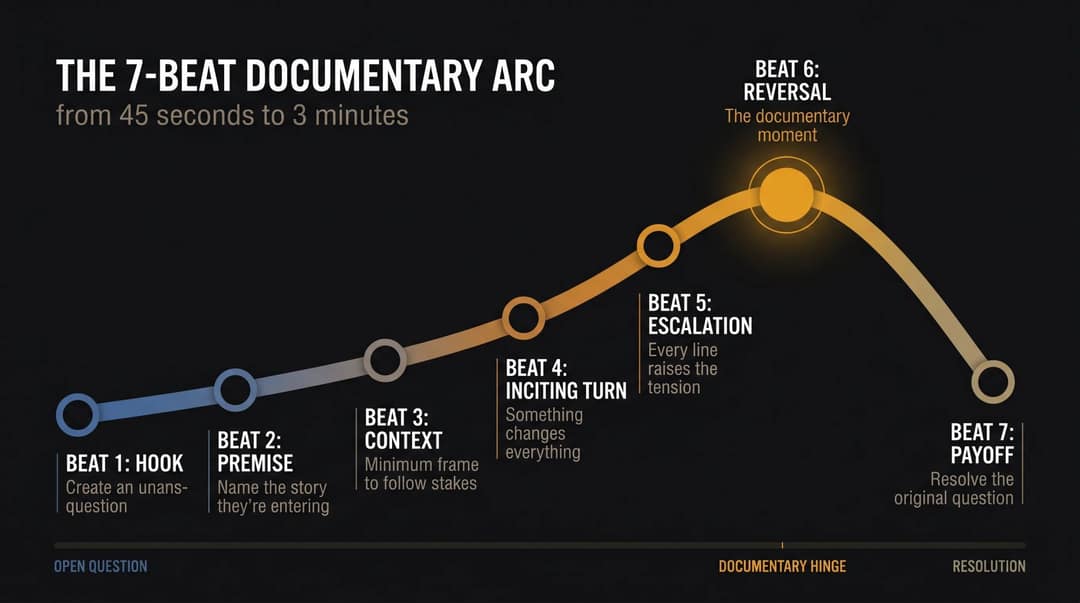
| Beat | Its job | Pompeii example |
|---|---|---|
| 1. Hook | Open a question the viewer needs answered | "The people of Pompeii had warning signs for days. So why didn't they leave?" |
| 2. Premise | Name the story they're entering | "In 79 AD, Mount Vesuvius buried an entire city. But the tragedy unfolded in stages." |
| 3. Context | Give the minimum frame needed to follow the stakes | Only what the viewer must know; cut the rest |
| 4. Inciting turn | One event sets the story moving | "Then, around midday, ash began falling." |
| 5. Escalation | Each line makes things worse, stranger or clearer | Every new detail raises the pressure |
| 6. Reversal | Reframe everything the viewer just learned | "The deadliest part wasn't the ash people could see. It was the pyroclastic surge that came later." |
| 7. Payoff | Resolve the opening question | "Pompeii wasn't destroyed because people ignored danger. It was destroyed because they misread what kind of danger they faced." |
The hook does most of the work. Weak hooks state ("Here are three facts about Pompeii"). Strong hooks name a paradox, a gap or a reversal: "This castle was not defeated by an army. It was defeated by math" beats "You won't believe this." For more openers by type, see these TikTok hooks that stop the scroll.
The reversal is the documentary moment. Without it, you have a timeline. Without the payoff, you have narrated a sequence of events instead of telling a story.
Prompt to try
Make a 75-second vertical mini-documentary on why Roman concrete lasted 2,000 years while modern concrete cracks in decades. Open with the hook: "Rome's harbors still stand underwater. Our bridges crumble in 50 years. Why?" Follow the 7 beats (premise, context, turn, escalation, reversal about self-healing lime clasts, payoff), with a calm but tense narrator, era-accurate reconstructions of Roman ports and simple diagrams.
Example script: why castles stopped working
This is the whole arc in about 120 words:
- Hook: "For centuries, castles were almost impossible to defeat. Then one invention turned their greatest strength into a weakness."
- Context: "A castle worked because height was power. Tall walls gave defenders vision, protection and time."
- Turn: "But gunpowder artillery changed the rules."
- Escalation: "Cannons didn't need to climb walls. They could break them from a distance. And the taller the wall, the easier it was to hit."
- Reversal: "So the future of defense wasn't taller castles. It was lower, thicker, angled fortresses built to absorb impact."
- Payoff: "Castles didn't vanish because humans stopped fighting. They vanished because war became a geometry problem."
It has a question, evidence, a reversal and a payoff that changes how you see the subject. Hold every script to that test: not "does it have good visuals?" but "does it have a reason to exist?"
Beat sheet template
Fill this in before you write a line of narration:
- Question: Why did ___ happen?
- Assumption vs truth: Everyone thinks this story is about ___. It's really about ___.
- Hook line: the paradox or gap, said as briefly as possible.
- Premise: the story in one sentence.
- Context: only what the viewer must know to follow the stakes.
- Turn: the event that changes things.
- Escalation: a few details, each heavier than the last.
- Reversal: the fact that reframes the story.
- Payoff: the line that answers the question in step 1.
If the story doesn't work on this sheet, it won't work in the edit.
Which topics work best for AI mini-documentaries?
Topics that work at short-form speed share four qualities:
- A curiosity gap: the viewer instantly wonders why.
- A visual world: places, objects, maps, documents, machines.
- A narrative turn: a discovery, a collapse, an invention, a betrayal.
- A clean payoff: an explanation or emotional punch that lands.
| Category | Example angle | Why it works |
|---|---|---|
| History | Why Roman concrete lasted 2,000 years | Built-in stakes and maps. AI fills visual gaps, but check every detail for accuracy |
| Business collapse | How one software bug cost $440 million; why BlackBerry missed the iPhone | Decisions, incentives and consequences make causality easy to build |
| Science mysteries | Why we still don't know how eels reproduce | The unknown is built-in tension |
| Disasters and near misses | The plane that ran out of fuel and still landed | Warning signs, decisions, escalation, aftermath |
| Biography through one moment | The day Tesla lost control of his own invention | One turning point beats a whole life story |
| Geography | Why a tiny canal controls global trade | Maps read instantly in vertical video |
Science is the most underused lane. Scientific American's picks of its best science TikToks show that serious education works in social formats when it is visually specific and led by curiosity.
History has its own pattern: the counterfactual with rules. Not "what if aliens built Stonehenge" but "you are a medieval peasant during a siege, here is exactly what surviving would involve." The premise works like a game, the stakes are clear at once, and every beat can be shown on screen.
Before you commit to a series, check that the angle already has an audience. Revid's library of about 2.77 million short-form videos with engagement data lets you find documentary-style videos that already performed. Its free deep analysis (up to 60 a day) breaks down why a video worked: the hook, the timed structure and the scroll-stopping moment.
How to make an AI documentary video in 10 steps
Prompt to try
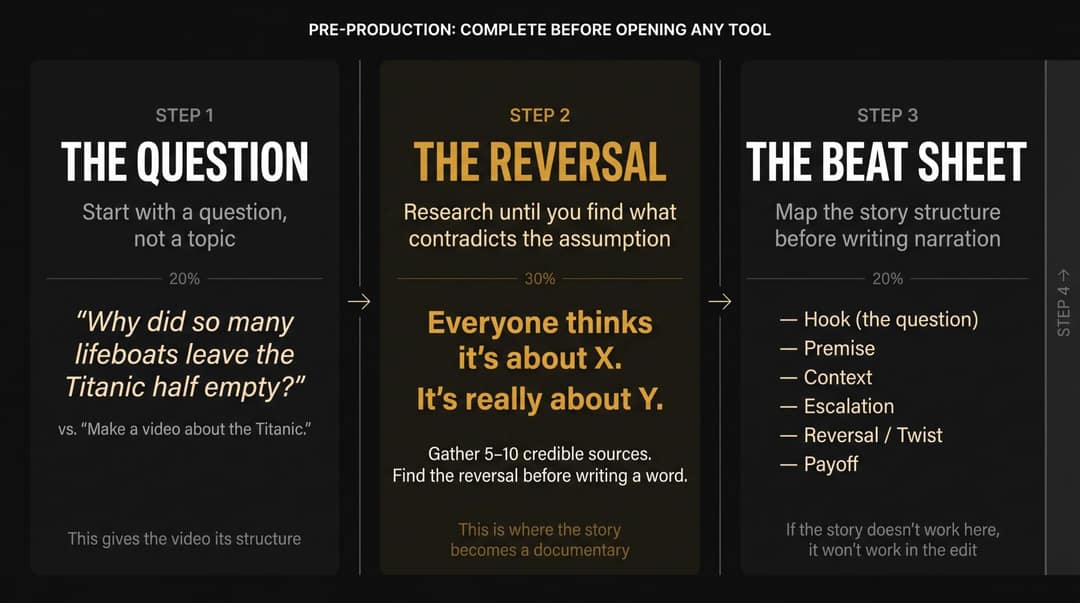
Create a 90-second documentary-style vertical video answering: "Why did so many lifeboats leave the Titanic half empty?" Hook with the number of empty seats, then build through the confusion on deck, the crew's orders and the reversal that passengers did not believe the ship would sink. Use a restrained narrator, a deck map, timeline graphics and labeled AI reconstructions of 1912 scenes, with low ambient sound.
1. Start with a question, not a topic
"Make a video about the Titanic" gives you generic output. "Why did so many lifeboats leave the Titanic half empty?" gives the video a structure, and it tells you which research matters and what to cut.
Write the story as one line: "Everyone thinks this is about X, but it's really about Y." For example: "Everyone thinks Blockbuster lost because of Netflix, but the real mistake happened earlier." That line forces you to find the reversal before you write anything else.
2. Research before you write the script
Gather 5 to 10 credible sources. Pull out the dates, names, numbers and disputed claims, then separate confirmed facts from interpretation. Keep a claim log:
| Script claim | Source | Confidence | Visual evidence | Note |
|---|---|---|---|---|
| "Warning signs began before the eruption." | [source URL] | High | Map, timeline | Needs a date |
| "Many people misread the danger." | [source URL] | Medium | Street reconstruction | Phrase carefully |
| "Pyroclastic surges were deadlier than ashfall." | [source URL] | High | Diagram or animation | Explain simply |
AI can summarize your sources. It should never be treated as the source. Write "evidence suggests" when a claim is interpretive, and "scientists proved" only when they did.
3. Build the beat sheet
Map the beats with the template above before you write a single sentence of narration. For a 60 to 90 second mini-doc, that means a hook, premise, context, turn, escalation, reversal, payoff and a final line people remember.
4. Write narration for the ear
Short documentary narration should sound like a smart person telling you something urgent, not like an encyclopedia entry.
- Page version: "Throughout the long and complex history of military architecture, castles played a very important role in protecting populations from hostile invading forces."
- Ear version: "For hundreds of years, castles worked because they made attackers slow. Then cannons changed the shape of war."
The rules: one idea per sentence, concrete nouns, active verbs, few adjectives, dates only when they matter. Vary sentence length so the short line after a long one lands as the punch.
5. Write a visual script for every line
Faceless documentaries live or die on matching the b-roll to the narration. One creator on r/NewTubers said 80 to 90% of their time went into finding footage that matched the narration. A visual script turns that search into a plan:
| Voice-over | Visual | Source type | Caption emphasis | Sound |
|---|---|---|---|---|
| "For hundreds of years, castles worked..." | Slow push on a castle | AI reconstruction | CASTLES WORKED | Low wind |
| "Then cannons changed the shape of war." | Cannon firing, wall impact | AI video or stock | CANNONS CHANGED WAR | Boom, hit |
| "Tall walls became targets." | Diagram of a high wall and a cannonball's path | Motion graphic | TALL WALLS = TARGETS | Low thud |
6. Direct the AI voice
AI voices work for documentaries only when you direct them. The usual failures: too fast, monotone, mispronounced names, the same cadence throughout, no silence.
Aim for one consistent narrator persona: calm but tense, lower intensity during context, more pressure during escalation, and a pause before every reveal. The tone to aim for is "I found something strange, and you need to see it," not influencer hype and not audiobook calm. A military disaster and a science curiosity should not sound the same.
7. Choose visuals by tier
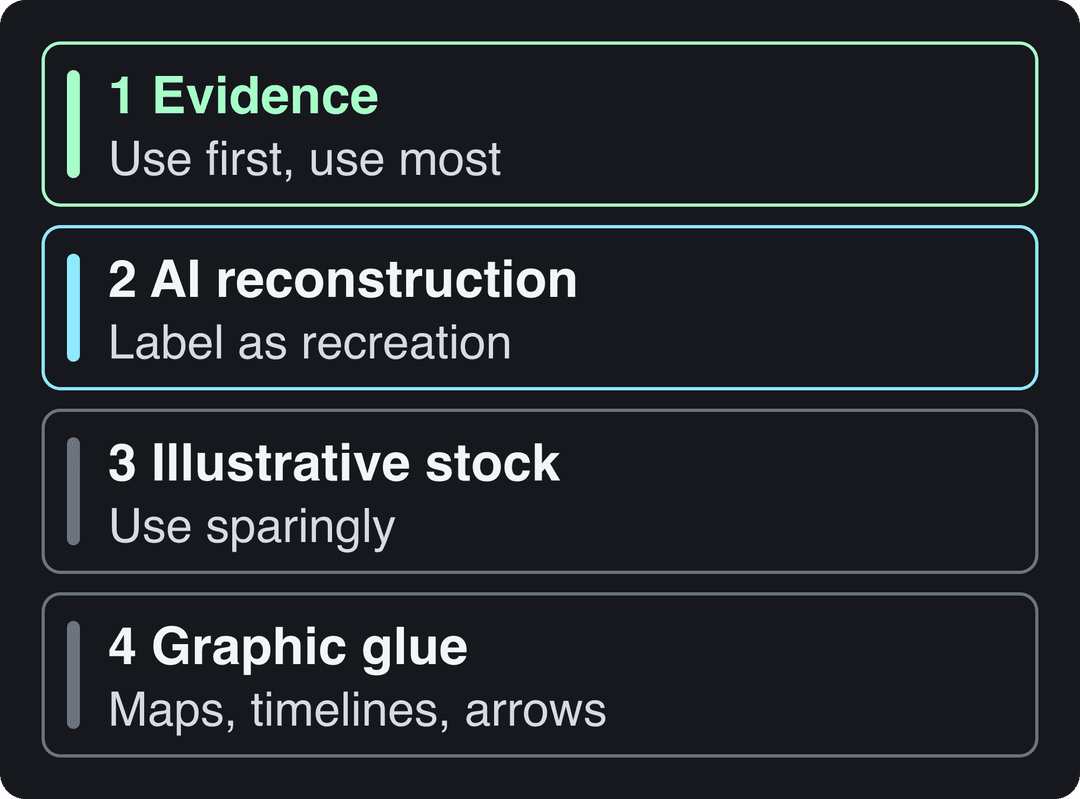
Rank every shot by what it proves:
- Evidence visuals (use first, use most): archival photos, newspaper scans, maps, documents, public records, real footage, scientific images. These are what make viewers trust the story.
- AI reconstruction (AI's best use): ancient cities, lost objects, disaster moments, science you cannot film. Never present a reconstruction as archival footage.
- Illustrative stock (use sparingly): city streets, people typing, building exteriors. "Man typing on laptop" is almost never evidence.
- Graphic glue: maps, timelines, arrows, highlighted documents, before and after splits. This often rescues a weak sequence.
Write a style bible for your AI scenes (era, color palette, lens feel, lighting and character rules) and check every generated shot against it. One anachronism, such as a wristwatch in an ancient street or armor that changes between shots, breaks trust on the spot.
8. Assemble the timeline
Build in this order: voice-over, b-roll, captions, music, sound effects, then cut the dead air. Change the visual every 1 to 3 seconds, and hold longer only when the image carries evidence, emotion or a reveal. At story turns, switch visual registers (map, then document, then reconstruction) so the cut itself signals the change.
Test the edit twice: once muted (do the visuals carry the story?) and once listening without watching (does the narration stand alone?). Fix the first three seconds last, since they decide whether the video gets watched or skipped.
9. Check and style the captions
YouTube's help page on automatic captions says to review them because speech recognition makes mistakes, and proper nouns, historical names and technical terms are where it slips most. Use high contrast, keep only a few words on screen at a time, emphasize names, dates and twist words, and never cover a map or document. Tragedy calls for restrained captions; a quirky science fact can take more punch. Revid's AI caption generator syncs captions automatically, but you still proofread every name.
10. Add music and sound design
Music should not carry the story. Constant ominous drones, epic trailer music and a riser every few seconds make a documentary feel like a parody. Use music as a bed, duck it under the narration, and add atmosphere: wind, crowd murmur, room tone, machine hum. Put silence before the reveal. The ambient layer is what turns a slideshow into a place.
How to make an AI documentary video with Revid
Revid handles the assembly (script draft, voice, scene visuals, captions, music and publishing) so your time goes into the question, the research and the final edit.
- Draft from your question, not your topic, with the free AI script generator. If you already have research notes or an article, paste the URL or text into Revid's article to video tool for a narrated first draft.
- Rewrite the hook and the payoff by hand, then run your claim log on the script.
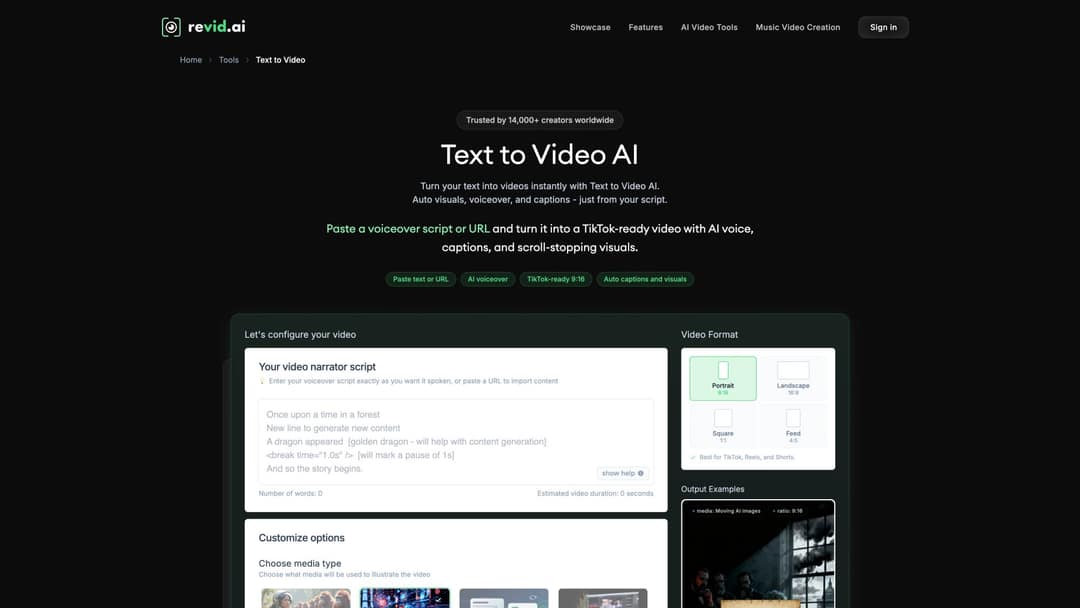
- Paste the final script into Revid's text to video AI, choose portrait 9:16, and add visual notes in square brackets, such as [map of the Mediterranean, 79 AD]. Revid doesn't read bracketed text aloud; it uses it to guide the visuals.
- Pick a voice from 1,000+ AI voices in 70+ languages and add pauses before your reversal and payoff (see below).
- For reconstructions, choose the AI video model scene by scene (Seedance 2.5, MiniMax Hailuo H3, Wan 3.0 or Google Veo 3), then swap weak scenes in the timeline editor. The explainer video maker works well for map and diagram sections.
- Export in 1080p or 4K and publish directly to TikTok, Instagram or YouTube. Each post's views, likes and comments come back to Revid.
Sign-up is free, and new accounts get free credits to try video creation with no credit card needed. Regular creation then uses the credits of a paid plan, starting at $39/month for 2,000 credits; current plans and credit costs show what each video uses before you generate it.
How do you add a pause in Revid narration?
Type <break time="1.0s" /> in the script at the exact spot where you want silence, and change the value to make the pause longer or shorter. Put one before the reversal and one before the payoff: the silence before a reveal is one of the strongest tools in short documentary narration. Short sentences also give the AI voice more natural pacing than long compound ones.
What an AI documentary video generator can and can't do
No AI documentary video generator researches, verifies and structures a story for you. Generators handle the mechanical layer well, and the tools differ in how much of it they cover. Raw clip generators such as Runway or Kling produce single clips, which leaves the script, voice, captions and assembly to you. Template editors such as InVideo or Pictory build videos from stock and templates. Revid goes from script to a finished, captioned vertical video with per-scene AI models and direct publishing.
| Stage | AI handles well | You decide |
|---|---|---|
| Ideation | Topic angles, hook variations, series formats | Is there a visual world and a real payoff? |
| Research | Summarizing sources, extracting timelines | Which sources are credible, and is the story fair? |
| Script | First drafts, alternative structures | What the story is really about, and whether the ending lands |
| Narration | Fast voice-over, voice styles, translation | Fit, pronunciation, trustworthiness |
| Visuals | Reconstructions, stylized b-roll, filling gaps | Accuracy, era details, whether a shot misleads |
| Editing | Captions, rough assembly, aspect ratios | Whether the hook is clear in the first two seconds |
The tool can generate the edit. You still have to generate the reason to watch.
How to tell a good AI documentary from a cheap one
A cheap AI documentary asks: "What visuals can I put under this narration?" A good one asks: "What does the viewer need to see at this exact moment to believe, understand or feel the story?"
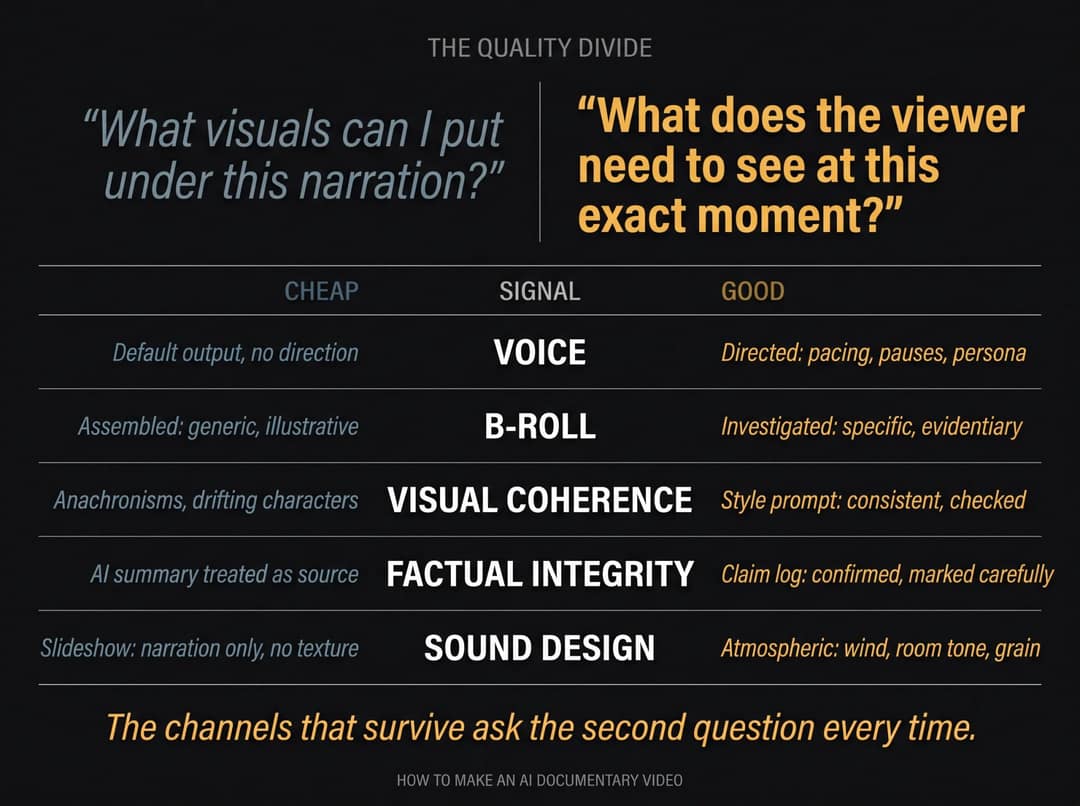
- Voice: directed pacing and a persona, not the default output.
- B-roll: a bank collapse shows the actual bank, the timeline and the headlines, not skyscrapers and handshakes.
- Visual coherence: one style, era-correct details, no drifting faces.
- Factual integrity: a slick video with wrong facts is worse than a plain one with right facts.
- Sound: an ambient layer under the voice, not narration over silence.
How long should an AI documentary video be?
Aim for 90 seconds to 3 minutes for a full mini-doc, 60 to 90 seconds for a compact story, and 35 to 60 seconds for one sharp twist. Every major platform now allows that length:
| Platform | Max length | Mini-doc range | Watch out for |
|---|---|---|---|
| YouTube Shorts | 3 minutes (vertical or square, uploaded since October 15, 2024) | 90 seconds to 3 minutes | A Short over one minute with an active Content ID claim is blocked globally and can't be monetized |
| TikTok | 60 minutes uploaded, 10 minutes with the in-app camera | 60 seconds to 3 minutes | TikTok's recommendation system weighs shares, comments, follows, skips and watch completion |
| Instagram Reels | 20 minutes | Up to 3 minutes | Reels over 3 minutes aren't recommended to people who don't follow you |
YouTube counting changed twice. Since March 31, 2025, a Shorts view counts every time a Short starts to play or replay, and since August 24, 2026, YouTube counts a view the moment any video starts playing. YPP earnings still use engaged views, so retention matters more than the public counter.
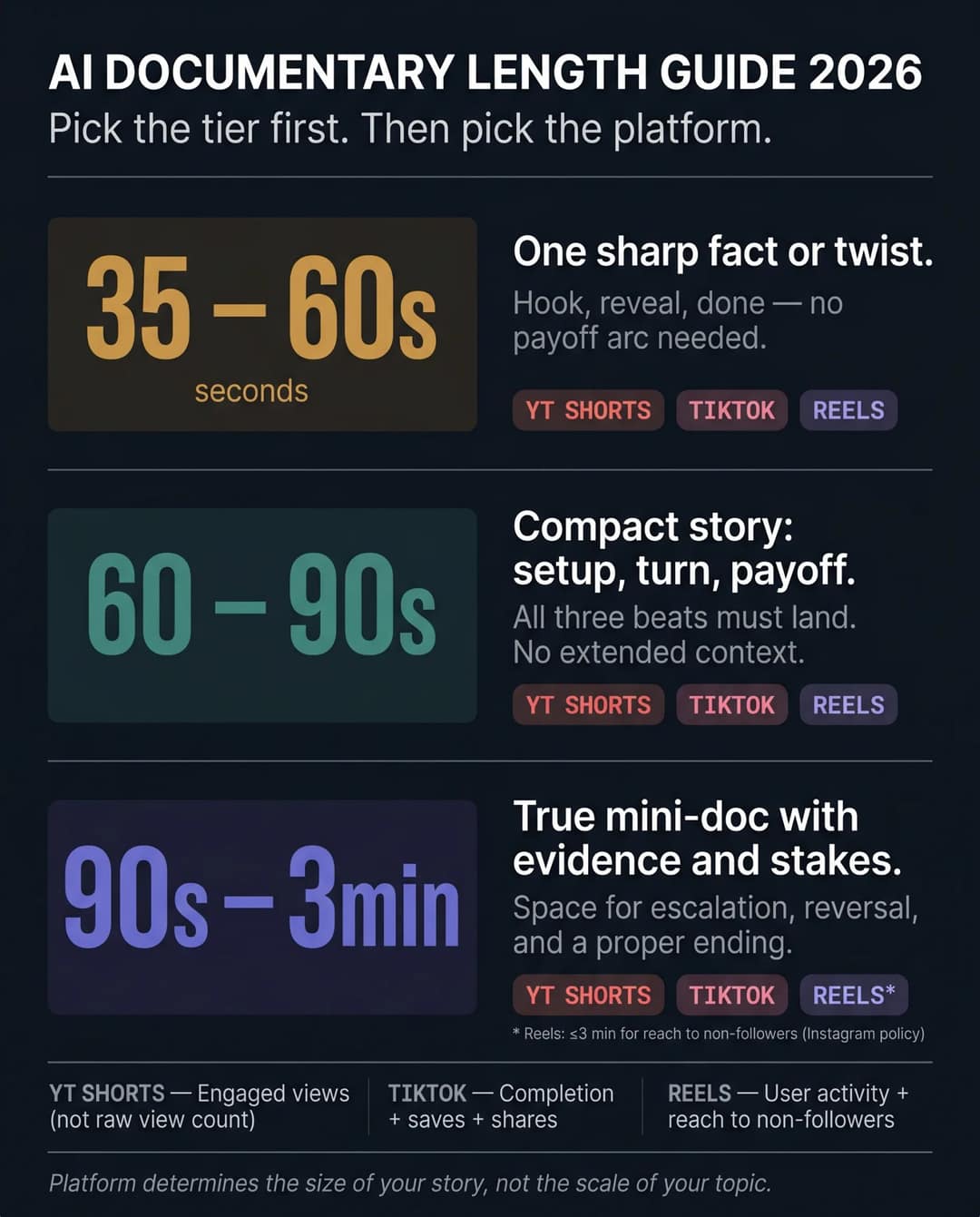
Length alone won't sink a mini-doc. In the same Revid TikTok study, every length from under 15 seconds to 10 minutes had a median between 58K and 76K views, with 61 to 90 seconds slightly ahead at 70K. What loses viewers is a long context section, not a long runtime. If viewers drop before the reversal, cut context. If they drop at the payoff, the setup didn't earn it. Check this in TikTok Studio or YouTube Studio analytics.
AI disclosure and rights: what to label
YouTube requires you to disclose realistic AI-generated content, such as a realistic scene that never happened. Disclosure alone doesn't limit reach or monetization. Since May 2026, YouTube also labels undisclosed photorealistic AI automatically, and the label is permanent for content made with Veo or carrying fully generative C2PA metadata. TikTok requires a label on realistic AI images, audio or video, and says the label doesn't affect distribution.
Rights need the same discipline. Keep a license log listing the source and license of every image, clip and track. Fair use is decided case by case and does not work as blanket permission. Libraries with clear terms, such as the Pexels license, are safer for stock.
How to monetize a faceless documentary channel
Short-form is the top of the funnel, not the business. Business Insider's profile of Jonathan Laramy, who left his job to run the faceless AI history channel Chloe VS History, reports that Instagram and TikTok brought little income at first. Longer YouTube videos paid better, and Shorts growth helped those videos get recommended.
The platform rules point the same way:
- YouTube ad revenue sharing requires 1,000 subscribers plus 4,000 qualified public watch hours in the last 12 months, or 10 million qualified Shorts views in the last 90 days. Shorts feed watch hours don't count toward the 4,000.
- From February 1, 2027, new applicants need 8,000 watch hours in 365 days or 20 million qualified Shorts views in 90 days. Earning Shorts ad revenue in a given month will also require 10 million qualified Shorts views in the last 90 days.
- TikTok's Creator Rewards Program needs 10,000 followers, 100,000 views in the last 30 days and videos of at least one minute, which suits mini-docs.
YouTube's channel monetization policies matter more than any threshold. Since July 15, 2025, the "repetitious content" policy has been called "inauthentic content". AI videos made from generic templates that look mass-produced can't monetize, and neither can channels that only read out text they didn't write. AI tools are allowed when the final video shows your creative vision: an original script, real research and an edit with a point of view.
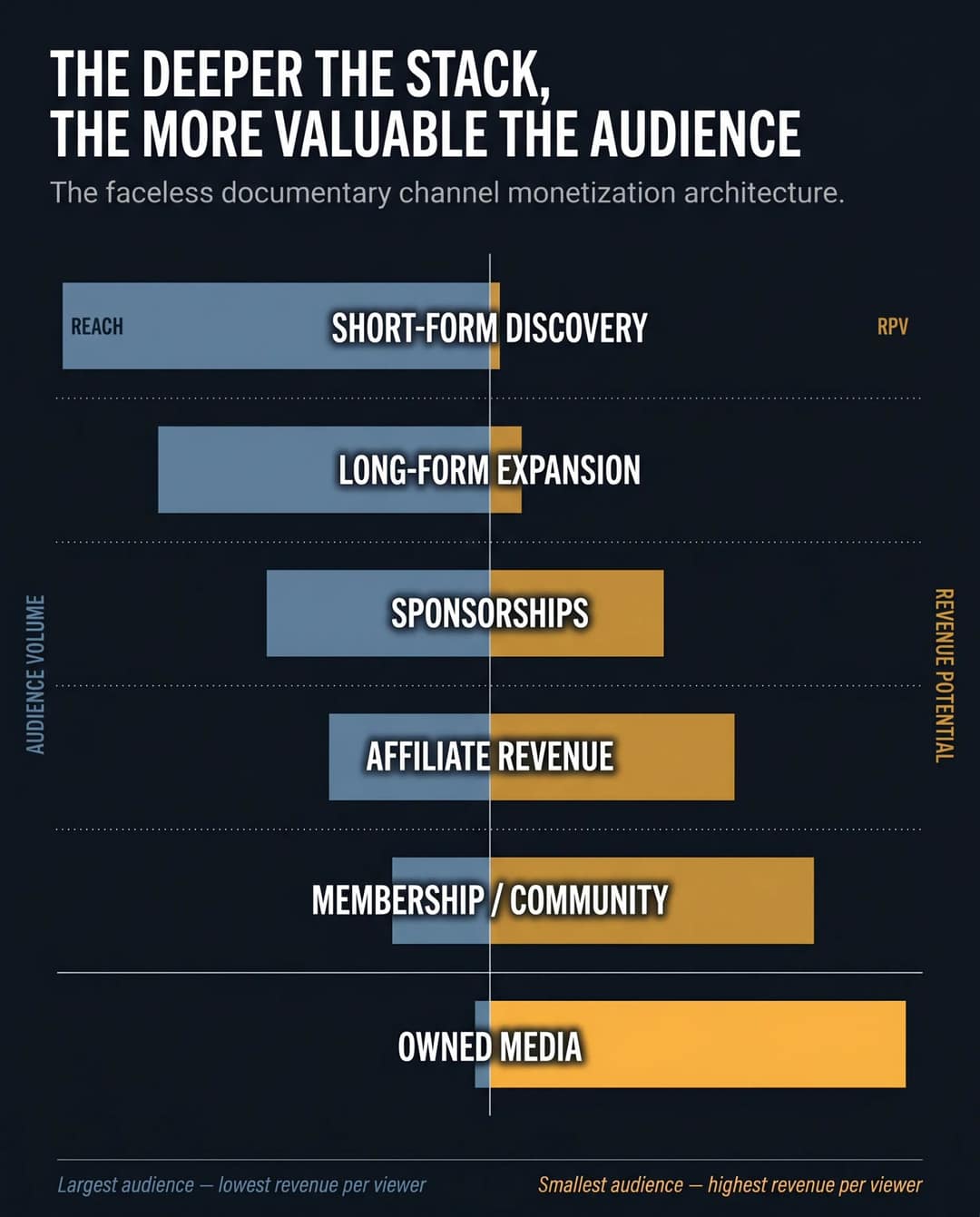
A common stack: Shorts, Reels and TikToks to test topics and hooks, then 6 to 20 minute YouTube versions of the winners. On top of that come sponsorships, affiliate links (books, courses, tools), memberships and owned media such as a newsletter. Give the channel a repeatable promise, such as "business disasters in under 90 seconds" or "maps that explain the world", so following it means something. For niche choice and channel setup, see how to create a faceless YouTube channel.
8 mistakes that kill AI documentary videos
- A listicle called a documentary: no question, no tension, no payoff.
- Starting with the tool: typing a topic into a generator before writing a question.
- Accepting the AI script: language models summarize; they don't investigate or verify.
- Using reconstruction as evidence: AI visuals carry atmosphere, not proof.
- Visual inconsistency: armor changes, faces drift, the era switches mid-video.
- An undirected voice: generic delivery, no pauses, mispronounced names.
- Stock as a substitute: skyscrapers and handshakes where evidence should be.
- Ignoring disclosure and rights: no labels and no license log.
FAQ
Can I make a documentary video without filming anything?
Yes. The visual track can come entirely from archival and public-domain images, licensed stock, AI-generated scenes, maps and motion graphics under an AI voice-over. What you can't skip is a researched script and visuals chosen for what the viewer needs to see.
Can I turn a blog post or article into a documentary video?
Yes. Paste the article into an article-to-video tool for a narrated draft, then rewrite it to open with a question and close with a payoff. Most articles are not structured as stories, so the rewrite is what makes it a documentary.
Does labeling a video as AI-generated reduce its reach?
No. YouTube and TikTok both say the AI label alone doesn't limit distribution, and YouTube adds that it doesn't affect eligibility to earn. Repeatedly failing to disclose realistic AI content on YouTube can lead to labels being applied, content removal or YPP suspension.
What AI voice works best for documentary narration?
A calm voice with slight tension and a consistent persona works best for most subjects. Slow it down for context, add pressure during escalation and pause before reveals. Test the pronunciation of every proper noun before you export.
Is it legal to use archival footage in an AI documentary?
Only if the footage is in the public domain, licensed for your use, or your use qualifies as fair use, which is judged case by case. Log the source and license of every asset so you can answer a claim quickly.