TikTok Video Dimensions (2026): Size, Resolution and Every Spec
TikTok videos should be 1080 x 1920 pixels at 9:16. Here is every other spec, from file size and length to frame rate, cover size and safe zones, checked against TikTok's own documentation.

On this page
TikTok video dimensions are 1080 x 1920 pixels (1080 wide, 1920 tall) in a 9:16 vertical aspect ratio, the size TikTok's Creator Academy recommends. Export an MP4 with the standard AVC codec at 30 fps and the video fills the whole phone screen with no black bars.
Most spec lists stop there and get the limits wrong. TikTok Studio on the web now accepts uploads in 1080p, 2K or 4K, up to 60 minutes long and 30 GB per file. The 10 GB cap (quoted in an earlier version of this page) and the old 3-minute length limit are out of date. Below is every spec, with where it comes from.
TikTok video specs at a glance
| Spec | Recommended | What TikTok accepts |
|---|---|---|
| Aspect ratio | 9:16 (vertical) | Vertical or landscape uploads |
| Resolution | 1080 x 1920 px | 1080p, 2K or 4K on TikTok Studio Web; 360 to 4096 px per side via the API |
| File format | MP4 | MP4, MOV or WebM (per TikTok's developer docs) |
| Video codec | AVC | AVC recommended |
| Frame rate | 30 fps (60 for fast motion) | 23 to 60 fps via the API |
| Length | Depends on your goal | Up to 60 minutes uploaded, 10 minutes recorded in the app |
| File size | As small as quality allows | Up to 30 GB on TikTok Studio Web, 4 GB via the API |
| Cover | 1080 x 1920 px, 9:16 | A frame of the same vertical canvas |
| Photo posts | Vertical images | Up to 35 photos per post |
| Caption | Put the hook in the first line | 2,200 characters via the API |
Sources: TikTok Support, TikTok Creator Academy and TikTok for Developers. The API limits apply to schedulers and apps that post on your behalf; the TikTok app and Studio Web can allow more.
What size are TikTok videos in pixels?
The standard TikTok video size is 1080 pixels wide by 1920 pixels tall. That width and height give an exact 9:16 ratio, so the video fills a phone screen in the For You feed from edge to edge.
Pick your resolution with these rules:
- Filming on a phone: shoot vertical in 1080p or 4K. Both export cleanly to a 9:16 frame.
- Source is 720 x 1280: TikTok accepts it, but text and fine detail look softer on modern phones. Re-export at 1080 x 1920 if the original footage allows.
- You want the sharpest upload: TikTok Studio Web accepts 2K and 4K (2160 x 3840 for vertical 4K). TikTok re-encodes uploads for streaming, so a 4K file gives the encoder more detail to work with, but it does not promise 4K playback on every phone.
- Footage is low resolution: don't upscale it hoping it will look sharper. It only adds file size.
What is the TikTok aspect ratio?
The TikTok aspect ratio is 9:16, vertical. TikTok also accepts square (1:1) and landscape (16:9) videos, but in a vertical feed they play with empty space above and below the picture, which shrinks your video to a band in the middle of the screen.
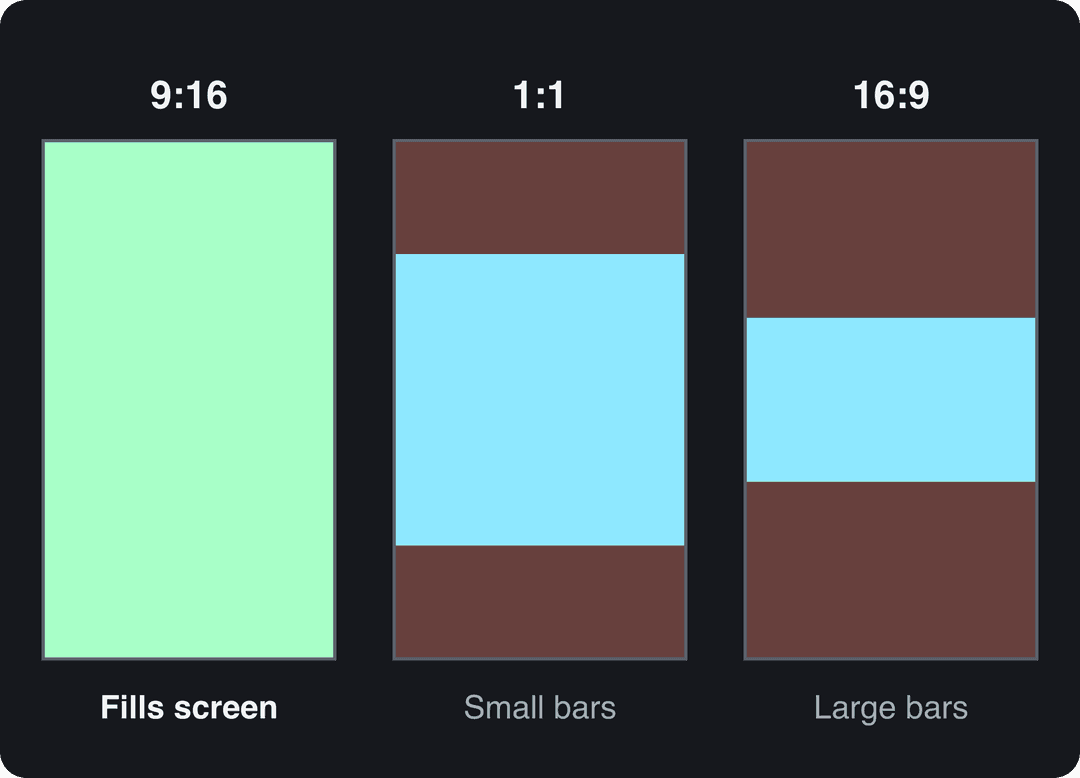
If your footage is landscape, crop it instead of posting it as is: reframe the subject in the center of a 9:16 canvas. The free resize video tool converts a clip to portrait 9:16 (or 4:5, 16:9 and 1:1). To turn a whole YouTube video into vertical clips, use the YouTube to TikTok converter.
The same 9:16 file works on other platforms: Instagram Reels accept ratios from 1.91:1 to 9:16, and YouTube treats vertical videos up to 3 minutes as Shorts. For platform details, see the Instagram Reel size guide, the YouTube video width and height guide, or the social media video sizes cheat sheet that covers them all.
What is the maximum file size for TikTok?
On TikTok Studio Web (desktop), files can be up to 30 GB, according to TikTok's Creator Academy. Tools that post through TikTok's Content Posting API are capped at 4 GB and 10 minutes per video.
TikTok has not published a file size limit for uploads from the phone app. The figures in other guides (72 MB on Android, 287.6 MB on iOS, 500 MB or 1 GB on the web) don't appear on any TikTok page. If a large file fails on your phone, upload it from a computer in TikTok Studio.
To shrink a file without visible loss, export an AVC MP4 at 1080 x 1920 and 30 fps, and lower the bitrate before you lower the resolution.
How long can a TikTok video be?
- Uploaded videos: up to 60 minutes.
- Recorded with TikTok's in-app camera: up to 10 minutes.
- Posted through the API (schedulers, third-party tools): up to 10 minutes.
Length also affects earnings. Under the Creator Rewards Program, TikTok's current monetization program, only videos at least one minute long can earn, and you need 10,000 followers and 100,000 video views in the last 30 days to join.
What format and frame rate should a TikTok be?
MP4 with AVC video (the most common codec, the default in most editors) is the safest format for TikTok; its developer docs also list MOV and WebM. For frame rate, 30 fps suits talking videos and most content, and 60 fps suits gaming, sports or fast camera moves. Anything from 23 to 60 fps is accepted.
Keep the frame rate you filmed at. Converting 24 fps footage to 60 fps adds file size, not smoothness.
What size is a TikTok cover?
A TikTok cover uses the same 9:16 canvas, 1080 x 1920 px, per TikTok's Creator Academy guidance on video covers. Keep any title text near the center of the frame so it stays readable in smaller previews and on your profile grid.
Keep text inside the TikTok safe zone
The right dimensions don't stop TikTok's interface from covering part of your video. The caption, username and sound name sit along the bottom, the like, comment, share and profile buttons run down the right edge, and the feed tabs and search icon sit at the top. Keep on-screen text, faces and products in the center of the frame, slightly above the middle.
Check a frame with the free TikTok safe zone checker before you export. If you add burned-in subtitles with the TikTok subtitle generator, keep them above the bottom caption area.
Export settings for a TikTok-ready file
- Set the project or sequence to 1080 x 1920 (9:16) before you start editing.
- Match the frame rate to your footage, usually 30 fps.
- Export as MP4 with AVC video.
- Watch the export full screen on your phone and check that nothing important sits under the buttons or the caption.
- If the file is very large, upload it from TikTok Studio Web, which accepts files up to 30 GB.
Prompt to try
Make a 30-second vertical TikTok explaining why 1080 x 1920 is the right size for TikTok videos. Open with the hook "Your TikToks have black bars? Here is why." Use clean motion graphics with bold centered captions kept away from the bottom and right edges, an upbeat voice-over and light background music.
How to make a 9:16 TikTok video with Revid
If you don't have footage yet, Revid creates the video at the right size from the start.
- Open the AI TikTok video generator and paste a script, an idea or a link (a blog post, a YouTube video, a Reddit thread).
- Revid writes the script, picks visuals for each scene (stock footage, AI images or AI video), and adds a voice-over, synced captions and music in a vertical 9:16 frame.
- Fix any scene in the timeline editor.
- Export in 720p, 1080p or 4K at 30 or 60 fps, or publish and schedule straight to TikTok from the same queue.
FAQ
Can you post a horizontal video on TikTok?
Yes. TikTok Studio Web accepts landscape uploads, but in the vertical feed a 16:9 video fills only a band across the middle of the screen. Crop it to 9:16 if you want the full screen.
Is 1080x1920 the same as 9:16?
Yes. 1080 x 1920 reduces to exactly 9:16, the same shape as 720 x 1280 and 2160 x 3840. Only the number of pixels changes, not the shape.
What size should TikTok photo posts be?
TikTok doesn't publish a recommended size for photo posts, so match the video canvas: vertical images at 1080 x 1920 fill the screen best. A photo post can hold up to 35 photos.
How long can a TikTok caption be?
TikTok's developer docs cap video captions at 2,200 characters for posts made through its API, with hashtags counted inside that text. TikTok hasn't documented the in-app limit on a support page, so check the app if you need a longer caption, or draft a shorter one with the TikTok caption generator.
What is the TikTok screen size?
There is no single TikTok screen size, because phones differ. TikTok fits a 9:16 video to the phone it plays on, which is why 1080 x 1920 is the safe target.