Video Marketing on Social Media: Plan, Create and Measure
Video marketing on social media: platform specs, a content plan, creation steps and the metrics that prove results on TikTok, Instagram and YouTube.

On this page
94.2% of internet users were identified as social-media users in DataReportal's Digital 2025 Global Overview. That makes social media a major distribution environment for video, not a side channel where you occasionally repost an advertisement.
But access to an audience isn't the same as earning its attention, and attention isn't the same as revenue. Effective video marketing on social media needs an operating system: a production specification, a platform matched to a business goal, a calendar built around an audience, and a test that separates reach from return.
- Share of internet users identified as social media users
- 94.2%
- DataReportal, Digital 2025
- Online adults who watch short-form video such as TikToks and Reels every week
- 87.5%
- DataReportal, 2025
- Marketers who expected short-form video to dominate content strategy in 2026
- 73%
- Emplifi
- Marketers citing short-form video as their top ROI-driving content format
- 49%
- HubSpot, 2026
Video Formats and Specs for Every Platform
A spec sheet comes before a single frame is recorded. Choosing dimensions after filming forces compromises; choosing them before filming costs nothing. The table below is that spec sheet: one row per placement, one recommended canvas per row.
| Platform | Aspect ratio | Best use |
|---|---|---|
| TikTok | Vertical master, recommended 9:16 at 1080 x 1920 | Discovery feed and trends |
| Instagram Reels | Vertical master, recommended 9:16 at 1080 x 1920 | Reach beyond followers |
| Instagram Feed | Portrait composition, recommended 4:5 at 1080 x 1350 | Profile grid and retargeting |
| YouTube Shorts | Vertical master, recommended 9:16 at 1080 x 1920 | New audiences from the Shorts feed |
| YouTube long-form | Landscape master, recommended 16:9 at 1920 x 1080 | Search, suggested views and series |
| LinkedIn native video | Portrait or landscape, selected for the footage | B2B expertise and decision makers |
Treat these dimensions as production recommendations, not fixed platform requirements. On duration, the pattern is consistent: TikTok, Reels and Shorts are built for clips measured in seconds, while YouTube long-form and LinkedIn native video accommodate material that runs several minutes or more. Exact allowances shift as platforms update their apps, so confirm the limit shown in the destination account's upload screen before planning a long recording. An upload that succeeds technically can still be poorly framed for its placement.
Keep important content clear of the interface
A safe zone is the part of the frame where faces, product details, captions, and instructions remain visible after the platform adds its controls. Every vertical placement overlays buttons along the right edge and captions or progress bars near the bottom. Anything essential placed in those areas gets covered, and covered information may as well not exist.
Keep essential text away from the lower edge and the right-hand control column. Check a draft in the destination app rather than assuming the editor's preview includes every interface element. For an export starting point, use MP4 with H.264 video and AAC audio. Keep a clean version without captions as well as a captioned version, so you can revise wording or reposition subtitles without rebuilding the edit.
Reframe rather than blindly crop
A vertical recording doesn't automatically become a useful wide-format video. Filling a wide canvas with vertical footage requires a severe crop, while fitting the full image leaves empty space beside it. Use that space deliberately for a demonstration, supporting graphics, or an additional camera angle. Likewise, a centered square crop removes material from the top and bottom of a vertical frame; if the presenter's face or product sits near an edge, reposition the image manually instead of accepting the default.
The reframe step is where reach and return separate. A video cropped carelessly still gets distributed, still accumulates impressions, and still fills a reporting column. What it doesn't do is show the product clearly enough to earn a click. Measure reframing by whether the subject stays legible on a phone screen, not by whether the export technically fits the placement.
Before posting:
- Export a master: For a vertical-first campaign, use a 1080 x 1920 working canvas and retain the original footage.
- Preview the opening and ending: Watch on a phone and check that the promise and next step are legible.
- Inspect the safe zone: Confirm that captions, product labels, and interface controls don't overlap important information.
The index leans toward videos that surface in hashtag and keyword searches, so its view counts run high: compare the groups, not the absolute numbers.
Source: Revid TikTok index: 2,377,477 TikToks with AI labels per video, snapshot of Sep 15, 2026. Median views estimated from view buckets.
Show the data
| Median views | Share past 1M views | |
|---|---|---|
| 0-7s | 88.3K | 19.9% |
| 8-15s | 111.1K | 22.6% |
| 16-30s | 141K | 25.1% |
| 31-60s | 120.4K | 22.8% |
| 61-120s | 97K | 19.8% |
| 2-5 min | 89.1K | 18.3% |
| 5 min+ | 90.1K | 17.2% |
Why Short Video Dominates Social Feeds
A commuter on a crowded platform makes a quick decision about which train to board. Someone scrolling a social feed makes a similarly quick choice about whether your video deserves attention. Your opening must make the destination clear before asking them to stay.
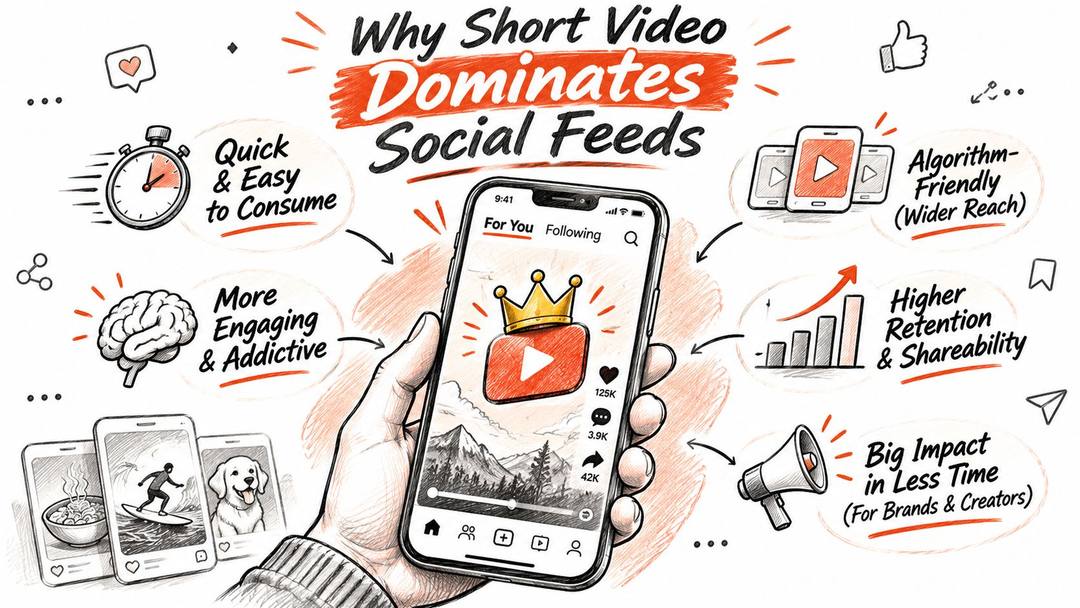
In its 2025 reporting, DataReportal stated that 87.5% of online adults watched short-form formats such as TikToks and Instagram Reels every week, and that mobile users consumed more than 110 billion gigabytes of video each month. Short video isn't a niche viewing habit. It belongs in everyday communication planning, not only in campaign launch meetings.
The visual below organizes the relationship between attention, retention, and distribution.
Prompt to try
Make a 30-second vertical video for a local bakery answering one customer question: how to transport a celebration cake without damaging it. Open with the hook "Your cake survived the party, but will it survive the car ride?", then show three clear tips with close-up shots of boxing, placing the cake on a flat car floor and keeping it cool. Warm, bright style with readable captions, ending with an invite to order a cake.
Make each clip useful on its own
Say a bakery wants more local customers to consider its celebration cakes. A polished brand film could introduce the business, but a repeatable series gives the owner more specific ideas to test: how to transport a cake, how portion sizes work, and what happens during decoration.
Each clip answers a recognizable question. Someone who has never encountered the bakery can understand the value without watching an earlier installment.
Use this editorial checklist:
- A clear promise: Show the question, problem, or result before a logo animation or greeting.
- An early payoff: Demonstrate something useful while viewers are still deciding whether to continue.
- A reason to finish: Build toward a comparison, completed process, or practical decision rather than withholding the whole answer.
Practical rule: Make the video understandable to someone who knows nothing about your business and hasn't seen your previous posts.
This doesn't mean every subject belongs in a short clip. A complicated buying decision may need a detailed demonstration, while a short video introduces the question and directs interested viewers toward that explanation.
For a self-check, replay a small sample of recent posts with the sound off. Can you identify the subject and promised benefit immediately? If not, improve the visible opening before buying better equipment.
Matching Platforms to Your Video Goals
| Goal | Primary platform | Format to start with | Why it fits |
|---|---|---|---|
| Brand awareness | TikTok | Brief, hook-led clips | A useful starting point for testing interest-based discovery |
| Website traffic | Reels directing viewers to a profile link, supported by explanatory carousels | Combines visual discovery with a defined route to your site | |
| Evergreen search traffic | YouTube | Clearly titled explainers | Supports question-led discovery and a searchable video library |
| B2B expertise | Native video examining a specific claim | Places professional commentary in a business-oriented context |
These are starting hypotheses, not promises about where your customers will respond. Choose the platform where your intended audience can encounter the video and take the action you need.
For Instagram, make the profile destination match the Reel's offer. For YouTube, give an explainer a title that names the actual question it answers. On LinkedIn, demonstrate a professional judgment, such as why you'd reject a particular project scope, rather than posting a broad motivational monologue.
Keep platform fit separate from business value
In Emplifi's State of Social Media Marketing report, 73% of marketers expected short-form video to dominate content strategy in 2026, while 73% said standing out was harder than ever. Publishing additional clips doesn't, by itself, solve the differentiation problem.
The same edit encounters different audience expectations, recommendation systems, analytics, and attribution windows across platforms. A reported view isn't necessarily an equivalent event everywhere, and a conversion credited within one platform's reporting window may not appear in another's.
Choose a primary platform for the campaign. Adapt secondary versions to their destination rather than treating every upload as an identical experiment.
If coordination is becoming the bottleneck, Virtustant's resource on a social media manager for small business can help you define the role before delegating. Assign ownership of adaptation, publishing, comment responses, and reporting, not just responsibility for posting.
Use the accompanying video as a prompt to examine your own platform choices.
Compare creative variants within the same platform first. For budget decisions across platforms, use a shared business outcome, such as qualified inquiries, and account for production and distribution costs. A large audience that never reaches the offer isn't automatically more valuable than a smaller audience that does.
Building a Video Calendar Around One Audience
A useful calendar records why each video exists, not just when it goes live. Start with an audience whose questions you can answer repeatedly, then turn those questions into a manageable production queue.
Build the calendar in a workable sequence
Define the audience and the job. Identify what the viewer needs to understand, believe, or do after watching. A skeptical buyer needs evidence; a beginner may need a clear explanation before considering a product. For example, a skincare brand could address customers who don't know how to introduce a new cleanser into their routine.
Choose content pillars with distinct purposes. Separate demonstrations, practical education, customer experiences, and behind-the-scenes explanations. Don't create pillars that merely rename the same promotional message. For the skincare brand, a demonstration shows application, while a formulation explanation addresses a different buying question.
Write hooks before booking filming time. Draft more ideas than you expect to publish, then remove openings that promise nothing specific. Use customer emails, search questions, and sales objections as starting material. A concrete hook might explain how much cleanser to use, rather than announcing another skincare tip.
Set a cadence your team can sustain. Budget time for approvals, captions, customer permissions, and revisions as well as filming. Leave room for a useful response to an unexpected customer question. A hypothetical small team might batch several demonstrations in a shared filming session instead of setting up the camera every morning.
Assign a format, destination, and owner. Every calendar entry needs an accountable person and a next action. Record whether the piece needs fresh footage, a screen recording, narration, or an approved customer contribution. For the skincare team, the founder could approve technical wording while an editor prepares platform-specific versions.
Review the audience response
The content calendar guide offers a practical reference for organizing ideas into a publishing workflow. Keep the working sheet simple enough that someone can identify the next unfinished task without a meeting.
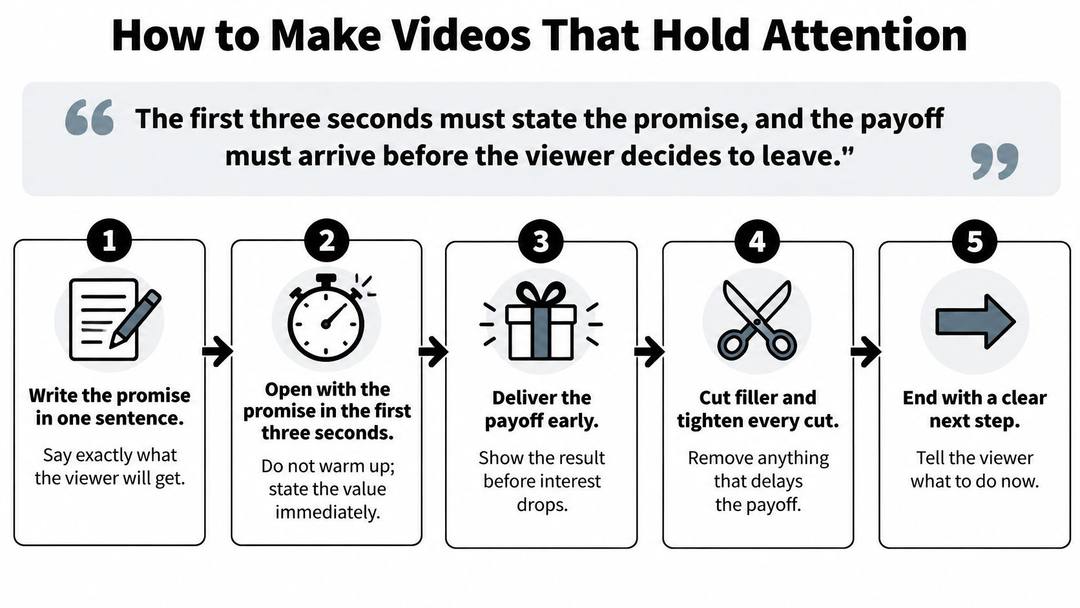
The creative process below can sit beside that calendar as a production reminder.
At a scheduled review, ask which audience questions generated useful conversations and which subjects repeatedly disappointed. Don't abandon a pillar because of an isolated weak post. First check whether the topic was relevant, the footage explained it clearly, and the publishing process gave the piece a fair test.
Protect momentum with a reserve of approved, non-time-sensitive material. A missed filming session shouldn't force the team to publish an irrelevant trend or stop altogether.
How to Make Videos That Hold Attention
State the promise immediately, and deliver the payoff before the viewer decides there's nothing useful ahead.
A strong edit helps the viewer follow an idea. Rapid cuts, animated captions, and music are tools, not substitutes for a coherent explanation. Begin with the smallest useful claim you can demonstrate.
Input
Your video as it is
Output
Edit for understanding
Write the promise before filming. Describe what the viewer will learn or see in a single sentence. Remove script lines that don't support it. For a product demo, explain the task the product completes rather than reciting the feature list.
Film an opening that supplies evidence. Put the relevant person, object, screen, or result in view immediately. Use a text overlay to clarify the subject, not to add an unrelated second message.
Cut when the idea advances. Remove repeated wording, unnecessary setup, and pauses that make the explanation feel unfinished. Don't interrupt a delicate demonstration just to maintain an arbitrary cutting rhythm.
Make captions readable. Use clear contrast and break text into natural phrases. Check product names, technical terms, and negations manually, because an incorrect subtitle can reverse the meaning of advice.
Give a specific next step. Match the request to the video's purpose. A demonstration might direct viewers to detailed specifications; an educational clip might invite them to save a checklist.
When editing is the constraint, LatHire's resource for teams looking to hire video editors can support role planning. Give the editor a reference cut, caption rules, source files, and a clear definition of what requires approval. Otherwise, outsourcing can move unclear decisions into a revision queue.
The index leans toward videos that surface in hashtag and keyword searches, so its view counts run high: compare the groups, not the absolute numbers.
Source: Revid TikTok index: 2,377,477 TikToks with AI labels per video, snapshot of Sep 15, 2026. Median views estimated from view buckets.
Show the data
| Median views | Share past 1M views | |
|---|---|---|
| Animal-focused | 273.2K | 36.3% |
| Faceless | 199.4K | 29.7% |
| Object-focused | 143.1K | 24.9% |
| Group-focused | 140.3K | 23.7% |
| Person-focused | 104.8K | 21.8% |
Choose the right source of trust
In Dropbox's 2026 study of 500 North American video and creative professionals, 81% increasingly viewed authenticity as a differentiator. That finding concerns creative professionals' views, not a guaranteed performance lift from showing a face.
Choose presentation methods according to what the audience needs to verify:
- A real creator or expert: Useful when judgment, accountability, or personal experience is central.
- Customer footage: Appropriate for genuine experiences, with permission and enough context to avoid implying a universal result.
- Narration and screen recordings: Suitable when the process matters more than the presenter.
- Stock footage: Helpful for illustration, but not evidence of your product's actual performance.
- An AI avatar: An option for presentation, provided you don't imply it is a real customer or independent expert.
Disclose synthetic presenters or materially AI-generated depictions in plain language, and use the destination platform's applicable disclosure controls. AI assistance mustn't turn a hypothetical scenario into an apparent testimonial.
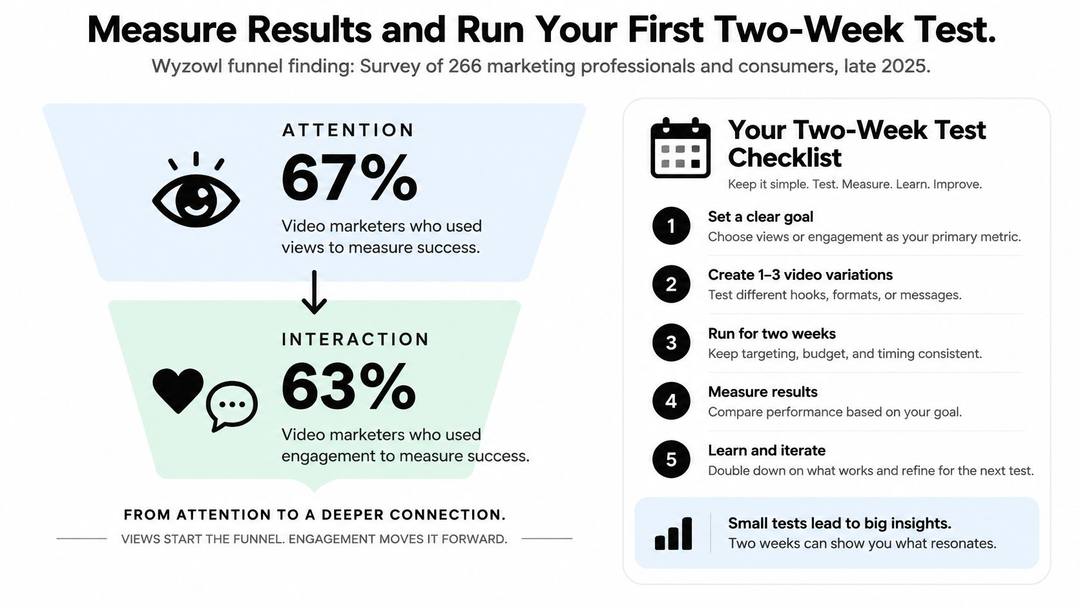
Use the funnel visual as a reminder to evaluate more than surface polish.
Finish with the competitor swap test: could another business publish the script unchanged? If so, add an original demonstration, a documented result, or a visible expert explaining a meaningful choice.
Measure Results and Run Your First Two-Week Test
In Wyzowl's survey of 266 marketing professionals and consumers conducted in late 2025, 67% of video marketers used views to measure success, 63% used engagement signals, 52% tracked leads and clicks, and 32% measured bottom-line sales. Those are measurement practices, not benchmarks your campaign must achieve.
Read the signals in sequence. Views indicate distribution, sharing suggests perceived value, and tracked actions show whether viewers moved toward the business goal. Clicks aren't revenue, and attributed revenue isn't profit.
| Metric | What it signals | What to do if weak |
|---|---|---|
| Three-second views, where available | Initial hook strength | Rewrite the opening promise |
| Completion rate | Pacing and retention | Cut the slowest section |
| Shares and saves | Perceived content value | Make the takeaway more useful or specific |
| Profile visits | Interest in the creator | Add a clear reason to explore or follow |
| Link clicks or sign-ups | Movement toward business impact | Test the landing page and call to action |
Hook variant to test
Create a 20-second Instagram Reel for a bakery's celebration cakes, opening on a customer problem: "Ordering a birthday cake two days before the party? Here's what's still possible." Show decorating close-ups and a finished cake, keep captions inside the safe zone, and end with a clear request to send a cake inquiry through the profile link.
Run a controlled bakery test
Consider a hypothetical local bakery testing Instagram product-making videos over two weeks. The offer is a celebration-cake inquiry, and the single experimental variable is hook wording. Keep the footage, duration, captions, destination page, and final request as consistent as practical.
Prepare an opening centered on the finished result and an alternative centered on a common customer problem. Publish both variants in reasonably comparable conditions, recording any unusual promotion or outside exposure. This is a directional organic test, not a perfectly randomized experiment.
The tracking visual provides a compact reminder of the reporting workflow.
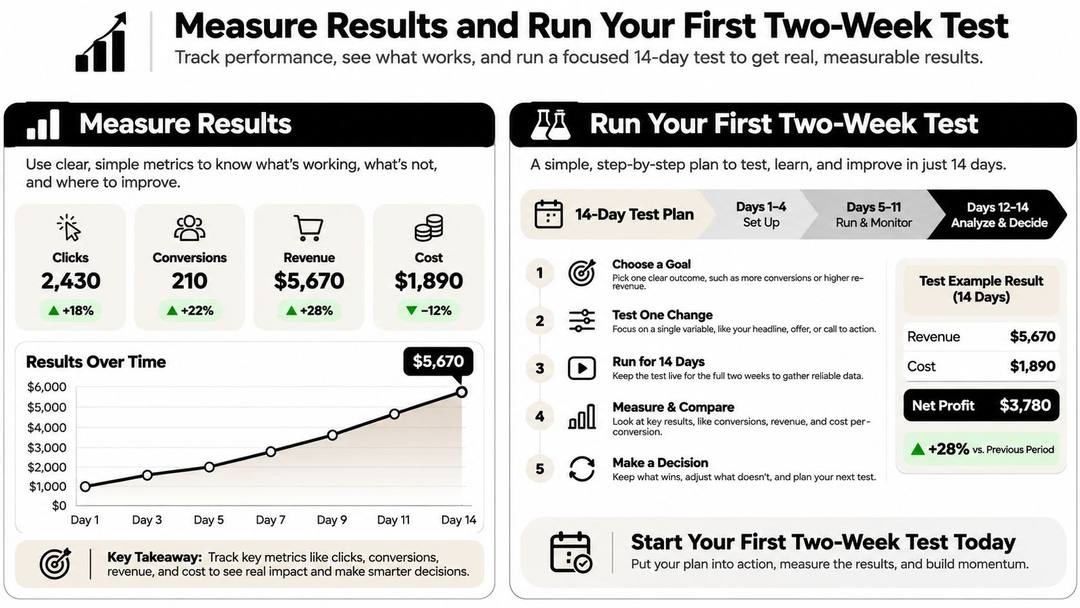
Keep a reporting sheet with a row for each video: publish date, platform, audience, hook, duration, caption treatment, reach, completion, shares, tracked clicks, and inquiries. Record the analytics definitions too, especially whether a metric counts people, plays, or actions.
Compare both totals and rates normalized by reach. Calculate shares per reached account and clicks per reached account, while preserving each platform's native completion definition. Don't divide every metric by reach indiscriminately or compare results captured after unequal observation periods.
Decide what deserves another test
At the end of the trial, retain the hook that improves attention without weakening qualified response. If an opening attracts more viewers but fewer relevant inquiries, it may be promising the wrong thing. If exposure is too limited or the results are mixed, repeat the comparison rather than declaring a winner.
Our viral video library holds 2.77M short-form videos and posts with public engagement data, searchable by topic, platform, and engagement. Use it to investigate candidate formats, not to assume that public popularity proves commercial success; videos can then be posted now or scheduled to TikTok, Instagram, and YouTube from one queue.
Tomorrow, choose a business goal, a primary platform, and a hook to test. Draft alternative openings before filming, and decide what result would justify another production batch.
Revid.ai helps you turn an idea, link, or proven format into a finished short-form video, with editing and publishing in the same workflow. Visit revid.ai to prepare your first test batch, then use your reporting sheet to decide which videos deserve another iteration.
FAQ
What aspect ratio should I use for social media videos?
Use a vertical 9:16 master at 1080 x 1920 for TikTok, Instagram Reels and YouTube Shorts. For the Instagram feed, a 4:5 portrait at 1080 x 1350 works well, and YouTube long-form uses 16:9 at 1920 x 1080. Treat these as production recommendations and confirm limits in each app's upload screen.
What is a safe zone in vertical video?
A safe zone is the part of the frame where faces, product details, captions and instructions stay visible after the platform adds its controls. Keep essential text away from the bottom edge and the right-hand control column. Check a draft in the destination app, since the editor preview may not show every interface element.
Which social platform should I use for video marketing?
Match the platform to the goal: TikTok for brand awareness, Instagram Reels for website traffic, YouTube explainers for evergreen search traffic and LinkedIn native video for B2B expertise. These are starting hypotheses, not guarantees. Choose one primary platform per campaign and adapt secondary versions to their destination.
What metrics should I track for social media video?
Read signals in sequence: three-second views for hook strength, completion rate for pacing, shares and saves for perceived value, profile visits for interest, and link clicks or sign-ups for business impact. In Wyzowl's survey, 67% of video marketers used views, 63% engagement, 52% leads and clicks, and only 32% measured bottom-line sales. Remember that clicks aren't revenue.
How do I run a video marketing test?
Test one variable, such as hook wording, over two weeks while keeping footage, duration, captions, destination page and call to action consistent. Log each video in a reporting sheet with reach, completion, shares, clicks and inquiries. Compare totals and rates normalized by reach, and repeat the test if results are mixed.
Is short-form video worth the investment for marketers?
Short-form video is now an everyday viewing habit: DataReportal reported that 87.5% of online adults watch formats like TikToks and Reels every week. HubSpot's 2026 State of Marketing found short-form video was the top ROI-driving content format, cited by 49% of marketers. Still, standing out is hard, so measure business outcomes rather than just publishing more clips.
Sources
- Revid TikTok index: 2,377,477 TikToks with AI labels per video, snapshot of Sep 15, 2026. Median views estimated from view buckets.
- HubSpot, 2026 Marketing Statistics, Trends & Data (2026)
Charts and figures checked on November 27, 2026.