Creators publish 30,000+ videos a month with Revid

Free Social Media Video Maker

Easily create high-performing social media videos using AI-driven templates and automated editing tools. Our platform helps you produce eye-catching content for all social networks, with built-in music, visual effects, and format optimization to increase reach, engagement, and brand visibility.

Paste a voiceover script or URL and turn it into a TikTok-ready video with AI voice, captions, and scroll-stopping visuals.

  • Paste text or URL
  • AI voiceover
  • TikTok-ready 9:16
  • Auto captions and visuals

Create Viral Content with Our AI Social Media Video Maker in 3 Simple Steps

1 Provide Your Script or URL

Start by pasting your text, voiceover script, or a URL into our social media video maker. Whether it's an article, blog post, or a simple idea, our AI will automatically adapt it into a highly engaging script tailored for short-form platforms like TikTok, Instagram Reels, and YouTube Shorts.

2 Select Your Visuals and AI Voice

Customize your social media video by choosing from our premium AI voices or uploading your own audio. Next, pick your preferred media type: lifelike AI video, animated AI images, motion graphics, stock footage, or satisfying static gameplay. You can even use [bracketed text] to guide the AI's visual choices.

3 Generate and Share to All Platforms

Click 'Generate' and let our free social media video maker do the heavy lifting. In minutes, you'll get a polished 9:16 vertical video complete with auto-captions, transitions, and background music. Make any final tweaks in our built-in editor, then download and post directly to your favorite social networks.

01

Create Social Media Videos for Every Platform from a Single Workflow

Write a script, paste a URL, or describe your idea and Revid generates a complete social media video with visuals, voiceover, captions, and formatting optimized for the platform you are posting to. TikTok, Instagram Reels, YouTube Shorts, and Facebook all have different format requirements and audience expectations. Revid handles those differences automatically, so you produce the right video for each platform without running separate production workflows or reformatting manually after the fact.

02

What the AI Handles When You Create Your Social Media Video

The social media video maker automates every element of video production that typically requires manual work. The AI writes the script from your input, selects or generates matching visuals, adds a natural voiceover, applies captions, and formats the final output for the platform you specify. You control the topic, tone, and style. The AI handles the execution. There are no editing tools to learn, no assets to source, and no production steps between your idea and a finished video ready to post.

03

Consistent Social Media Video Output Without a Full-Time Production Team

The biggest challenge for brands and creators on social media is not the quality of individual videos but the pace of consistent publishing. Algorithms reward accounts that post regularly and build audiences faster than accounts that post infrequently. Revid removes the production barrier that limits how often most teams can publish. Write the concept, generate the video, and post without spending production hours between each piece of content. Channels that use this workflow consistently outpace those that depend on traditional production timelines.

What Creators Say

Loved by Social Media Video Maker Users

After hearing about this tool from a friend who creates engaging content, I decided to give it a shot for my latest project. The user interface was incredibly intuitive, making it easy to craft visually appealing videos.

Emily J.

Emily J.

Social Media Manager

Who knew creating social media videos could be this easy with Revid!

Oliver T.

Oliver T.

Content Creator

Creating fun videos for our family events was a breeze with this tool, as even the kids found it easy to use.

Sophia M.

Sophia M.

User

Target Audience

Who is this tool for?

Social media managers and brand teams

Maintain a consistent publishing schedule across TikTok, Instagram, and YouTube Shorts without relying on a video production team for every piece of content.

Creators building a multi-platform presence

Produce video content formatted for every platform you are active on without reformatting each video manually or running separate production workflows for each channel.

Agencies managing client content calendars

Scale social media video output across multiple client accounts without adding production overhead to each, keeping every client's social presence active and consistent.

Small businesses posting regularly

Create professional-quality social media videos for your products and services without hiring a video editor or learning production software to maintain your online presence.

Comparison

Why Choose Revid's Free Social Media Video Maker?

Creating engaging social media content shouldn't require expensive software or video editing skills. Revid's AI-powered platform makes it simple to produce professional videos for all major platforms, with automation that saves time while maintaining quality.

AI-Powered Automation
Revid's Social Media Video MakerAutomatic scene generation, visuals, and subtitles
Other Social Media Video MakersManual editing required for most elements
Multi-Platform Format
Revid's Social Media Video MakerOne-click optimization for TikTok, Reels, Shorts, and more
Other Social Media Video MakersManual resizing and reformatting needed
Content Creation Speed
Revid's Social Media Video MakerVideos ready in minutes from text or URL
Other Social Media Video MakersHours of editing and production time
Learning Curve
Revid's Social Media Video MakerNo video editing skills required
Other Social Media Video MakersRequires training and experience
Scalability
Revid's Social Media Video MakerCreate unlimited variations effortlessly
Other Social Media Video MakersTime-consuming to produce multiple versions
Cost
Revid's Social Media Video MakerAffordable plans
Other Social Media Video MakersExpensive subscriptions or one-time fees
Example Videos

See What You Can Create with Social Media Video Maker

Explore different styles and possibilities with our Social Media Video Maker

Turn Ideas into Social Media Videos in Seconds

Stop starting from a blank canvas. With Revid's AI-powered social media video maker, you can transform simple ideas, scripts, or URLs into ready-to-publish videos in just a few clicks. The system automatically generates scenes, selects visuals, adds subtitles, and structures the content for maximum impact. This lets you focus on the message while the platform handles the heavy lifting, making video creation fast, consistent, and scalable for teams and solo creators alike.

Create More Content Without Increasing Your Workload

Producing content for multiple platforms doesn’t have to mean more effort. With smart automation and reusable layouts, you can generate dozens of video variations from a single concept. Instantly adapt the same video for different formats, languages, or audiences, and keep a steady publishing rhythm without burning time on repetitive tasks. This approach helps brands grow their presence while maintaining quality and speed.

FAQs

Frequently Asked Questions

What is the AI Social Media Video Maker?
Our AI social media video maker is a powerful, automated tool designed to help creators, small businesses, and agencies produce engaging short-form content effortlessly. By simply inputting text or a URL, the social media video creator automatically generates a ready-to-post vertical video with an AI voiceover, dynamic visuals, and auto-captions perfectly formatted for TikTok, Instagram Reels, and YouTube Shorts.
How do I use the free social media video maker?
Using our free social media video maker is incredibly easy and requires no editing skills. First, paste your script, text, or a URL into the tool. Next, select your preferred AI voice and visual style—such as AI video, stock footage, or motion graphics. Finally, hit generate. The AI social media video generator will compile your assets, add subtitles, and deliver a high-quality video in minutes.
Can I turn an article or URL into a social media video?
Yes! One of the best features of our AI social media video generator is the ability to repurpose written content instantly. Just paste the URL of a blog post, tweet, or article into the social media video maker. The AI will summarize the content, write a tailored voiceover script, and generate a complete video to boost your multi-platform presence.
What visual styles does the social media video creator offer?
Our social media video maker offers multiple media types to suit your brand and niche. You can choose from lifelike AI video clips, animated AI images, fast-paced motion graphics, premium stock videos, or even satisfying static/gameplay backgrounds. You can also upload your own media to the social media video creator for a truly custom aesthetic.
Are the videos optimized for TikTok, Reels, and Shorts?
Absolutely. The AI social media video maker defaults to a 9:16 vertical ratio, which is the perfect format for TikTok, Instagram Reels, Facebook Reels, and YouTube Shorts. This means you can create a single social media video and seamlessly share it across all your favorite platforms without any manual resizing or cropping.
Can I use my own voice instead of the AI voice generator?
Yes, you can. While our social media video maker includes a vast library of ultra-realistic AI voices, you can easily upload your own audio file or record a custom voiceover. The AI social media video generator will then perfectly sync your uploaded voice with the generated visuals and auto-captions.
Do I need video editing skills to use this AI social media video generator?
Not at all. Our free social media video maker is built specifically for users with zero video editing experience. The AI handles all the heavy lifting—from scene selection and camera movements to subtitling and formatting. If you do want to make tweaks, our intuitive drag-and-drop editor makes post-generation adjustments a breeze.
How can I control the images generated by the AI?
You can easily guide the AI social media video generator by using bracketed text in your script. For example, typing '[a sunny beach]' tells the social media video maker to use or generate visuals of a beach for that specific scene. This bracketed text acts purely as a visual cue and will not be spoken aloud by the AI voiceover.
How much does the social media video maker cost to use?
New accounts get free credits so you can test the social media video maker and see its value firsthand. Generating a video uses credits from your account balance. The exact credit cost depends on the video's length and the specific AI features utilized, and it is shown before you generate. For users and agencies posting regularly, regular creation uses your paid plan's monthly credits, with affordable plans that scale with your video production.
How fast can the AI social media video generator make a video?
Speed is a major advantage of our automated social media video creator. Once you click generate, your video will typically be ready in just 2 to 5 minutes. This rapid turnaround allows social media managers and creators to scale their content output and maintain a consistent publishing schedule without spending hours in complex editing software.

Still have questions?

Contact us

Find detailed answers to 100+ questions about features, tools, and workflows

or check our markdown version optimized for LLMs

Tools

Free AI Video Tools

Choose your tool, add your content, and create a video in seconds. Then customize it to your liking.

See all tools

AI TikTok Video Generator

Turn text into trendy, viral TikTok videos in a snap

Try it out

Prompt to Video

Turn your prompts into engaging videos with AI assistance

Try it out

Add Caption to Video

Generate subtitles in 100+ languages with AI captions

Try it out

PDF to Brainrot

Convert PDFs into attention-grabbing, scrollable videos

Try it out

Text to Brainrot

Turn your text into trendy, scrollable content with dynamic visuals

Try it out

AI Talking Avatar

Create lifelike talking avatars from text in seconds

Try it out

Video Podcast Generator

Transform your podcasts into visually engaging video content

Try it out

AI Movie Maker

Create studio-quality videos from text, no filming required

Try it out

Audio to Video

Make engaging videos from your podcasts, interviews, or any audio content

Try it out

Animated Lyrics Video Generator

Turn any song into an animated lyric video with synced text and visuals.

Try it out

AI Music Video Generator

Transform your music into cinematic music videos.

Try it out

AI Lyrics Video Generator

Transform your lyrics into a complete music video with AI

Try it out
How it works

From Signal To Published In Four Steps.

1

Find Viral & Trending Videos.

RevidAI's Viral Search and Channel Watcher surface the formats, creators, and trends getting attention right now, then help you turn them into ideas of your own.
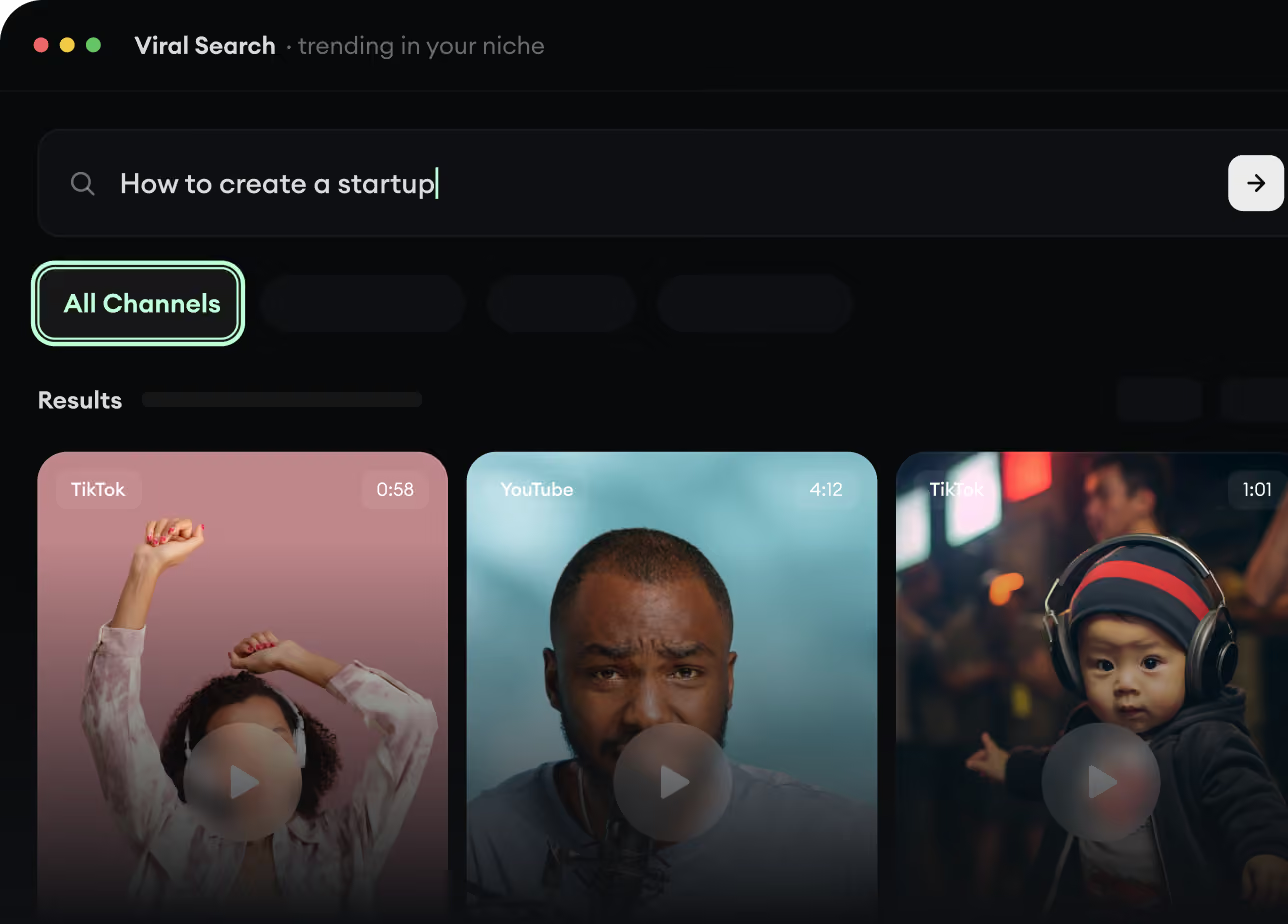
  • Discover winning video formats in your niche
  • Follow creators and channels that matter
  • Start with proven ideas instead of guessing
Find Viral & Trending Videos.
2

Turn An Idea Into A Story.

Found something worth making? Revid AI writes the script, suggests the structure, and turns links, prompts, or topics into complete video concepts.
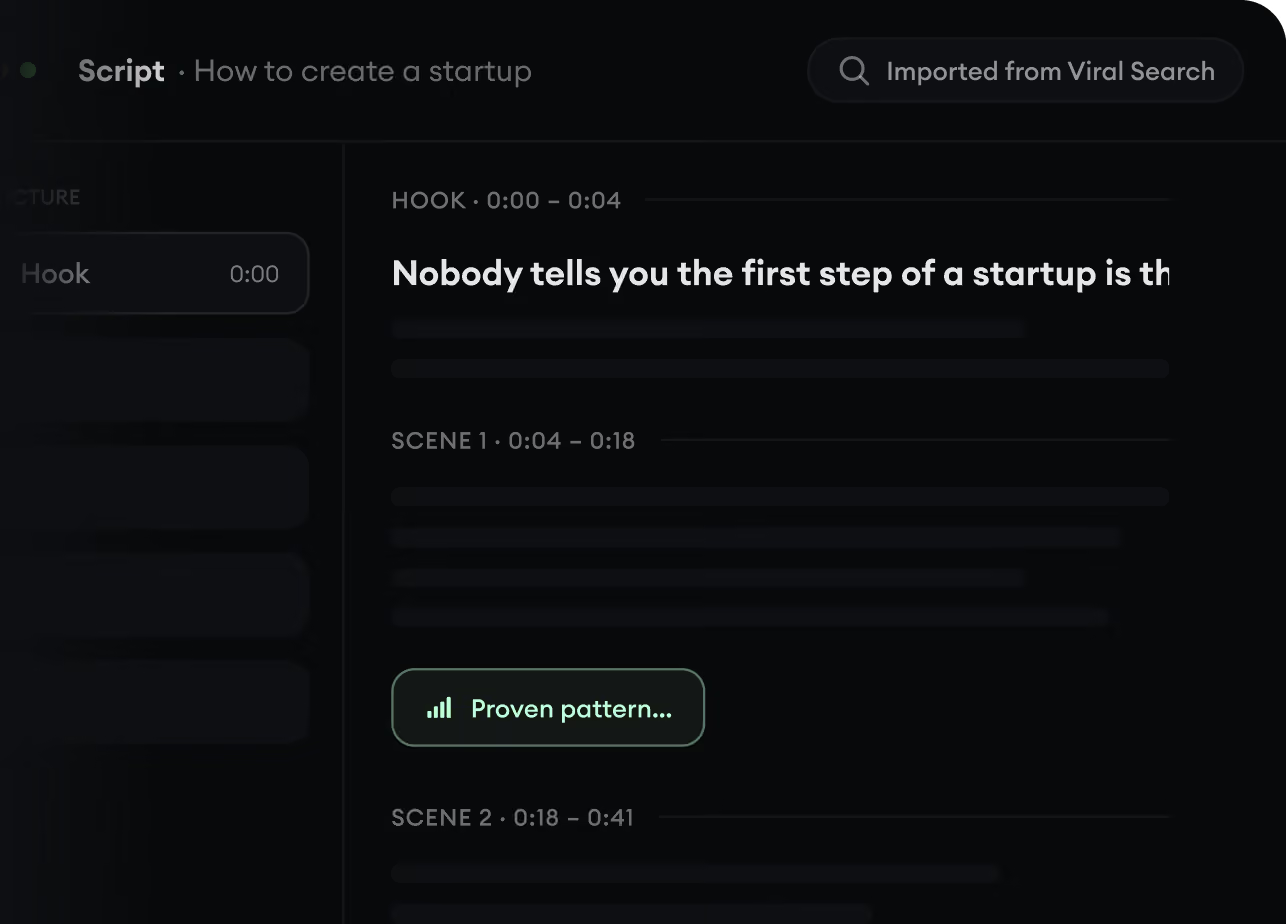
  • Start with a prompt, topic, or URL
  • Generate scripts inspired by proven patterns
  • Build stories designed to keep people watching
Turn An Idea Into A Story.
3

Generate The Finished Video.

Script, voiceover, visuals, subtitles, and editing all come together in one workflow. No stitching together five different tools.
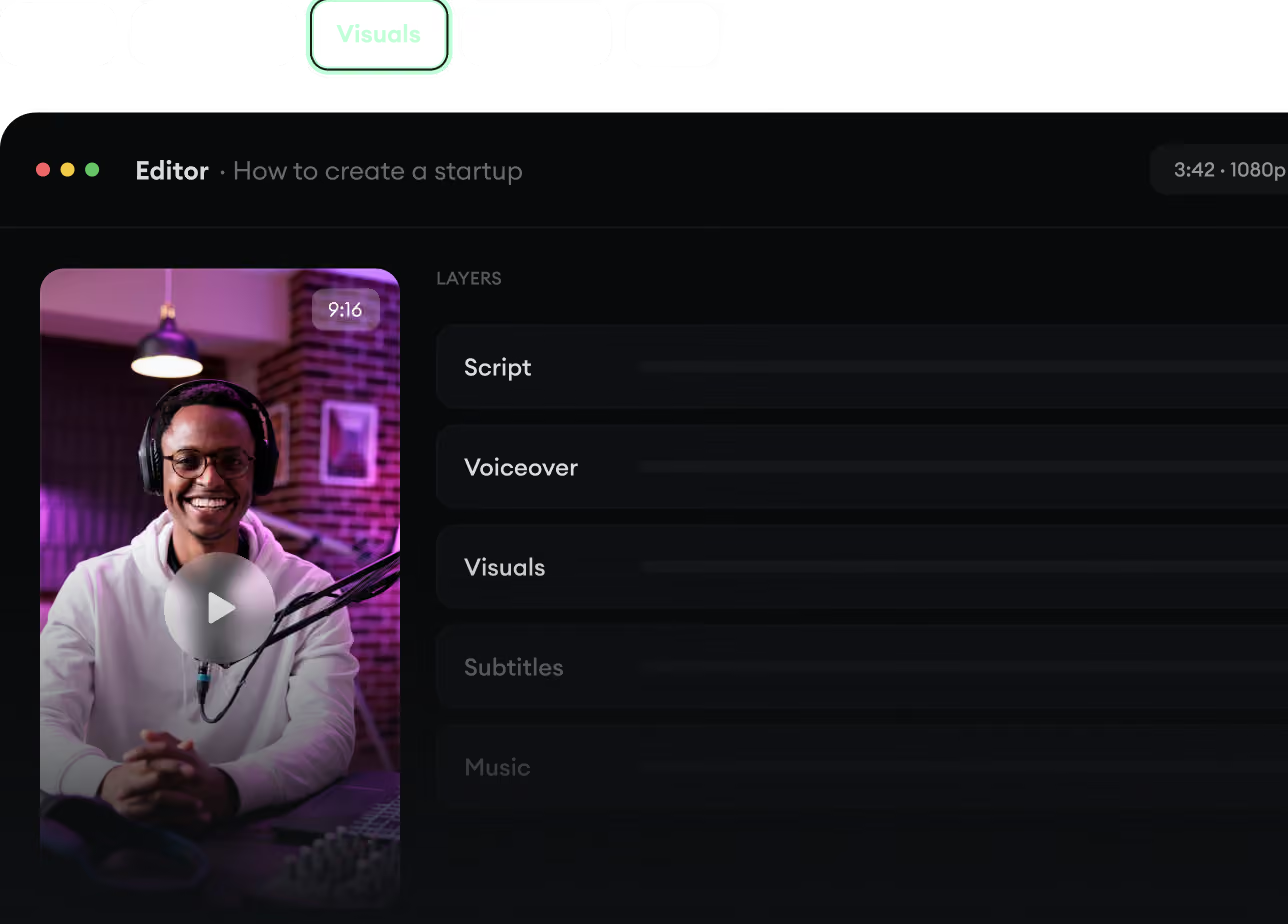
  • Turn text into complete, multi-minute videos
  • Generate everything in one place
  • Refine the result in the editor
Generate The Finished Video.
4

Publish Everywhere.

Share your videos to TikTok, YouTube, Instagram, and wherever your audience is.
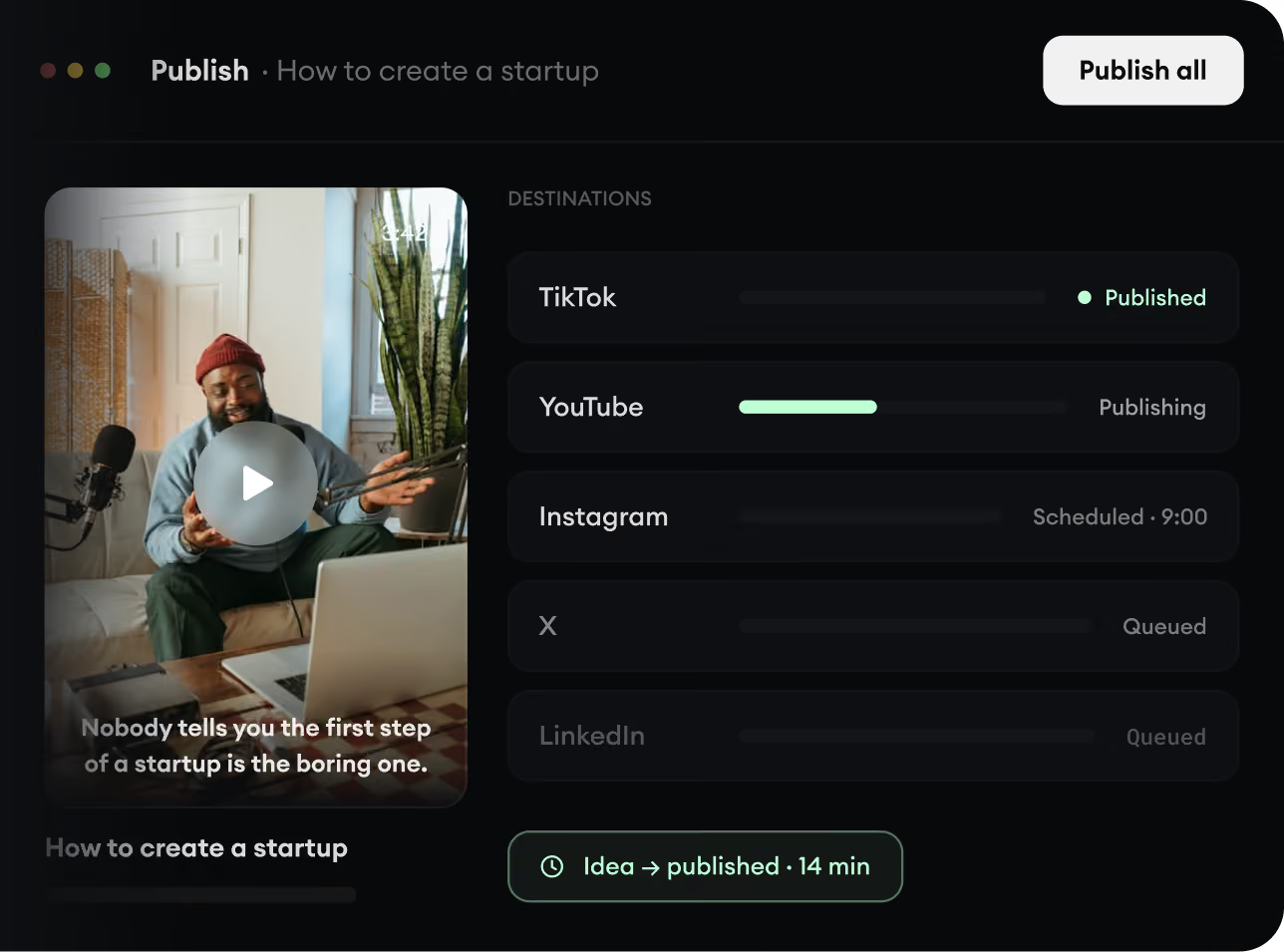
  • Publish across every major platform
  • Reach more people with less work
  • Go from idea to published video in minutes
Publish Everywhere.