On this page
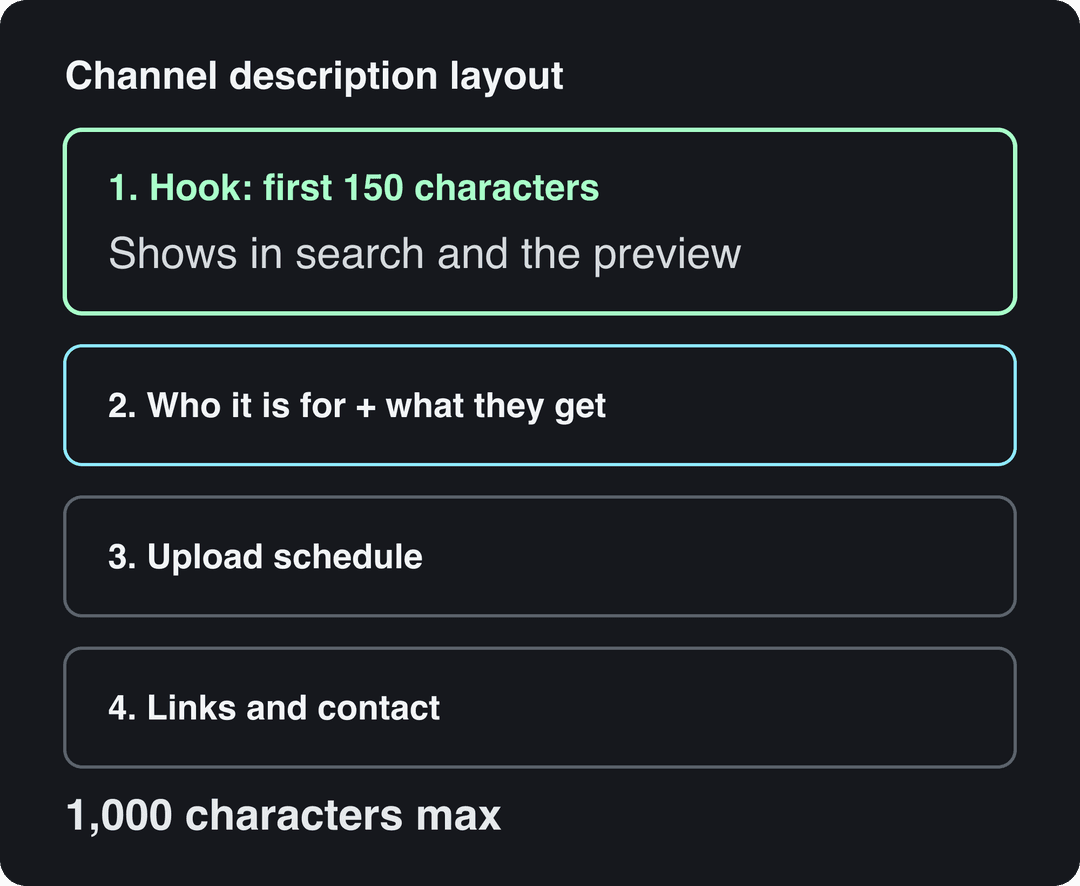
A good description for a YouTube channel says who the channel is for, what viewers get and how often you post, all in the first sentence or two. Then add your upload schedule, your best playlist, links and a reason to subscribe. YouTube allows up to 1,000 characters for a channel description.
The most common mistake is spending the opening on "Welcome to my channel." Only the first line or so shows in search results and on your channel page before viewers tap "more", so that line has to carry your topic and your promise. A second mistake: many guides quote a 5,000-character limit, but that is the limit for video descriptions, not channel descriptions.
YouTube channel description template (copy and paste)
Fill in the brackets, delete what does not apply, and keep the order. The first line matters most.
[What you make] for [who it's for], so they can [result they want].

On this channel: [content type 1], [content type 2] and [content type 3].
[One line on why you: experience, angle or style that sets you apart.]

New videos every [day/frequency]. Start with [best playlist or video].

Subscribe if you want [specific benefit].

Business inquiries: [email]
[Website / newsletter / main social link]Here is what each part does:
- Hook line: your main topic in the words people search, plus the audience and the result. This is the preview line, so treat the first 150 characters as the part most people read.
- What's on the channel: the formats or topics a new viewer can expect. Name them specifically ("redstone tutorials", not "gaming content").
- Why you: one line of credibility or personality. Skip it rather than write something vague.
- Schedule and starting point: a posting rhythm sets expectations, and pointing to one playlist gives a new viewer an easy next step.
- Call to subscribe: tie it to a benefit ("subscribe for a new budget recipe every Sunday"), never a bare "please subscribe".
- Contact and links: brands look for a business email here.
How long should a YouTube channel description be?
The hard limit is 1,000 characters. You do not need to fill it: a tight description of a few short paragraphs reads better than a wall of keywords, and the part that does the work is the opening line.
Use this rule: if a stranger read only your first sentence, would they know what the channel is about and whether it is for them? If yes, the rest is supporting detail. If no, rewrite the first sentence before touching anything else.
How to write a description for your YouTube channel in 5 steps
- Pick one main phrase. Choose the term your ideal viewer would type, such as "budget meal prep" or "GCSE chemistry revision". Start from YouTube's own search suggestions, then check volume and competition with TubeBuddy, vidIQ or Google Keyword Planner. Specific phrases bring viewers who are more likely to subscribe than broad ones.
- Write the hook line. Put the main phrase, the audience and the result in one sentence. Use the phrase once here and once more lower down, at most. Anything beyond that reads as stuffing to viewers.
- Describe the content and your angle. List the formats and topics, then one line on what makes your take different: your background, your format, your tone.
- Add the schedule and a starting point. "New video every Friday. Start with the Beginner Series playlist." Only promise a schedule you can keep.
- Close with a specific call to action and contact details. Benefit-led subscribe line, business email, one or two links.
For more on wording and keyword placement, read Yellowhead's tips on channel and video descriptions and YouTube's own guidance for creators, which started as the YouTube Creator Academy. If you are new to search optimization in general, this beginner video covers the basics:
Be realistic about what the description does for search. It helps YouTube and viewers understand the channel, but your videos' titles, thumbnails and content drive most discovery. For video-level search, see our guide to YouTube Shorts SEO.
YouTube channel description examples by niche
Each example follows the template. Swap the bracketed parts for your own details.
Educational and study channel description
Education is the niche where a specific promise matters most: students search by subject and exam, not by "educational channel". Here is a description of about 100 words for an educational YouTube channel:
Chemistry and biology explained clearly for high school and first-year college students. Every lesson takes one topic from the syllabus (atoms, cell division, reaction rates, genetics) and breaks it into diagrams, worked examples and a quick recap you can review the night before a test. New lessons every Tuesday and Friday, plus revision playlists before exam season. I'm [Name], a [science teacher / tutor] with [X] years in the classroom. Start with the Exam Prep playlist, and subscribe if you want school science to finally make sense. Business inquiries: [email]
For a study channel (study-with-me, productivity, revision tips):
Study with me in real time: focus sessions with a timer, rain sounds and no talking, for students who work better with company. Long sessions every weekday, plus revision tips and planner setups on weekends. Subscribe and keep a session open next time you need to focus.
Gaming channel description
Name the games. Gamers search by title and play style, and a vague "gaming videos" line tells them nothing.
Minecraft survival builds, hardcore challenges and redstone tutorials for players who want to get better without the grind. Let's plays every Wednesday, Shorts most days, live streams on weekends. Subscribe and turn on notifications to catch the streams. Discord, Twitch and business email below.
Vlog channel description
Vloggers are the product, so the description should say who you are and what kind of life the viewer is signing up to watch.
[City]-based [student / new parent / van lifer] filming what [this life] really looks like: real budgets, honest bad days and the good ones too. A new vlog every Sunday, plus Shorts from the week in between. Subscribe to come along.
Facts channel description
Strange-but-true facts about space, history and the human body, checked against real sources and told in under a minute. New Shorts daily and longer explainers every week. Subscribe if you like being the person who knows the weird stuff.
If your facts channel uses AI voices or visuals, make sure each video adds your own research and angle. YouTube does not let mass-produced, template-based AI content earn money, but AI-assisted videos that show a creator's creative vision can be monetized.
Prompt to try
Make a 45-second YouTube Short on a strange-but-true fact: the human body gives off a faint glow of light that our eyes are too weak to see. Open with the hook "Your body is glowing right now, you just can't see it." Use AI visuals, a curious and upbeat voice and bold captions, and end by inviting viewers to subscribe for a new weird fact every day.
Tech channel description
Honest reviews of budget phones, laptops and smart-home gear, used for [how long] before we publish a verdict. Buying guides, setup tutorials and "is it worth it" comparisons every week. Subscribe before your next upgrade. Review units and business: [email]
Movie channel description
Movie breakdowns, ending explanations and hidden details you missed in [genres]. Every video adds our own analysis, not just clips. New breakdowns every [day], with spoilers flagged in every title. Subscribe to watch your next film with sharper eyes.
The line about your own analysis matters: channels that mostly reuse other people's footage without adding commentary run into YouTube's reused content rules.
Motivational and music channel descriptions
Motivational:
No-fluff motivation for people building discipline: morning routines, study focus and gym mindset in short, punchy videos. New Shorts daily and a longer talk every Sunday. Subscribe for the push you need on the days you don't feel like it.
Music:
Original lo-fi beats for studying, working and sleeping, produced by [Name]. A new track every Friday and full-length mixes every month. Free to use with credit; licensing details below. Subscribe to build your focus playlist.
Description for a new YouTube channel
With no videos yet, keep it short and make the promise only. A short description for a YouTube channel can be a single formula: "[What] for [who]. New video every [day]."
Simple vegan meal prep for busy students. New recipe every Sunday.
Update it after your first handful of videos, once you know which topics viewers actually watch.
Before and after: fixing a weak description
An illustrative example for a budget DIY home repair channel:
- Before: "Welcome to my channel. I post videos about fixing stuff around the house. Hope you enjoy, and don't forget to subscribe."
- After: "Budget DIY home repair for renters and first-time homeowners. Learn to fix leaky faucets, patch drywall and swap light fixtures yourself, and skip the expensive service call. A new step-by-step fix every Friday. Subscribe so you never miss one."
The rewrite puts the topic and search terms in the first 150 characters, names the audience, states a concrete benefit and ties the call to action to a schedule.
YouTube video description template
A video description has more room (up to 5,000 characters) and a different job: help one video get found and send viewers somewhere useful next. Only the first couple of lines show before "more", so the opening still carries the weight.
[One or two sentences: what this video shows and who it helps, with the main search phrase.]

In this video:
0:00 [Intro]
[timestamp] [Section]
[timestamp] [Section]

Resources mentioned: [links]
Watch next: [related video or playlist]

Subscribe for [specific benefit]. New videos every [day].
Business inquiries: [email]Related limits worth knowing: video titles cap at 100 characters, and tags share a single 500-character total. For more formats, see ClickMinded's YouTube description template and the 13 YouTube description templates collected by Martechs. If you also need the video itself planned, our YouTube video script template and these YouTube end screen templates cover the next steps, and the free YouTube title generator helps with the line people see first.
Mistakes that make a channel description weak
| Mistake | Fix |
|---|---|
| Opening with "Welcome to my channel" | Open with the topic, the audience and the result |
| Listing keywords separated by commas | Use the main phrase in natural sentences, once or twice |
| "I post videos about everything" | Name the formats and topics a new viewer will actually get |
| A schedule you stopped keeping | Remove it or update it; a stale promise costs trust |
| No business email | Add one line for brands and collaborators |
| Pasting a video description template | Keep the channel description about the channel, not one video |
| Copying another creator's description | Borrow the structure, write your own angle |
Write a first draft with a description generator
If a blank box is the problem, a generator gets you a first draft to edit. Revid's free YouTube description generator drafts keyword-rich copy from your topic, and Hootsuite's YouTube channel description generator is another free option. Either way, rewrite the result in your own voice and check it against the template above: hook line first, specific content, schedule, call to action.
You can also ask a chatbot directly. A prompt that works: "Write a YouTube channel description of about 100 words for a channel that makes [content] for [audience]. Start with one sentence that includes the phrase [main phrase]. Mention that new videos come out [schedule] and end with a call to subscribe tied to a benefit. No hashtags, no emojis."
Once the profile is set, the videos do the growing. If you want to publish Shorts consistently without filming, the AI YouTube Shorts generator turns a script, a link or an idea into a captioned Short you can publish straight to your channel.
Check whether your new description works
- Note the date you change it. Then compare the "YouTube search" traffic source and subscribers gained in YouTube Analytics over the following weeks. A description change is a small signal, so look for a trend rather than a jump.
- Track your links. Shortened links from Bitly or UTM tags read in Google Analytics show which links in your channel and video descriptions people actually click.
- Don't expect a built-in A/B test. YouTube's Test & Compare tool covers titles and thumbnails only, not descriptions. Test one change at a time and give it a few weeks.
FAQ
How do I change my YouTube channel description?
In YouTube Studio, open Customization and go to the tab with your channel name, handle and description (Profile on current layouts, Basic info on older ones), edit the text and click Publish. You can also edit it from the YouTube app through your channel's edit (pencil) button.
Do keywords in a channel description help a channel rank?
They help a little: the description tells YouTube and viewers what the channel covers. Video titles, thumbnails and how viewers respond to your videos matter far more, so use your main phrase naturally and spend your energy on the videos.
Can I put links in my YouTube channel description?
Yes, but put your main links in the channel's Links section, which shows them as clickable links on your channel page. In the description itself, mention the one link that matters most, usually your website or business email.
What is the difference between a channel description and a channel bio?
They are the same thing: the "about" text on your channel, also called the profile description or YouTube bio. It is capped at 1,000 characters, unlike video descriptions, which allow 5,000.
Should I use AI to write my YouTube channel description?
AI is fine for a first draft, but edit it so the first sentence names your specific topic and audience in your own voice. Generic AI phrasing ("your ultimate destination for amazing content") tells viewers nothing about why they should subscribe.