On this page
A YouTube video script template has six blocks: a hook (your first line, no greeting), a setup that says what the viewer gets, your main points in order, a re-hook before each new point, a payoff that keeps the hook's promise, and one call to action. Copy the template below, fill each block, then read it aloud with a timer.
The most common scripting mistake is writing an intro instead of a hook. "Hey guys, welcome back" and "before we start, make sure to subscribe" spend the seconds when viewers decide whether to stay. The template below has no intro slot on purpose: the hook is the intro, and the subscribe ask waits until you have earned it.
The YouTube video script template (copy and paste)
This template is built for long-form YouTube videos: tutorials, explainers, reviews and list videos. Paste it into Google Docs, Notion or any notes app and fill it top to bottom. Versions for Shorts, vlogs and video essays follow further down.
WORKING TITLE (YouTube allows up to 100 characters):
TARGET VIEWER: who they are and what they already know
PROMISE: "By the end of this video, you will..."

HOOK (no greeting)
Say: the result, mistake, claim or question
Show: what is on screen while you say it

SETUP
Say: the problem in the viewer's words
Say: what they get if they stay, and in what order

POINT 1
Say:
Show:
Re-hook into point 2:

POINT 2
Say:
Show:
Re-hook into point 3:

POINT 3
Say:
Show:

PAYOFF
Say: the answer, result or reveal the hook promised
Show: the proof (before and after, final result, demo)

CTA (one action)
Ask: comment, subscribe, or watch the next video
Point to: the end screen video and why it is next

EDIT NOTES
B-roll:
On-screen text:
Chapters:
Sources to cite:Add or remove POINT blocks to match your topic. Three is a sensible default for an explainer, a list video needs one block per item, and a single-fix tutorial may need only one.
How to fill in each part of the script
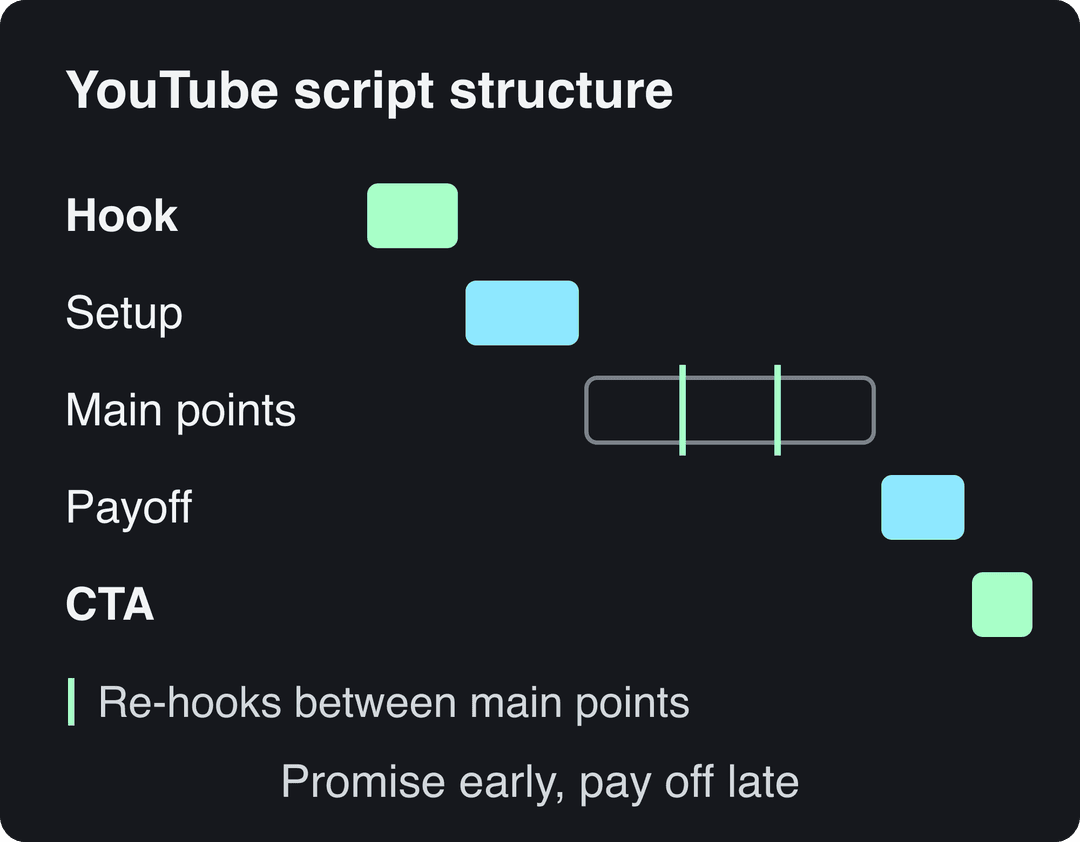
Hook: the first lines, with no greeting
The hook makes a promise specific enough that the viewer wants to see it kept. Four formulas cover most videos:
- Result first: "This is the same room, before and after, and it cost less than a new sofa." (Show the after.)
- Mistake callout: "If your espresso tastes sour, your beans are fine. Your grind isn't."
- Contrarian claim: "Posting every day is why your channel stopped growing."
- Open question: "Why do some cheap headphones sound better than expensive ones?"
Questions are not your only option. Among the TikToks with over 100 million views in Revid's 100M Club study, 51% of those with a transcript open with a statement and 16% with a question, so a bold claim works at least as well. For more opening lines sorted by type, browse these 130+ TikTok hooks and adapt them to long-form.
Write the visual next to the line. A hook spoken to a still camera is weaker than the same line said over the result.
Setup: tell viewers what they get
The setup answers "why should I keep watching?" in two or three sentences: name the problem in the viewer's words, then say what the video covers and in what order. Saying the order matters, because a viewer who knows the best tip comes third has a reason to wait for it.
Keep backstory out of the setup. If the viewer needs background, give it inside the point where it is needed.
Main points and re-hooks
Each point gets two lines in the template: what you say and what you show. If you can't name a visual for a point, that stretch will be a talking head, which is fine for a confident speaker and slow for everyone else.
The re-hook is the line between points that gives viewers a reason to stay for the next one:
- "That fixes most sour shots. If yours is still sour, it's the next setting."
- "This one is free. The next one costs money, and it's worth it."
- "Those two are what everyone tells you. The third is the one most guides skip."
Don't put your strongest point first. Lead with a solid point that proves you know the topic, save the most surprising one for the end of the body, and the video builds instead of peaking early.
Payoff and call to action
The payoff delivers exactly what the hook promised, with proof on screen: the finished dish, the before and after, the working setup. If the payoff doesn't match the hook, viewers feel baited, and they say so in the comments.
The call to action asks for one thing, chosen by the goal of the video: a comment question for engagement ("Which of these did you already try?"), the end screen video for watch time, or a link for sales. A CTA that names the next video and why ("If your shot turned bitter instead, this video fixes it") gives viewers a reason to click, which a generic subscribe ask doesn't.
For a second walkthrough of the hook, value, call to action and end screen structure, vidIQ's guide to writing a YouTube video script covers the same blocks with its own examples.
YouTube video script example: a filled-in sample
Here is the template filled in for a short tutorial on a home coffee channel. Use this sample video script to see how much (and how little) each block needs.
WORKING TITLE: Why your home espresso tastes sour (and 3 fixes)
TARGET VIEWER: new home espresso owner, knows how to pull a shot
PROMISE: By the end, you will fix a sour shot without buying new beans

HOOK
Say: "If your espresso tastes sour, your beans are probably fine. Your grind isn't."
Show: close-up of a pale, fast shot running into the cup

SETUP
Say: "Sour means the water ran through too fast and pulled out mostly acids. Fix the flow and the same beans taste sweet. Three things control it, and I'll go in the order you should change them."

POINT 1: GRIND
Say: "Go finer, one step at a time, and pull a shot after each change."
Show: grinder dial turning, then two shots side by side
Re-hook: "Finer grind fixes most sour shots. If yours is still sour, it's the next one."

POINT 2: DOSE
Say: "Weigh your coffee every time. A light dose runs fast even with the right grind."
Show: basket on a scale
Re-hook: "If grind and dose are right and it still tastes thin, check the thing nobody weighs."

POINT 3: TEMPERATURE
Say: "Cool water extracts less. Let the machine fully heat up, and run a blank shot to warm the group head."
Show: machine warming up, blank shot

PAYOFF
Say: "Same beans. Finer grind, steady dose, hot machine."
Show: slow, dark shot, the sip, the reaction

CTA
Say: "If your shot turned bitter instead, that's the opposite problem. This video fixes it."
Show: end screen pointing to the bitter-espresso videoNotice what this YouTube video script example leaves out: no welcome, no channel plug, no "in this video I'm going to". Every line either promises, delivers or moves the viewer to the next point.
Video editing script template (two-column A/V format)
If someone else edits your video, or you edit days after filming, use an A/V script: the audio in one column and everything the editor needs in the others. This is the layout most video editing script templates use, and it removes the guesswork from the edit.
| Scene | Visual (shot or b-roll) | Audio (voice-over or dialogue) | On-screen text | Edit note |
|---|---|---|---|---|
| Hook | Close-up, pale shot running fast | "If your espresso tastes sour, your beans are probably fine." | "Sour = too fast" | Cut in on the pour, no intro card |
| Point 1 | Grinder dial, then two shots side by side | "Go finer, one step at a time." | "Fix 1: grind finer" | Speed ramp the dial turn |
| Payoff | Slow, dark shot, then the sip | "Same beans. Finer grind, steady dose, hot machine." | None | Hold on the sip, music swells |
Write edit notes as instructions, not wishes: "cut on the pour" is usable, "make it punchy" is not. For the editing side, this step-by-step guide to editing YouTube videos picks up where the script ends.
YouTube video outline template: when to outline instead of script
A word-for-word script is not always the right tool. Use this decision rule:
- Script word for word if you read a voice-over (faceless channels, explainers), if the wording must be exact (sponsor reads, technical claims), or if you tend to ramble on camera. These voice-over script examples show how tight a read script can be.
- Outline if you film vlogs, interviews or reactions, or if you sound better talking freely. Script only the hook and the CTA word for word, and outline the rest.
TITLE:
PROMISE (one sentence):
HOOK (word for word):
BEAT 1: key point + example or story + visual
BEAT 2: key point + example or story + visual
BEAT 3: key point + example or story + visual
PAYOFF (bullet):
CTA (word for word):The outline keeps you on track without making you sound like you're reading. If you drift off-topic while filming, the next beat tells you where to come back to.
Vlog script template
Vlogs are filmed before they are written, so a vlog script template has two halves: a plan for what to capture, then a voice-over script written after you review the footage.
BEFORE FILMING
Cold open: the most interesting moment you expect (shoot it, place it first)
The plan: what you set out to do today
The obstacle: what could go wrong or what you don't know yet
Shots to get: arrival, process, people, details, result

AFTER FILMING (write over the footage you actually have)
Cold open line:
Plan line:
Turn: the moment things changed
Takeaway: what you learned or how it ended
CTA: the next vlog or a related videoThe cold open is the vlog version of a hook: lead with the funniest, tensest or most beautiful moment, then rewind to "this morning".
Prompt to try
A 2-minute narrated video essay asking why cities keep building wider highways when traffic never gets better. Open with the claim 'Adding lanes makes traffic worse, and engineers have known it for decades,' then state the thesis, walk through three pieces of evidence, address the best counterargument and end on what it means for city planning. Calm documentary narration over archival-style city footage and simple maps, with chapter titles on screen.
Video essay script template
A video essay is an argument, so its script works like a written essay with visuals attached. Script it word for word, because video essays are almost always narrated.
HOOK: the puzzle or claim that makes the topic interesting
THESIS: your answer, in one sentence
CONTEXT: only the background the viewer needs for the thesis
CHAPTER 1: first piece of evidence + source + visual
CHAPTER 2: second piece of evidence + source + visual
CHAPTER 3: your strongest evidence
COUNTERARGUMENT: the best case against you, and your answer
CONCLUSION: what the thesis means beyond this topic
SOURCES: full list for the descriptionName each chapter in the script so you can add them as YouTube chapters later, and put every source next to the claim it supports. A YouTube description holds up to 5,000 characters, enough for a full source list.
Prompt to try
A 60-second vertical Short on fixing sour home espresso. Hook in the first line: 'If your espresso tastes sour, your beans are fine. Your grind isn't.' Then one sentence of context and three quick fixes (grind finer, weigh the dose, fully heat the machine), each with a close-up coffee visual, ending on a slow dark shot and a loop back to the hook. Few words, bold captions, warm cafe style.
90-second video script template for Shorts, Reels and TikTok
A short video has no room for a setup and three points. Compress the template into four blocks:
| Time | Block | What to write |
|---|---|---|
| 0 to 5 s | Hook | One line plus the visual: the result, the mistake or the claim |
| 5 to 20 s | Context | Why it matters, in one or two sentences |
| 20 to 75 s | Body | The steps, the list or the story, with a new visual for each line |
| 75 to 90 s | Payoff and CTA | The result on screen, then one ask or a loop back to the start |
Use the same 90 second video script template for 30 or 60 seconds by shrinking the body. YouTube classifies square or vertical videos up to 3 minutes as Shorts, so you have room, but length is not the goal: cut any line the viewer doesn't need. Shorts deserve the same scripting care as long-form, since YouTube said in August 2026 that it sees over 200 billion daily Shorts views.
Write less than you think. In Revid's analysis of 176,367 TikToks with 1,000+ likes posted between October 2025 and October 2026, videos with under 40 characters of speech had a median of 123K views and 20.2% passed 1 million views, against 68K and 11.9% for videos that talk throughout (300+ characters of speech). Silent videos had a 73K median. This is TikTok data, and the sample only includes videos that already did reasonably well, so it shows what top performers have in common rather than a cause. The lesson for any short script still holds: let the visuals carry the story and keep only the words the picture can't say. The method and every chart are in our study of what makes a TikTok go viral.
Videos with just a few spoken words (a line or two) beat both silent videos and videos that talk the whole way through, which were the most common and the weakest.
Source: Revid analysis of 176,367 TikToks analyzed by AI, with 1,000+ likes posted between Oct 1, 2025 and Oct 16, 2026 (61,203 creators)
Show the data
| Median views | Share that passed 1M views | |
|---|---|---|
| No speech | 73.3K | 14.3% |
| Under 40 | 122.7K | 20.2% |
| 40 to 120 | 97.2K | 17.6% |
| 120 to 300 | 91.6K | 16.8% |
| 300+ | 67.7K | 11.9% |
For a first draft, the free YouTube Shorts script generator writes a short-form script from a topic, which you can then trim into the four blocks above.
How to use generative AI to write a YouTube script
AI tools such as ChatGPT or Claude are good at filling in a template and bad at deciding what your video should say. Give them the structure and your thinking, and use them for drafts and options.
- Decide the angle yourself. Write the promise and the one thing you know or tested that most videos on the topic miss.
- Check the competition. Search the topic on YouTube and watch the first 30 seconds of the top results, so your hook says something theirs don't.
- Paste the template, your notes and your sources into the AI tool, and ask it to fill the template block by block instead of "write a video about X".
- Ask for several hook options, pick one and rewrite it.
- Rewrite the draft in your own voice and read it aloud. Cut every line that sounds like an essay.
- Fact-check every claim and number before you record.
A prompt you can adapt:
You are helping me write a YouTube video script.
Topic and promise: [one sentence]
Viewer: [who they are, what they already know]
My angle: [what I know that other videos miss]
Notes and sources: [paste]
Fill in this template block by block: [paste the template]
Rules: no greeting in the hook, one idea per line, write for speaking, not reading.
Give me five hook options before the full script, and flag any claim that needs a source.Two YouTube rules to keep in mind. You don't need to disclose AI use for an AI-written script or outline: the "AI use" setting covers realistic generated or altered visuals and audio. Monetization is the bigger risk. AI content made from generic templates that looks mass-produced, without your own insight, can't be monetized, and a video that only reads out text you didn't write counts as reused content. A structure is fine; a channel of interchangeable videos is the problem.
Turn your script into a video with Revid
If your video is a voice-over, an explainer or a Short, Revid takes you from script to published video in one place:
- Draft the script with Revid's free AI script generator, or bring your own filled-in template. When Revid writes a script from a prompt in its automations and several of its tools, it first retrieves transcripts of related TikToks with more than 10,000 likes as references for style and story.
- Paste the script into the script to video tool. Revid builds scene-by-scene visuals (stock footage, AI images or AI video), a voice-over in 70+ languages, synced captions and music.
- Fix any scene in the timeline editor, export in up to 4K, and publish or schedule straight to YouTube, TikTok and Instagram.
How to improve your next script with retention data
Your best script template is the one you have corrected with your own numbers. Once a video has been live for a few days, open its analytics in YouTube Studio and look at the audience retention graph.
- A steep early drop means the hook or setup didn't match the title and thumbnail, or took too long. Rewrite that block first next time.
- A dip in the middle usually marks a slow point or a missing re-hook. Note what that section was (a tangent, a long explanation, a sponsor read) and cut or move that kind of section in your next script.
- A spike means people rewound or rewatched. Do more of whatever was on screen there.
You can't A/B test a script directly. YouTube's Test & Compare tool on desktop tests up to 3 titles and thumbnails and shows the version with the highest watch time to everyone, and Shorts are not eligible. To test script changes, change one thing at a time across several videos (the hook formula, or where the CTA sits) and compare retention.
Comments are the other half. Questions viewers ask point to steps your script skipped, and they make good next videos: keep a running list of them in your content planning template.
Other free video script templates
If you prefer a different layout, these video script templates are worth comparing:
| Template | What it gives you | Best if |
|---|---|---|
| Butler Branding's simple YouTube script template | A free downloadable template | You want a file to start from |
| Backlinko's video script template | A marketing-oriented script template | You script videos for a business |
| Milanote's YouTube script template | A visual board that keeps chapters next to images and references | You plan visually or work with an editor |
FAQ
How long should a YouTube video script be?
As long as the promise needs and no longer. Read the script aloud with a timer: the read time is close to the finished length before b-roll and pauses. For Shorts, stay within the 3-minute limit and usually well under it.
What is the difference between a video script and a storyboard?
A script holds the words and the beats; a storyboard shows each shot as a sketch or frame. For most YouTube videos, the "Show" lines in the template or an A/V script do the storyboard's job.
Can I use the same script for YouTube Shorts, TikTok and Instagram Reels?
Yes, one short vertical script works on all three. Adjust the CTA to each platform and keep on-screen text away from each app's buttons. For a long-form video, write a separate short script rather than cutting the long one down.
Should I write the title before or after the script?
Before. Write a working title and promise first so the hook delivers what the title and thumbnail sell, then sharpen the title once the script is done.