On this page
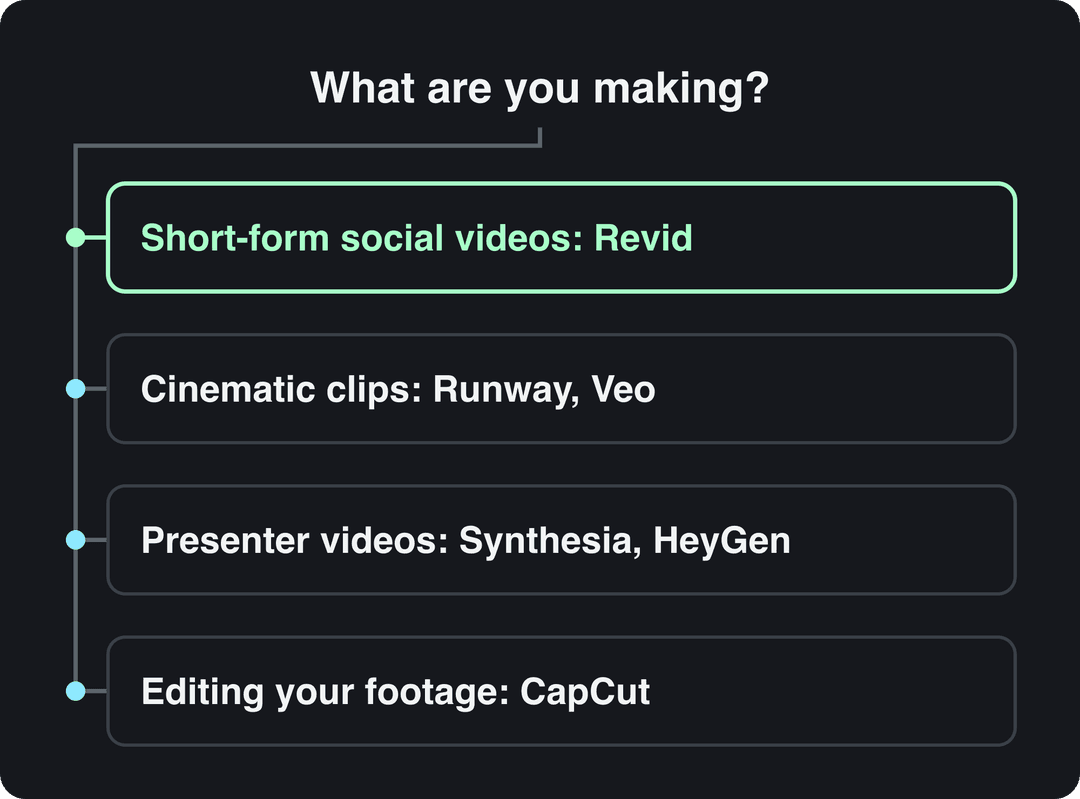
The best AI video generator depends on the video you need. For finished short-form social videos from an idea, script or link, use Revid. For cinematic clips, use Runway or Google Veo. For avatar presenters, use Synthesia or HeyGen. To edit footage you filmed yourself, use CapCut.
Most roundups skip one fact: many of these products rent the same models. Google Veo, Seedance, Kling, Wan and MiniMax Hailuo are sold through APIs to video tools, Revid included, so the same prompt sent to the same model returns a comparable clip wherever you pay for it. What you are really choosing is everything around the clip: the script, voice, captions, editing, publishing and the price of a finished video.
Speed also differs more than marketing pages admit. Across 713,649 clips generated on Revid in 90 days, MiniMax H3 Max Turbo had a 23-second median clip time, while Seedance 2.5 had a median wait of 6 minutes 40 seconds, according to Revid's AI video model index. If you publish daily, that gap matters more than a small difference in realism.
The 12 best AI video generators compared
The tools are grouped by use case, not ranked. Prices are each vendor's entry plan as checked in August and September 2026, so confirm them on the vendor's site before you buy. For side-by-side breakdowns, see Revid's AI video tool comparisons.
| Tool | Best for | Paid plans from | Free option |
|---|---|---|---|
| Revid | Finished short-form videos for TikTok, Reels and Shorts | $39/month | Free sign-up with credits to try |
| Runway | Cinematic generation and shot-level control | $15/month | 125 one-time credits, watermarked |
| Google Veo | Short clips with native audio | $0.05 per second (Veo 3.1 Lite, 720p, Gemini API) | No free API tier |
| Higgsfield | Camera moves and many models in one plan | About $15/month (billed yearly) | 10 credits a day, watermarked |
| Pika | Effects and AI edits on your own footage | $8/month (billed yearly) | Free account, buy credit packs, no commercial license |
| Synthesia | Corporate training with avatar presenters | $29/month | 10 minutes a month, 9 stock avatars |
| HeyGen | Realistic avatars and video translation | $29/month ($24 billed yearly) | 3 watermarked videos a month |
| Creatify | Product ads with AI actors | $39/month | 10 credits a month, watermarked |
| InVideo | Editing by chat with stock footage | $20/month per seat | Watermarked, weekly limits |
| Pictory | Turning blog posts and webinars into videos | $29/month | Free trial |
| Fliki | Voice-led videos in many languages | $28/month ($21 billed yearly) | Watermarked, 720p, 1-minute exports |
| CapCut | Editing footage you filmed | About $9.99/month | Full editor, 1080p export |
How to choose an AI video generator
Start with what you have and what you need at the end, not with the model name.
- If you need finished posts every day without filming: pick a full-pipeline tool that writes, voices, captions and publishes (Revid; InVideo or Pictory for a stock-footage style).
- If you need one striking shot for a film, trailer or ad: pick a model or model hub (Runway, Google Veo, Higgsfield, Pika).
- If a person must speak to camera: pick an avatar platform (Synthesia for training, HeyGen for marketing and translation).
- If you sell a product: pick an ad-focused tool (Creatify, or Revid's UGC-style ad tools).
- If you already filmed the footage: pick an editor (CapCut, or Descript for talking videos).
Before paying, check three things: the cost of one finished video (not the price per credit), the export you need (9:16, resolution, frame rate), and whether the tool publishes for you or leaves you to download and upload each file by hand.
The 12 tools in detail
1. Revid: best for short-form social videos
Revid is an AI video platform that turns an idea, a link or a proven viral format into finished short-form videos and publishes them to TikTok, Instagram and YouTube. It writes the script, builds scene-by-scene visuals (stock footage, AI images, AI video or motion graphics), adds a voice-over in 70+ languages, synced captions and music, and lets you fix any scene in a timeline editor before export up to 4K.
The difference is where a video starts. Revid includes a searchable library of about 2.77 million real short-form videos and posts with their public engagement data, so you can start from a format audiences already watch and have Revid write an original version on your topic instead of prompting from a blank page.
Best for: founders, small businesses, e-commerce brands and creators who publish short-form video every day.
Strengths:
- Seedance 2.5, MiniMax Hailuo H3, Wan 3.0 and Google Veo 3 under one credit system, chosen per scene.
- 100+ specialized tools: script to video, link or article to video, YouTube to Shorts, music videos, talking avatars and UGC-style ads.
- Direct publishing and scheduling to TikTok, Instagram and YouTube, plus Auto-Mode workers that create a fresh video every day.
- A REST API, an MCP server and a CLI on every paid plan.
Pricing: free sign-up with credits to try, no credit card needed. Growth is $39/month ($32 billed yearly) with 2,000 credits; Elite is $89/month and Ultra $199/month. A 30-second video with Pro AI visuals and a voice-over costs about 40 to 80 credits, and you see the estimate before generating. The live list is on Revid pricing.
Watch out: Revid is not the right tool for long-form film work or for teams that only want to hand-edit their own footage.
To make a video with Revid:
- Open the AI video generator and paste an idea, a script or a link, or start from a video in the viral library.
- Pick the visual style per scene, a voice and one of the caption styles.
- Adjust scenes, timing and text in the timeline editor.
- Export in 720p, 1080p or 4K at 30 or 60 fps, or publish and schedule straight to TikTok, Instagram and YouTube.
2. Runway: best for cinematic generation
Runway is a model lab with some of the highest-rated generation quality available (Gen-4.5) and shot-level control: camera moves, relighting and object removal with Aleph, plus native audio and motion transfer. It also offers a developer API and an MCP server.
Best for: filmmakers, creative directors and designers who craft individual shots.
Pricing: Standard from $15/month. The free plan gives 125 one-time credits (not monthly), watermarked, on select models.
Watch out: Runway makes clips. Script, voice-over, captions, assembly and publishing are up to you. See Revid vs Runway for how the two workflows differ.
3. Google Veo: best for clips with native audio
Veo is Google's video model. In the Gemini API, Veo 3.1 generates 4, 6 or 8-second clips in 16:9 or 9:16 with native audio, and every output carries a SynthID watermark.
Best for: developers and studios who want realistic clips with sound generated in the same pass.
Pricing (Gemini API, per second of video): Veo 3.1 costs $0.40 at 720p or 1080p and $0.60 in 4K; Veo 3.1 Fast starts at $0.10 (720p); Veo 3.1 Lite starts at $0.05 (720p). There is no free API tier.
Watch out: the model lineup is moving. The Veo 3.1 preview models on the Gemini API shut down on October 22, 2026, and Google now recommends Gemini Omni Flash as its default video model, keeping Veo 3.1 for scene extension and last-frame control. Check the current model name before you build on it, or use Veo 3 inside a tool like Revid. More options are in our list of Google Veo alternatives.
4. Higgsfield: best model hub for budget filmmakers
Higgsfield bundles 30+ video models in one subscription and adds cinematic camera presets (dolly, crane, FPV, bullet time), Soul ID for consistent characters and photo-to-talking-video lip sync.
Best for: creators who want many models and camera control without paying for each one separately.
Pricing: about $15/month (Starter, billed yearly). The free tier gives 10 credits a day with a watermark, and premium models such as Veo are locked.
Watch out: like Runway, it produces clips rather than finished multi-scene videos with voice and captions.
5. Pika: best for effects on your own footage
Pika is known for effects nothing else has (Pikadditions, Pikaswaps, Pikaffects) and for inserting AI characters and objects into footage you filmed. Generations take 1 to 2 minutes, and credits roll over.
Best for: creators who want playful, eye-catching edits on real clips.
Pricing: from $8/month billed yearly. The free account includes all models with no watermark, but it comes with no monthly credits (you buy one-time packs) and no commercial license.
Watch out: no script, voice-over or publishing; you assemble the final video elsewhere.
6. Synthesia: best for corporate training
Synthesia turns scripts and slides into presenter videos with polished avatars (Express-2 adds full-body gestures) in 140+ languages. SCORM and LMS export, SSO and enterprise governance make it a fit for learning and development teams.
Best for: training, onboarding and internal communication at company scale.
Pricing: from $29/month. The free plan covers up to 10 minutes of video a month with 9 stock avatars; logo removal is paid.
Watch out: the output is a presenter on a background, which rarely suits TikTok or Reels.
7. HeyGen: best for realistic avatars and translation
HeyGen offers some of the most realistic avatars and digital twins available, video translation with lip sync across 175+ languages, and real-time interactive avatars (LiveAvatar).
Best for: marketers sending personalized outreach and teams localizing videos.
Pricing: Creator from $29/month ($24 billed yearly). The free plan gives 3 watermarked videos a month, up to 1 minute each.
Watch out: formats beyond a talking presenter are limited. Compare it in Revid vs HeyGen.
8. Creatify: best for product ad testing
Creatify turns a product URL into an ad with a choice of 300 to 1,500 AI actors, batch-generates up to 50 ad variants for testing, and connects to Meta, TikTok, YouTube, Snap and Amazon ad platforms.
Best for: performance marketers who test many ad variations.
Pricing: from $39/month. The free plan gives 10 credits a month (roughly 2 ads), watermarked.
Watch out: users complain about unclear credit costs. If you also need organic posts, Revid covers both; see Revid vs Creatify.
9. InVideo: best for editing by chat
InVideo works through a chat-style agent: you describe the video, then edit by typing commands instead of using a timeline. It draws on a 16M+ stock library (with metered iStock assets on paid plans) and bundles avatars and voice clones from the entry tier.
Best for: marketers who prefer typing changes to dragging clips.
Pricing: from $20/month per seat. The free plan has a watermark and weekly generation limits.
Watch out: fixing one scene means re-prompting rather than editing it directly.
10. Pictory: best for repurposing written content
Pictory turns blog posts, scripts and URLs into narrated videos at volume and clips highlights out of Zoom, Teams and webinar recordings. It uses a 12M+ licensed stock library from Getty Images and Storyblocks, with ElevenLabs voices on premium plans.
Best for: content teams turning articles and webinars into videos for LinkedIn and YouTube.
Pricing: from $29/month, with a free trial and no permanent free tier.
Watch out: videos have a stock-footage look rather than generated visuals.
11. Fliki: best for voice-led videos in many languages
Fliki has one of the largest voice libraries in the category: 2,000+ voices in 80+ languages, with emotional delivery such as laughing, sarcasm and deadpan. It can also run recurring TikTok series with direct publishing.
Best for: narrated explainers and multilingual voice-overs.
Pricing: from $28/month ($21 billed yearly). The free plan has a watermark, 720p and a 1-minute maximum export.
Watch out: visuals lean on stock slideshows.
12. CapCut: best editor for footage you filmed
CapCut is a fast editor on mobile and desktop with auto-captions, trend templates that drop your clips into viral formats, and the tightest TikTok integration of any editor.
Best for: creators who film on their phone and want quick, trend-ready edits.
Pricing: about $9.99/month (Standard). The free tier includes the full editor and 1080p export; premium templates, effects and most AI features are paid.
Watch out: CapCut edits; it does not generate a video from text. If your footage is mostly talking (podcasts, interviews), Descript edits video by editing the transcript, from $24/month ($16 billed annually).
Prompt to try
Make a 30-second vertical video for a small neighborhood coffee shop launching a new oat milk latte. Open with the hook "This is the latte our regulars won't stop ordering", show close-ups of the drink being poured and customers smiling, and end with the shop's opening hours. Warm, cozy style with an upbeat voice-over and bold captions.
Which AI video generator is best for beginners and small businesses?
For beginners and small businesses making social media videos, choose by your starting material:
- You have an idea, a product page or a blog post, and no footage: Revid. It writes, voices, captions and publishes, and you only touch the editor if a scene needs fixing.
- You film on your phone: CapCut, whose free tier already exports 1080p.
- You have long articles or webinars: Pictory or InVideo.
For the best mix of quality and low cost, compare the price of a finished video, not the plan price. A $15 clip generator still leaves you paying, in time or software, for the script, voice, captions and editing.
Input
A 15-second vertical (9:16) UGC streetwear fashion transformation video filmed on a smartphone.
Output
Best AI video generators for short-form, marketing and product videos
For short-form content, the deciding factor is whether the tool outputs a vertical, captioned, publish-ready video. Revid, InVideo and Fliki do; Runway, Veo, Higgsfield and Pika give you clips to assemble.
For short marketing and ad videos, Creatify is built for testing many ad variants with AI actors. Revid's UGC ad generator turns product images into UGC-style ads, and its product video tool reads a product page URL, keeps the real photos and writes the script, which suits small brands that also need organic posts from the same subscription.
Top AI video generators for filmmakers on a budget
If you need shots rather than finished posts, these are the cheapest serious entry points:
| Tool | Entry price | Why pick it |
|---|---|---|
| Pika | $8/month (billed yearly) | Effects on your own footage, credits roll over |
| Higgsfield | About $15/month (billed yearly) | 30+ models and cinematic camera presets |
| Runway | $15/month | Gen-4.5 quality and shot-level control |
| Google Veo 3.1 Lite | $0.05 per second (720p) | Pay only for what you generate, via the Gemini API |
Decision rule: if you generate a few shots a month, per-second API pricing is cheapest; if you iterate daily, a subscription with a credit allowance usually costs less.
Which AI video generator has native audio?
Google Veo 3.1 generates sound with the video in the same pass, and Runway also offers native audio. Native audio covers ambient sound and dialogue inside a clip. For a full social video you still need a voice-over, music and captions across scenes, which is what Revid adds around the model (including Veo 3).
Prompt to try
Create a 45-second animated explainer on how compound interest turns $100 a month into a large sum over 30 years. Hook: "Two people save the same amount, but one ends up with twice as much." Use simple flat animation with a growing chart, a calm voice-over and synced captions.
Which tool makes animated explainers from plain text with multilingual voice-overs?
Revid's explainer video maker turns a script into an animated explainer with an AI voice-over in 70+ languages and synced captions. Fliki is the alternative if voice variety matters most (2,000+ voices in 80+ languages), and Synthesia fits when the explainer needs a human-looking presenter in 140+ languages.
What happened to Sora, and what are the alternatives?
OpenAI discontinued the Sora app and website on April 26, 2026 and removed the Sora 2 models from its API on September 24, 2026, with no recommended replacement. Any list that still ranks Sora is out of date.
Free and low-cost options that compare for professional-looking video:
- Runway: 125 one-time credits, watermarked, on select models.
- Higgsfield: 10 credits a day, watermarked; premium models locked.
- Pika: free account with no watermark, but you buy credit packs and get no commercial license.
- YouTube Shorts: since September 2025, YouTube has been adding Veo 3 Fast to Shorts for free, generating 480p clips with sound, starting in the US, UK, Canada, Australia and New Zealand.
- Revid: free sign-up with credits to try Seedance 2.5, MiniMax Hailuo H3, Wan 3.0 and Veo 3; regular creation runs on a paid plan.
For client or commercial work, budget for a paid plan: free tiers either watermark the output or exclude commercial use.
What changed in AI video in 2026
Three shifts affect which tool you should pick this year. First, the model lineup turns over fast: Sora is gone and older Veo versions are being retired on the Gemini API, so tools that let you switch models protect you from a shutdown. Second, platforms now label AI content: TikTok said in July 2026 that it had labeled over 3 billion videos as AI-generated, and since May 2026 YouTube automatically labels undisclosed videos with significant photorealistic AI. Third, the market keeps growing: Grand View Research's AI video generator market report valued it at about USD 554.9 million in 2023 and projects growth of around 20% a year to nearly USD 2 billion by 2030.
FAQ
Is there a free AI video generator with no watermark?
Pika's free account exports without a watermark, but it comes with no monthly credits and no commercial license. Most other free tiers (Runway, Higgsfield, HeyGen, Creatify, Fliki) watermark their output, so plan on a paid plan for client work.
What is the best AI tool for script-to-video in 2026?
Revid is the best fit for vertical social videos from a script, because it generates the visuals, voice-over, captions and music and can publish the result. Pictory and InVideo suit stock-footage videos, and Synthesia suits scripts that a presenter should read.
Which AI video translator is best for beginners and YouTube creators?
HeyGen is the easiest place to start: it translates video with lip sync across 175+ languages, and its free plan includes 3 watermarked videos a month. If you already make videos in Revid, its video translator converts a project into another language while keeping the edit, media and captions.
How much does Revid cost in 2026?
Revid's Growth plan costs $39/month ($32 billed yearly) with 2,000 credits, Elite costs $89/month and Ultra $199/month. Sign-up is free and new accounts get credits to try video creation, and the pricing page is the authoritative source for current prices.
Can you monetize AI-generated videos on YouTube?
Yes, if the final video shows your creative vision and gives educational or entertainment value. YouTube does not monetize mass-produced template content, incoherent AI clip compilations, or AI personas presented as experts giving health, legal, financial or political advice.