On this page
The best script to video AI for TikTok, Reels and Shorts turns your script into a publish-ready vertical video in one pass: scenes, voice-over, captions, music and posting. Revid covers that full loop; InVideo and Pictory fit stock-footage videos, Fliki fits voice-first narration, and HeyGen or Synthesia fit presenter videos.
Most script-to-video tools default to a voice-over that talks from the first frame to the last, and that is not what the best-performing short videos do. In Revid's analysis of 176,367 TikToks with 1,000+ likes posted between October 2025 and October 2026, videos with under 40 characters of speech had a 123K median and 20.2% passed 1M views, while videos that talked throughout (300+ characters of speech) had 68K and 11.9%. The full method is in our study of what makes a TikTok go viral.
Videos with just a few spoken words (a line or two) beat both silent videos and videos that talk the whole way through, which were the most common and the weakest.
Source: Revid analysis of 176,367 TikToks analyzed by AI, with 1,000+ likes posted between Oct 1, 2025 and Oct 16, 2026 (61,203 creators)
Show the data
| Median views | Share that passed 1M views | |
|---|---|---|
| No speech | 73.3K | 14.3% |
| Under 40 | 122.7K | 20.2% |
| 40 to 120 | 97.2K | 17.6% |
| 120 to 300 | 91.6K | 16.8% |
| 300+ | 67.7K | 11.9% |
So the tool matters, but the script you feed it matters more. This guide covers both.
Best script to video AI tools compared
| Tool | Best for | Visuals | Free option | Starts at |
|---|---|---|---|---|
| Revid | Finished TikToks, Reels and Shorts from a script | Stock, AI images, AI video (4 models), motion graphics | Free sign-up with free credits to try; regular creation uses paid credits | $39/month |
| InVideo | Editing by typing commands | 16M+ stock, third-party AI models, avatars | Free plan with watermark | $20/month per seat |
| Pictory | Blog posts and scripts into stock videos at volume | 12M+ licensed stock | Free trial, no permanent free tier | $29/month |
| Fliki | Voice-first narration | Stock-based scenes | 720p, watermark, 1-minute max | $28/month |
| HeyGen | Realistic avatar presenters and translation | Avatars and digital twins | 3 watermarked videos a month | $29/month |
| Synthesia | Corporate training videos | Avatar presenters | Up to 10 minutes a month | $29/month |
Prices were checked in August and September 2026; confirm on each vendor's site before you buy. The list is ordered by how well each tool fits this article's criterion: a finished short-form video from a script, with no filming.
Revid: best for finished short-form videos
Revid takes a script, an idea or a link and builds the video scene by scene: stock footage, AI images, AI video or motion graphics, with a voice-over from 1,000+ AI voices in 70+ languages, synced captions in 30 styles and music. You pick the AI video model per scene (Seedance 2.5, MiniMax Hailuo H3, Wan 3.0 or Google Veo 3), fix anything in a timeline editor, export in 720p, 1080p or 4K at 30 or 60 fps, and publish or schedule straight to TikTok, Instagram and YouTube.
What sets it apart is where the script starts. Revid keeps a library of about 2.77 million real short-form videos with engagement data, so a script can follow a format audiences already watch instead of a blank prompt.
The trade-off: generation uses credits. A 30-second video with Pro AI visuals and a voice-over costs about 40 to 80 credits, and plans start at $39/month (Growth, 2,000 credits, or $32/month billed yearly). Current plans are on the Revid pricing page.
InVideo: best for editing by chat
InVideo works like a conversation: you change the video by typing commands instead of dragging clips on a timeline. It pairs a 16M+ stock library with a menu of third-party AI models, and includes AI avatars and voice clones from the entry tier. Plans start at $20/month per seat (Starter), and the free plan adds a watermark. Pick it if you like editing by chat; pick a timeline editor if you want to fix scenes by hand (Revid vs InVideo).
Pictory: best for stock videos at volume
Pictory turns blog posts, scripts and URLs into videos at volume, built from a 12M+ licensed stock library (Getty Images and Storyblocks), with ElevenLabs voices on premium plans and a gentle scene-based editor. It starts at $29/month with a free trial but no permanent free tier. The output looks like stock footage, which suits explainers and repurposed articles more than feed-native TikToks (how Pictory compares with Revid).
Fliki: best for voice-first narration
Fliki has the largest voice library in the category: 2,000+ voices in 80+ languages, with emotional delivery such as sarcasm or deadpan. Plans start at $28/month ($21/month billed yearly); the free plan exports at 720p with a watermark and a 1-minute maximum. Its visuals lean on stock slideshows, so choose it when the narration is the product (Revid vs Fliki).
HeyGen and Synthesia: best for presenter videos
If your script is meant to be spoken by a person on screen, use an avatar platform. HeyGen has the most realistic avatars and digital twins, plus video translation with lip sync in 175+ languages, from $29/month (free: 3 watermarked videos a month, up to 1 minute each). Synthesia is built for corporate training, with 140+ languages and SCORM/LMS export, from $29/month (free: up to 10 minutes a month with 9 stock avatars).
Both give you a presenter on a background rather than a multi-scene short (Revid vs HeyGen).
How to choose a script to video tool
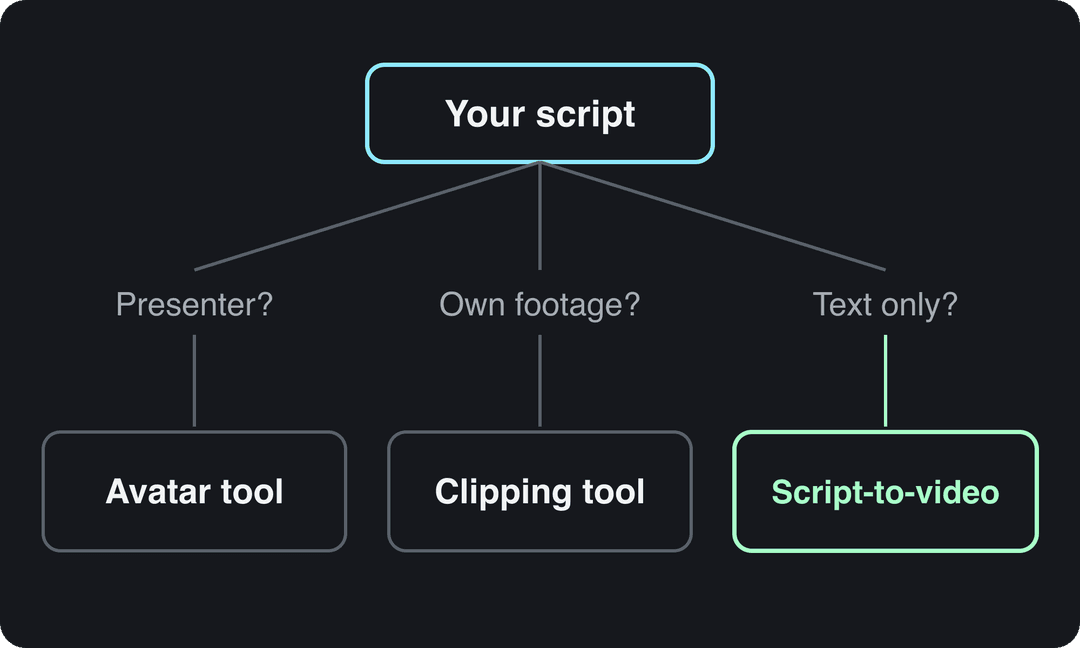
Start from what the finished video needs to look like, not from the feature list:
- If a presenter should say the script: HeyGen for realistic avatars and translation, Synthesia for training content with LMS export.
- If you already have long recordings: a clipping tool such as OpusClip cuts them into shorts (Revid also turns YouTube videos into Shorts).
- If you want raw cinematic clips to edit yourself: a model lab such as Runway, then assemble the video in an editor.
- If you only edit your own footage by hand: a classic editor such as CapCut.
- If you have only text and want a finished vertical video: a full script-to-video generator such as Revid.
How to turn a script into a video with Revid
- Open Revid's script to video tool and paste your script. An idea or a link works too if you don't have a script yet.
- Choose the visuals for each scene: stock footage, AI images or AI video, and the model per scene when you use AI video.
- Pick a voice and a caption style.
- Check the estimated credit cost, then generate.
- Fix timing, swap scenes or rewrite lines in the timeline editor.
- Export in 1080p or 4K, or publish and schedule to TikTok, Instagram and YouTube from one queue.
If you found a video in Revid's library whose spoken words you want to keep, the "Reuse the script" option gives the same words new visuals. You are responsible for having the rights to anything you reuse.
Do you need an AI video script generator first?
Only if you don't have a script. ChatGPT drafts any format and is easy to iterate on in conversation. Jasper focuses on marketing copy, with templates for ads and YouTube intros. Copy.ai is quick at hooks, taglines and short copy. Revid's free AI script generator writes short-form scripts with hooks for TikTok, Reels and Shorts.
For a full comparison of writing tools, see our roundup of the best AI video script generator tools.
How do AI tools write viral scripts?
A model asked for "a viral script about X" has no evidence of what performs in your niche, so it drifts toward a generic average. The tools that write better scripts give the model examples first. When Revid writes a script from a prompt in automations and several tools, it first retrieves transcripts of related TikToks with more than 10,000 likes and uses them as references for style and story.
Emotion is the second lever. In the same Revid study, TikToks whose dominant mood was outrage had a 156K median (23.7% past 1M) and humor 121K (19.3%), while inspirational videos had 45K (11.3%). These figures show what high-performing videos have in common, not causes, and the sample only includes TikToks that already reached 1,000+ likes.
High-arousal emotions (outrage, humor, sadness) earned the most views. Calm, inspirational videos earned the least, even though they collect the most likes per view.
Source: Revid analysis of 176,367 TikToks with 1,000+ likes posted between Oct 1, 2025 and Oct 16, 2026 (61,203 creators)
Show the data
| Median views | Share that passed 1M views | |
|---|---|---|
| Outrage | 156K | 23.7% |
| Humor | 121K | 19.3% |
| Sadness | 104.4K | 16.5% |
| Excitement | 92.5K | 15.9% |
| Joy | 89.9K | 18% |
| Informative | 64.1K | 11.2% |
| Neutral | 61.2K | 11.5% |
| Inspirational | 44.6K | 11.3% |
Use these formulas as the first line of your script, or browse 130+ TikTok hooks for more:
Hook
• Question: "What if [pain point] wasn't a problem?"
• Statement: "This [solution] changes everything"
• Challenge: "Stop doing [common mistake]"

Body
• Problem → Solution → Proof
• Tip → Example → Application
• Story → Lesson → Action

Call to action
• Direct: "Try this now by..."
• Value-based: "Start [benefit] today"
• Community: "Share your experience with..."How to structure an AI script for Reels, TikTok and Shorts
The same four beats work on all three platforms. Give each beat a line of visual direction so the tool knows what to show, not only what to say.
| Beat | Timing | What the script does |
|---|---|---|
| Hook | 0 to 3 s | One line that names the problem or promise, with a strong opening visual |
| Setup | 3 to 7 s | States the relatable problem or context |
| Payoff | 7 to 15 s and beyond | Delivers the tip, answer or twist, one idea per scene |
| Call to action | Last seconds | One clear ask: follow, comment, try it |
Length is less decisive than many guides claim. In Revid's 12-month study, every length bucket from under 15 s to 10 min had a median between 58K and 76K views, so write to the length your idea needs. The platform rules set the real limits:
- TikTok: uploads can run up to 60 minutes. The Creator Rewards Program only pays on videos at least one minute long (and requires 10,000 followers and 100,000 views in the last 30 days), so script past the minute mark if you want rewards.
- Instagram Reels: reels can be up to 20 minutes, but reels longer than 3 minutes are not recommended to non-followers. An AI script generator for Reels should keep reach-focused scripts under 3 minutes.
- YouTube Shorts: square or vertical videos up to 3 minutes count as Shorts, but a Short longer than one minute with an active Content ID claim is blocked globally. If you use claimed music, keep the script under a minute.
Prompt to try
Make a 30-second vertical TikTok about three meal prep mistakes that make food taste bland. Hook (0 to 3 s): "Stop cooking all your chicken on Sunday" over a close-up of dry sliced chicken. Then a quick setup on soggy, tasteless leftovers, one tip per scene with a matching close-up shot, short spoken lines with silent visual beats between them, and end with "Comment your go-to prep meal."
Mistakes that make script-to-video AI look generic
- Talking over every second. Leave room for visual beats and silent moments; the data above shows lighter speech did better.
- Pasting a blog paragraph. Written sentences read slowly aloud. Write for the ear: short lines, one idea each.
- No visual direction. A script with only words gets generic scenes. Add a shot description per line.
- Skipping human review. Check facts, names, numbers and brand voice before you render.
- Copying a competitor's script word for word. Reuse the structure and pacing, write new words.
- Forgetting AI labels. TikTok requires a label on realistic AI-generated content, and YouTube requires disclosure of realistic AI scenes through the "AI use" setting in YouTube Studio.
FAQ
Which AI tool is used for generating videos based on scripts?
Script-to-video generators such as Revid, InVideo, Pictory and Fliki turn a script into scenes, voice-over and captions, while avatar platforms like HeyGen and Synthesia turn it into a presenter video. Choose by the output you need: a multi-scene vertical short, a stock-footage explainer or a talking presenter.
Can ChatGPT turn a script into a video?
ChatGPT writes and edits scripts but does not render a finished short-form video on its own; OpenAI discontinued the Sora app on April 26, 2026 and removed the Sora 2 API on September 24, 2026. You can connect ChatGPT to Revid's MCP server so it can create and publish a video from the script it writes.
Is there a free script to video AI?
Yes, with limits: Fliki's free plan exports 720p with a watermark and a 1-minute maximum, HeyGen gives 3 watermarked videos a month, and InVideo's free plan adds a watermark. Revid sign-up is free and new accounts get free credits to try video creation, with no credit card needed; regular creation then uses the credits of a paid plan from $39/month.
Does labeling an AI video hurt its reach?
No. TikTok and YouTube both say the AI label on its own does not limit a video's distribution, and YouTube says it does not affect eligibility to earn. Failing to disclose realistic AI content is what carries risk, from labels applied for you to removal.