On this page
To write a viral hook, open with one short line you can say in a single breath that names a specific payoff or tension the viewer can only resolve by watching. Make it a statement rather than a question, cut every warm-up word, and show what the line promises in the first frame.
Most creators assume a question is the safest opener. The biggest videos disagree: in Revid's analysis of every TikTok over 100 million views, 51% of the videos with a transcript open with a statement, 16% with a question and 14% by speaking directly to the viewer. Below are the rules, the data on which openers get watched, and how to generate and use hooks in Revid. For ready-made openers by category, keep our list of TikTok hooks that stop the scroll open in another tab.
How to write a viral hook: 5 rules
Run every hook, written by you or generated by AI, through these rules before you film:
- One breath. If you cannot say it in a single breath, cut it. Drop the second clause, the semicolon and the exclamation mark.
- A specific noun. "This street", "this fee" or "this setting" beats "things" or "a side of".
- An open loop. The line should create a question the video answers, without asking it outright.
- No warm-up words. Delete "Discover", "In this video", "Hey guys" and anything else that delays the point.
- Matches the first frame. If the hook promises a street, show the street. A mismatch between the words and the picture is the fastest way to lose the viewer.
Prompt to try
Make a 30-second vertical TikTok for first-time visitors to Tokyo that opens on the line "The guidebooks skip this street in Tokyo." over a shot of a narrow lantern-lit alley. Reveal three small shops on the street one by one, with fast cuts, bold captions and a calm, curious voice.
Hook types with examples
| Hook type | Example | Use it when |
|---|---|---|
| Bold statement | "Your product demo is too long." | You have a clear opinion your audience half-agrees with |
| Open loop | "The guidebooks skip this street in Tokyo." | The payoff is visual and arrives later in the video |
| Direct address | "If you sell candles, stop posting product shots." | Your audience is a specific group you can name |
| Stakes or outrage | "Nobody told me about this fee." | You are exposing a cost, a mistake or an unfair rule |
| Humor | "My cat has a better morning routine than me." | The format is comedy or a relatable skit |
| Question (sparingly) | "Why does every bakery queue start at the same door?" | The question itself is surprising, not generic |
For Reels-specific patterns, see our guide to hooks for Instagram Reels.
Prompt to try
Create a 25-second TikTok for renters that opens on "Nobody told me about this fee." with on-screen text of a lease clause. Explain the hidden move-out cleaning fee, how much it can cost and one sentence to ask the landlord before signing, in a direct, slightly outraged tone with punchy captions.
Which emotions the top TikToks open on
In Revid's analysis of 176,367 TikToks with 1,000+ likes posted between October 2025 and October 2026, videos whose dominant mood was outrage had a median of 156K views (23.7% passed 1 million), humor 121K (19.3%) and sadness 104K, while inspirational videos had the lowest median at 45K (11.3%). Mood comes from Revid's AI analysis of each video, and the sample only holds videos that already reached 1,000 likes, so these numbers show what strong performers have in common, not what causes views. The full method is in our study of what makes a TikTok go viral.
High-arousal emotions (outrage, humor, sadness) earned the most views. Calm, inspirational videos earned the least, even though they collect the most likes per view.
Source: Revid analysis of 176,367 TikToks with 1,000+ likes posted between Oct 1, 2025 and Oct 16, 2026 (61,203 creators)
Show the data
| Median views | Share that passed 1M views | |
|---|---|---|
| Outrage | 156K | 23.7% |
| Humor | 121K | 19.3% |
| Sadness | 104.4K | 16.5% |
| Excitement | 92.5K | 15.9% |
| Joy | 89.9K | 18% |
| Informative | 64.1K | 11.2% |
| Neutral | 61.2K | 11.5% |
| Inspirational | 44.6K | 11.3% |
The practical rule: if your topic allows it, open on tension (a cost, a mistake, an unfair rule) or a joke. If your hook could sit on a motivational poster, rewrite it.
Say less, show more
The same dataset found that videos with under 40 characters of speech had a 123K median and 20.2% passed 1 million views, compared with 68K and 11.9% for videos that talk throughout (300+ characters) and 73K and 14.3% for silent videos. A hook does not need a paragraph of voice-over: one short spoken line, or on-screen text over a strong visual, is often enough.
Videos with just a few spoken words (a line or two) beat both silent videos and videos that talk the whole way through, which were the most common and the weakest.
Source: Revid analysis of 176,367 TikToks analyzed by AI, with 1,000+ likes posted between Oct 1, 2025 and Oct 16, 2026 (61,203 creators)
Show the data
| Median views | Share that passed 1M views | |
|---|---|---|
| No speech | 73.3K | 14.3% |
| Under 40 | 122.7K | 20.2% |
| 40 to 120 | 97.2K | 17.6% |
| 120 to 300 | 91.6K | 16.8% |
| 300+ | 67.7K | 11.9% |
How to generate video hooks with Revid
Revid's Hooks tool writes several opening lines from a description of your video. It moved since earlier versions of this guide: it is no longer under Inspiration but in the collapsible Studio section of the sidebar.
- Open Hooks. In the left sidebar, expand Studio and click Hooks (it sits next to Video Editor, Scripts and Voices).
- Describe your video. Give the topic, who it is for, the payoff and your script if you have one. "A video about Japan" works, but "A 30-second video for first-time visitors about a Tokyo street the guidebooks skip" gives you sharper hooks.
- Generate and pick. Generate the options, then judge each against the 5 rules above. Keep the one with the most specific noun and the clearest open loop.
- Copy it to the top of your script. The hook is the first line of your narration, so paste it before everything else.
If none of the options pass the rules, add detail to your description (the audience, the payoff, the first shot) and generate again.
Two other places in Revid help when you want proof before you write. Viral Search & Ads (under Inspiration in the sidebar) searches Revid's library of real short-form videos by topic and engagement, so you can see which first lines are working in your niche. And Revid's free deep analysis (up to 60 a day) watches any video and explains its hook, spoken or visual, the formula behind it and its strength. You can also browse viral TikToks about hooks and openers without signing in.
Example: tightening generated hooks
Here are three hooks the Hooks tool generated for "A video about Japan". All three are usable ideas, but each runs too long. The rules above shorten them:
| Generated hook | Tightened version | What changed |
|---|---|---|
| "Discovering a side of Japan the guidebooks don't show you - where ancient tradition clashes with futuristic fantasy!" | "The guidebooks skip this side of Japan." | Cut the second clause and the exclamation mark |
| "Discover why Japan is secretly influencing your daily life, from the tech in your pocket to the food on your plate!" | "Japan is already in your kitchen." | One specific place instead of a list |
| "Discover how Japan turns everyday things into art; it's not just a place, it's a whole vibe!" | "In Japan, even the manhole covers are art." | A concrete object the first frame can show |
Notice the pattern: every generated line opened with a warm-up word ("Discover", "Discovering") and ended on an exclamation mark. Deleting both is usually half the work.
Turn the hook into a finished video
Once the hook is the first line of your script, you can build the rest in Revid:
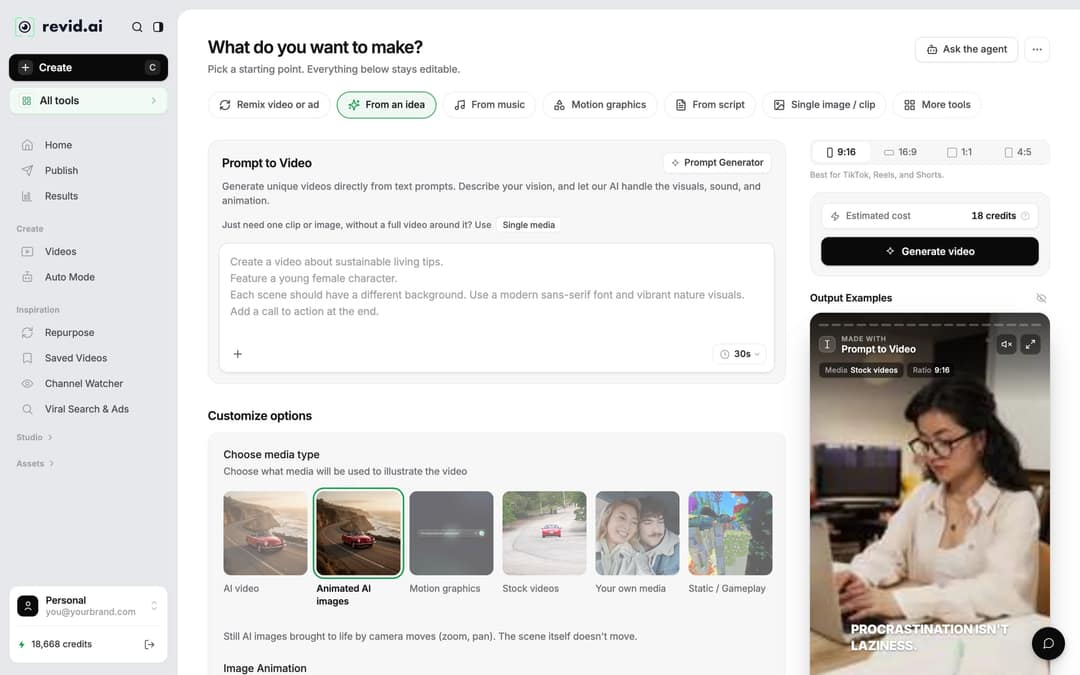
- Click Create at the top of the sidebar (shortcut C). On "What do you want to make?", choose From script.
- Paste your script, hook first, into the "Your video narrator script" field. If you want a beat of silence after the hook, add
<break time="1.0s" />(up to 10 seconds; Gemini and Kling voices ignore the tag). Our guide to writing an AI video script covers the full syntax. - Pick a media type, check the Estimated cost, then click Generate video. The same tool is available as the AI TikTok video generator.
To test a different hook after the video is built, open it in the editor. The Script panel lists every caption segment, and the first ones hold your hook. Edit the text there, then regenerate the voice from the Audio panel (Re-generate on the voiceover row). Regenerating a voiceover requires a paid plan and costs 10 credits per started 500 characters.
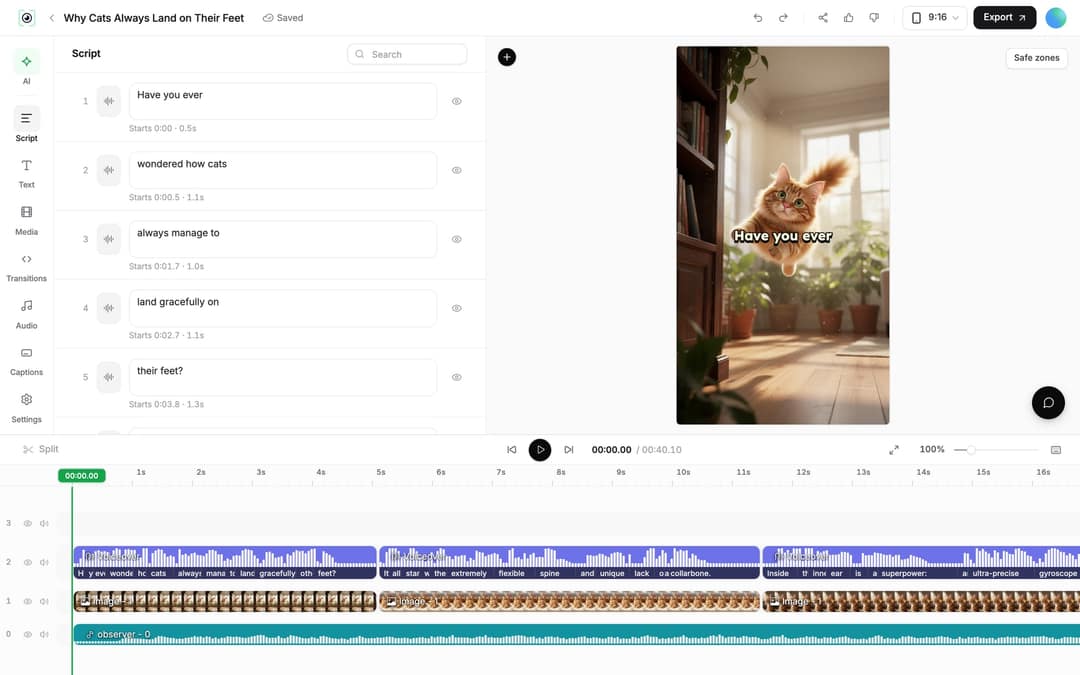
Captions are generated with the video, so the hook also lands with the sound off. For footage you filmed yourself, add them with the TikTok subtitle generator. For a dedicated script draft before you open Revid, try the free TikTok script generator.
FAQ
Should a hook be a question or a statement?
A statement, in most cases. Among TikToks over 100 million views that have a transcript, 51% open with a statement and 16% with a question, so save questions for when the question itself is surprising.
How long should a hook be?
One breath, usually under 10 words. In Revid's TikTok data, videos with under 40 characters of speech had the highest median views, so a short spoken line or on-screen text is enough.
Can I use the same hook on TikTok, Instagram Reels and YouTube Shorts?
Yes. A short line with a clear payoff works on all three; adjust the wording to the audience and keep on-screen text clear of each app's buttons and captions.
Why do AI-generated hooks sound generic?
Because the input is generic. Give the generator your audience, the specific payoff and your script, then cut the result down to one breath and one concrete noun.
Can Revid explain why another video's hook worked?
Yes. Revid's free deep analysis watches any video and explains its hook (spoken or visual), the formula behind it and its strength, with up to 60 analyses a day.