
On this page
Which matters more in HeyGen vs Synthesia, the most convincing avatar or the least work required to publish an acceptable video? Start with HeyGen for self-serve creator and social workflows, and Synthesia for structured training and corporate communication, then judge each platform on the cost and rework behind one publishable vertical clip rather than demo quality alone.
The middle rows decide the cost: revision, billing and approval.
| Criterion | HeyGen | Synthesia |
|---|---|---|
| Primary strength | Self-serve social and creator videos, many presenters | Structured training, corporate communication, localization |
| Workflow style | Custom-avatar and dynamic-content workflows | Structured training and communication workflows |
| Pricing model | Monthly credits across video, translation and asset features | Video-minute allowances by plan, detailed in the pricing section below |
| Enterprise controls | SAML/SSO, SCIM and multi-workspace on Business | Governance-oriented production and review workflows with SCORM export |
| Best-fit buyer | Creators and social managers testing presenters | L&D teams producing formal training libraries |
- HeyGen Creator monthly price, with 600 credits
- $29
- HeyGen help center
- Synthesia Starter monthly price, about 10 video minutes
- $19
- HeyGen comparison article
- HeyGen stock avatars, vs 125+ on Synthesia Starter
- 700+
- Independent OpenDeveloper comparison
- Languages and dialects on HeyGen Creator
- 175+
- HeyGen Creator documentation
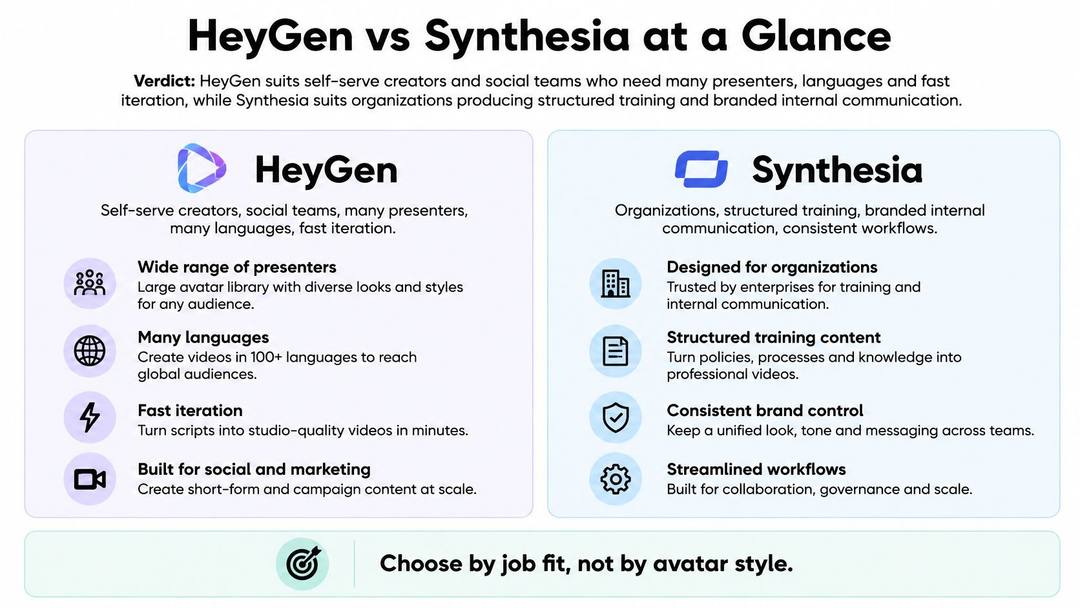
HeyGen vs Synthesia at a Glance
The useful distinction isn't creative software versus business software. It's individual production flexibility versus organizational repeatability.
An independent OpenDeveloper comparison characterizes HeyGen as better suited to self-serve creator workflows and faster custom-avatar production, while associating Synthesia with structured enterprise learning, governance and SCORM export. Treat those as starting hypotheses, not permanent feature boundaries. Neither platform's positioning proves that the other can't handle a particular assignment.
For a creator, the buyer question is practical: can you change the presenter, rewrite the hook and produce another acceptable clip without rebuilding the project? For a training manager, the question is different: can colleagues maintain consistent content, review changes and deliver material in the format their learning system accepts?
This comparison summarizes those different priorities.
Compare the work, not the vendor's size
Company scale isn't a production benchmark. The Forbes Synthesia company profile provides business context, but funding and customer totals won't tell you how many revisions your next campaign will require.
A small marketing team may need strict approvals. A large organization may need quick experimental social clips. Match the assignment to the workflow, rather than assuming your company size determines your choice.
For a broader purchasing checklist, Rankozo's avatar video cost guide for teams is a useful companion when comparing subscription costs with production requirements. Build your own shortlist around the work you publish, including localization, review and delivery.
Practical rule: A platform isn't cheaper because its subscription costs less. It's cheaper when your team spends less money and time producing videos that pass review.
Both vendors change plans and entitlements. Before committing, confirm the current avatar access, export formats, usage rules and enterprise package directly with each vendor. The decisive evidence should be your own completed projects, not a feature list detached from your production process.
Avatars, Voices and Language Coverage
Reported library counts aren't directly comparable entitlements. HeyGen's plan documentation specifies what its Creator tier includes, while the published comparison figures for Synthesia stop at stock avatars and languages. The table keeps those two kinds of evidence separate.
| Metric | HeyGen | Synthesia |
|---|---|---|
| Stock avatars | 700+ reported in the independent comparison cited above | 125+ on Starter, 240+ on Enterprise in that comparison |
| Languages | 175+ languages and dialects in HeyGen's Creator documentation | 140+ languages and voices in the independent comparison; HeyGen's competitor article says 160+ |
| Custom avatars | Five custom digital twins on Creator | No per-plan allowance published in either cited source |
| Voice cloning | Included on Creator | Plan entitlement not published in the cited comparison |
| Export resolution | 1080p on Creator, 4K on Pro | Plan-level resolution not published in the cited comparison |
| Maximum video length | Up to 30 minutes on Creator | Per-video cap not broken out in the cited comparison |
The HeyGen entitlements come from its help-center documentation linked under pricing, and the stock-avatar counts come from the independent comparison cited above. Where neither source publishes a Synthesia figure, price the gap before buying. An undisclosed custom-avatar allowance or a lower resolution cap can add a plan upgrade to the cost of every publishable video you produce.
For Synthesia, the language discrepancy is material: HeyGen's alternatives article describes 160-plus languages, whereas the independent comparison lists 140-plus languages and voices. Those descriptions may cover different capabilities or publication dates, so neither replaces a current, like-for-like Synthesia entitlement check.
Test localization instead of counting languages
A supported language doesn't establish that a presenter sounds appropriate for your audience. Pronunciation, idioms, subtitle segmentation and delivery speed can change whether a translated clip feels credible, and each failed version costs generation allowance plus another review cycle.
Use a creator concept that includes a product name, an everyday expression and a clear call to action. Adapt it for the United States, Brazil, India, Germany, Japan and an Arabic-speaking market, choosing the actual regional language and audience rather than treating each country as linguistically uniform.
Ask native reviewers to assess:
- Naturalness: Would someone in this market speak this way?
- Cultural fit: Does the example make sense without additional explanation?
- Pronunciation: Are names, places and product terms correct?
- Subtitle accuracy: Do captions preserve meaning and readable phrasing?
- Call-to-action strength: Is the next step clear and locally appropriate?
Review the translated script before generating the final video. A writing error caught at the script stage costs one review comment. Caught after generation, it costs credits and a re-render on each platform.
A platform with fewer advertised languages can still be the better choice for a specific market. A suitable voice, a credible presenter and a cheap correction path may matter more than coverage you'll never use.
The true measure is whether one idea becomes several native-feeling videos, each carrying its own local phrasing.
How Realistic Each Avatar Looks on Camera
In Synthesia's published interactive-avatar benchmark, Synthesia scored 0.95 versus HeyGen's 0.34 for visual quality, 0.22 versus -0.38 for naturalness, 0.48 versus 0.15 for overall experience, and 0.65 versus 0.43 for responsiveness, with overlapping confidence intervals for the latter dimensions.
Those results need two qualifications. The benchmark evaluates interactive avatars, not ordinary prerecorded social videos, and Synthesia published it. It isn't a neutral, universal ranking of every video each platform can produce.
Separate visual polish from suitability
For training, assess whether the presenter remains consistent through technical language, pauses and longer explanations. For a social campaign, assess whether the delivery fits the intended personality without distracting from the message.
Don't assume that a more expressive face automatically makes a stronger clip. Equally, don't assume that a restrained corporate delivery will suit a personal-brand video. Our guide to realistic AI video provides additional context for evaluating believable output.
Run a controlled comparison using identical scripts, equivalent voices, matching resolutions and the same delivery speed. Where identical voices aren't available, match accent, perceived age and speaking style, and record that limitation.
Score these separately:
- Lip-sync error: Watch consonants and the start and end of sentences.
- Facial artifacts: Inspect teeth, blinking, head movement and expression changes.
- Latency: Measure render waiting time for prerecorded clips, or response delay for interactive use.
- Viewer preference: Ask which presenter viewers would willingly continue watching.
A visible artifact matters most when viewers notice it during normal playback, not only when an editor pauses and enlarges the frame.
For your test, recruit five to ten people from the intended audience and show unbranded clips in a shuffled order. Ask them to explain their rankings, not just pick a winner.
Choose the platform whose output viewers consistently accept with less corrective work. If preference is effectively tied, prioritize production economics or mandatory business requirements rather than declaring a realism winner.
US dollars except InVideo, which showed euros on October 29. InVideo Starter has no Seedance 2.5; Revid Growth includes 2,000 credits, the editor, publishing and the API, MCP server and CLI.
Source: Vendor pricing pages (invideo.io, runway.com, synthesia.io, pictory.ai, heygen.com, zebracat.ai, revid.ai), read October 29, 2026
Show the data
| Billed monthly | Billed yearly, per month | |
|---|---|---|
| InVideo AI Starter (EUR) | 20 | 10 |
| Runway Standard | 15 | 12 |
| Synthesia Starter | 19 | 14 |
| Pictory Starter | 29 | 25 |
| HeyGen Creator | 29 | 24 |
| Zebracat Cat Mode | 39 | 23 |
| Revid Growth | 39 | 32 |
Pricing, Credits and What a Video Really Costs
The prices below are reference figures for a 2026 evaluation, not a live-checked quotation. HeyGen's figures come from its own help center; the available Synthesia figures come from a HeyGen comparison and haven't been independently checked against Synthesia's current pricing page.
| Plan | Monthly price | Allowance | Notable inclusions |
|---|---|---|---|
| HeyGen Creator | $29 | 600 credits; videos up to 30 minutes | Five custom digital twins, voice cloning, 1080p |
| HeyGen Pro | From $49 | 1,000 credits | 4K export |
| HeyGen Business | $149 for first seat | 1,500 credits | SAML/SSO, SCIM, multi-workspace |
| Synthesia Starter | $19, or $14 per month billed annually | About 10 video minutes; no rollover in the cited comparison | Confirm current vendor entitlements |
| Synthesia Creator | $89, or $59 per month billed annually | About 30 video minutes | API access and interactive video in the cited comparison |
| Revid credit example | Consult current plan pricing | 2,000 credits | About 25 to 50 thirty-second videos at 40 to 80 credits each |
HeyGen's credit-based subscription guide lists Creator at $29 with 600 monthly credits, Pro from $49 with 1,000, and Business at $149 for the first seat with 1,500. It also documents the Creator, Pro and Business inclusions shown above.
HeyGen's Runway and Synthesia comparison lists Synthesia Starter at $19 monthly or $14 per month annually with approximately 10 video minutes, and Creator at $89 monthly or $59 per month annually with approximately 30 minutes. That competitor-authored source also describes Starter's lack of rollover and self-serve top-ups, so verify those restrictions before buying.
A posting schedule exposes the real constraint
Consider a hypothetical creator publishing four thirty-second clips each week across a four-week production period. That's sixteen accepted clips and eight finished video minutes, before rejected generations, translations or revisions.
The arithmetic doesn't establish that a particular plan will cover the workload. You need to know whether corrections consume allowance, which generation model you're using and what other features draw from the same pool.
Credits aren't minutes. HeyGen's allowance can fund generation, translation and asset creation, so dividing its subscription price by a nominal video duration won't produce a defensible cost estimate.
For our credit example, a typical thirty-second video using Pro moving images and a voiceover costs about 40 to 80 credits. A 2,000-credit balance therefore covers roughly 25 to 50 such videos, while full AI video models cost more credits per second.
Keep subscription spend, consumed allowance and labor in separate columns. Then calculate the cost of accepted output, including rejected drafts and correction time.
Record a dated vendor quotation before purchase. An annual-billing equivalent is a commitment price, not a month-to-month subscription.
Which Platform Fits Your Work
The right choice starts with the job, not the most impressive demonstration. Use these recommendations as a shortlist, then test your actual delivery requirements.
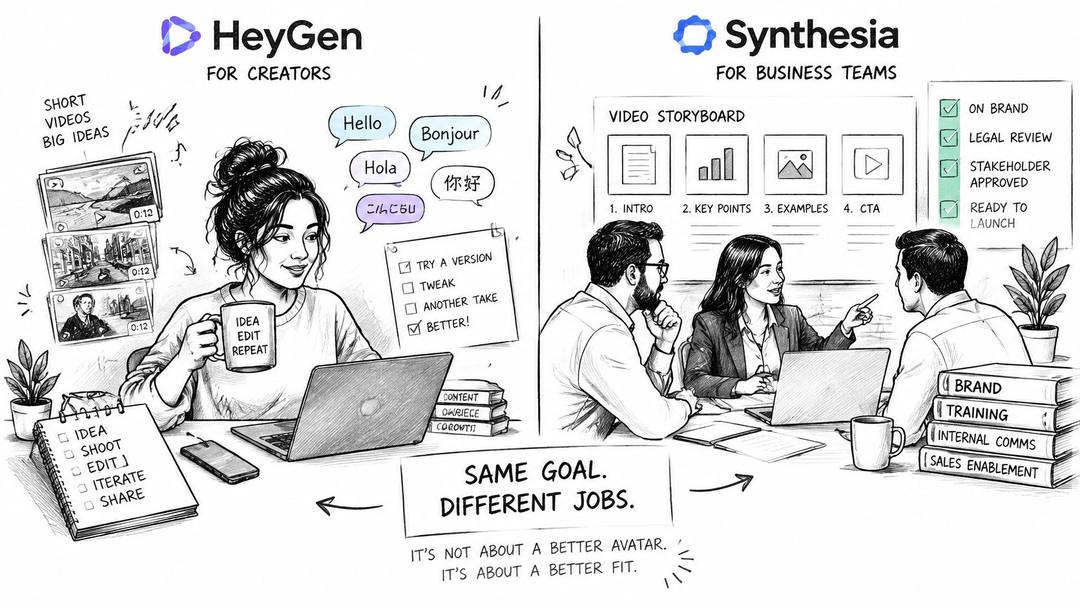
The illustration summarizes the main buyer fit.
Input
explanation of types of houses
Output
Which one should you pick
| Your situation | Start with | Why |
|---|---|---|
| Solo creator posting several short clips a week | HeyGen | Presenter experimentation and custom-avatar workflows |
| Corporate L&D team with SCORM needs | Synthesia | Training-oriented production and SCORM workflow |
| Team needing SSO and workspace controls | HeyGen Business or Synthesia Enterprise | Validate the exact identity and administration requirements |
| Brand localizing one idea into several markets | Test both | Native-reviewer acceptance matters more than language totals |
| Creator wanting a finished short from one prompt | Revid | Script, voiceover, captions, music and publishing together |
Enterprise-oriented adoption and broad self-serve adoption describe different customer needs. Neither tells you whether your editor can fix a mispronounced product name efficiently or whether your administrator can enforce the required access policy.
If you're expanding the shortlist, TopToolAdvisor's top AI avatar tools for business can help frame additional candidates. Keep your mandatory requirements fixed while comparing them.
Videos built
Character swap (put your own people into a video) and talking avatars are used about 9x and 5x as much as the UGC generator. Many marketers want a face they own, a founder or a consistent character, not a new stranger in every ad. Character swap is also used outside ads.
Source: Revid product analytics (Amplitude), project_built events grouped by tool, Sep 29 to Oct 28, 2026 (UTC), 2,482 videos across these six tools
Show the data
| Videos built | |
|---|---|
| Character swap | 1,203 |
| Talking avatar video | 745 |
| AI ad generator | 325 |
| UGC ad generator | 140 |
| Video face swap | 53 |
| Website review video | 16 |
When the finished short is the product
Revid is a third option when you want a finished social video rather than an avatar asset to assemble elsewhere. Our AI can generate scripts from any text or URL, and we offer faceless narrated videos, talking AI avatars and voice cloning on Elite.
The distinction is the production endpoint: a presenter-led asset, a governed training module or a finished social short.
Our HeyGen alternative overview explains that workflow, while the talking-avatar tool addresses presenter-led creation. This isn't a claim that we beat HeyGen at avatar specialization or Synthesia at structured training.
On Growth, users can publish to TikTok, Instagram and YouTube, view post stats and use one-click remix. Consult current plans and pricing for the package that matches your publishing requirements.
This product walkthrough provides another way to assess the workflow.
Before committing to any platform, confirm digital-twin consent requirements, applicable synthetic-presenter disclosures and who approves automatically localized scripts. Treat brand safety as a review responsibility, not a generation setting.
FAQ
Is HeyGen always better for social video? No. It's a sensible starting point for avatar-led creator content, but your editing and publishing workload can change the result.
Is Synthesia only for training? No. Corporate communication and localization also fit its positioning; the assignment still needs a practical trial.
Should avatar realism decide the purchase? Only when viewers meaningfully prefer one output and the production cost remains acceptable. Required governance or delivery formats can take priority.
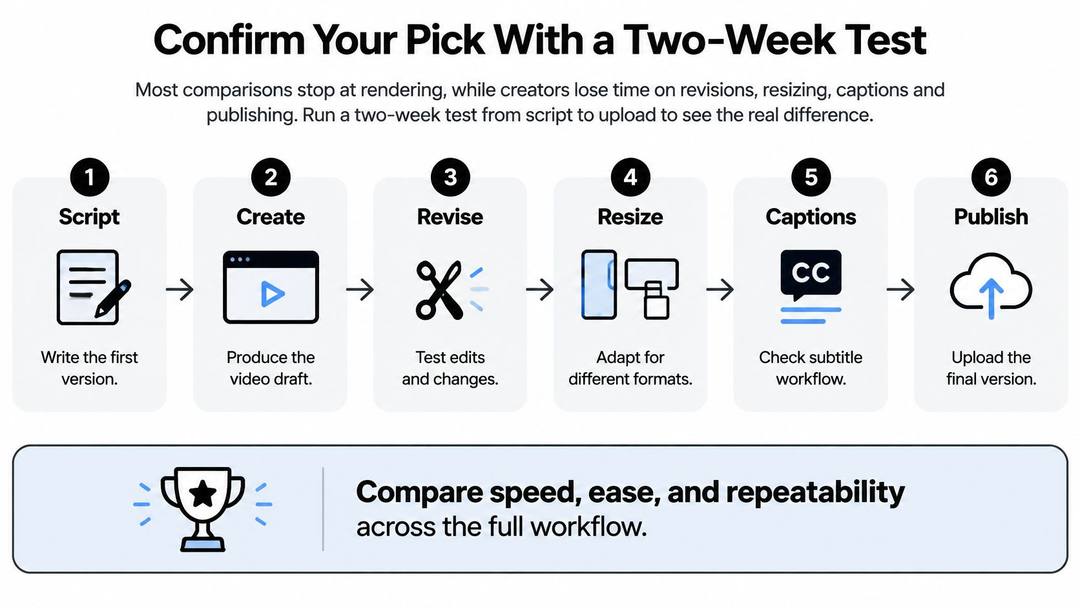
Confirm Your Pick With a Two-Week Test
Most comparisons stop when the render finishes. Your production test should continue through revisions, resizing, captions, approval and upload.
The G2 HeyGen and Synthesia comparison offers useful reviewer context, including stronger creator-oriented preference for HeyGen and training-oriented preference for Synthesia. Those preferences don't measure your team's cost per publishable vertical clip.
Use the following two-week protocol as a working experiment, not a claim about either vendor's typical performance.
This workflow keeps the evaluation focused on the complete production process.
Prompt to try
Create a 45-second vertical talking avatar video where a friendly presenter explains how the project app Taskline saves teams an hour a day. Open with the hook "Your team loses an hour every day to status meetings." Say the product name Taskline clearly twice, keep a calm conversational delivery with captions, and end with "Try Taskline free this week."
Build a comparable production log
Shortlist two platforms against mandatory requirements. Start with the use-case table, then eliminate any option that can't meet your actual delivery requirement. The common slip is testing attractive output before discovering that a necessary export or administration feature isn't included.
Write three identical scripts lasting thirty to sixty seconds. Give each a hook in the first three seconds, a main point and a clear next action. Include a product explanation, a pronunciation challenge and a more expressive social concept so you don't select a platform based on an unusually easy script.
Render equivalent presenter treatments. Match framing, voice style, pacing and output settings as closely as possible. Log hands-on editing time separately from render waiting time, and record credits or minutes consumed by every revision rather than only the accepted render.
Count rejected outputs and explain each rejection. Use categories such as pronunciation, lip sync, factual error, subtitle issue and unsuitable delivery. Don't discard an awkward draft without logging it, because repeated failures are part of the production cost.
Adapt the result to vertical and square layouts. For this test, create both 9:16 and 1:1 versions and inspect presenter framing, captions, logos and text safety zones. A widescreen composition may need rearrangement rather than a simple crop, particularly when text sits beside the presenter.
Add captions and perform a phone-screen review. Check timing, line breaks, names and whether captions obscure a face or interface element. Watch with sound off, then with sound on; reviewing only the transcript misses synchronization problems.
Confirm the purchasing conditions before final export. Record current entitlements, resolution, API access and commercial usage rights from the vendor's own documentation or quotation. Save the date and plan name, because testing a feature doesn't prove that your intended subscription includes it.
Upload the best accepted clips to your target channels. Use TikTok, Instagram Reels and YouTube Shorts where relevant, and record early watch time and completion alongside the publishing conditions. Don't treat small, unmatched audience samples as a controlled platform comparison; use them to identify obvious delivery problems and viewer objections.
Turn the log into a decision
Keep a row for each generation attempt and a separate status for accepted, rejected or needs revision. Track script changes too, so a better rewritten hook doesn't get mistaken for a better avatar engine.
Calculate credits per accepted clip and generated minutes per accepted clip separately. They're consumption measures, not money, and shouldn't be added together.
For financial comparison, divide subscription allocation, overages, external-tool spend and production labor by accepted clips. Use the same labor valuation and allocation method for both candidates.
Decision rule: Choose the lower-cost workflow that passes the viewer test, unless required SCORM delivery, identity controls or formal governance disqualifies it first.
Our generation workflow brings script, voiceover, visuals, subtitles and editing together without stitching separate tools together. Generation, captions, voice, publishing, automation, API, MCP and CLI access are available within the product, so you can run the same scripts through an end-to-end alternative and measure the result on the same terms.
For a finished short rather than another asset to assemble, revid.ai combines script creation, voiceover, visuals, captions, music and publishing in one workflow. Bring the same scripts from your HeyGen vs Synthesia test and compare the work required to reach an upload-ready video.
Sources
- Vendor pricing pages (invideo.io, runway.com, synthesia.io, pictory.ai, heygen.com, zebracat.ai, revid.ai), read October 29, 2026
- Revid product analytics (Amplitude), project_built events grouped by tool, Sep 29 to Oct 28, 2026 (UTC), 2,482 videos across these six tools
Charts and figures checked on November 12, 2026.