On this page
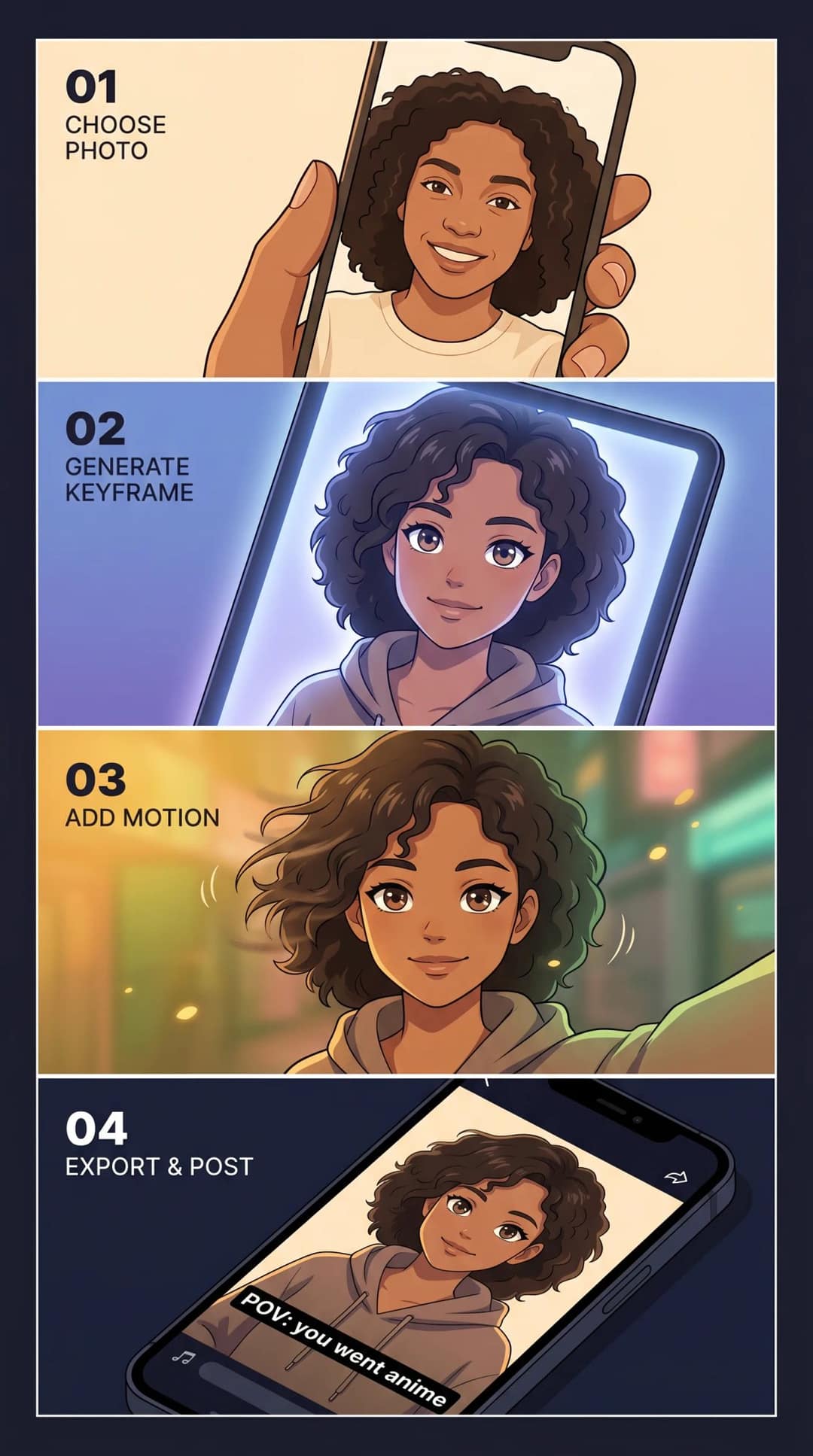
To make an AI anime video from a photo, convert a clear front-facing portrait into an anime still with a reference-image generator, pick the cleanest of 4 to 8 results, then animate it with an image-to-video tool using small motion (a blink, moving hair, a slow push-in). Finish with a hook, captions and music in a 9:16 edit.
Most attempts fail at the same step, and it isn't the anime conversion. It's motion. A photo shows one angle, so when you ask the model to make your character walk, dance or turn around, it has to invent everything the camera never saw. That invented geometry is where melting faces and warped hands come from. Pick a better keyframe, ask for less movement, and the same tools produce a clip worth posting.
The 5-step workflow at a glance
Each stage controls one variable. When a result looks wrong, find the stage that owns the problem instead of regenerating everything.
| Step | What it controls | What to use |
|---|---|---|
| 1. Photo | How much the result looks like you | A clear, front-facing portrait |
| 2. Anime still | Style and resemblance | A photo-to-anime app or a reference-image generator |
| 3. Keyframe pick | What the animation has to work with | 4 to 8 options, defects fixed before animating |
| 4. Motion | Smooth or glitchy | An image-to-video tool, small motion only |
| 5. Packaging | Whether anyone watches | Hook, captions, sound, 9:16 edit |
Step 1: Choose a photo the AI can read
Image models don't understand your face the way an illustrator would: they match visual patterns. If the model can't clearly see your face shape, hair, skin tone and expression, it fills the gaps with generic anime defaults. You get an anime person with your hair color instead of you.
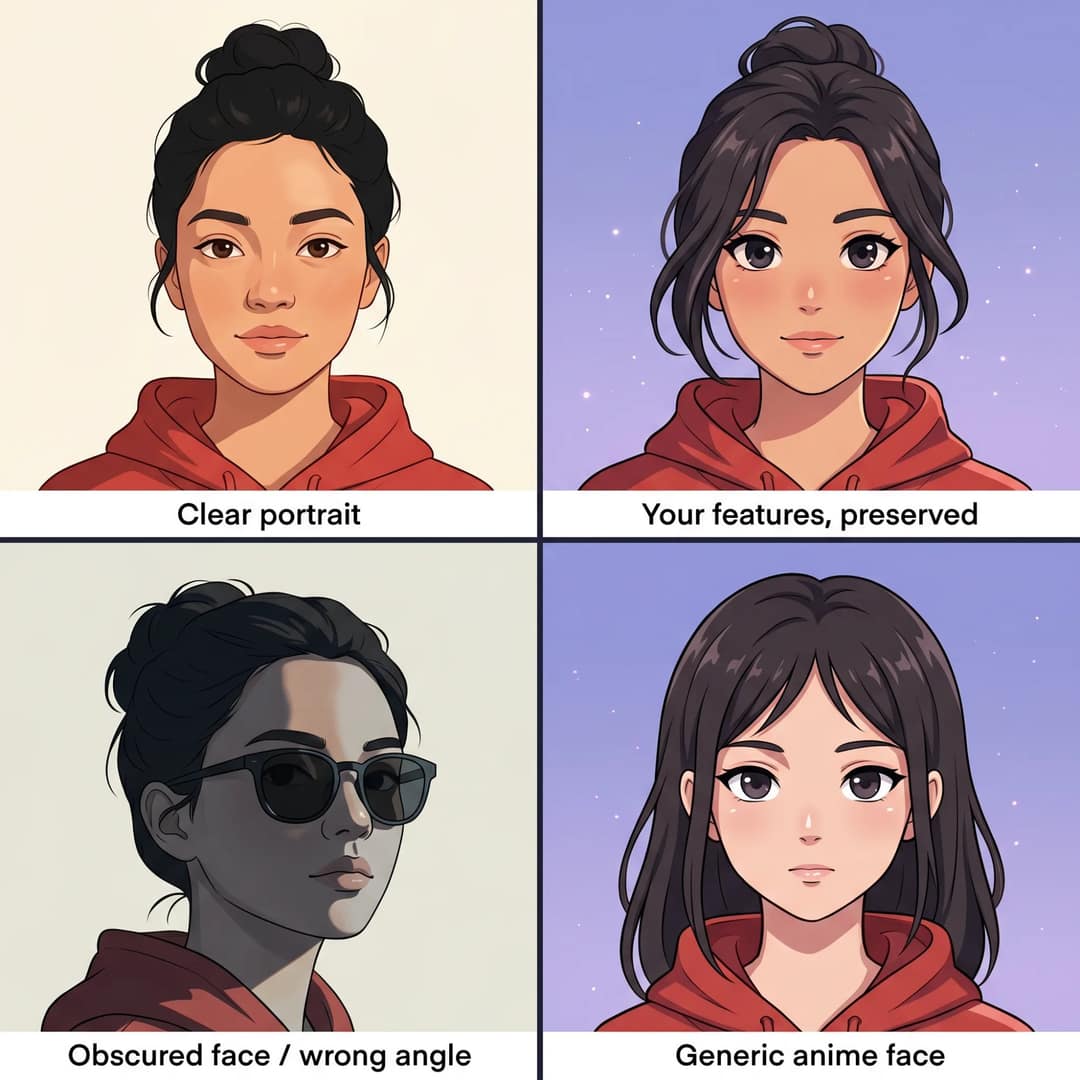
Run through this checklist before you generate anything:
- One person in the frame
- Face fully visible: no sunglasses, heavy shadows or hair over the eyes
- Front-facing or a clean 3/4 angle, not a sharp side profile
- Enough resolution that the face isn't pixelated when you crop it
- A simple background, or one you can blur or remove first
- Cropped to 9:16 now if the video is for TikTok, Reels or Shorts (TikTok recommends 1080x1920)
- For couples or groups, generate each person separately, then cut between them
Hats, hoods, thick glasses and dramatic shadows are harder for these models to keep. If your favorite photo has them and the first result looks off, swap the photo before blaming the tool.
Step 2: Turn the photo into an anime still
There are three routes. Pick by how much resemblance matters and how often you'll reuse the character.
| Route | Effort | Resemblance | Best for |
|---|---|---|---|
| Photo-to-anime app | Lowest | Often generic | One-off trend posts |
| Reference image + structured prompt | Moderate | Good | Most creators |
| Identity-preserving diffusion workflow | Highest | Best | A recurring anime avatar or client work |
Quick path: photo-to-anime apps
Style apps take a photo and return an anime version in seconds, usually with presets like chibi, manga, cyberpunk or soft fantasy. The tradeoff is identity drift: the result looks like a plausible anime character, often not strongly like you. That's fine for a trend post and weak for anything where resemblance matters.
If you don't need your own face at all, skip the conversion. Revid's AI anime video generator turns a story, a script or a one-line idea into a narrated anime-style video.
Creator path: a reference image plus a structured prompt
Upload your photo as the reference image in an AI image tool that supports one, then write a prompt that separates who you are from how the anime version should look. Mixing the two is the main reason results don't look like the person.
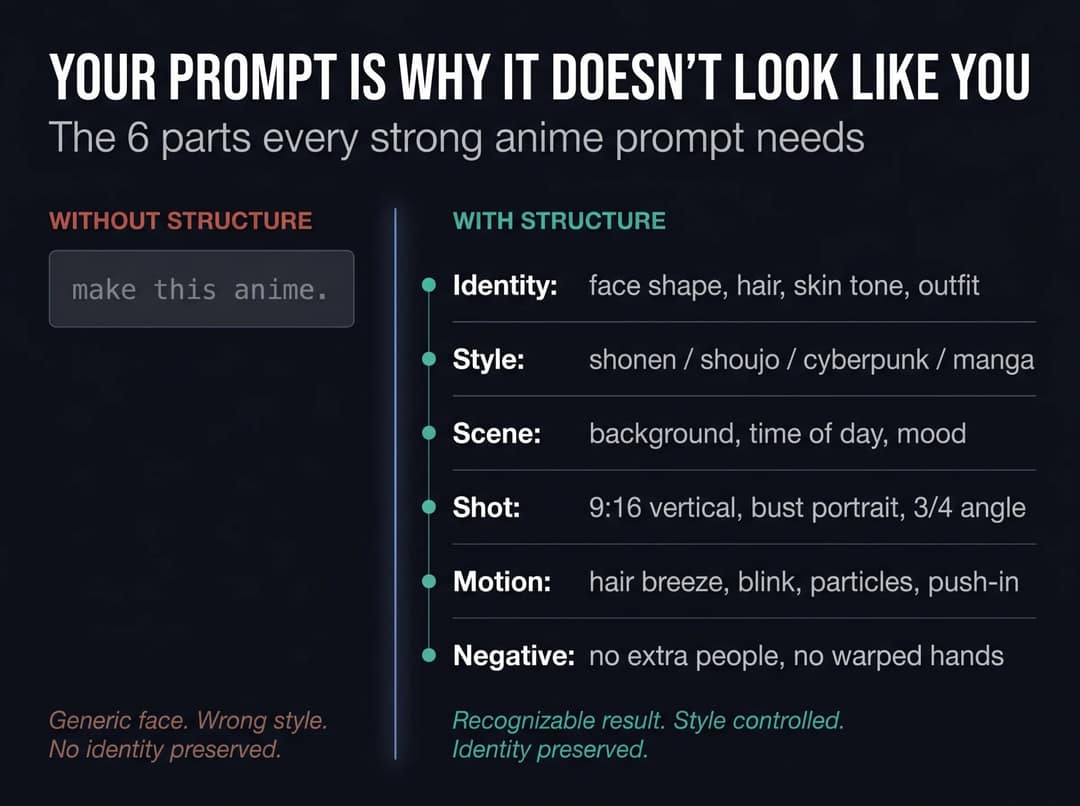
The template:
Identity: [what must stay the same about you]
Style: [anime look and aesthetic]
Scene: [background and mood]
Shot: [camera framing]
Motion-ready details: [hair, clothing, particles, background depth]
Negative: [what must not happen]Bad prompt:
Make this anime.Better prompt:
Identity: preserve the same face shape, brown eyes, short curly black hair, warm
brown skin tone, silver glasses, and red hoodie.

Style: original modern anime character, clean cel shading, expressive eyes,
detailed hair, crisp line art.

Scene: nighttime city rooftop with soft neon lights and a purple-blue sky.

Shot: vertical 9:16 bust portrait, 3/4 angle, face centered, space at top
for captions.

Motion-ready details: light breeze moving hair and hoodie strings, subtle
background depth, glowing particles.

Negative: no extra people, no text, no logo, no watermark, no distorted hands,
no change in age or skin tone.The first prompt hands every decision to the model's defaults. The second anchors your features and leaves the art direction open.
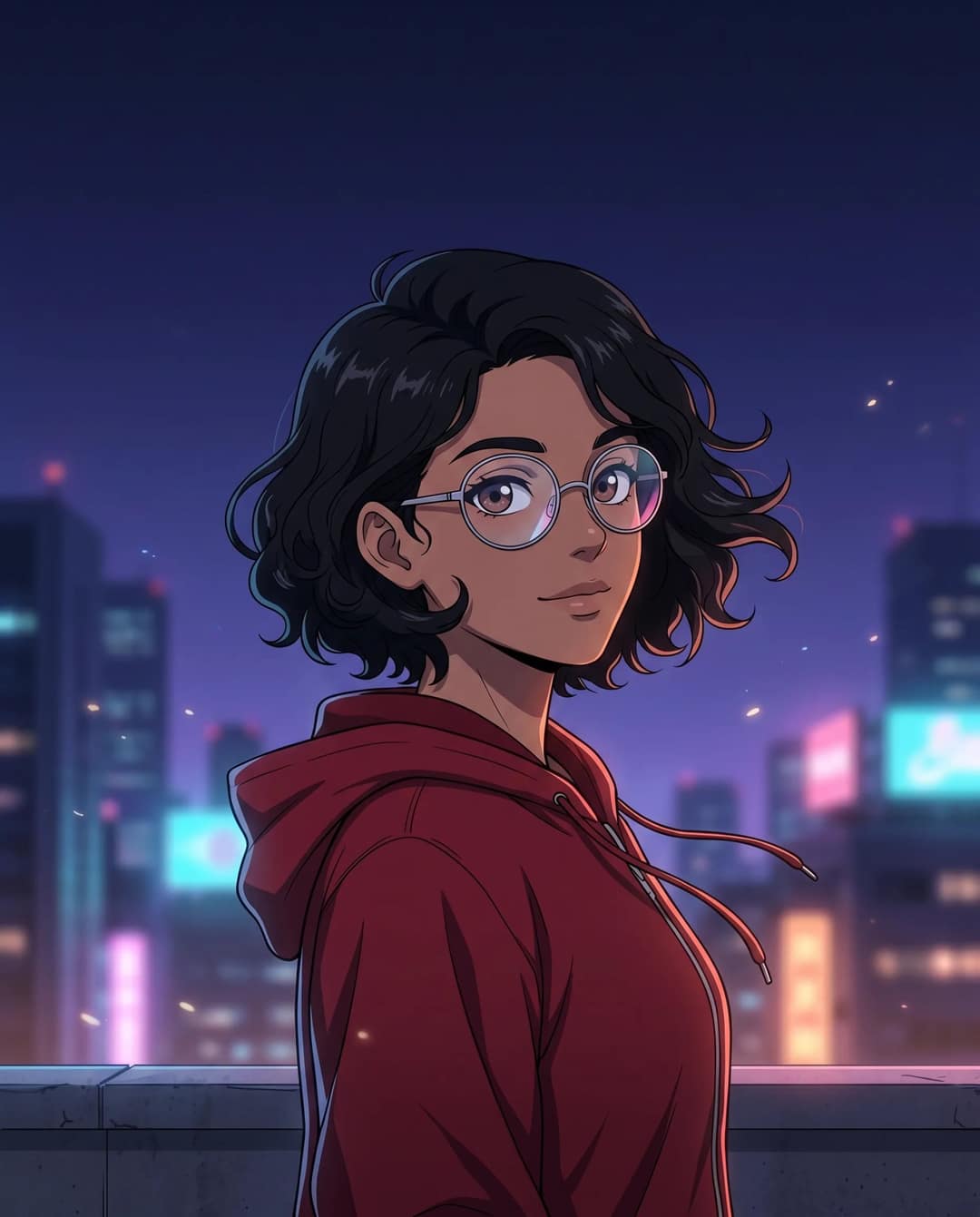
Give the background a job too. Rain, drifting particles, flickering lights and depth give the animation model something to move later, so the face doesn't have to. Scenes that animate well:
clean bedroom with anime posters, soft morning light, shallow depth of field
rainy neon street, reflections on pavement, signs blurred in the distance
school rooftop at sunset, warm orange sky, soft clouds, gentle wind
fantasy forest path, glowing fireflies, painterly trees, soft blue-green paletteAdvanced path: identity-preserving diffusion models
Skip this if you want a video today. It matters when you're building a channel around a consistent anime avatar or need the strongest facial resemblance. These workflows combine an anime model, an identity method and a composition control:
| Method | What it does | Use it when |
|---|---|---|
| LoRA paper | Freezes a large pretrained model and trains small added layers, so fine-tuning is far cheaper than retraining | You want one consistent anime character across many videos |
| DreamBooth paper | Fine-tunes a text-to-image model on a few photos of one person | Your avatar needs to appear in many different scenes |
| ControlNet paper | Adds spatial control (edges, depth maps, pose) to diffusion models | The anime still should keep your photo's pose and composition |
| IP-Adapter paper | Uses an image as a prompt alongside text | The photo should guide the structure and look of the output |
| InstantID paper, PhotoMaker, PuLID | Preserve facial identity from a single face photo | Facial resemblance is the main goal |
For the base model, Animagine XL 4.0 is an SDXL-based anime model that ships with prompt templates and recommended negative prompts for anatomy, hands, text artifacts and watermarks. NovelAI V4.5 and Illustrious are other common choices.
Step 3: Pick the best keyframe before you animate
Don't animate the first result. Generate 4 to 8 stills and choose the strongest, because image-to-video models don't fix flaws in the source: they amplify them. A slightly bent finger becomes a glitching hand, and a slightly off eye starts drifting.
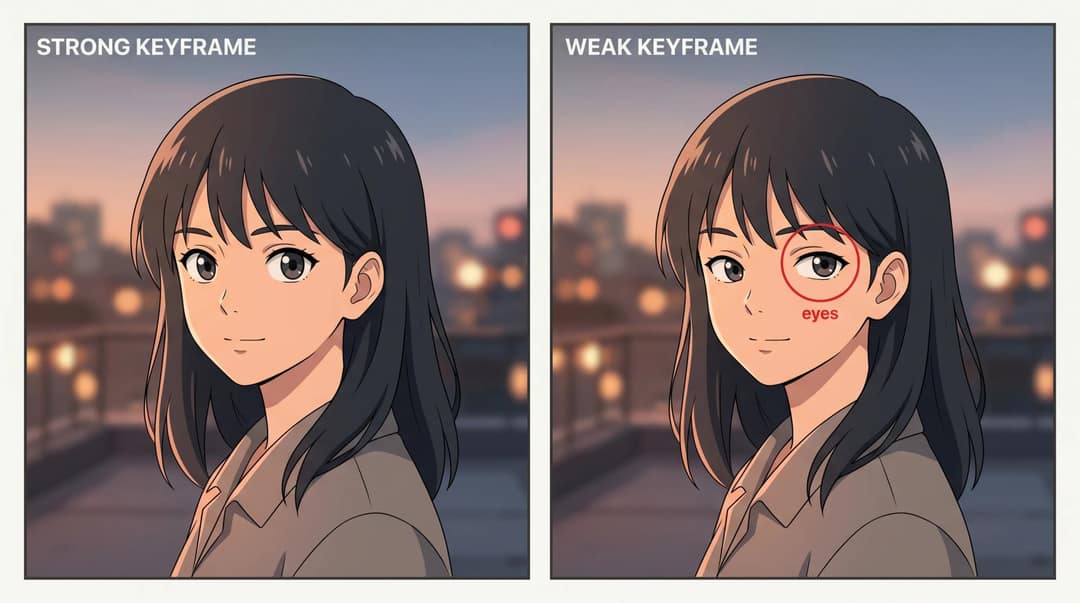
A strong keyframe has:
- A face that is recognizably you
- Clean, symmetrical eyes
- Clean hands, or hands out of frame
- No stray text, logos or watermarks
- The hairstyle and outfit from your photo
- Clear separation between character and background
Fix leftovers (an extra finger, mismatched earrings, a text artifact) in an image editor now. Fixing a still takes minutes, while finding the problem after an animation run costs you another generation.
Step 4: Animate with small motion
Less motion almost always looks better. Your keyframe is a flat image that only contains what was visible in the frame. Walking, dancing, spinning or turning forces the model to invent the back of the head, hidden limbs and how clothes fold in motion, and those guesses are usually wrong.
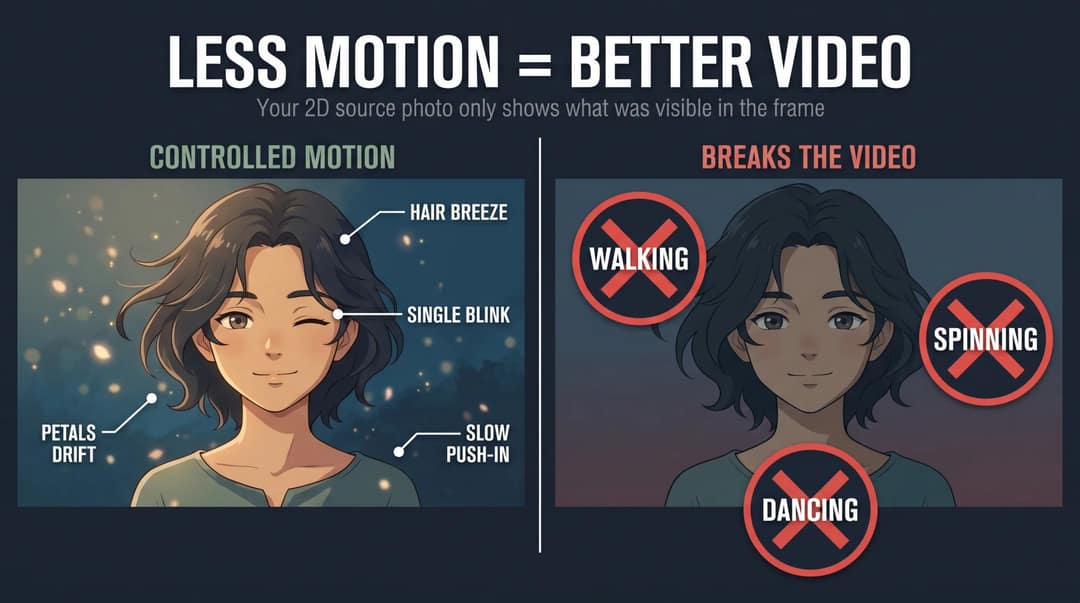
Aim for a living illustration, not an episode. The recipe:
camera movement + facial micro-expression + environmental motionGeneral motion prompt:
Animate this as a 5-second 2D anime shot. Slow camera push-in, subtle parallax
between the character and background, one natural blink, slight smile, hair and
jacket moving in a light breeze, soft particles drifting through the scene.

Preserve the exact face, hairstyle, outfit, and cel-shaded anime style. No extra
characters, no facial deformation, no warped hands, no mouth movement, no camera
spin, no style change.Shonen hero reveal:
Animate this as a short shonen anime hero reveal. Slow upward camera tilt from
chest to face, wind moving the hair and jacket, glowing rim light, dust particles
in the air, intense eyes, subtle energy aura behind the character.

Keep the character identity, outfit, face, and 2D cel-shaded style consistent.
No extra people, no distorted hands, no exaggerated mouth movement, no change
in hairstyle.Avoid these unless you have a full-body reference image or a video driving the motion:
- Walking, running or fighting
- Dancing or spinning
- Complex hand gestures or weapon swings
- Turning 180 degrees
- Hugging or interacting with another person
How do you turn one anime image into a short video?
If you already have an anime image (your own keyframe, or art you own the rights to), this is the simplest beginner route:
- Check the image against the keyframe list above: clean eyes, clean or hidden hands, no stray text.
- Upload it to Revid's AI Image Animator and describe the motion in one or two sentences: one camera move, one facial micro-expression, one environmental effect.
- Generate, then watch the eyes and hands first. If they drift, cut the motion back before you change anything else.
- Keep the shot short: a 5-second clip is enough for a reveal.
- Add a hook, captions and sound (Step 5) before you post.
The same approach works on a regular photo with no anime conversion. Our guide to making an AI video from a photo covers that version with prompt templates.
Step 5: Turn the clip into a TikTok, Reel or Short
An animated anime still is raw footage, not a post. Before it goes up, it needs:
- A hook in the first second or two (the before photo usually does this job)
- Captions readable at phone size, kept away from the platform buttons
- Sound that matches the style (see the style table below)
- 9:16 vertical framing
- One line of text or voice that tells the viewer what they're looking at
Keep the talking to a minimum. In Revid's analysis of 176,367 TikToks with 1,000+ likes posted between October 2025 and October 2026, videos with under 40 characters of speech had a median of 123K views and 20.2% passed 1M, against 68K and 11.9% for videos with speech throughout (300+ characters). The sample only holds videos that already did reasonably well, and it shows what top videos share rather than causes. It still supports letting the visual reveal and the music carry an anime transformation. The method and every chart are in Revid's TikTok virality study.
Videos with just a few spoken words (a line or two) beat both silent videos and videos that talk the whole way through, which were the most common and the weakest.
Source: Revid analysis of 176,367 TikToks analyzed by AI, with 1,000+ likes posted between Oct 1, 2025 and Oct 16, 2026 (61,203 creators)
Show the data
| Median views | Share that passed 1M views | |
|---|---|---|
| No speech | 73.3K | 14.3% |
| Under 40 | 122.7K | 20.2% |
| 40 to 120 | 97.2K | 17.6% |
| 120 to 300 | 91.6K | 16.8% |
| 300+ | 67.7K | 11.9% |
How to finish it in Revid
Revid covers the packaging in one place, from your animated clip or from a script:
- Bring in your animated anime clip and add synced captions with the AI caption generator (100+ languages, 30 caption styles).
- If you want one spoken line, add an AI voice-over (1,000+ voices in 70+ languages) and keep it under a sentence.
- Add music and adjust timing in the timeline editor, so the anime reveal lands on the beat.
- Export at 1080p or 4K, 30 or 60 fps, in 9:16.
- Publish or schedule it directly to TikTok, Instagram and YouTube from one queue.
For a full narrated anime short built from a script, the anime video generator linked in Step 2 writes the scenes and generates the visuals. Notes in [brackets] in your script steer the visuals without being read aloud, and Revid offers Seedance 2.5, MiniMax Hailuo H3, Wan 3.0 and Google Veo 3, chosen per scene. Sign-up is free and new accounts get free credits to try video creation; regular creation then uses the credits of a paid plan, from $39/month.
6 anime styles: prompts, motion and sound
"Anime" isn't one look. Each style has its own prompt vocabulary, the motion that suits it and the sound that sells it.
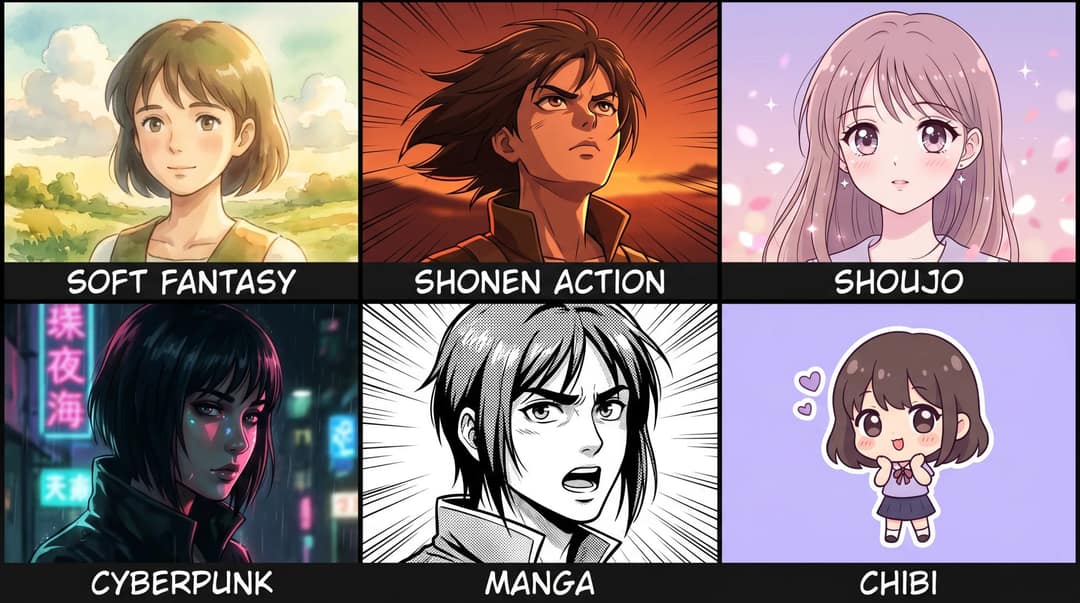
| Style | Prompt keywords | Motion that works | Sound |
|---|---|---|---|
| Soft fantasy | soft hand-painted look, warm watercolor background, painterly clouds, cozy countryside light | Slow push-in, hair breeze, drifting leaves or petals, warm light flicker | Piano, wind, birds, soft sparkle, page-turn |
| Shonen action | bold cel shading, sharp line art, dramatic rim light, wind-swept hair, speed lines, dust particles | Upward camera tilt, jacket in wind, energy glow, eye glint | Riser, impact hit, whoosh, aura hum |
| Shoujo | delicate linework, pastel palette, sparkling eyes, soft blush, floral bokeh | Blink, soft smile, floating petals, sparkles, gentle zoom | Bell, sparkle, soft pop, romantic strings |
| Cyberpunk / 90s sci-fi | neon city at night, rain reflections, high-contrast cel shading, chrome highlights | Rain falling, neon flicker, steam, slow side pan | Rain, neon buzz, synth bass, glitch sweep |
| Manga | black-and-white panel, clean ink linework, screentone shading, speed lines, empty speech bubble area | Slow zoom, speed lines sliding, paper texture, caption reveal pop | Page flip, ink scratch, camera shutter, dramatic hit |
| Chibi | oversized expressive eyes, small body proportions, sticker-like outline, pastel background | Small bounce, blink, wink, floating hearts, soft camera bob | Bounce, bubble pop, cute blip |
A few notes by style:
- Soft fantasy went viral in waves as people turned personal photos into pastoral, hand-painted scenes, and AP News coverage of the Ghibli-style AI trend laid out the ethical and copyright questions that came with it. Describe the look rather than naming a studio, or start from Revid's Ghibli-style AI video generator.
- Shonen suits transformation reveals, motivation and gaming niches because the before/after contrast is so strong.
- Shoujo is the most forgiving for subtle motion: petals, sparkles and one blink are enough to feel alive.
- Manga makes captions pop because there's no color competing with the text. For narrated stories in this look, Revid's AI manga video generator works from a script.
- Chibi has exaggerated proportions, so warping is less visible than in realistic anime styles.
Prompt to try
A 20-second vertical anime short about an original shonen ninja-inspired hero on a city rooftop at sunset. Open on the hook "Nobody believed he'd make it this far." Style: bold cel shading, spiky wind-swept hair, orange-and-black jacket, speed lines and glowing rim light, with slow camera push-ins and drifting dust instead of fast action.
Describe the style, not the franchise
Don't write "make me Naruto" or "make this look exactly like Studio Ghibli." Describe the visual vocabulary instead:
original shonen ninja-inspired anime protagonist, bold cel shading, spiky
wind-swept hair, orange-and-black athletic jacket, dramatic speed lines,
rooftop action pose, glowing sunset rim lightAnd always add a negative prompt. Anime models are prone to bad hands, extra fingers and text artifacts:
bad anatomy, bad hands, extra fingers, missing fingers, crossed eyes,
asymmetrical eyes, changed face, changed hairstyle, extra person, text,
logo, watermark, blurry, low quality, deformed face, warped mouthPost formats that work for anime transformations
AI visuals do get watched on TikTok. Revid's study of AI videos vs real footage tagged 292,784 TikToks: AI-generated videos had an estimated median of 151.7K views against 67.3K for real footage, though their like rate was lower (3.9% vs 7.7%). The catch is that on X, Instagram and Threads, AI visuals cluster in the lowest engagement tier, so the packaging matters even more there.
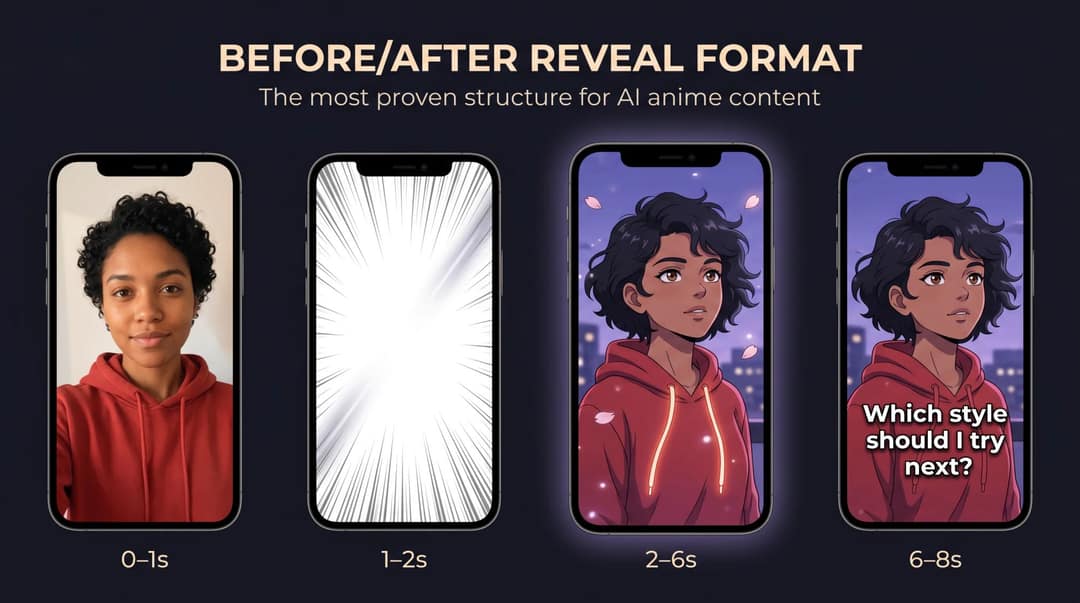
Format 1: Before/after reveal. The most proven structure, because viewers understand instantly what changed.
Hook: "I turned myself into an anime character..."
0-1 sec: original photo
1-2 sec: flash or swipe transition on the beat drop
2-6 sec: anime version animates (blink, hair, particles)
6-8 sec: caption: "Which style should I try next?"Format 2: Style roulette. "Me in 5 anime styles": shonen, shoujo, cyberpunk, manga, soft fantasy. People pick a favorite in the comments and argue about it.
Format 3: Main character opening. Selfie, then anime hero shot, then a title card and a dramatic one-line hook. It's deliberately over the top, which is the appeal.
Format 4: Couple, friend or pet transformation. The emotional layer on top of the visual change tends to pull "do mine" comments.
Format 5: Prompt reveal. Show the original photo, the prompt, the tool, one mistake you made and the final version, then end with "Prompt is at the end. Try it on your own photo." That line turns the video into a resource people save. For the formats TikTok itself expects to grow, check TikTok's Next trend report, and YouTube's 2025 culture and trends recap describes fans expanding the worlds they love through their own videos, which is exactly where anime transformations sit.
Voice-over or on-screen hooks that fit these formats:
- "I turned my real photo into an anime video. Here's the result."
- "POV: your camera roll becomes an anime opening."
- "This is what I'd look like as the main character."
- "Which anime style fits me best?"
For more openers, browse this list of TikTok hooks that stop the scroll.
Sound: match it to the style using the table above, and look up what's trending in TikTok's Creative Center before you pick a track.
Hashtags: use a few, not a wall. In the same Revid study, TikToks with 4 hashtags had the best median (77K views) and 3 hashtags 75K, while 9 or more had only 16K. Instagram caps posts at 5 hashtags, so 3 to 4 works on both. Display Purposes' anime hashtag page shows related tags (treat it as a directional signal, not platform data). A starting pick: #aianime #animeart #imagetovideo plus one style tag such as #shoujo or #cyberpunkanime.
Common mistakes and how to fix them
| Mistake | What you see | Fix |
|---|---|---|
| Weak source photo | An anime face that doesn't look like you | One person, clear and well lit, front-facing or 3/4 |
| "Make this anime" prompt | Generic face, random style | Separate identity traits from style traits |
| Naming franchises or studios | Knockoff look, legal exposure | Describe the visual style instead |
| Animating the first result | Small defects that grow in motion | Generate 4 to 8 stills and fix flaws first |
| Too much motion | Melting face, warped hands | One camera move, one micro-expression, one environmental effect |
| Posting the raw clip | A nice clip that nobody watches | Hook, captions, sound and 9:16 framing |
Copyright, consent and AI labels
Consent. Use your own photo, or get explicit permission from the person you're transforming. Be strictest with minors, private individuals and partners.
Character and studio IP. "Original shonen-inspired anime hero with bold cel shading" is a style direction; "make me Naruto" asks for a protected character. Major studios have taken this seriously: Reuters reported on Disney and Universal suing Midjourney over allegedly infringing characters. For monetized or client work, stick to original anime-inspired styles, use assets you have rights to, and check Revid's terms for what you upload.
AI labels. TikTok's AI-generated content rules require a label on realistic AI images, audio or video, and TikTok may auto-label uploads that carry C2PA Content Credentials (an auto label can't be removed). YouTube's disclosure rules cover realistic altered or synthetic content and exempt clearly non-realistic content. Instagram shows an "AI info" label when Meta detects industry-standard AI signals. A stylized anime version of yourself usually isn't "realistic", but labeling it costs nothing: TikTok and YouTube both say the label alone doesn't reduce distribution.
FAQ
Can I use someone else's photo to make an AI anime video?
Only with their permission. Most tools won't stop you, but turning a real person's likeness into AI content without consent creates platform and legal risk, especially for minors and private individuals.
How long should an AI anime video be?
For a before/after reveal, 6 to 8 seconds is enough: a second of the original photo, a quick transition, then the animated anime shot and an end caption. A 5-second animated shot per style is plenty for a style roulette.
Why doesn't my AI anime video look like me?
The cause is almost always the photo or the prompt. Start from a clear front-facing portrait and list identity traits (face shape, hair, skin tone, glasses, outfit) separately from the style; if the still doesn't look like you, the video won't either.
Is Revid free for making anime videos?
Sign-up is free with no credit card needed, and new accounts get free credits to try video creation. A free account can also search Revid's viral video library. Regular video creation uses the monthly credits of a paid plan, from $39/month (Growth, 2,000 credits); the live pricing page is the reference for current prices.
What's the best AI tool to turn a photo into an anime video?
No single tool wins every step. Reference-based image generators and identity-preserving diffusion workflows give the strongest resemblance for the still, image-to-video tools handle the motion, and Revid covers animation, captions, voice, music and publishing in one place.