On this page
To make an animated or anime music video (AMV) with AI, upload your song to an AI music video generator, pick an animated style such as anime, claymation, 3D render or pixel art, write a short visual direction, and choose whether the scenes follow the beat or the lyrics. Then fix any shot in the editor and export it for YouTube, TikTok or Reels.
Generating original animation also solves the classic AMV problem. A traditional AMV is cut from anime footage the editor doesn't own, which can get it claimed, muted or taken down. With AI, every frame is generated for your video, so as long as you invent your own characters, the main rights you need are the rights to the song.
This guide adds what a generic tutorial can't: which styles creators actually pick and how they time their songs, from 54,949 music video generations on Revid in the last 90 days, plus six real animated music videos with their exact settings and what they would cost today.
- music video generations on Revid in 90 days
- 54,949
- Jul 25 to Oct 22, 2026, Revid analytics
- of AI music videos with a chosen style used an animated or illustrated look
- 50.4%
- 29,209 videos that left Default and Auto
- were timed to the lyrics, 9.4% to the beat
- 90.6%
- Lyrics is the default timing
- of AI-video music videos used Low, the cheapest tier
- 74.3%
- 16,965 AI-video music videos
- TikTok views on a claymation music video made on Low
- 502,816
- "Er passero ferito", tracked September 2026
- visual styles in the music video generator
- 58
- Style picker, October 23, 2026
What is an AMV (anime music video)?
An AMV is a fan-made video that edits clips, usually from Japanese anime, to a song. They are not official music videos. According to Wikipedia's history of the form, the earliest known AMV was made in 1982 by Jim Kaposztas, who connected two VCRs and set violent scenes from Star Blazers to the Beatles' "All You Need Is Love" for comic effect.
AMVs spread through fansub tapes, then anime conventions, which started holding AMV shows and contests in the 1990s. Digital editing took off between 1999 and 2001, and today AMVs live on AnimeMusicVideos.org and YouTube. Many people now use "AMV" for any anime-style music video, including original ones that musicians make for their own songs.
Can you use anime footage you don't own in a music video?
Usually not safely. Clips from a series belong to the studio that made it, and the song belongs to its rights holders. In the US, whether a reuse counts as fair use is decided case by case on four factors: the purpose of the use, the nature of the work, how much is used, and the effect on the market. YouTube's fair use page lists the myths that trip up AMV editors:
- Giving credit to the owner does not, on its own, make a copy fair use.
- There are no magic words: "no copyright infringement intended" doesn't protect you.
- Calling a video non-commercial or "for entertainment only" is not an automatic defense.
- YouTube's Content ID system can't decide fair use; it only matches content.
Music rights holders act too: Wikipedia notes that record labels pushed for AMV removals, including a 2005 request from Wind-up Records to AnimeMusicVideos.org to remove videos using some of its artists' songs.
If you are an artist making a video for your own track, the clean route is original animation: generated scenes in an anime style, with characters you invent. Two rules keep it clean. Don't ask the AI for existing characters from a series, and use a song you own or have licensed.
Which animated styles do creators pick for AI music videos?
About half go animated once they move off the default. We counted 49,458 music video generations with AI visuals on Revid between July 25 and October 22, 2026. 40.1% kept Default, the style the picker starts on, which asks the image model for a photorealistic look. Of the 29,209 where a different style was picked (Auto aside), 50.4% used an animated or illustrated look and 42.8% a realistic one.
Default is the style the picker starts on, and its style text asks for a photorealistic look. Highlighted bars are animated or illustrated styles. "All other styles" groups the remaining built-in styles, Auto and custom styles, including presets named after a studio, game or brand (14.9% together), which we don't list by name.
Source: Revid product analytics (Amplitude): music video generations in the AI music video generator, Jul 25 to Oct 22, 2026 (90 days, UTC), event totals. 49,458 generations with AI visuals, by visual style. Pulled Oct 23, 2026.
Show the data
| Share of AI music videos | Music videos | |
|---|---|---|
| Default | 40.1% | 19,850 |
| Ultra Realism | 9% | 4,452 |
| Movie | 7.5% | 3,693 |
| Realist | 4% | 1,989 |
| Anime | 2% | 971 |
| Fantasy | 1.4% | 675 |
| Claymation | 1.3% | 627 |
| Sketch Color | 1.2% | 616 |
| Anime Realism | 1.2% | 615 |
| Modern Noir | 1.1% | 545 |
| Creative | 0.9% | 447 |
| Retro Cartoon | 0.9% | 442 |
| All other styles | 29.4% | 14,536 |
Default leads because it is where the picker starts. Among the styles shown, realistic looks take the next three places, and Anime is the most used animated one. Presets named after a studio, game or brand sit inside "All other styles" and are not named here; together they were 14.9% of these videos.
Among the 29,209 videos where the creator picked a style other than Default or Auto, 50.4% chose an animated or illustrated one and 42.8% a realistic one. Animated looks were made as AI video less often (36%) than realistic ones (49%).
Source: Revid product analytics (Amplitude): music video generations in the AI music video generator, Jul 25 to Oct 22, 2026 (90 days, UTC), event totals. 49,458 generations with AI visuals, styles grouped by their realistic or illustration flag. Pulled Oct 23, 2026.
Show the data
| Share of AI music videos | Made as AI video, not animated images | Music videos | |
|---|---|---|---|
| Default (photorealistic) | 40.1% | 22.1% | 19,850 |
| Animated or illustrated styles | 29.8% | 36.2% | 14,727 |
| Realistic styles | 25.3% | 49.2% | 12,512 |
| Custom and other styles | 4% | 49.9% | 1,970 |
| Auto (picks a style) | 0.8% | 24.8% | 399 |
Animated looks also lean on the cheaper media type. Only 36.2% of animated-style music videos were made as AI video (moving clips); the rest used animated AI images, stills brought to life by camera moves. Realistic styles went to AI video 49.2% of the time.
Highlighted styles have a real example in this post. Presets named after a studio, game or brand made up half of all animated-style videos (7,365 of 14,727) and are left out of this ranking.
Source: Revid product analytics (Amplitude): music video generations in the AI music video generator, Jul 25 to Oct 22, 2026 (90 days, UTC), event totals. 14,727 generations in styles flagged as illustration, by style. Pulled Oct 23, 2026.
Show the data
| Music videos | Made as AI video, not animated images | |
|---|---|---|
| Anime | 971 | 30.8% |
| Claymation | 627 | 38.3% |
| Sketch Color | 616 | 14.6% |
| Anime Realism | 615 | 41.3% |
| Modern Noir | 545 | 43.9% |
| Retro Cartoon | 442 | 29.4% |
| Stylized Illustration | 401 | 51.9% |
| Kids Book | 342 | 31% |
| Sketch B&W | 291 | 16.5% |
| Illustration | 256 | 33.2% |
| 3D Render | 240 | 60% |
| Cosmic Baroque | 209 | 43.1% |
| Lyrics | 200 | 65% |
| Expressive Ink | 199 | 10.1% |
| Paper Collage | 196 | 15.3% |
| 1950s Advertisement | 175 | 40% |
| Epic Lineburst | 174 | 42.5% |
| Manga | 153 | 38.6% |
| Flat Animation | 125 | 44.8% |
| Pixel Art | 124 | 27.4% |
Anime leads this ranking, ahead of Claymation, Sketch Color and Anime Realism. The second tab shows how each one was made: sketch and ink looks stay mostly as animated images, while 3D Render and Lyrics go to AI video more often than not.
Which animated styles can you make with AI?
Revid's music video generator lists 58 visual styles (as of October 23, 2026). These are the main animated ones, with how many AI music videos used each in the last 90 days and a real example where we have one. Every example was made with the same tool and is listed on our AI music video maker page.
| Style in Revid | Look | Suits | AI music videos, 90 days | Example |
|---|---|---|---|---|
| Anime | Detailed anime: expressive characters, dramatic angles, intricate backgrounds | Synthwave, J-pop, emotional ballads | 971 | "Welcome to the Mainframe", synthwave, Ultra tier, 6:47 |
| Anime Realism | Semi-realistic anime: clean linework with realistic skin and fabric textures | Story songs, game-style heroes | 615 | "Savon de minuit", kids song, Pro tier, 1:25 |
| Manga, Manga B&W | A Japanese manga illustration, in color or black and white with screentone | Darker tracks, lyric-heavy songs | 153 and 43 | |
| Retro Cartoon | Bold outlines, saturated colors, vintage textures, cel shading | Funk, novelty songs, kids music | 442 | |
| Flat Animation | Flat vector shapes, muted palette, simple figures | Indie pop, explainer-style lyric videos | 125 | |
| Claymation | Handmade stop-motion clay with fingerprints and tool marks | Folk, acoustic, humor | 627 | "Er passero ferito", Italian folk, Low tier, 3:21, 502,816 TikTok views |
| 3D Render | A polished CGI render: detailed materials, ray-traced light, depth of field | Rap, pop, comedy and parody | 240 | "Top Floor Itch", boom bap, Ultra tier, 70-second cut |
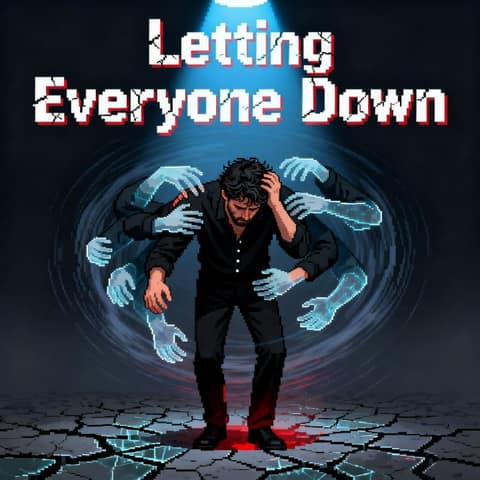
| Pixel Art | Retro game pixels, 8-bit palette | Hip-hop, chiptune, nursery rhymes | 124 | "Letting Everyone Down", hip-hop, Low tier, square |
| Sketch Color | Colored pencil on rough paper, strokes left visible | Acoustic, nostalgic songs | 616 | |
| Kids Book | Loose, washed-out watercolor with scratchy ink outlines | Lullabies, kids songs | 342 |
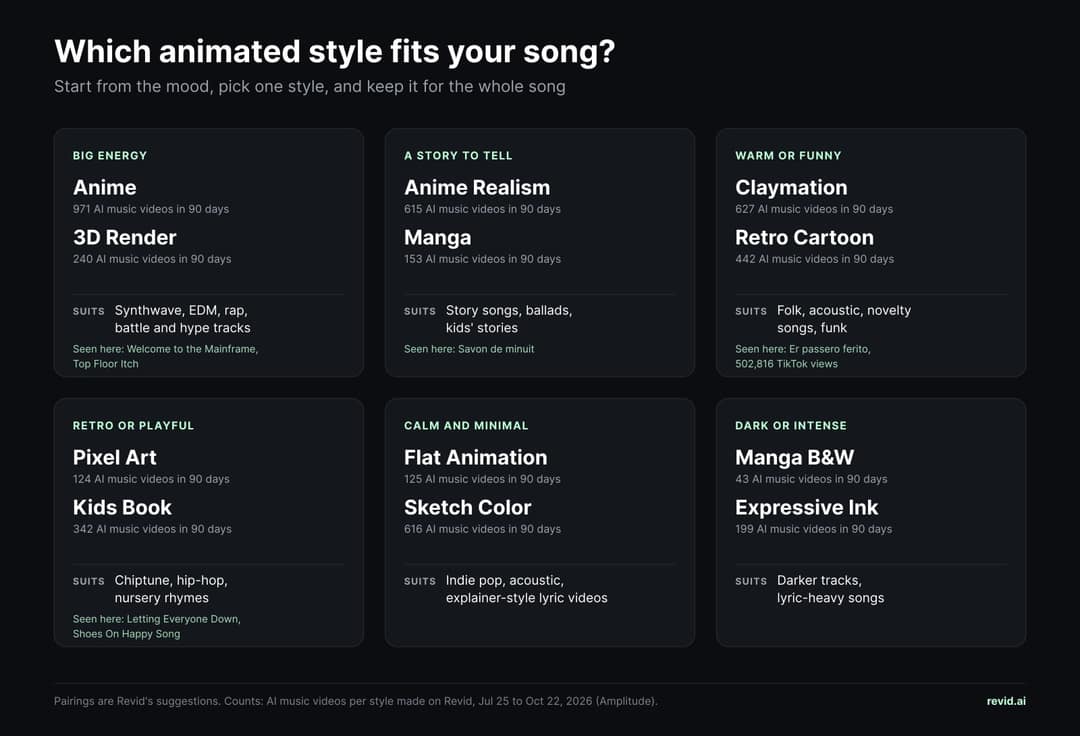
Start from the mood of the song, pick one style and keep it for every scene: a single look and a fixed cast are what make the result feel like one video.
Animated style guide: six real music videos and their settings
Each example below is a public video made from the creator's own song (a Suno link) with Revid's music video generator. Settings come from each video's public page. Costs are estimated with Revid's credit calculator for the same settings on October 23, 2026. Views are the TikTok or YouTube counts Revid tracked in September 2026, shown only where they passed 1,000. Each style comes with a prompt to copy into the visual direction box of the generator.
Anime: scale and drama
Anime suits songs that want scale: synthwave, J-pop, emotional ballads, battle tracks. It is the most used animated style on Revid that isn't named after a studio or brand (971 AI music videos in 90 days). This one covers the whole 6:47 track on Ultra, which also makes it the priciest example here: 8,140 credits for the same settings today. Anime holds together best with a fixed cast, so describe each character's hair, outfit and age once and ask for the same face in every shot.
Synthwave night drive (beat sync)
Anime music video, detailed cel-shaded anime with neon magenta and cyan lighting. Cast: KAI, 20s, short silver hair, black bomber jacket, always the same face. INTRO: a rain-soaked city at night seen from a rooftop. VERSE: Kai drives an old coupe through empty neon streets, reflections on wet asphalt. CHORUS: the road lifts into the sky, the city turns into a glowing grid, fast cuts on the beat. BRIDGE: Kai stops on an empty highway at dawn. FINAL CHORUS: night again, faster, brighter. Avoid text, logos and characters from existing anime.
Anime Realism: anime faces, real textures
Anime Realism blends clean anime linework with realistic skin and fabric. On this French kids' song it came out soft and rounded, close to a 3D cartoon, which is a good reason to test one chorus before you generate a whole song. It suits story songs and game-style heroes. Same settings today: 850 credits.
Anime Realism look: a story song (lyric sync)
Anime Realism music video for a story song: clean anime linework with realistic skin, hair and fabric textures, warm cinematic light. Cast: LENA, 12, curly red hair, yellow raincoat, and her grandfather TOMAS, 70s, white beard, navy fisherman's sweater, the same faces in every shot. VERSE 1: Lena finds an old map in the lighthouse attic during a storm. CHORUS: the two of them row a small boat across glowing night water toward an island of lights. VERSE 2: they climb cliffs covered in moss and fireflies. BRIDGE: the map turns out to show the lighthouse itself, seen from the sea. FINAL CHORUS: sunrise, they light the lamp together. No text, no logos, no characters from existing series.
Claymation: warm, funny and forgiving
Claymation is the surprise of our examples page. "Er passero ferito", an Italian folk song made on Low, the cheapest AI video tier, reached 502,816 TikTok views, the most of any animated example. The handmade look forgives small motion glitches, and the clay singer lip-syncs the lines. Same settings today: 603 credits for 3 minutes 21 seconds.
Claymation look: a village sing-along (lyric sync)
Claymation music video with a handmade stop-motion look: plasticine characters with visible fingerprints and tool marks, miniature sets, warm studio light, slightly jerky motion. Cast: NONNA ROSA, 70s, grey bun, flowered apron, round glasses, the same clay figure in every shot, and a striped clay cat. VERSE 1: Rosa cooks in a tiny kitchen while the cat steals a meatball. CHORUS: the whole street gathers at one long table in the village square and sings along, glasses raised. VERSE 2: the cat is chased through the market stalls. FINAL CHORUS: night, string lights, Rosa dances with the cat. Keep the camera mostly still, like a real stop-motion set. No text, no logos.
3D Render: polished CGI for rap, pop and parody
3D Render gives a glossy CGI finish with detailed materials and ray-traced light. "Top Floor Itch" uses only 70 seconds of its track (0:20 to 1:30) and plans every section in the visual direction: meerkat rappers, neon penthouses and a running gag on each chorus. Same settings today: 1,400 credits on Ultra. For rap tracks, the AI rap video generator is built around the same idea.
3D Render look: rooftop rap party (lyric sync)
3D render music video: glossy CGI with detailed fur and materials, ray-traced reflections, neon rim light, shallow depth of field. Cast: BANDIT, a raccoon rapper in a silver puffer jacket and gold headphones, the same character in every shot. INTRO: a rooftop at night above a rainy city. VERSE 1: Bandit raps in a tiny recording booth built from cardboard boxes. CHORUS: the rooftop turns into a party, pigeons dance, confetti bursts on the beat. VERSE 2: a slow walk through a neon alley, puddles reflecting signs with no readable text. OUTRO: sunrise, Bandit asleep on a stack of vinyl records. No real people, no brand logos.
Pixel Art: retro game energy on the cheapest tier
Pixel Art reads as a retro game: big pixel blocks and a limited palette. Two of our examples use it, both on Low and in a square frame: "Letting Everyone Down", a hip-hop track about burnout (2:42, 1,129 YouTube views, 486 credits today), and "Shoes On Happy Song", a nursery rhyme with the sound wave on (1:52, 336 credits). For songs aimed at toddlers, see the kids music video maker.
Pixel Art look: a robot's night run (beat sync)
Pixel art music video with a retro game look: big crisp pixel blocks, an 8-bit palette, side-on views like a platform game. Cast: BIT, a small round robot with one blue eye and a red scarf, the same sprite in every shot. VERSE: Bit walks through a rainy pixel city at night under flickering neon. PRE-CHORUS: Bit finds a glowing cassette in an alley. CHORUS: the screen bursts into color and Bit jumps across rooftops collecting stars on the beat. BRIDGE: a quiet moment on a pixel hill under a huge moon. FINAL CHORUS: sunrise, the whole city lights up. No text on screen, no logos.
Six animated music videos made with Revid
Anime, Anime Realism, Claymation, 3D Render and Pixel Art, each made from the creator's own song with the AI music video generator.
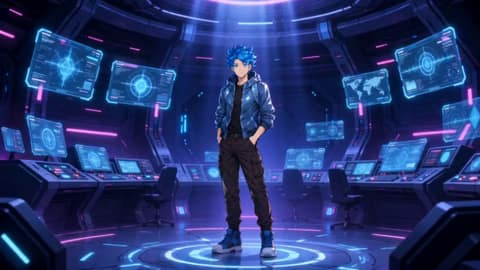 Welcome to the Mainframe
 Savon de minuit
 Er passero ferito
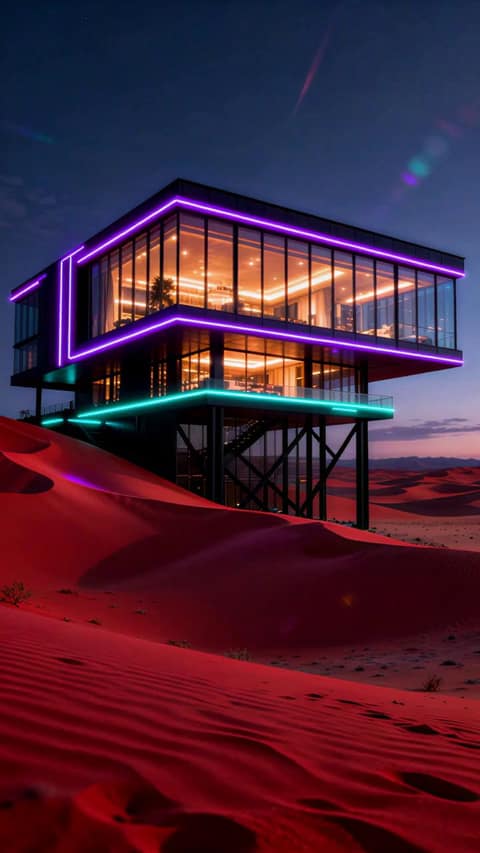 Top Floor Itch
 Letting Everyone Down
 Shoes On Happy Song
What the six examples would cost today
| Example | Style | Tier | Length | Credits, same settings | About, on Growth |
|---|---|---|---|---|---|
| Welcome to the Mainframe | Anime | Ultra | 6:47 | 8,140 | $159 |
| Top Floor Itch | 3D Render | Ultra | 1:10 (cut) | 1,400 | $27 |
| Savon de minuit | Anime Realism | Pro | 1:25 | 850 | $17 |
| Er passero ferito | Claymation | Low | 3:21 | 603 | $12 |
| Letting Everyone Down | Pixel Art | Low | 2:42 | 486 | $9.50 |
| Shoes On Happy Song | Pixel Art | Low | 1:52 | 336 | $6.50 |
In the calculator, the price depends on length and tier, not on the style: 15 credits per 5 seconds on Low, 50 on Pro and 100 on Ultra. Dollar figures use the Growth plan ($39 a month for 2,000 credits), so a full-length Ultra video like the anime one needs the Ultra plan or a credit pack. Most AI-video music videos use Low: 74.3% of the 16,965 made on Revid in the last 90 days.
Beat sync or lyric sync: which is better for an AMV?
Many classic AMVs are cut on the beat, so for that feel choose beat timing. Choose lyric timing when the words carry the story.
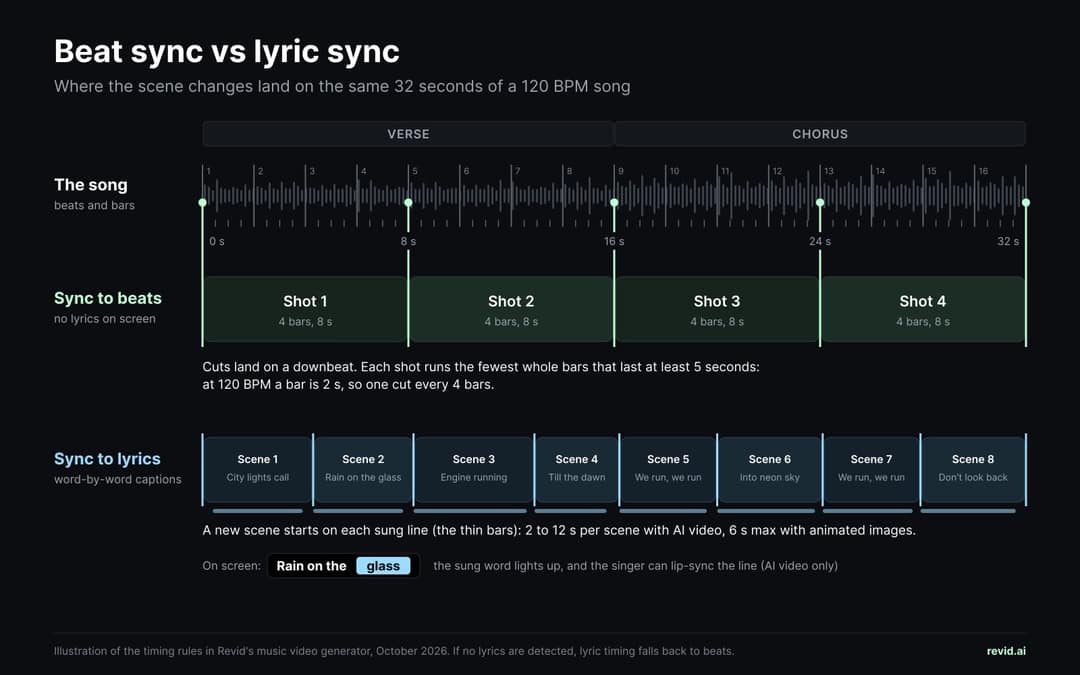
Here is what each mode does in Revid's music video generator. With beat timing, cuts land on downbeats, and each shot runs the fewest whole bars (1, 2 or 4) that last at least 5 seconds, so generated footage stays readable: at 120 BPM, that is a cut every 4 bars, or 8 seconds. With lyric timing, scenes follow the sung lines, each lasting 2 to 12 seconds with AI video and at most 6 seconds with animated images, and word-by-word captions follow the vocals. If no lyrics are detected, lyric timing falls back to beats.
| Sync to beats | Sync to lyrics | |
|---|---|---|
| When scenes change | On the rhythm (downbeats) | On the lines of the lyrics |
| Lyrics on screen | No | Word-by-word captions (can be turned off or restyled) |
| Singer lip sync | Not available | Available with AI video |
| Best for | Instrumentals, EDM, fight-scene energy | Ballads, story songs, sing-alongs |
Only 9.4% of music videos are timed to the beat; the rest follow the lyrics, which is the default timing, so part of the gap is people keeping the default. Beat timing was most common with creators' own media (18%) and AI video (12%). Static images and motion graphics (190 videos) count in the total only.
Source: Revid product analytics (Amplitude): music video generations in the AI music video generator, Jul 25 to Oct 22, 2026 (90 days, UTC), event totals. 54,949 generations by timing setting and media type. Pulled Oct 23, 2026.
Show the data
| Timed to the beats | Timed to the lyrics | Music videos | |
|---|---|---|---|
| All music videos | 9.4% | 90.6% | 54,949 |
| Animated AI images | 7.5% | 92.5% | 32,494 |
| AI video | 12% | 88% | 16,964 |
| Stock video | 9.3% | 90.7% | 3,034 |
| Your own media | 18% | 82% | 2,267 |
Most music videos on Revid are timed to the lyrics: 90.6% of the 54,949 generations in the last 90 days, partly because lyrics is the default setting. Beat timing was most common with creators' own media (18.0%), the closest thing to a classic cut-to-the-beat AMV, and with AI video (12.0%).
Two more choices shape the result:
- AI video or animated AI images. AI video makes characters act and objects move; animated AI images are stills brought to life by camera moves (zoom, pan). Animated AI images is the default and the most used media type (59.1% of music video generations, against 30.9% for AI video). Images cost far less, and they work well for lyric-heavy songs. Lip sync needs AI video.
- One look, one cast. Keep a single style for the whole song, and select a saved character so your lead looks the same in every shot. A character can also sing your lines: see our guide to AI lip sync music videos.
Want to plan the cuts yourself first? The free BPM finder reads your track's tempo and the free music video shot planner turns it into a timed shot list.
How to make an anime music video with AI, step by step
- Add the song. Open the AI music video generator and upload an MP3 or WAV, or paste a Suno link.
- Trim if you want a cut. AMVs usually run the whole song; a vertical teaser can use just the chorus.
- Choose the timing. Beats for the classic AMV feel, lyrics for story and captions.
- Choose the media. AI video for movement and lip sync, animated AI images for a lower cost.
- Pick the style. Anime, anime realism, manga, claymation, 3D render, pixel art or another look. Select a saved character for your lead.
- Write the visual direction. A few lines on the cast, the world and what happens in each part of the song (examples below and in the style guide above).
- Choose the tier and check the price. AI video costs 15 credits per 5 seconds on Low, 50 on Pro and 100 on Ultra, so a 3-minute song costs 540, 1,800 or 3,600 credits. The cost is shown before you generate.
- Edit and export. Regenerate any shot that misses, restyle or remove captions, and export in 720p, 1080p or 4K: 16:9 for YouTube, 9:16 for TikTok, Reels and Shorts.
The step-by-step music video tutorial walks through four real videos, including a claymation and a 3D one, with their exact settings. If you'd rather build the video from your own artwork or photos, the tutorial on making a music video from photos covers it. Comparing tools first? See our comparison of AI music video generators.
Anime prompts that work for music videos
The visual direction is the part that makes the difference. Write it like a director's note: who is in it with a fixed look, where it happens, what happens in each section of the song, and what must never appear. Name the style in plain words (linework, shading, palette) and never ask for characters from an existing series. The synthwave prompt is in the anime section above; here are two more to copy into the visual direction box.
Emotional ballad (lyric sync)
Soft anime style with watercolor skies and gentle light. Cast: MIRA, 17, long dark hair, school uniform with a red scarf. One continuous story, not lyric by lyric: Mira waits for a train that never comes, in summer, then autumn, then snow, on the same small countryside platform. On the chorus, memories of a friend appear as reflections in the train window. Keep the camera slow. End on the first train arriving at sunrise. No text on screen except the captions, no logos.
Hype track, battle anime (beat sync)
High-energy battle anime: bold linework, speed lines, dramatic low angles, sparks and glowing energy. Cast: two rivals, RYU (red jacket, spiky black hair) and SORA (white coat, blue eyes), same look in every shot. VERSES: they train in a ruined arena at sunset. PRE-CHORUS: close-ups of eyes and fists, the crowd falls silent. CHORUS: the clash, every hit on the beat, camera spinning around them. OUTRO: both on the ground laughing, the arena lit by the last light. No blood, no text, no characters from existing series.
FAQ
Is there a free AMV maker?
Revid's sign-up is free with no credit card, and new accounts get free credits to try video generation. Generating full songs regularly needs a paid plan or a credit pack. For a free visual with no account at all, the MP3 to MP4 converter turns a track and a cover image into a video with an animated waveform, with no watermark. Classic AMVs from existing clips are made in ordinary video editors, but those come with the copyright risks above.
Can I make an AMV from my own drawings or photos?
Yes. In the music video generator, choose "Your own media" as the media type and Revid selects the best of your uploaded images and clips for the scenes. The style picker is not offered for this media type, so your drawings keep their own look: draw them in the style you want. The photos tutorial shows the steps. To turn a single photo into an anime-style clip, see our guide on making an AI anime video from a photo.
Which animated style is the most popular for AI music videos?
On Revid, among styles not named after a studio, game or brand, Anime: 971 AI music videos in the 90 days to October 22, 2026, ahead of Claymation (627), Sketch Color (616) and Anime Realism (615). Brand-named presets together made up half of all animated-style videos. Across music videos where the creator changed the style, about half (50.4%) used an animated or illustrated look.
How long can an AI anime music video be?
There is no published maximum. The examples on our music video page run from 37 seconds to 6 minutes 47 seconds, and the anime one is the longest. Cost scales with length, so test a chorus first.
What's the difference between the anime video generator and the music video generator?
The AI anime video generator turns a story, a script or an idea into an anime-style video with a voiceover, music and captions. The AI music video generator starts from your song and builds the scenes around its beat or lyrics. For an AMV, use the music video generator.
Can I post an AI anime music video on YouTube?
Yes. Clearly unrealistic visuals such as animation don't need an AI disclosure on their own. YouTube's disclosure rules do list AI-generated music that is the main focus of the video, so if the song itself was made with AI, disclose it. If you made your animated album art too, our guide on how to animate an album cover covers Spotify Canvas and visualizers.
How much does an animated music video cost with AI?
On Revid, a 3-minute song costs 540 credits on Low, 1,800 on Pro and 3,600 on Ultra, about $10.50, $35 or $70 of credits on the Growth plan ($39 a month for 2,000 credits). The six examples in this post would cost between 336 credits (a 1:52 pixel art song on Low) and 8,140 credits (the 6:47 anime video on Ultra) with the same settings today. For filmed budgets, see how much a music video costs in 2026.
How we got these numbers
- Usage data. Revid's product analytics (Amplitude) record every music video generation started in the AI music video generator. The window is July 25 to October 22, 2026 (90 full days, UTC): 54,949 generations. Style shares use the 49,458 generations with AI visuals (animated AI images or AI video), because the style picker is not offered for stock footage or your own media.
- Animated or realistic. Every built-in style in Revid's style list carries a realistic or an illustration flag. We grouped styles by that flag, kept Default (whose style text asks for photorealism) and Auto apart, and put the custom styles creators made under "Custom and other".
- Brand-named presets. Styles named after a studio, game or brand are counted in the totals but not listed by name.
- What a count means. Counts are generations, not people or finished videos: one creator can generate several times.
- Examples and costs. The six videos come from the 30 public examples on our music video page, picked on September 30, 2026. Settings are read from each video's public page, views are the TikTok or YouTube counts tracked in September 2026 (shown above 1,000 only), and costs come from Revid's public credit calculator with the same settings, run on October 23, 2026.
- Timing rules. The beat and lyric rules above describe the generator as of October 2026 and can change.
Sources
Checked on October 23, 2026.
- Wikipedia, "Anime music video".
- YouTube Help, "Fair use on YouTube".
- YouTube Help, "Disclosing use of GenAI content".
- Revid product analytics (Amplitude), music video generations in the AI music video generator, July 25 to October 22, 2026: 54,949 generations, event totals by visual style, media type, timing and AI video tier. Pulled October 23, 2026.
- Revid, music to video API reference, whose credit calculator priced each example with its own settings on October 23, 2026.
- Revid, 30 AI music video examples with style and tier, picked September 30, 2026; settings read from each video's public page on October 23, 2026.
- Revid University, How to make a great AI music video from your song, October 21, 2026.
- Revid University, How to make a music video from your photos.