On this page
To make an AI movie trailer, compress your story into a one-sentence promise, map it to seven beats (cold open, setup, disruption, escalation, money shot, title card, button) across 60 to 90 seconds, then prompt each shot separately in an AI movie trailer generator. Finish with a sound pass and a human edit.
Most AI trailers fail the same way. You type “make a cinematic trailer for my thriller” and get back gorgeous shots that all sit at one energy level: a mood board with a voiceover. That is the slideshow problem, and better models do not fix it. A trailer is not your story made shorter. It is a controlled climb with contrast built in, and the AI only produces one when you hand it that structure.
- Beats in a trailer, from cold open to button
- 7
- Trailer anatomy in this guide
- Typical length of an AI movie trailer
- 60-90 s
- Trailer anatomy in this guide
- Credits per 5 seconds of premium AI video on Revid
- 100-130
- Revid credit estimate
- Maximum length of a YouTube Short since October 2024
- 3 min
- YouTube Official Blog, October 2024
AI trailer production in 6 steps
- Write the trailer promise. Squeeze the story into one sentence with a protagonist, a goal, a threat and a twist.
- Build a beat sheet. Map the promise to seven beats, each with a specific image.
- Write the trailer script. Voiceover, dialogue fragments and title cards, each with its own job.
- Plan coverage. Prompt individual shots (wide, closeup, insert), not whole scenes.
- Generate and cut. Paste a structured brief into an AI movie trailer generator, then regenerate the weak shots.
- Add sound and export. Layer ambience, hits, risers and silence, then export 9:16 for social or 16:9 for YouTube and pitches.
What is the structure of a movie trailer?
A trailer is a promise, not a summary. It makes the audience feel the world, sense the stakes and want to know what happens. Trailer editor Derek Lieu describes most effective trailers as a cold open plus three acts: start strong, pull back to establish, then build to a climax. StudioBinder's guide to making a movie trailer frames it the same way: establish characters, introduce conflict, raise stakes, tease without explaining.
Both rest on contrast. If everything is loud, nothing feels loud. The escalation only lands because a quiet moment came before it.
Here is the anatomy of a 60 to 90 second AI trailer:
| Beat | Job | Timing |
|---|---|---|
| Cold open | Grab attention with an image, line, mystery or shock | 0 to 5 s |
| Setup | Show the world, the protagonist and the tone | 5 to 20 s |
| Disruption | Introduce the problem, threat, secret or impossible choice | 20 to 35 s |
| Escalation | Fast intercutting, rising music, stronger images | 35 to 60 s |
| Climax (money shot) | The biggest visual or emotional moment | 60 to 75 s |
| Title card | Let the audience absorb the promise | 75 to 82 s |
| Button | A final joke, scare, line, twist or image | 82 to 90 s |
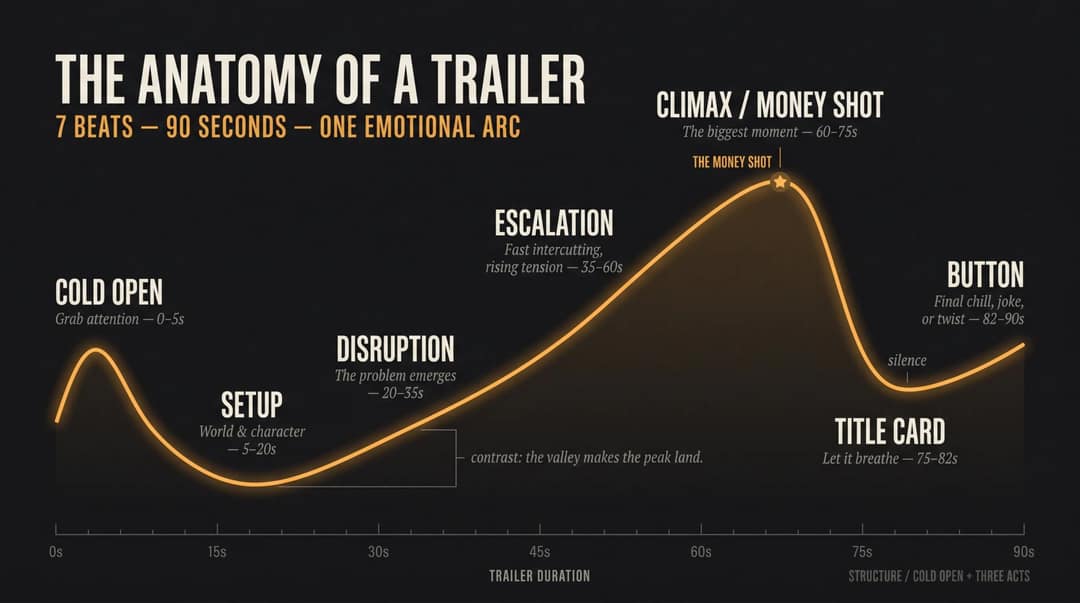
The money shot is the image the whole trailer builds toward. In film, a money shot is the memorable, commercially important image that sells the scale, the creature, the emotion or the reveal. AI footage can feel disposable, so you need at least one frame that would work as a poster: a lone astronaut in a cathedral made of bone, a bride seeing her dead husband in the mirror, the monster visible for one second.
Why most AI trailers look like a slideshow
Most creators generate clips, not coverage. Coverage is the filmmaking word for the raw material of a scene: wide shots, closeups, reaction shots, inserts, movement, and moments at different energy levels. Ten beautiful clips with the same framing and mood, cut to epic music, look expensive and feel empty, because the energy never changes.
Better models have not removed the problem. A 2025 survey of generative AI for film creation found that artists still rank consistent character movement, camera control and character consistency as top priorities, which is exactly where weak AI trailers break first. A slideshow made with a better model is still a slideshow.
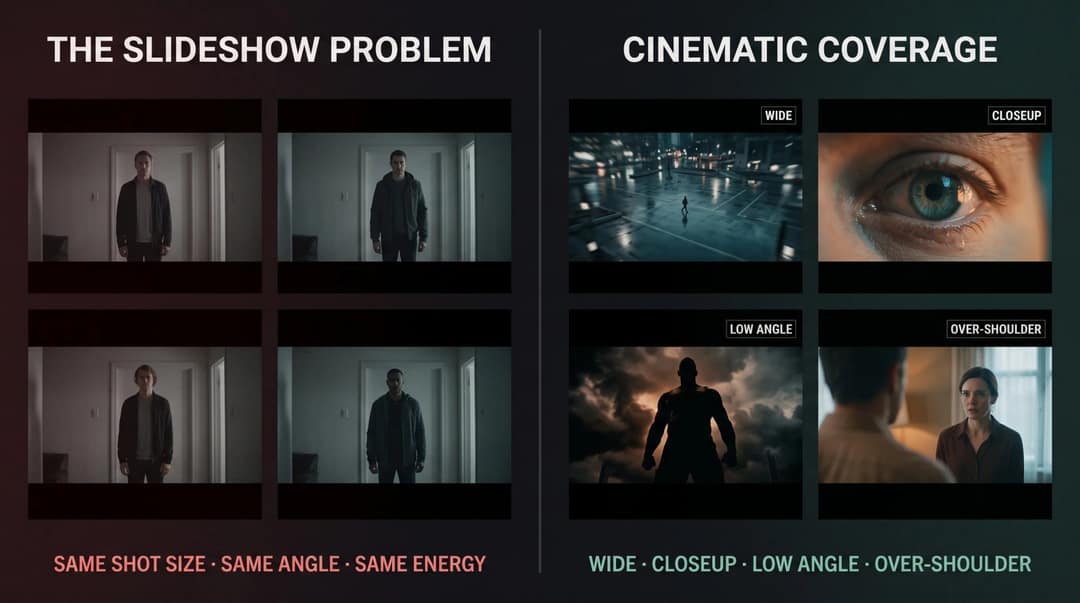
What cinematic AI trailers do differently:
- Shot variety: wide, medium, closeup, insert, POV, silhouette, aerial and over-the-shoulder, not five versions of one framing.
- Camera intention: one movement per shot, chosen for a feeling.
- Visual continuity: the same protagonist, wardrobe, palette, lighting logic and world rules in every shot.
- Audio-led editing: cuts that land on hits, risers, silences and voiceover pauses.
- A human pass: the AI assembles; you decide what earns a place.
How to turn your story into a trailer promise
The best source material has a clear genre, a simple central conflict, a visible world, a threat you can show rather than talk about, three to six moments that can become beats, one line that can be the hook, and one image big enough to be the money shot.
Quiet, internal stories can work, but the trailer has to turn internal stakes into visible action:
- Weak direction: “A man deals with grief after losing his wife.”
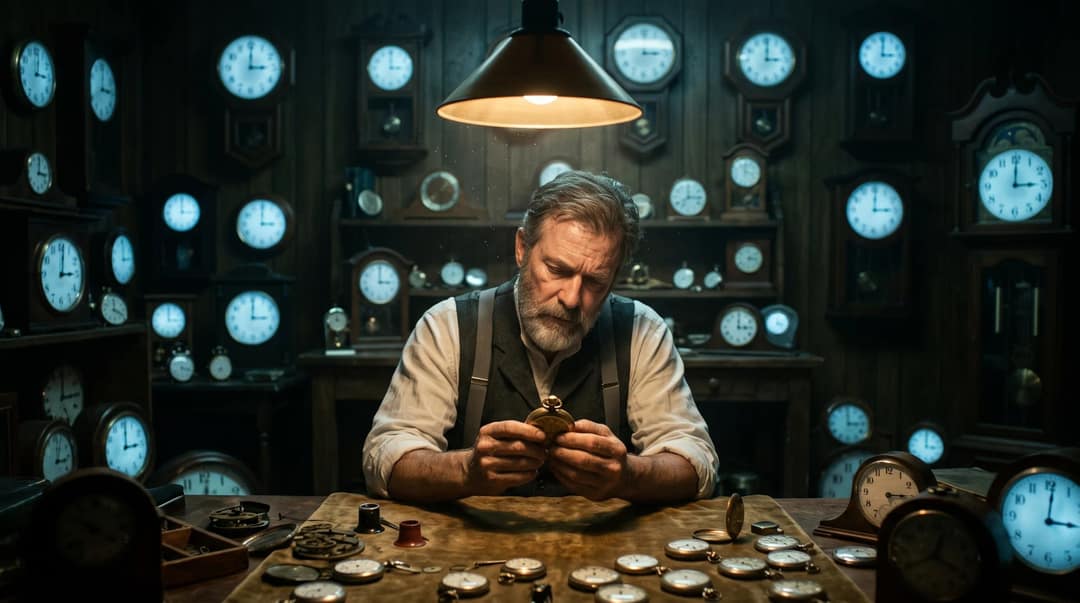
- Trailer direction: “A grieving watchmaker discovers every clock in his town stops at 3:17 AM, the exact time his wife died. Each night, he hears one more second of her voice.”
Same emotional story, but now the AI has images to render: stopped clocks, a dark workshop, an obsession, a voice.
Answer seven questions before you generate anything:
- Who is this about, and what do they want?
- What interrupts their life?
- What is the impossible choice or threat?
- What is the trailer's emotional flavor?
- What is the biggest image in the whole story?
- What should the viewer feel at the end?
- What must the audience not learn until the film?
Then compress the story into one sentence:
A [type of protagonist] must [goal] before [threat], but [twist or choice] forces them to [terrible decision].
For a moon story: “A disgraced astronaut must return to a silent moon base before Earth loses contact forever, but the voice guiding her home belongs to a crew member who died ten years ago.” That sentence is the spine, and every shot serves it. If you only have a rough idea, a free AI script generator can draft a premise and beats for you to rewrite.
Prompt to try
Create a 60-second 9:16 cinematic horror trailer about a lighthouse keeper on a remote island who notices the beam now lands on a ship that sank 40 years ago. Cold open on the lighthouse lamp turning on by itself, then follow seven beats: setup, disruption, escalation, a money shot of the ghost ship lit in the storm, a title card THE LAST LIGHT, and a whispered button line. Style: cold grey-blue palette, rain, shallow depth of field, slow push-ins, minimal piano rising to deep hits with silence before the title.
How to build a trailer beat sheet
A beat sheet is not a plot outline. It maps what the audience feels, beat by beat, with a concrete image for each. It works like a rough storyboard for your video, done before you generate a single frame.
| Beat | Purpose | Example |
|---|---|---|
| Cold open | Instant mystery | The abandoned moon base lights turn on by themselves. |
| Setup | Normal world and main character | A retired astronaut living alone near the sea. |
| Inciting signal | The story engine starts | A transmission arrives from the abandoned base. |
| Stakes card | Emotional punch | SOME SIGNALS SHOULD STAY BURIED |
| Escalation | Fast visual montage | Launch, empty corridors, broken helmets, impossible footprints. |
| Turn | Twist | The signal is coming from inside her old suit. |
| Money shot | Biggest image | The moon surface splits open with blue light beneath it. |
| Title | Release | MARE TRANQUILLITATIS |
| Button | Final chill | A dead crew member whispers: “You brought it back.” |

Notice what is missing: the plot. The sheet moves from calm to mystery, dread, escalation, silence and reveal, and every beat names something the AI can actually render.
How to write a trailer script
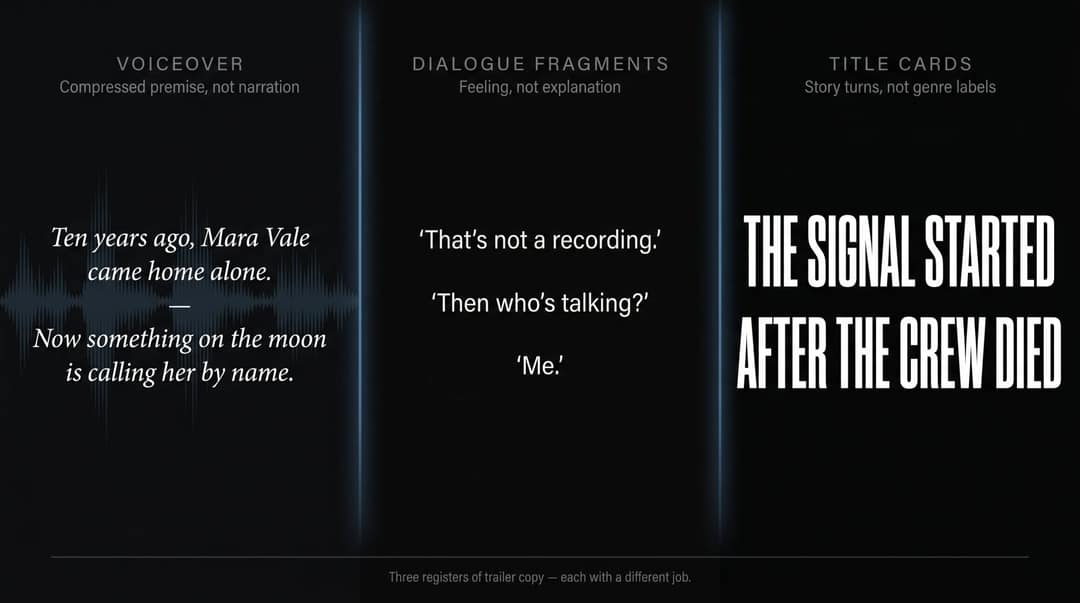
A trailer script has three kinds of copy, and each does a different job.
Voiceover: compressed premise, not narration
Voice123's guide to movie trailer scripts describes trailer voiceover as compressed premise, setting and tone, not a plot summary read aloud. Use it for clarity and let the images carry the emotion.
- Weak: “Mara is an astronaut who lost her team ten years ago. Now NASA wants her to go back to the moon because a signal appeared.”
- Better: “Ten years ago, Mara Vale came home alone. Now something on the moon is calling her by name.”
The better version leaves five questions open. That is the trailer doing its job.
Dialogue fragments: feeling, not explanation
Dialogue should feel more human than the voiceover: short lines that reveal how something feels, never what is happening.
“That's not a recording.” “Then who's talking?” “Me.”
Three lines, no exposition, and the viewer leans in.
Title cards: story turns, not genre labels
Derek Lieu's advice on writing trailer title cards separates weak cards (generic, unconvincing, forgettable) from strong ones that work as turns in the story. Compare “THIS SUMMER / ONE MAN / MUST FACE HIS DESTINY” with “THE SIGNAL STARTED / AFTER THE CREW DIED.” The second raises a new question; the first raises nothing.
Rules for trailer title cards:
- Keep them to 2 to 7 words.
- Make them specific to your story, never genre boilerplate.
- Place them right before escalation moments.
- Land a sound hit on the reveal.
- Skip hype words unless the trailer is a parody.
How to plan AI trailer shots before you generate
Prompt individual shots, not scenes
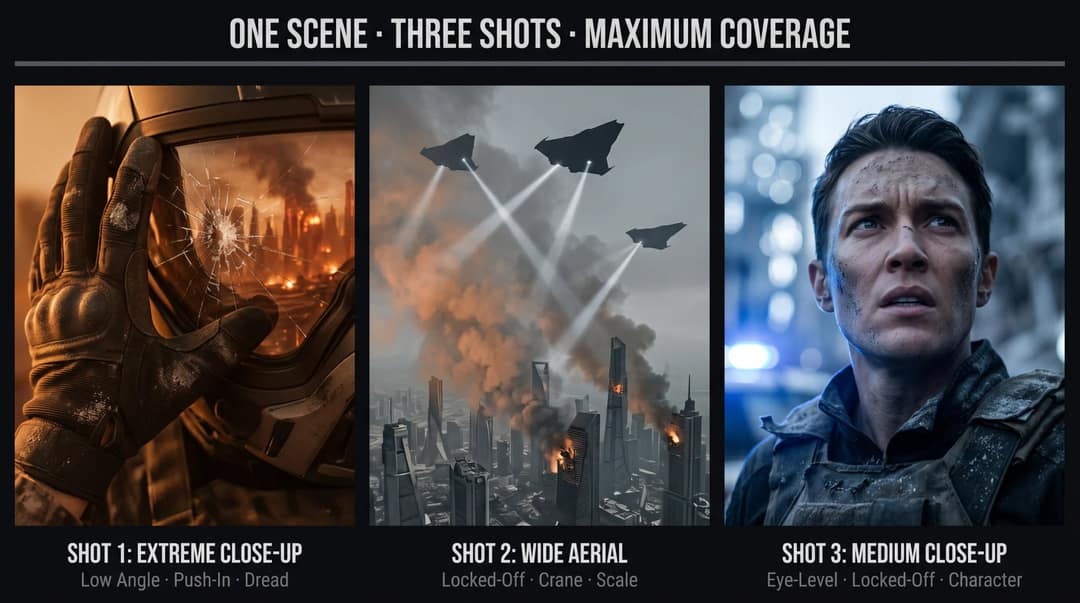
Instead of “Show a battle in a futuristic city,” prompt three shots of the same moment:
- “Low-angle closeup of a soldier's shaking hand gripping a cracked helmet, burning futuristic city reflected in the visor, slow push-in, orange smoke, handheld tension.”
- “Wide aerial shot of the same city under attack, three triangular ships crossing the skyline, searchlights cutting through smoke, slow descending crane movement.”
- “Closeup of the protagonist looking up, ash on face, blue emergency lights flickering, shallow depth of field, fear turning into resolve.”
Cut together, they read as a scene. Generated as one prompt, they give you one clip. A free AI video prompt generator suggests camera directions for each shot, and Revid's AI scene generator turns one described moment into wide, medium and close-up shots that cut together.
Keep your character consistent across shots
Write one character line (age, hair, wardrobe, palette, lighting) and paste it unchanged into every prompt. Keep the emotional progression consistent too.
Vary everything else: shot size, angle (low, high, eye level, over the shoulder), background, and camera motion. That is what turns twelve AI images into one character with an arc.
Use one camera move per shot
Too much motion looks like a demo reel. Pick one dominant move per shot: a slow push-in for dread, handheld shake for panic, a locked-off frame for unease, a crane reveal for scale, an orbit for obsession. Mixing several moves in one shot is where AI video tends to warp and glitch.
AI cinematic trailer template (copy and paste)
Paste this brief instead of your screenplay, then swap in your genre, character line and beats. Keep the structure and the Avoid line.
Create a cinematic AI movie trailer from this brief.

Genre: psychological sci-fi thriller
Format: 90 seconds, 16:9 horizontal
Tone: eerie, emotional, mysterious, slow burn into high tension
Visual style: cold blue moonlight, realistic cinematic lighting, practical sci-fi, lonely wide shots, closeups with shallow depth of field
Main character: Mara Vale, 40s, former astronaut, tired but intense, short dark hair, grey flight jacket
Trailer structure:
1. Cold open: abandoned moon base lights turn on by themselves
2. Setup: Mara living alone, listening to an old mission recording
3. Disruption: a new signal arrives from the moon base
4. Stakes card: SOME SIGNALS SHOULD STAY BURIED
5. Escalation: launch, empty corridors, cracked visor, impossible footprints, alarms
6. Twist: the signal is coming from Mara's old spacesuit
7. Money shot: the moon surface splits open with blue light beneath it
8. Title card: MARE TRANQUILLITATIS
9. Button: a dead crew member whispers, "You brought it back."

Voiceover style: low, restrained, cinematic, not cheesy
Music: minimal piano at first, rising pulse, deep trailer hits, silence before the title
Text cards: bold, short, dramatic; not every line captioned
Avoid: slideshow pacing, random unrelated characters, generic explosions, over-explaining the plotThe Avoid line matters as much as the structure: AI tools follow constraints better when you say what not to do.
Median seconds
Revid has since moved its base tier to Grok Imagine 1.5 (October 14, 2026), which is not timed here.
Source: Revid production data: 713,649 AI video clips generated Jun 29, 2026 to Sep 26, 2026.
Show the data
| Median seconds | |
|---|---|
| MiniMax H3 Max Turbo | 23 |
| MiniMax H3 Max | 31 |
| Seedance 2.5 | 400 |
| Seedance 1.0 Pro Fast | 69 |
| Seedance 2.0 Mini | 374 |
| Seedance 2.0 | 303 |
How to make an AI movie trailer in Revid
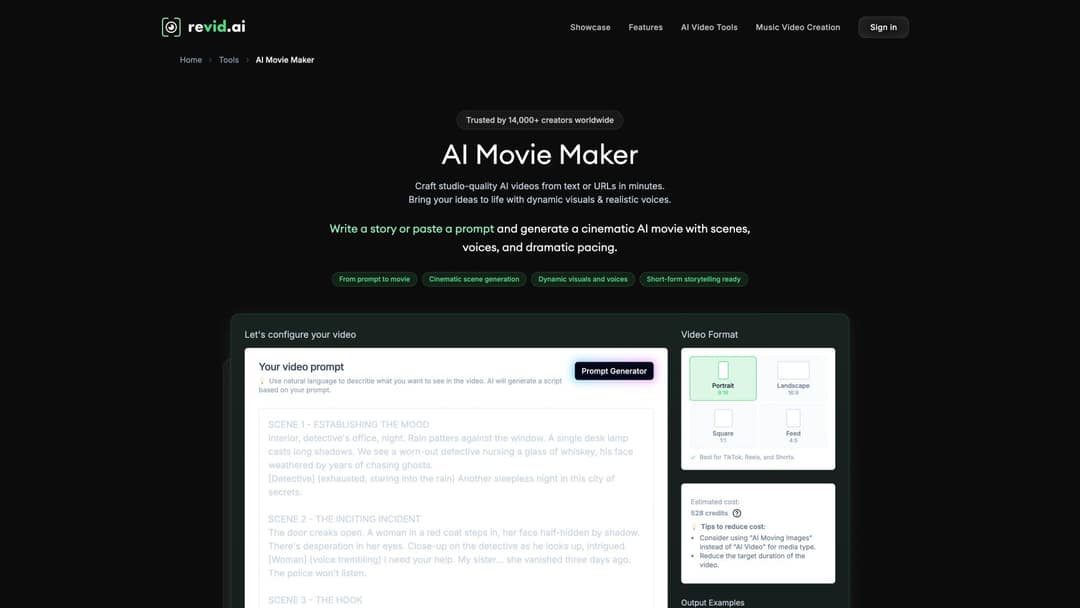
- Open the AI movie trailer maker and pick the format: Portrait 9:16 for TikTok, Reels and Shorts, or 16:9 for YouTube and pitches (Square 1:1 and Feed 4:5 are also available). If you need both, start with 16:9.
- Paste the structured brief above. For a longer story with dialogue scenes rather than a trailer, the AI movie maker takes a script or idea and writes the scenes.
- Check the credit estimate before generating. Premium models cost 100 to 130 credits per 5 seconds of video, so a full premium trailer adds up.
- Review the first render as raw material, then regenerate weak shots. You can choose the model per scene (Seedance 2.5, MiniMax Hailuo H3, Wan 3.0 or Google Veo 3) without redoing the whole trailer.
- Fix timing, text cards, voice and music in the timeline editor. Revid has 1,000+ AI voices in 70+ languages, and voice cloning on the Elite plan and above.
- Export in 720p, 1080p or 4K at 30 or 60 fps, or publish directly to TikTok, Instagram and YouTube. For a second aspect ratio, duplicate the project and switch the copy to the other format in the editor.
Use this checklist on every render:
- Do the first five seconds create curiosity?
- Can someone tell the genre with the sound off?
- Does every shot reveal story, emotion or scale?
- Are there at least three closeups?
- Is there one unmistakable money shot?
- Do the text cards feel specific?
- Does the music build, pause and release?
If a shot is just cool AI footage with no beat behind it, cut it. A trailer is not rewarded for more shots; it is rewarded for the right shots in the right order. For lighting and look settings, see how to create cinematic videos in Revid.
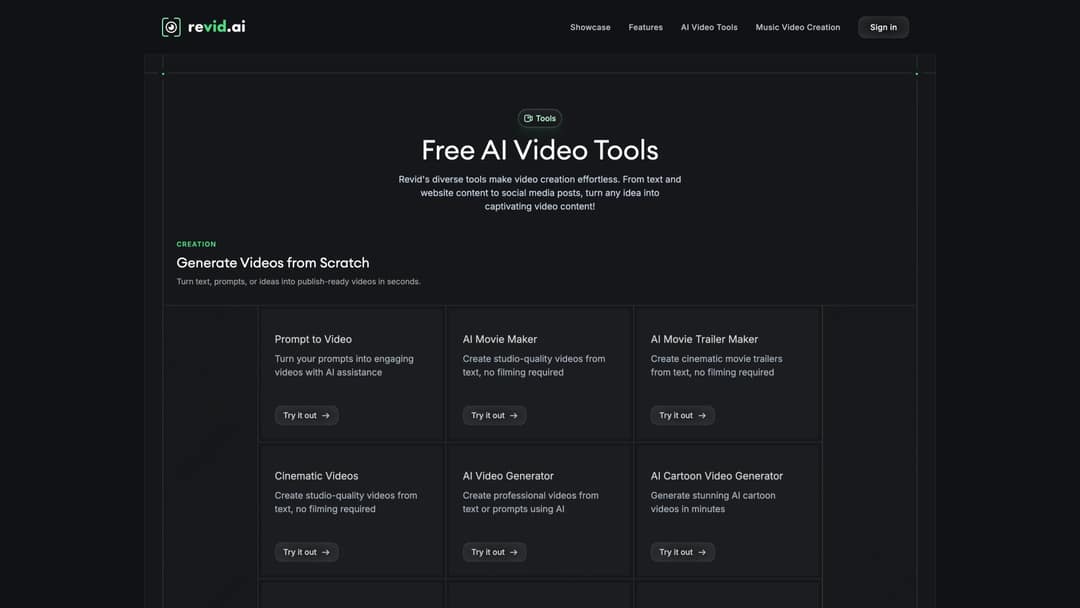
Which AI movie trailer generator should you use?
The right tool depends on whether you want a finished trailer or raw shots to cut yourself.
| Tool | What you get | Best for | Starting price |
|---|---|---|---|
| Revid AI Movie Trailer Maker | A finished trailer: script, multi-scene AI visuals, voice-over, captions, music, timeline editor, direct publishing | Social and pitch trailers built from a brief | $39/month (Growth) |
| Runway | High-quality clips (Gen-4.5) with shot-level control: camera moves, relighting, object removal | Hero shots you assemble yourself | $15/month |
| Higgsfield | Clips with cinematic camera presets (dolly, crane, FPV, bullet time) | Stylized camera moves on single shots | About $15/month, billed yearly |
| Premiere Pro or DaVinci Resolve | Manual editing of every cut, no generation | A final cut where you control each frame | See vendor pricing |
If every shot of your trailer will be hand-built and hand-edited, a clip lab plus a professional editor fits better. If you want a complete trailer from a beat sheet in one place, Revid does the assembly. The Revid vs Runway comparison covers that trade-off in detail.
How to design trailer sound
The gap between “AI made a video” and “this feels like a trailer” is mostly sound. Derek Lieu's breakdown of trailer sound design shows how dense trailer audio really is: on-screen actions are sweetened or entirely rebuilt with effects.
Build the stack in seven layers:
- Ambience: wind, room tone, ship hum, fluorescent buzz. It sets the world before the music arrives.
- Pulse: a low rhythmic tension under the whole edit, barely there at first.
- Risers: build into cards, reveals and the money shot.
- Impacts: bass hits, booms and metallic slams that land on cuts.
- Whooshes: for fast cuts and card reveals.
- Silence: the cheapest effect you have. Use it before the title, before a reveal or after a hit.
- Button sting: the final sound after the title (a whisper, a scare hit, a glitch).
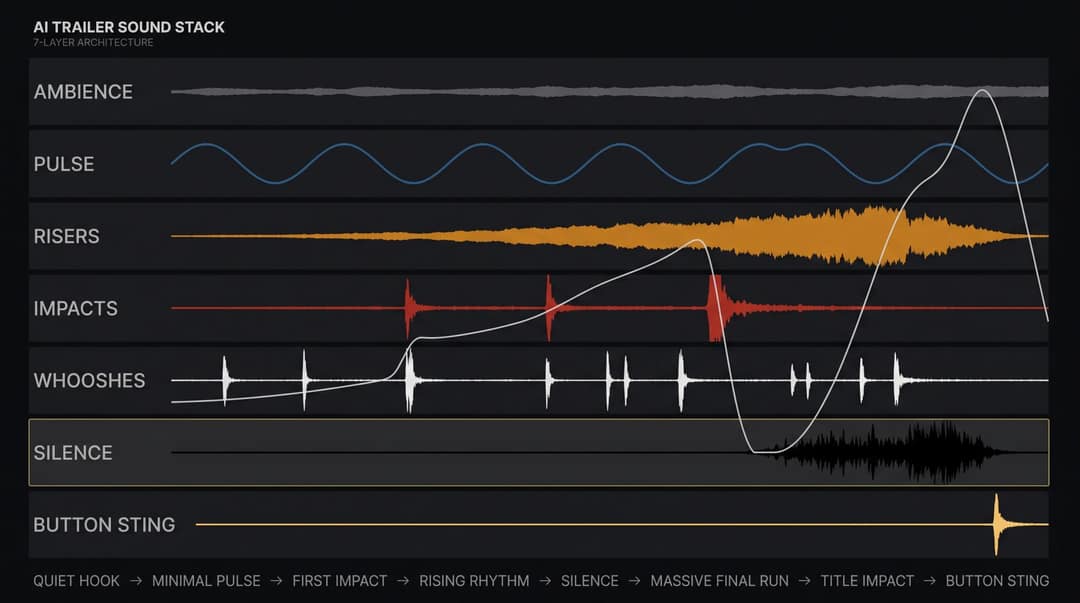
The most common music mistake is keeping it loud from start to finish. The shape that works: quiet hook, minimal pulse, first impact, rising rhythm, drop to silence, massive final run, title impact, button sting. The silence is what makes the last hit feel huge.
For music, the YouTube Audio Library offers free production music and sound effects for YouTube videos. Paid libraries have more polished trailer cues. Royalty-free does not mean rule-free, so read each license before you publish.
AI trailer examples worth studying
Curious Refuge's Wes Anderson-style trailers for Star Wars and Lord of the Rings drew millions of views because the concept fit in one sentence, the visual grammar was instantly recognizable and the humor was built into the structure. Specificity beat generic “cinematic.”
The AI short “Genesis” became a reference point for AI filmmakers because it combined world-building, mythic imagery, a cohesive tone and real trailer editing instincts. The breakthrough was curation and editing taste, not the model.
The Frost is useful because its creators described the process honestly: careful continuity, varied prompts, cinematography language in every generation, and hundreds of hours of directed work by a team.
WIRED's profile of AI filmmaker Neural Viz gives the most useful strategic lesson: the creator picked a mockumentary format because it fit what AI does well. Pick a trailer form that plays to the tool. Found-footage horror, a fake archival documentary, a transmission from another civilization or a noir monologue needs fewer perfect full-body action shots than a superhero-scale trailer.
Common AI trailer mistakes and how to fix them
| Mistake | Why it fails | Fix |
|---|---|---|
| Asking for “a cinematic trailer” | Too vague; produces a generic montage | Give a beat sheet, character line, style and shot list |
| Summarizing the whole plot | Kills curiosity | Tease the conflict, never the resolution |
| No cold open | No reason to keep watching | Open on your best mystery line or image |
| Same shot size throughout | Reads as a slideshow | Mix wide, medium, closeup, insert and POV |
| Drifting protagonist | Breaks believability | Paste the same character line into every prompt |
| Camera motion in every shot | Warping and glitches | One clear move per shot |
| Generic title cards | Feels formulaic | Make each card a story turn |
| Constant epic music | No contrast, no release | Use drops and silence |
| No sound effects | Visuals feel weightless | Add hits, risers, whooshes and ambience at edit points |
| Too much voiceover | Sounds like an audiobook | VO for clarity, dialogue for emotion, silence for impact |
| Copying famous IP or real actors | Legal and monetization risk | Original characters and worlds |
| Accepting the first render | The AI picks convenience, not taste | Regenerate weak shots and tighten pacing by hand |
Concept trailers with AI: rules for pitches and fan trailers
Concept trailers with AI are the cheapest way to pitch an original film, series, book or game before anything is shot. They also sit in the riskiest legal territory of any AI video, so check four things before you publish. This is practical guidance, not legal advice.
Disclose realistic AI content. YouTube requires creators to disclose realistic AI-generated or altered content, such as a realistic scene that never happened; clearly stylized or fantastical content does not need it. Since May 2026, YouTube also labels undisclosed photorealistic AI automatically, and the label is permanent for content made with Veo. TikTok likewise requires a label on realistic AI images, audio or video. On both platforms the label alone does not reduce distribution.
Document your authorship. The U.S. Copyright Office's guidance on AI makes human authorship the deciding factor. AI-assisted work can be protected where your creative contribution is substantial, so keep script drafts, beat sheets, shot notes, prompt history and edit decisions.
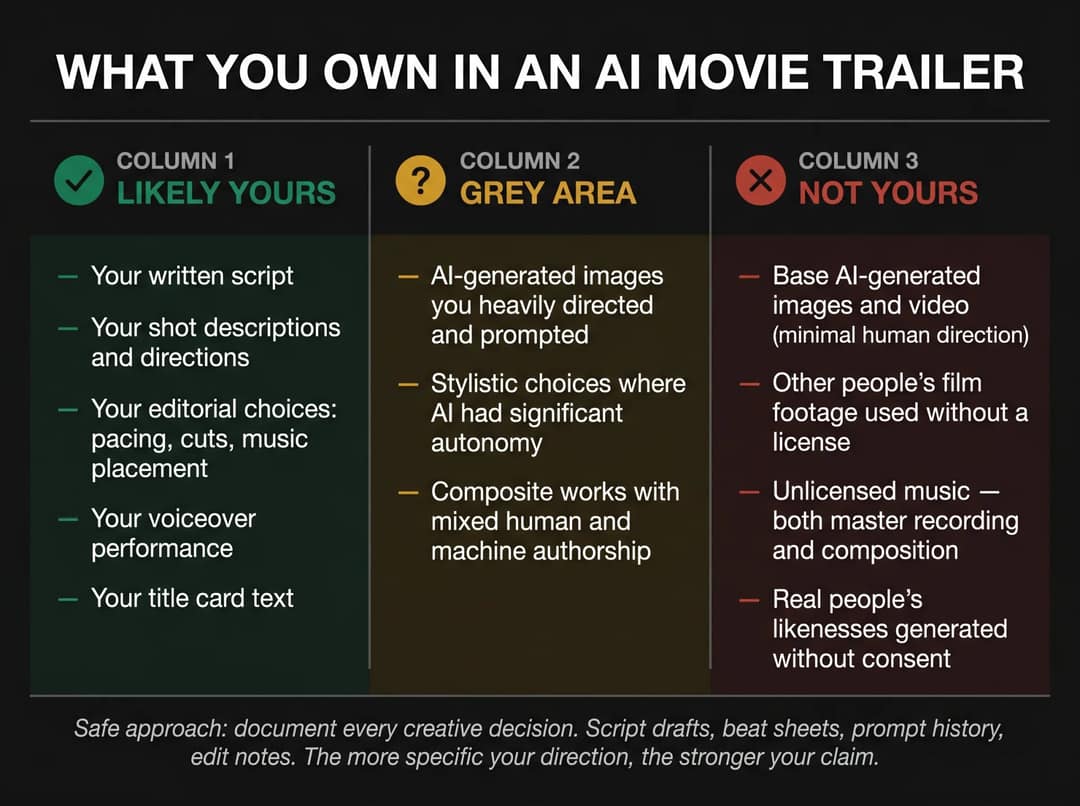
Get consent for real faces and voices. Do not generate realistic versions of real actors without permission. SAG-AFTRA's AI resources center on consent and compensation for digital replicas, and the AI Val Kilmer western used his likeness with his estate's permission. That is the model to follow.
Be careful with fan trailers. Deadline's investigation of fake AI movie trailers on YouTube shows the demand, and the confusion and studio pressure that come with it. YouTube's channel monetization policies do not let videos that use realistic visuals to fake events earn money, and they exclude mass-produced, template-like AI content. Give every trailer its own beat sheet, characters and look, and build on original worlds inspired by a genre rather than unofficial versions of studio films.
The index leans toward videos that surface in hashtag and keyword searches, so its view counts run high: compare the groups, not the absolute numbers.
Source: Revid TikTok index: 2,377,477 TikToks with AI labels per video, snapshot of Sep 15, 2026. Median views estimated from view buckets.
Show the data
| Median views | Share past 1M views | |
|---|---|---|
| AI generated | 151.7K | 19.5% |
| Animation/Cartoon | 121.3K | 14.2% |
| Mixed | 87.3K | 11.4% |
| Real shot | 67.3K | 9.5% |
Vertical or 16:9: which trailer format to export
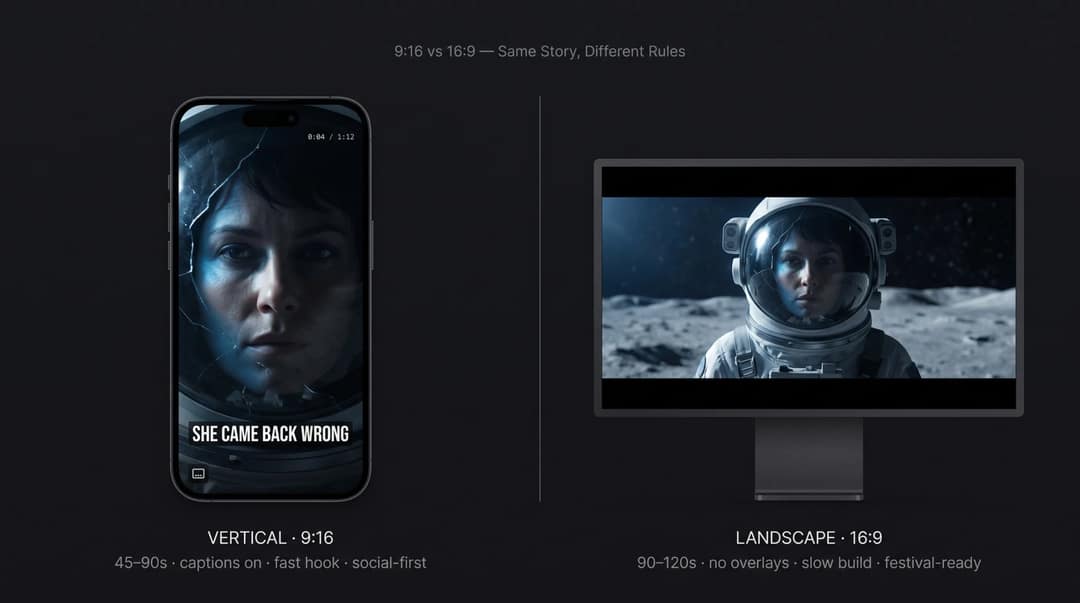
9:16 vertical is for TikTok, Instagram Reels and YouTube Shorts: 45 to 90 seconds, captions on, a hook in the first seconds. YouTube Shorts can now run up to 3 minutes, but a trailer rarely earns that much time. Platform matters for AI footage too: in Revid's study of AI videos versus real footage, AI-generated TikToks averaged twice the views of real footage, while on X, Instagram and Threads AI visuals clustered in the lowest engagement tier. If your trailer is fully AI-generated, test it on TikTok first.
16:9 is for YouTube, websites, pitch decks and festivals: 90 seconds to 2 minutes, no text overlays beyond title cards, and room for a slower build. If you are pitching a producer, send this version.
FAQ
Can I make an AI movie trailer for free?
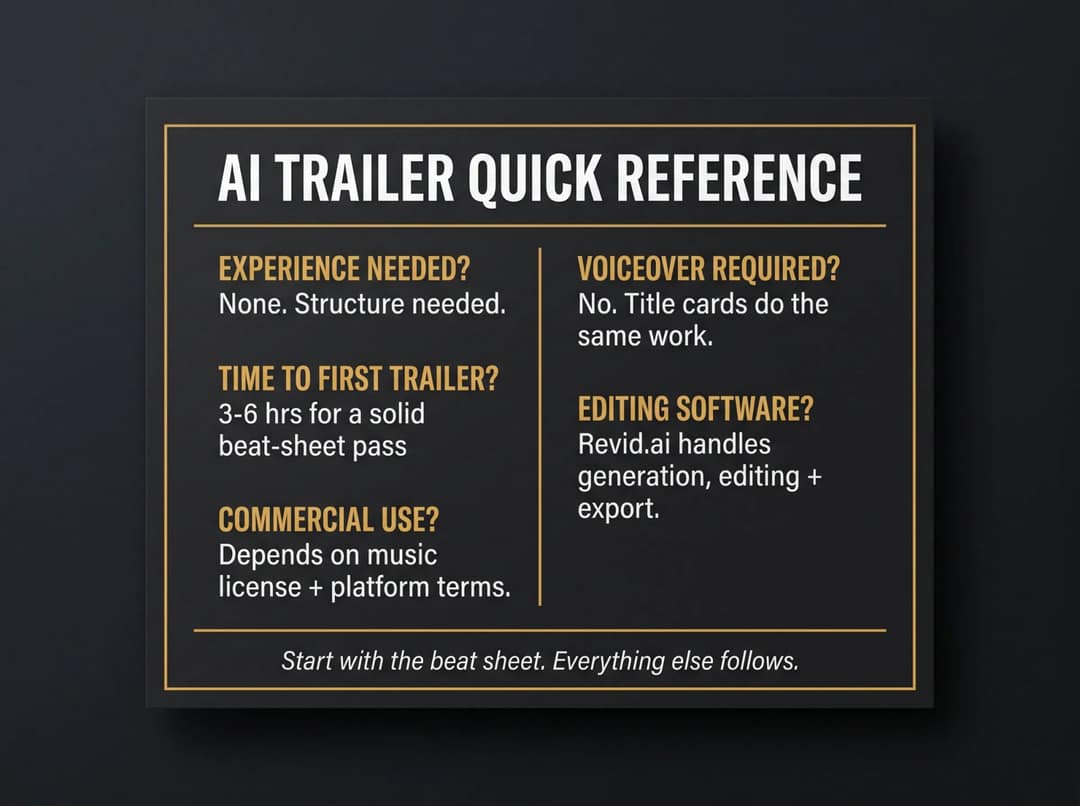
Partly. Revid sign-up is free and new accounts get free credits to try video creation, no credit card needed. Regular creation then uses credits from a paid plan starting at $39/month (see Revid pricing for current plans). The beat sheet, the script and YouTube Audio Library music cost nothing.
How long should an AI movie trailer be?
45 to 90 seconds for TikTok, Reels and Shorts, and 90 seconds to 2 minutes for YouTube and pitches. Go longer only if every extra second earns its place.
Do I need a full script to make an AI trailer?
No. You need a clear protagonist and conflict, three to six strong visual moments and a one-sentence promise, written as a structured brief like the template above. A 90-page screenplay pasted into a prompt box gives the AI less direction, not more.
Does labeling my AI trailer as AI-generated hurt its reach?
No. YouTube and TikTok both say the AI label alone does not affect distribution or eligibility to earn. On YouTube, repeatedly failing to disclose realistic AI content is what risks labels being applied, removal or suspension from the Partner Program.
Sources
- Revid production data: 713,649 AI video clips generated Jun 29, 2026 to Sep 26, 2026.
- Revid TikTok index: 2,377,477 TikToks with AI labels per video, snapshot of Sep 15, 2026. Median views estimated from view buckets.
- YouTube Official Blog, Tall updates coming to Shorts (October 2024)
Charts and figures checked on November 6, 2026.