Video Script Writing: How to Write a Video Script in 6 Steps
How to write a video script: the two-column format, a 6-step process, sample scripts for tutorials, products and romantic videos, and Revid data on how much a short video should actually say.
On this page
A video script is the written plan of everything viewers see and hear. To write one, open with a hook, set up the promise in one line, deliver the value in order, pay it off and end with one call to action. Write it in two columns (visuals, audio) and read it aloud before you film.
The most common mistake is writing too much. In Revid's analysis of 176,367 TikToks with 1,000+ likes posted between October 2025 and October 2026, videos with under 40 characters of speech had a median of 123K views, nearly double the 68K of videos that talked from start to finish. The script that performs is usually the one you cut hardest.
What is a video script?
A video script is the written plan for a video: the spoken words (dialogue or voice-over), the on-screen text, and the shots or visuals that go with each line. It is shorter and looser than a film screenplay. Its job is practical: it lets you film or generate the video in one pass without improvising the parts that matter.
Which video script format should you use?
Most video scripts use one of three formats:
| Format | What it looks like | Best for |
|---|---|---|
| Two-column (A/V) script | Visuals on the left, audio on the right, one row per beat | Tutorials, explainers, ads, faceless and AI-generated videos |
| Single-column script | Spoken lines in order, shot notes in brackets | Talking-head videos, vlogs, video podcasts, presentations |
| Screenplay format | Scene headings, character names, dialogue blocks | Sketches, narrative shorts and films with actors |
For short-form and marketing video, use the two-column format. It forces you to decide what the viewer sees during every line, which is exactly where weak scripts fall apart.
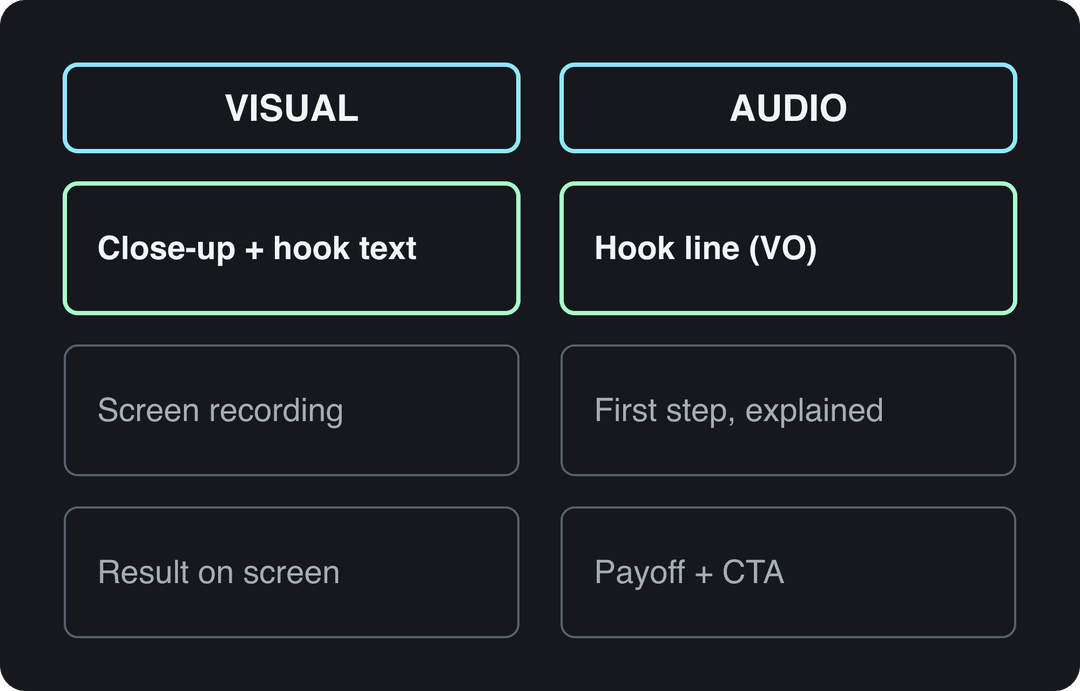
How to write a video script in 6 steps
These six steps work for a 20-second Reel and a 5-minute tutorial alike.
1. Write one sentence: who it's for and what they get
Before any dialogue, decide the video's job: teach something, entertain, or get the viewer to act (buy, sign up, follow). Then finish this sentence: "After watching, [specific viewer] will be able to [one result]."
"After watching, a first-time sourdough baker will know when their dough is ready to bake" is a script brief. "A video about sourdough" is not. If you need two results, you need two videos. If you are stuck for a topic, this list of video ideas for Instagram gives starting points you can narrow down to one result.
Prompt to try
Make a 20-second vertical sourdough tutorial that opens on a flat loaf next to a tall one with the hook "Same flour, same oven. One of these is flat." Show the finger poke test in close-up, explain slow versus fast spring back in short spoken lines, then cut open the airy loaf as the payoff. Warm kitchen lighting, minimal voice-over, bold on-screen captions, end with "Follow for the shaping video."
2. Write the hook first
The first line decides whether anyone hears the second, so write it before anything else, and write five versions. Strong openings do one of four things:
- Show the result: "Same flour, same oven. One of these loaves is flat."
- Name the mistake: "You're proofing your dough by the clock. That's why it's flat."
- Make a specific promise: "Here's how to tell dough is ready, without a timer."
- Start mid-action: open on the finished result, then rewind to how you got there.
You don't need to open with a question. Among TikToks with over 100 million views that have a transcript, Revid's analysis found that 51% open with a statement and 16% with a question. For more strong openings to adapt, use this list of TikTok hooks.
3. Outline the beats
Every script, whatever its length, runs through the same beats:
- Hook: the reason to keep watching.
- Setup: the context in one or two lines. Skip it if the hook already did the job.
- Value: the steps, the proof or the story, one idea per beat.
- Payoff: the result the hook promised.
- Call to action: one ask (follow, comment, visit, buy), never three.
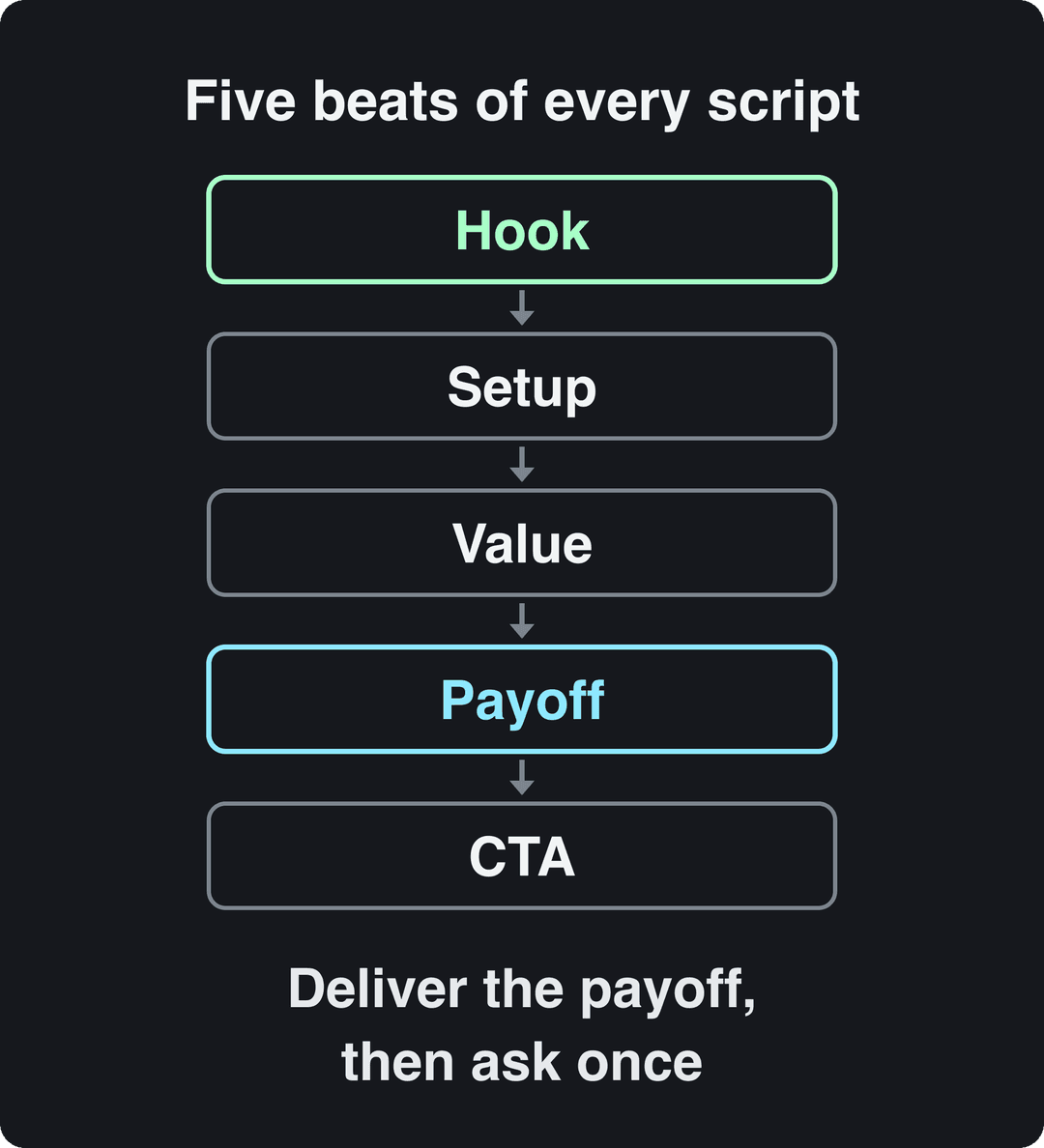
The structural mistake to avoid: holding the payoff until after the call to action. Viewers who feel the promise was kept are the ones who follow. In longer videos, a callback (returning to the hook's image or line at the payoff) ties the script together without repeating the main point five times.
4. Write for the ear, not the page
A script is read aloud, so write the way you speak. Use short sentences, contractions and plain words. Put one idea in each sentence. Round numbers when you say them. Delete warm-up lines such as "In this video, I'm going to show you": the viewer already clicked.
Then read it aloud. If you run out of breath, split the sentence. If you stumble, rewrite the line rather than practicing it.
With two or more speakers, give each one a role so they don't sound identical: one explains, the other asks what the viewer would ask. The back-and-forth does the pacing for you.
5. Fill in the visual column
For every audio line, write what is on screen: the shot, a screen recording, B-roll, a product close-up or on-screen text. Use this rule: if the visual only repeats the words, replace it with something that proves them. "It cuts cleanly" needs a clean cut on screen, not a smiling presenter.
Plan for sound-off viewing as well. Put the hook and the key line on screen as text, and add automatic captions so the video still works muted.
6. Cut, time and test
Read the full script aloud with a timer, at the pace you will actually speak. Cut every line that does not serve the sentence from step 1. Then do a table read with one person from your target audience and ask them to repeat the main point back to you. If they can't, the script isn't clear yet.
Before you film, check five things:
- Hook: would you stop scrolling for the first line?
- Clarity: can the main point be said in one sentence?
- Payoff: does it arrive before the call to action?
- Timing: does the read-aloud time fit the platform and the format?
- Call to action: is there exactly one?
After posting, look at where viewers drop off in your retention graph and fix that beat in the next script. On TikTok, a free TikTok account audit shows which of your videos and formats work best.
Video script example: a two-column sample script
Here is the sourdough example written out. It is a short-form tutorial, and it shows how little speech a good short script needs.
| Beat | Visual | Audio (voice-over) |
|---|---|---|
| Hook | A flat loaf next to a tall one, side by side | "Same flour, same oven. One of these is flat because of one rushed step." |
| Setup | Hands lifting the proofing basket | "The step is the final proof. Here's how to know it's done." |
| Value | Floured finger pressing into dough, slow spring back | "Press a floured finger in. Springs back slowly and leaves a small dent? Bake it." |
| Value | Split screen: fast spring back vs no spring back | "Springs back fast: wait longer. Doesn't spring back: bake it now, shape tighter next time." |
| Payoff | The loaf cut open, showing an airy crumb | "That's the whole difference." |
| CTA | On-screen text: "Shaping guide next" | "Follow for the shaping video." |
Notice what is missing: no introduction, no "hey guys", no recap. The visuals carry the proof, so the voice-over only says what the picture can't. For longer formats, start from these YouTube video script templates, or follow this walkthrough of a YouTube script:
How to write a short video script
Write it as long as the payoff needs, and no longer. Length itself is not the lever it is often said to be: in Revid's 12-month TikTok study, every length bucket from under 15 seconds to 10 minutes had a median between 58K and 76K views, with 61 to 90 second videos at 70K. Marketers lean short too: 71% of marketers in Wyzowl's 2026 video marketing survey believe videos between 30 seconds and 2 minutes are the most effective length.
What matters more is how much the script talks. In the same sample, videos with under 40 characters of speech (a single short line) had a 123K median and 20.2% passed 1 million views. Silent videos had 73K and 14.3%, and videos that talked throughout (300+ characters of speech) had 68K and 11.9%. The sample only includes TikToks that already reached 1,000+ likes, so this shows what top-performing videos have in common, not a guaranteed cause. The full method is in Revid's study of what makes a TikTok go viral.
Videos with just a few spoken words (a line or two) beat both silent videos and videos that talk the whole way through, which were the most common and the weakest.
Source: Revid analysis of 176,367 TikToks analyzed by AI, with 1,000+ likes posted between Oct 1, 2025 and Oct 16, 2026 (61,203 creators)
Show the data
| Median views | Share that passed 1M views | |
|---|---|---|
| No speech | 73.3K | 14.3% |
| Under 40 | 122.7K | 20.2% |
| 40 to 120 | 97.2K | 17.6% |
| 120 to 300 | 91.6K | 16.8% |
| 300+ | 67.7K | 11.9% |
The practical rule for a short video script: if the visual can say it, cut the line. Script the hook and the payoff word for word, and let the footage do the rest.
Platform limits to script around
Each platform sets limits that should shape the script before you write it:
| Platform | Length limits | What the script needs |
|---|---|---|
| TikTok | Uploads up to 60 minutes; Creator Rewards only pays on videos at least 1 minute long | Hook in the first line, on-screen text, payoff before the end |
| Instagram Reels | Up to 20 minutes, but reels over 3 minutes are not recommended to non-followers | Same as TikTok; captions for muted viewing |
| YouTube Shorts | Square or vertical videos up to 3 minutes | Title up to 100 characters; Shorts over one minute with a Content ID claim are blocked |
| YouTube long-form | Uploads over 15 minutes need a verified account | Say the topic early, script chapters, deliver the promise in the intro |
| Up to 15 minutes | Lead with the takeaway, professional tone, captions |
If you plan to monetize on TikTok, script to at least one minute from the start rather than padding later: a padded minute is obvious to viewers.
Choose the emotion before you write a line
The tone of a script matters as much as its words. In Revid's AI analysis of the same 176,367 TikToks, videos driven by outrage had a 156K median (23.7% past 1 million views), humor 121K (19.3%) and sadness 104K, while inspirational videos had only 45K (11.3%). Generic uplifting scripts were among the weakest performers.
High-arousal emotions (outrage, humor, sadness) earned the most views. Calm, inspirational videos earned the least, even though they collect the most likes per view.
Source: Revid analysis of 176,367 TikToks with 1,000+ likes posted between Oct 1, 2025 and Oct 16, 2026 (61,203 creators)
Show the data
| Median views | Share that passed 1M views | |
|---|---|---|
| Outrage | 156K | 23.7% |
| Humor | 121K | 19.3% |
| Sadness | 104.4K | 16.5% |
| Excitement | 92.5K | 15.9% |
| Joy | 89.9K | 18% |
| Informative | 64.1K | 11.2% |
| Neutral | 61.2K | 11.5% |
| Inspirational | 44.6K | 11.3% |
Use this when you write. If your draft sounds like a motivational poster, rewrite it around a tension: a mistake, a myth, a before-and-after, a problem that annoys your audience. Aim any outrage at a problem, never at a person, and keep it true. Humor works best when it comes from the topic itself rather than a joke bolted onto the intro.
Script structures for tutorials, demos, explainers and vlogs
The five beats stay the same; what changes is how much room each one gets.
| Video type | Key beats | Call to action | Typical length |
|---|---|---|---|
| Video tutorial | Result first, steps in order, common mistake, recap | Subscribe or watch next | 3 to 5 minutes (long-form) |
| Product demo | Problem, product in action, key feature, benefit | Buy or learn more | 1 to 2 minutes |
| Explainer | Problem, how it works, benefit | Sign up or try it | 1 to 2 minutes |
| Brand story | Moment of tension, why the brand exists, impact | Visit or follow | 1 to 3 minutes |
| Vlog | One question or event for the day, moments in order, what you learned | Comment or follow | Varies; bullet points, not full lines |
| Video presentation | Takeaway first, a few supporting points, recap | Next step for the audience | Fit the slot you are given |
| Short-form (TikTok, Reels, Shorts) | Hook, one idea, payoff | Follow or comment | Under 3 minutes for reach |
Prompt to try
Create a 30-second vertical product demo for a chef's knife. Open on the knife slicing a ripe tomato under its own weight with the line "This is what a sharp knife does to a tomato," then show a dull knife squashing the same tomato with no narration. Follow with one close-up of the edge, one line answering "does it stay sharp?", and a single on-screen call to action.
Product TikTok script structure: the knife demo format
Product TikToks that sell tend to follow one format, easy to see with a kitchen knife:
- Demo as the hook: the knife slices a ripe tomato under its own weight. Line: "This is what a sharp knife does to a tomato."
- Contrast: a dull knife squashes the same tomato. No words needed.
- One detail: a close-up of the edge or the handle, with one sentence on why it matters.
- Objection: answer the doubt viewers have (price, care, does it stay sharp) in one line.
- CTA: where to get it, said once and shown as on-screen text.
Swap the knife for any product whose benefit is visible, and the structure holds: demonstrate first, explain second.
Romantic video script with visual references
For an anniversary video, a proposal clip or a short love story, add a third column: a visual reference for each beat (a photo you own, a film still or a mood shot you want to match). It keeps the look consistent whether you film it or generate it.
| Beat | Visual reference | Line |
|---|---|---|
| Hook | Close-up of two hands, warm evening light | "I almost didn't go to that party." |
| Setup | Your first photo together, slowly zooming in | "You were the only one who laughed at my terrible joke." |
| Value | Quick cuts of small everyday moments | "Since then: coffee you make too strong, songs you sing wrong." |
| Payoff | Today, the same two hands, same light | "Still the best decision I nearly didn't make." |
| Close | Slow fade on one held frame | "Happy anniversary." |
The structure is the same five beats; the emotion does the work, so keep the lines short and let the images carry the feeling.
Professional video scripting: preparing for a shoot
Professional video scripting adds a production layer on top of the words. Before a shoot with a crew, a client or several people on camera:
- Annotate the script: shot type and angle, music and sound cues, and pacing notes for each row.
- Build a shot list: every shot needed, with location and props, so nothing is missed on the day.
- Make role versions: the director needs visual flow; the sound person needs the audio cues highlighted.
- Run a table read: hear the lines in the presenter's voice and fix anything they stumble on.
- Lock the must-say lines: keep the hook, the claims and the CTA fixed, and allow improvisation elsewhere.
- Plan the review: decide before filming how you will judge the result (retention, comments, clicks).
If you make the same kind of video every week, save the annotated two-column table as your own template so each new script starts with the beats already in place.
Scriptwriting software and AI script tools
You can write a good video script in any document with a two-column table. Dedicated software earns its place when you need industry formatting or team collaboration, and market research firms such as Fortune Business Insights, Verified Market Research and IMARC Group all track scriptwriting software as a growing category.
| Tool | What it does well | Best for |
|---|---|---|
| Final Draft | Industry-standard screenplay formatting and templates | Films, TV and scripted series |
| Celtx | Cloud scripts plus pre-production planning (shot lists, schedules) | Independent productions and teams |
| Fade In | Professional screenplay formatting across operating systems | Screenwriters who want a standalone app |
| Any doc with a two-column table | Fast, free, easy to share for comments | Short-form, ads, tutorials |
| Revid AI script generator | Drafts short-form scripts from a topic or prompt | First drafts of TikToks, Reels and Shorts |
Check each vendor's site for current pricing before you buy. This workshop covers the craft side of scriptwriting if you want to go further:
AI is good at first drafts and bad at specifics. Ask it for ten hooks and a structure rather than a finished script, then add your own examples, numbers and opinions, and cut. When Revid writes a script from a prompt in automations and several of its tools, it first retrieves transcripts of related TikToks with more than 10,000 likes and uses them as references for style and story, so drafts start from formats that already performed. For TikTok specifically, the TikTok script generator writes hooks and scripts in that format.
On YouTube, AI-written scripts do not need an AI disclosure; realistic AI-generated visuals of real people or events do.
The policy details are on YouTube's channel monetization policies page.
Turn your script into a video with Revid
Once the script is final, you don't have to film it. With Revid:
- Paste the finished script into Revid's script to video tool.
- Revid builds scene-by-scene visuals for each line (stock footage, AI images, AI video or motion graphics), with a voice-over in 70+ languages, synced captions and music.
- Fix any scene in the timeline editor, or choose a different AI video model (Seedance 2.5, MiniMax Hailuo, Wan 3.0 or Google Veo 3) for that scene.
- Export up to 4K, or publish directly to TikTok, Instagram and YouTube from one queue.
Because your two-column script already says what each line should show, the visual column becomes the brief for each scene.
FAQ
What does a video scriptwriter do?
A video scriptwriter turns a goal (sell, teach, entertain) into the spoken lines and shot plan for a video: the hook, the structure, the dialogue or voice-over and the visual notes. Solo creators usually write their own scripts; brands and agencies often hire a dedicated video scriptwriter for ads and explainers.
How do you write a viral video script?
Start from a format that already works in your niche, keep the speech minimal, deliver the payoff before the end, and build the script around a clear emotion such as humor or tension instead of a generic inspirational tone. Nothing guarantees virality, but in Revid's TikTok data, challenges and comedy had the highest median views of any format.
Can AI write a video script?
Yes, AI writes a usable first draft in seconds. Your job is to sharpen the hook, add your own examples and cut; scripts that only repackage generic material perform worse and, on YouTube, can fall under the reused or inauthentic content policies.
Should you read a video script word for word?
For voice-overs and ads, yes: tight wording is the point. For talking to camera, rehearse with the full script, then film from bullet points so it sounds natural, keeping only the hook and the call to action word for word.
Do short videos need a script?
Yes, even if the script is three lines. Writing down the hook, the payoff and the call to action before you film is what separates a short video with a point from a clip that viewers swipe past.