

On this page
Most comparisons of these two models open with a scoreboard. One side wins a benchmark, a table of category wins follows, and you're told to buy the winner. That framing is tidy, and it's the wrong question for anyone publishing short video every week.
A benchmark scores a model on prompts someone else wrote, in a configuration someone else chose, judged by a method someone else designed. It says nothing about how many of your briefs come back publishable, how often a character's face drifts between shots, or how many credits you burn reaching one clip you'd post.
The decision that moves your numbers is narrower and more useful. Which model fits the shot in front of you, and what does one approved clip cost after rerolls, audio fixes and editing time?
Kling is the stronger default for motion, continuity and high-volume iteration. Veo is the stronger pick when spoken dialogue, rendered text and close prompt interpretation decide whether a clip is usable, and neither model wins outright.
- How much more Veo 3.1 costs than Kling 4.0 for an 8-second 1080p clip with sound
- 1.7x
- APImage comparison, 2026
- Longest clip on Kling 3.0 Standard API, vs 8 seconds on Veo 3.1
- 15 s
- Gradually.ai, 2026
- Veo 3.1 median generation time, vs 124 seconds for Kling O3 Pro
- 45 s
- Sandbase API benchmark, 2026
- Kling 3 Pro overall v-benchmark score, vs 62.5 for Veo 3.1
- 75.6
- Megaton benchmark comparison
Kling vs Veo at a Glance
Read this table as a workflow filter, not a trophy case. It sorts the comparison by the criteria that usually decide whether a short clip gets approved, so you can shortlist in about a minute.
| Criterion | Kling | Veo |
|---|---|---|
| Developer | Kuaishou | Google DeepMind |
| Maximum clip length | Up to 15 seconds on Kling 3.0 Standard API, with native 30-second generation listed on the official plan page | 8 seconds on Veo 3.1 |
| Audio | Synchronized audio-video generation listed on the official plan page | Video-plus-audio evaluation documented in the Veo 3 Model Card |
| Dialogue and lip sync | Lip sync listed as a platform feature | Stronger reported accuracy on spoken lines and lip-sync in standardized tests |
| Motion and continuity | Stronger reported motion control, element reference and temporal consistency | Lower reported temporal consistency in the same 150-generation test |
| Entry plan pricing | $10 per month for 660 credits on the official page, date-checked before publishing | Sold through Google's own plans, so check the current Google pricing page before you budget |
| Reported cost, one 8-second 1080p clip with sound | 314 credits on Kling 4.0 | 534 credits on Veo 3.1 |

Use Kling's official plan page to confirm the free daily allowance, the entry paid tier, 1080p and 4K options, watermark removal, fast-track generation and Kling Video 2.6 features such as voice control and multi-shot generation. Check those details on the day you publish, because plan pages can show first-month promotional pricing beside later renewal prices.
Two rows deserve a caveat rather than a number. The clip-length row is not one fixed maximum: the limit depends on the API or plan you generate through, so confirm it on the version you will be billed against. The audio row also splits by route, since synchronized audio-video output sits on Kling's plan page while Google's documented video-plus-audio evaluation appears in its model card.
Three questions narrow the shortlist before you spend anything. Does the clip need spoken lines? If yes, dialogue accuracy outranks every other row. Does the same character need to recur across shots? If yes, reference and keyframe controls matter more than peak visual quality. How many clips will you test each week? High volume pushes you toward the cheaper credit line, and low volume toward the model that needs fewer rerolls.
For a directory-style view while you shortlist, the Free AI Directories Kling listing can sit beside the official plan page rather than replace it.
What Benchmark Scores Show and Why They Disagree
Two evaluations ran in 2026 and reached opposite conclusions. The gap sits in what each test measured, then compressed into a single headline figure.
A v-benchmark comparison scored Kling 3 Pro at 75.6 overall against 62.5 for Veo 3.1, with Kling taking 11 of the 13 rated categories (Megaton benchmark comparison). A separate 150-generation evaluation split the result differently: Veo came out ahead on visual quality and prompt adherence, while Kling led on temporal consistency. Same two model families, opposite verdict.
| Evaluation or metric | Kling | Veo |
|---|---|---|
| v-benchmark overall score (Kling 3 Pro vs Veo 3.1) | 75.6 | 62.5 |
| v-benchmark categories won (of 13 rated) | 11 | 2 |
| 150-generation evaluation, visual quality | lower | higher |
| 150-generation evaluation, prompt adherence | lower | higher |
| 150-generation evaluation, temporal consistency | higher | lower |
Read each row within itself, never across rows. The two protocols didn't test the same prompts, the same clip lengths or the same raters, so a 75.6 on one scale and a "higher" on another aren't on speaking terms.
Four variables move the number more than the models do.
- The exact release. Kling 3 Pro, Kling 3.0 and Kling 2.6 are different products, and so are Veo 3 and Veo 3.1. A score attached to one version says little about the next.
- The prompt set. A category-weighted benchmark rewards breadth across many shot types; a 150-clip test rewards whatever those 150 prompts happened to ask for.
- The scoring method. Human raters, task checklists and automated metrics disagree with each other by design, because each weighs artifacts, motion and adherence differently.
- The generation settings. Resolution, duration and whether audio is on can change a clip enough to change its score.
Google's own documentation shows how much method matters when it is disclosed. The Veo 3 Model Card reports a structured human evaluation against Kling 2.0 using Meta's MovieGenBench, with 1,003 prompts for video-only comparisons and 527 for video-plus-audio, plus image-to-video testing on VBench I2V across 355 image-and-text pairs. That is a far more specific protocol than a creator test, and it still stops short of crowning a universal winner.
The practical reading takes one sentence. When polish and close prompt interpretation decide whether a clip ships, Veo tends to win the test; when a character or object has to hold together through movement, Kling tends to win it.
Benchmark scores measure output quality. They don't measure audience engagement, virality or creator productivity, and no score tells you whether the clip fits your hook.
The useful move is to stop reading scores as a verdict and start using them as a filter. Build a ten-prompt set from your own real briefs, score every output on the same three criteria, and compare totals inside your own library, because the cost that matters is credits burned per approved clip rather than points on someone else's rubric. If realism is the criterion you're judging, our guide to realistic AI video covers what separates footage that holds up from footage that only looks convincing in a thumbnail.
Which Model Fits Your Task
The fastest way to waste a credit budget is to choose a model by brand reputation. Choose by shot type, and name the criterion that decides it before you open either tool.
Where Kling leads
Kling's plan information names dynamic motion handling, Omni reference, native 30-second generation and multiple keyframes, along with synchronized audio-video generation, intelligent storyboarding, element reference and improved prompt adherence (Kling plan features). Those are the mechanics behind motion control and continuity, and they explain why Kling keeps turning up on multi-shot work.
Clip length points the same way for single takes. In 2026, Gradually.ai reported that Veo 3.1 tops out at 8 seconds, while Kling 3.0 Standard API supports clips up to 15 seconds (Gradually.ai model comparison). A nine-second uninterrupted camera move is outside Veo's stated ceiling on that comparison.
Veo still wins on this criterion in one condition. If the shot depends on a line of dialogue landing cleanly inside eight seconds, extra runtime buys nothing, and tighter speech handling matters more than a longer take.
Where Veo leads
Dialogue, rendered on-screen text, prompt adherence and finish are the criteria to test first. The gap is accuracy rather than capability: Kling lists lip sync, avatars, video extension, multi-image-to-video, multi-element editing and video-to-audio among its platform features (Kling developer pricing), so it can attempt the same work. Testers report Veo landing spoken lines and text more reliably.
That distinction changes how you brief each tool. On Veo you can write a line into the prompt and expect it near the mark. On Kling you can write the same line, then plan a longer clip and a second attempt so the delivery has room.
The practical rule: pick the model that fails least on your brief, not the one that peaks highest on someone else's.
Prompt to try
A 30-second vertical story about a lighthouse keeper's orange cat who sneaks out each night to watch ships. Open on the hook "Every night at 2am, he disappears." Keep the same cat in every scene, warm cinematic lighting, slow camera moves and a gentle piano score.
Calls that failed
Source: Revid production data: 713,649 AI video clips generated Jun 29, 2026 to Sep 26, 2026.
Show the data
| Calls that failed | |
|---|---|
| Seedance | 2.7% |
| MiniMax Hailuo | 2.2% |
| PixVerse | 6.4% |
Five briefs and the model to test first
A faceless channel with one recurring character across many clips. Start with Kling. Element reference and storyboarding are built for keeping an identity stable, and the lower reported credit cost makes large batches cheaper to rerun. Keep one reference image per character and reuse it across the whole batch instead of regenerating a fresh face each time.
A talking product ad with exact spoken lines. Start with Veo, and check that any on-screen text renders correctly before you scale the format. A single misrendered word in a product name means a full regeneration, which wipes out the price advantage of a cheaper model.
A single cinematic hero shot where the wording matters most. Start with Veo, then run the same prompt through Kling. Motion quality occasionally rescues a shot that a more literal model renders flat, and one comparison run is cheap insurance on a hero frame.
A multi-shot story that has to hold together across cuts. Start with Kling, using multiple keyframes and element reference to lock framing and subjects between shots. Longer native generation reduces the number of seams you have to hide in the edit.
A product demo that needs fast revisions. Time both tools on the identical brief rather than trusting either vendor's throughput claim. Measure the full loop from prompt to approved clip, including retries and fixes, because a fast draft that needs several rerolls can lose to a slower generation that ships on the first pass.
One evidence gap should temper any confident claim you read about either ecosystem. Documentation for multi-turn editing, versioning, rollback and reliable instruction-following is thin and rarely independently corroborated, as the Over the Top SEO comparison notes. Until that's tested properly, treat "it remembers my last instruction" as unproven for both.
For every scenario above, run the same five prompts through both tools and keep the model with the fewest publishable failures. A faceless operator chasing repeatable character identity and a small business chasing accurate spoken lines will reach different conclusions from identical evidence, and that's the correct outcome.
Median seconds
Revid has since moved its base tier to Grok Imagine 1.5 (October 14, 2026), which is not timed here.
Source: Revid production data: 713,649 AI video clips generated Jun 29, 2026 to Sep 26, 2026.
Show the data
| Median seconds | |
|---|---|
| MiniMax H3 Max Turbo | 23 |
| MiniMax H3 Max | 31 |
| Seedance 2.5 | 400 |
| Seedance 1.0 Pro Fast | 69 |
| Seedance 2.0 Mini | 374 |
| Seedance 2.0 | 303 |
Cost and Speed per Usable Clip
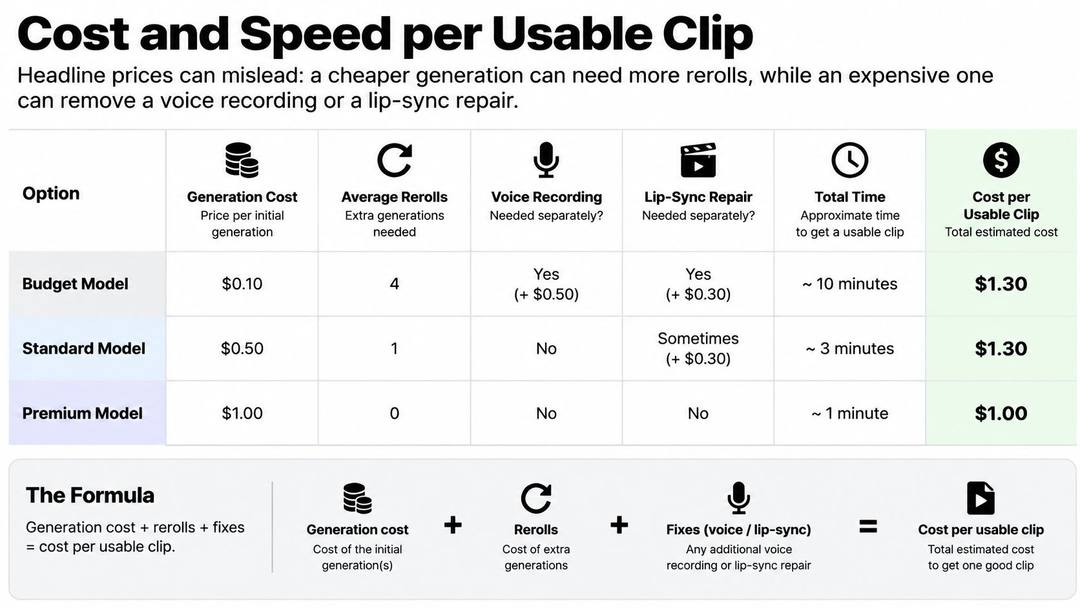
A credit price is an input, not an answer. Multiply it by the rerolls a model needs and the ranking flips. A cheap generation that drifts a character's face costs more than an expensive one that lands the line on the first attempt.
The formula worth putting in a spreadsheet is (generation credits + rerolls + audio replacement + editing minutes + caption corrections + failed exports) divided by approved clips. Credits go on top because they're easy to count. The manual fixes sit there too, converted at your hourly rate, because that's the part headline comparisons leave out.
At the raw-cost layer, one published comparison put Kling 2.6 at about $4.20 per generated minute against $24 per minute for Veo 3, a roughly 5.7-fold gap on that comparison's stated assumptions (Veo 3 vs Kling 2.6 cost comparison). Note the unit: per generated minute, not per approved minute. The same source scored the two models equally overall while splitting on category strength, with Veo ahead on anime output and Kling ahead on hands.
| Reported test | Kling | Veo |
|---|---|---|
| 8-second 1080p with sound, 2026 (APImage) | 314 credits (Kling 4.0) | 534 credits (Veo 3.1) |
| Clip cost, 2025 (Crevas.ai) | 280 credits for a 10-second Kling 2.5 Turbo Master clip | 320 credits for an 8-second Veo 3 clip; 120 credits for Veo 3 Fast |
| Clip with audio, 2026 (Modellix.ai) | About $0.42 for a 5-second 720p Kling 3.0 clip | About $3.20 for an 8-second Veo 3.1 Standard clip with audio |
| API benchmark, 2026 (independent test) | About $0.56 for a 5-second 1080p Kling O3 Pro clip; score 21/24; median 124 seconds | About $0.80 for a 4-second 720p Veo 3.1 clip, audio off; score 20/24; median 45 seconds |
Each row comes from a different test, clip length and configuration, so don't subtract one row from another. The pattern across them is consistent: Kling usually carries the lower credit cost, and Veo costs more per clip.
The 2026 APImage comparison makes the gap concrete, with an 8-second 1080p video with sound costing 314 credits on Kling 4.0 against 534 on Veo 3.1, making Veo approximately 1.7 times more expensive (APImage model comparison). Speed cuts the other way. In the Sandbase run, Kling O3 Pro scored 21/24 and returned higher resolution, while Veo's median generation time was 45 seconds against Kling's 124 (Sandbase API benchmark). Cheaper per clip, slower per clip, marginally better on the task. Three prompts and one configuration produced those numbers, so treat them as a signal rather than a verdict.
The worksheet that settles it: generate twenty clips from your own brief, count the approved ones, record credits and minutes, then divide. Compare cost per approved clip before you commit to a default model, and re-run the exercise whenever a new version ships.
When a Finished Short Beats Picking a Model
Model choice is one decision inside a longer chain. A TikTok, a Reel or a YouTube Short also needs a script, a voiceover, captions, music and a publishing step, and if that chain is the bottleneck, comparing generators is optimizing the wrong stage.
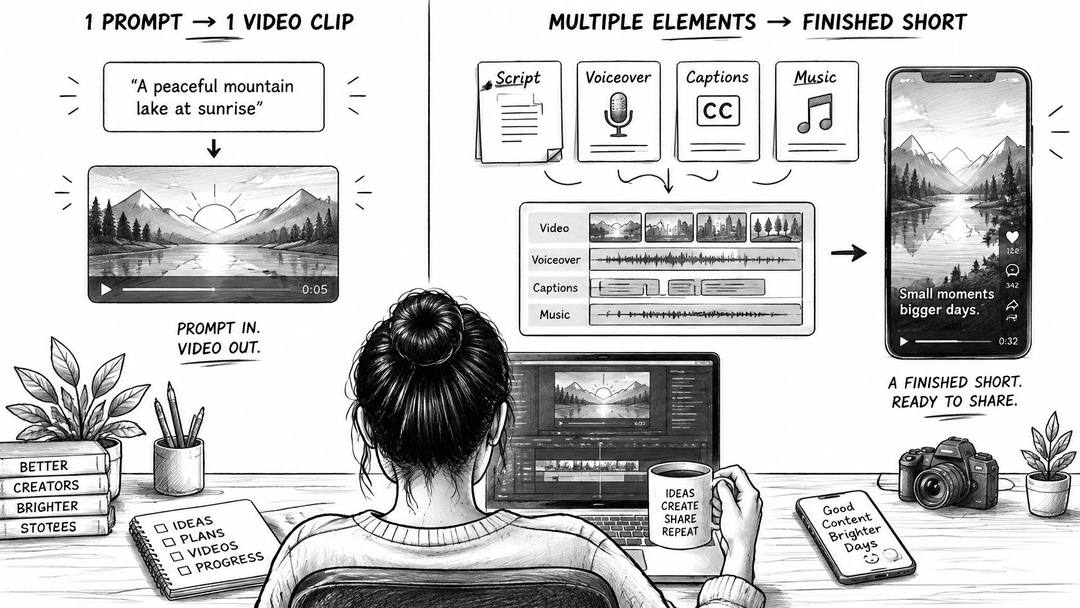
Revid is built for that chain. It writes the script, voiceover, visuals, subtitles and editing in one workflow, so no editing skills are required and one clip does not depend on five tools. It also runs several AI video models, including Google Veo 3, inside one credit system, with the model chosen per scene. Plan access changes, so check Revid pricing for the current model list before planning around a release; the company background sits on Revid about.
For budgeting, a typical 30-second video with Pro moving images and a voiceover costs about 40 to 80 credits, which puts 2,000 credits at roughly 25 to 50 such videos a month. Hold that against the direct route: per-clip fees plus the hours spent cutting, captioning and exporting.
A prompt-to-video run fits ideas that are already written. The Revid AI video generator starts from one prompt and returns an editable sequence rather than a locked render.
The limits are clear. It does not beat Kling or Veo at their specialty, so a shot that needs precise motion control or a perfectly timed spoken line still belongs in the model that does that best. It is also less suited to long-form film production or to teams that only want to edit their own footage by hand. No tool guarantees views; results depend on the idea, the offer and the distribution.
The video below walks through how the all-in route compares in practice.
The decision comes down to the shape of work. If you need one controllable shot for a film, go direct to Kling or Veo and accept the per-clip cost. If you need a publishable short every day, compare the all-in cost including editing hours, because that is the number your calendar pays.
Frequently Asked Questions About Kling and Veo
Is Kling or Veo better in 2026?
Neither wins outright. The better model is the one that passes more of your own prompts, which is why the scenario list above starts with the shot rather than the brand. Two 2026 evaluations reached opposite conclusions on the same model families, and the disagreement came from method, not from a hidden truth.
Which one is cheaper?
Reported per-clip examples usually favor Kling on credits. Cost per approved clip is a different figure, because it includes rerolls, audio work and editing time, and a cheaper model that needs more attempts can end up costing more. Run the twenty-clip worksheet on your own briefs before you commit.
How long can each clip be?
The limits sit in the comparison table at the top of this article, and they move with the version and route you generate through. Check the current figure on each official site before you storyboard around a shot length, since a plan update can change what a single take can hold.
Do I need both?
Many creators keep both in a test library and choose per scene, which is the same logic of picking a model per scene inside one editor. The cost of keeping two subscriptions is usually smaller than the cost of forcing one model onto shots it handles badly.
Revid turns a prompt, script or product page into a finished short with script, voiceover, captions, music and publishing in one workflow, and it runs several video models including Google Veo 3 in the same credit system, so you can test the Kling-style continuity shot and the Veo-style dialogue shot without managing two vendors. If your bottleneck is publishing a short every day rather than producing one perfect clip, start at revid.ai and compare the all-in cost against buying credits from each model separately.
Sources
- Revid production data: 713,649 AI video clips generated Jun 29, 2026 to Sep 26, 2026.
Charts and figures checked on November 20, 2026.