On this page
You have just filmed a sharp skincare routine. Your first three seconds show the before and after, your lighting is clean, and then you stall on the caption and type "new video." People watch, but they don't save it, search for it later, or leave a comment you can turn into the next post.
That weak caption wastes work you've already done. A stronger one tells a viewer why this clip matters, who it's for, and what to do next, all before they decide to scroll.
Length matters, but clarity matters more. One creator focused analysis found TikToks with 41 to 80 character post captions reached a 67,000 median view level, compared with 36,000 for videos without a caption, in the Revid TikTok engagement analysis. Those numbers don't prove a caption alone causes reach, because topic, retention, and creator size also shape results.
Treat every caption as a job assignment. Some TikTok video caption ideas are built to hook, some to rank in search, some to hold attention, and some to convert a viewer into a follower, saver, or buyer.
The 10 types below give you that job, a niche example, the tone to use, and a hashtag approach. Pick by goal, not by what sounds clever in isolation.
1. Question Hook Captions

Job: hook and comment starter. A direct question creates a small open loop. The viewer wants the answer in the video, then wants to give their own answer in the comments.
A food reviewer holding up an unusual plate can use, "Would you eat this for breakfast? 🤔" A fitness coach can ask, "Why do people quit after week two?" Both work because they're specific to what's on screen, not generic prompts like "Thoughts?"
How to make the question earn replies
- Put the sharpest version first: Lead with the exact tension, not "Quick question for you" filler.
- Answer fast on screen: Start answering in your opening seconds so viewers don't feel baited.
- Test question shape: Compare open ended questions with yes or no questions, then keep the format that brings longer comments.
Use a curious, conversational tone, as if you're asking one person across the table. For hashtags, I'd use two or three narrow tags that name the topic and audience, such as a food style or fitness level, not broad tags that could fit any post.
Prompt to try
Make a 30-second vertical TikTok titled "How to edit a 30 second recipe video on your phone." Open with the hook "Your recipe videos are too long, here's the fix," then walk through 3 quick editing steps with bold on-screen text matching the voiceover. Friendly, plain-spoken tone with upbeat background music.
2. Keyword-Optimized (SEO) Captions
Think about the phrase someone types when they have a problem at midnight. That's the caption you want, written like a sentence a human would say.
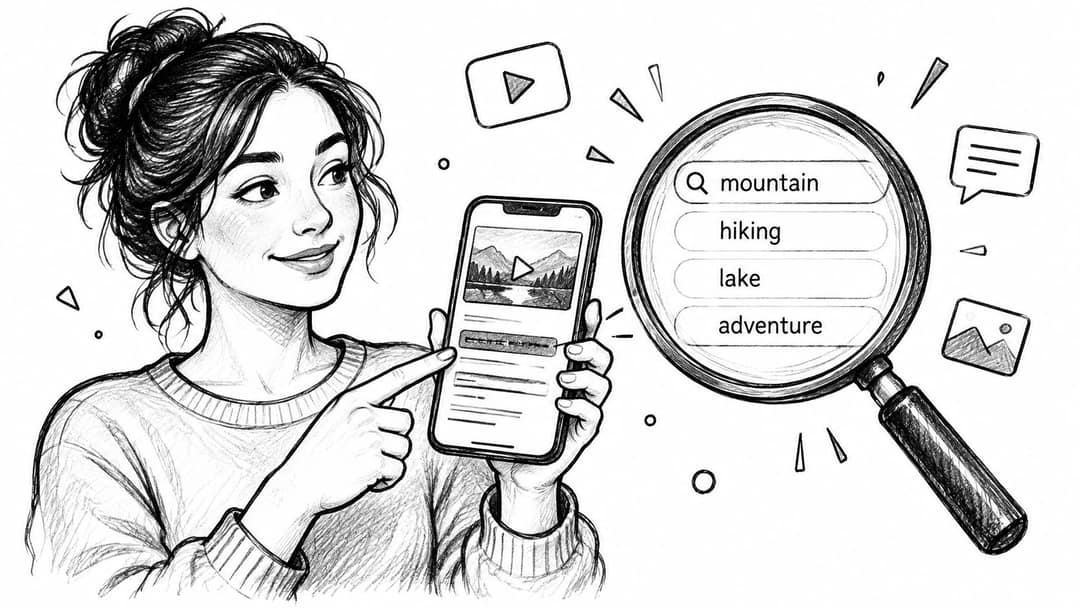
Job: search. A cooking creator might write, "How to edit a 30 second recipe video on your phone." A finance creator might use, "Beginner budgeting tips for college students." Each one states the query and promises a clear answer.
Don't scatter keywords and hope TikTok connects the dots. Say the search phrase naturally, then prove you answered it.
That discipline matters because third party analysis found that, among 108 captions ranking for ten everyday searches, 82 included every word of the search phrase but only 12 used the exact phrase in a natural order, according to the guide to how TikTok search works. Words alone don't frame an answer. Sentence order does.
Use a helpful, plain spoken tone. Check TikTok search suggestions for real phrasing, front load the phrase, and repeat the same wording in your on screen text and voiceover. For hashtags, add one or two keyword matched tags only. Five vague tags won't rescue a caption that never answers the search.
3. Call-to-Action (CTA) Captions
Job: conversion. Viewers don't need five instructions. They need one obvious next step that matches the value in the clip.
A planning tutorial earns, "Save this for your next content batch 📌." A creator offering a free file can use, "Comment TEMPLATE and I'll send it." Both tell the viewer exactly what action gets them the benefit.
Keep the ask honest and easy. Pair the action with the reason, such as "Save this so you don't forget step two," and keep any link in bio destination current. If the promised resource is buried, your caption created friction instead of momentum.
For stronger wording, study practical call to action examples for social content, then adapt one pattern to your niche rather than copying a sales page line. You can also write stronger marketing CTAs and trim each draft until only the action and benefit remain.
Use a direct, friendly tone. Add two niche hashtags after the CTA, not before it, so the instruction stays visible and readable.
4. Series and 'Part 1' Captions
A series caption turns one good clip into a reason to follow. Job: retention and follow conversion. It works best when each episode delivers a small payoff while leaving a clear next step open.
A lifestyle creator can post, "Part 3: I tried the 5 minute morning routine for a week." A faceless channel owner can use, "Day 12 of posting daily to grow my faceless channel." New viewers instantly understand there's a backlog worth checking and a future update worth following for.
What makes a series caption hold up
- Pin part one: Give newcomers a starting point on your profile.
- Add a recap line: Name what changed last time in six or eight words.
- Plan the payoff: Outline the full run first so part four doesn't repeat part two.
Use an upbeat, diary like tone, especially for challenges and makeovers. Create one consistent series hashtag with your niche or series name in it, then repeat it on every installment. Add one topic tag per episode for search. Don't invent a new hashtag set each time, because viewers can't follow a trail that keeps changing.
5. Relatable Humor Captions

Job: hook through recognition. The caption names a moment viewers have lived, and the video proves you understand it. People tag friends because the joke feels personally accurate.
Try "Tell me you're a content creator without telling me..." over a behind the scenes clip of you retaking the same line. Or use "Me pretending I understand the analytics dashboard" over a reaction shot. The humor lands when the detail is specific, like refreshing views or exporting the wrong file.
Generic jokes are the weak spot here. If your caption could sit under a thousand unrelated videos, it won't make anyone feel seen. Anchor the gag in one real behavior from your niche, then stop writing.
- Keep it to one line: Let the face, sound, or skit carry the punchline.
- Invite the tag naturally: "Tag the friend who does this" works only when that friend is obvious.
Use a dry, self aware tone. For hashtags, I'd use one niche community tag and one format tag, then let shares do the heavy lifting.
Prompt to try
Create a 35-second TikTok called "3 mistakes costing your small shop sales." Hook: "Mistake number 2 is the one nobody notices." Show each number large on screen as the voice says it, in a confident, instructional tone with clean motion graphics.
6. Numbered List Captions
"3 mistakes costing you sales" beats "Some advice for sellers" because viewers can judge the payoff instantly. Job: hook and retention. The number sets a finish line, so people stay to collect every point.
A productivity creator can promise, "5 free tools I use to create faster videos." A marketing account can use, "3 hooks that doubled my watch time." In my judgment, three to five points is the sweet spot for short videos, because seven quickly turns into a rushed blur.
Early, readable text matters here. TikTok's Creative Center reports text boxes appear in 86% of TikTok ads, while concise text introduced early produced a 2.1 times awareness lift versus alternative timings in TikTok's Creative Center guidance on power creative elements. Those are ad benchmarks, so use them as direction, not a promise for organic posts.
Show each number on screen as you say it, and keep the tone confident and instructional. Use hashtags that name the exact task and audience, such as editing beginners or small shop owners. You can also split one long blog post into a numbered multi part series.
7. Hot Take Captions
A hot take works when you can defend it, not when you're just hunting for angry comments. Job: hook and discussion. The caption takes a clear position, then the video supplies your evidence.
A strategist might write, "Unpopular opinion: posting daily is not required to grow." A creator could use, "Hot take: most hashtags do nothing." Both invite disagreement, but neither attacks a person. That distinction protects your credibility while the debate runs.
Keep the take useful, not reckless
- Show your receipts: Give a result, a test, or a concrete reason inside the video.
- Reply early: Answer the first thoughtful objections to shape a better thread.
- Avoid harm: Don't punch down at beginners, customers, or protected groups for engagement.
Use a calm, confident tone. Shouting in caps makes a weak argument look weaker. For hashtags, choose the debate topic and your niche, then skip inflammatory tags designed to pull in people who only want to fight.
The trade off is real. You'll get more comments, but some viewers will remember the opinion more than the nuance, so your explanation needs to be airtight.
8. Trend and Sound Reference Captions
Trends give you borrowed context. Your caption has to translate that trend into your niche before the format goes stale.
Job: discovery and hook. A social media educator might pair a trending sound with, "POV: you finally understand the algorithm." A small bakery can adapt a popular challenge to show a cake being frosted in time to the beat instead of copying a dance that has nothing to do with its product.
Speed helps, but relevance helps more. Check the TikTok Creative Center for rising sounds and hashtags, then ask a blunt question. Would this still make sense to your ideal viewer with the sound removed?
Practical rule: If the trend disappears tomorrow and your caption becomes meaningless, rewrite it so the niche payoff survives on its own.
Use a playful, current tone without forcing slang you wouldn't say aloud. Include the trend or challenge hashtag when there's an established one, plus one niche tag that tells TikTok who should care. Post while the sound is rising, not after your feed is saturated. A late, copied trend reads like an ad trying to be young, and viewers spot that fast.
9. Curiosity Gap Captions

Job: retention. You're withholding one piece of information, and viewers stay to close the gap. The risk is simple. If the payoff feels small, they'll remember your account as clickbait.
A time lapse can carry, "I tested this for 30 days and the result shocked me," if the result is visible. A DIY or cooking video can use, "Wait for the last step," when that step changes the texture, time, or final look.
Make the teaser specific enough to be credible. "You won't believe this" says nothing. "The last step cut my prep time in half" gives the viewer a concrete reason to stay, then your video proves it.
- Deliver quickly: Reveal the answer clearly once you reach it.
- Measure carefully: Compare watch time against a direct caption on a similar video.
Use a suspenseful but grounded tone. For hashtags, name the test, recipe type, or project rather than curiosity words like viral or shocking. I reserve this style for transformations and experiments, not basic announcements.
10. Minimal Emoji and Short-Phrase Captions
Sometimes the video is the message. A slow cafe pour, a fashion reveal, or a quiet travel clip can be weakened by a caption that explains every detail.
Job: mood and brand recognition. "slow mornings ☕️" lets a cafe video breathe. "new drop 🤍" gives a fashion brand a clean reveal without turning it into a sales announcement. This is the most fragile style for discovery, so don't use it by default.
Compensate where TikTok can still read context. Put searchable words in your on screen text, say them in audio when it fits, and choose descriptive hashtags that name the place, product, or aesthetic. You're keeping the post caption minimal, not making the whole video invisible.
- Build a signature: Reuse a consistent emoji, lowercase style, or short phrase pattern so regular viewers recognize you.
- Pair formats wisely: Balance mood clips with search and list captions across the week.
Use a calm, understated tone. Two or three precise hashtags work better than a wall of aesthetic tags. I'd use this approach for atmosphere and product drops, never for tutorials that viewers need to find through search.
How each TikTok caption style compares by goal, best use, and main risk
| Item | Primary goal | Best for | Main risk |
|---|---|---|---|
| Question Hook Captions | Prompt viewers to stop, think, and comment | Educational videos and explainers | Generic or yes/no questions may get weak responses |
| Keyword-Optimized (SEO) Captions | Improve search discovery with relevant phrases | How-to content, niche channels, and product searches | Keyword-heavy wording can sound awkward |
| Call-to-Action (CTA) Captions | Encourage a specific next action | Lead generation, product promotion, and resource sharing | Too many prompts can feel pushy |
| Series and 'Part 1' Captions | Build anticipation and returning viewership | Ongoing creator or brand series | Inconsistent posting can break momentum |
| Relatable Humor Captions | Encourage shares and friend tags | Comedy, skits, and playful brand content | Humor may miss the audience or become outdated |
| Numbered List Captions | Preview clear, structured value | Educational, productivity, and marketing videos | Repeated formats can feel formulaic |
| Hot Take Captions | Spark debate and comments | Commentary and industry-focused content | Hostile reactions or misleading claims can harm trust |
| Trend and Sound Reference Captions | Connect content to a popular trend | Trend-focused creators and adaptable brands | Trends fade quickly or may not fit the brand |
| Curiosity Gap Captions | Increase watch time by teasing a payoff | Experiments, DIY, cooking, and transformations | A weak payoff can feel like clickbait |
| Minimal Emoji and Short-Phrase Captions | Let visuals and mood carry the message | Aesthetic, cinematic, and lifestyle content | Limited context can hinder search discovery |
Pick the Caption That Matches Your Video's Job
Start with one question before you write anything. Should this video stop the scroll, get found in search, drive a comment, hold viewers to the end, or earn a follow? Pick the caption type built for that job, then write a single clear line before you touch hashtags.
That order prevents the most common mistake I see in weak TikTok video caption ideas. Creators start with tags, emojis, and a clever phrase, then try to retrofit a purpose. The video ends up asking for a comment, promising a tutorial, and selling a product in the same cramped caption.
Keep the evidence in proportion. One large creator focused analysis found posts using four hashtags had a 77,000 median view level, while posts using nine or more hashtags recorded a 16,000 median, in the creator focused analysis of TikTok caption performance. Don't treat that as a magic number. Treat it as a warning against stuffing, because relevance usually beats volume.
Readability deserves the same discipline on screen. A 2024 ACM CHI study examining 300 TikTok videos found captioning errors in 19.7% of videos overall, with a 7.9% average word error rate among videos containing at least one error, according to the 2024 ACM CHI study of TikTok captioning practices. Proofread names, numbers, and technical terms, keep each text block to one idea, and leave it up long enough to read.
Test over 10 posts, not one
Rotate your strongest three caption types across similar videos, then compare saves, shares, comments, search traffic, and average watch time. A curiosity caption may win for transformations, while a keyword caption brings in viewers for weeks on a tutorial. Stop judging both by first day views alone.
Write one CTA that matches the job, use two or three niche hashtags, and keep your tone consistent with how you speak on camera. If testing feels slow, revid.ai can help you search real TikTok videos by topic and engagement, generate scripts, and schedule posts to TikTok from one queue. We can also add captions to any video in 30 styles, which makes it easier to compare readable on screen text without rebuilding each edit.
Your next caption doesn't need to be brilliant. It needs a clear job, a specific promise, and no wasted words. Write that version first, publish it, and let real viewer behavior teach you what to repeat.
Ready to test these caption types without rebuilding every video from scratch? With Revid, you can search proven TikToks by topic and engagement, turn an idea or link into a finished short, add captions in 30 styles, and publish or schedule to TikTok, Instagram, and YouTube from one queue. Start creating your next batch today at revid.ai.