On this page
The TikTok engagement hacks that work in 2026: hook viewers in the first 3 seconds, use 3 or 4 relevant hashtags, keep videos short enough to loop, add captions, end with one specific comment prompt, reply to comments with video, and post when your viewers are active. Each one moves a different signal: likes, comments, shares or watch time.
Comments are the hardest signal to earn. In Revid's analysis of 176,367 TikToks with 1,000+ likes posted between October 2025 and October 2026, viewers liked 7.1% of the time and shared 0.88% of the time, but commented only 0.08% of the time: fewer than one comment per 1,000 views. If your call to action only asks for likes, you are asking for the one thing people already give freely.
What is a good engagement rate on TikTok?
Divide each interaction by views and compare the result with what popular TikToks get. Two Revid samples give you a benchmark:
| Interaction per view | Revid study (176,367 TikToks, Oct 2025 to Oct 2026) | Revid full index (2.39 million TikToks, all dates) |
|---|---|---|
| Likes | 7.1% | 7.9% |
| Shares | 0.88% | 0.50% |
| Comments | 0.08% | 0.07% |
Both samples only include TikToks that reached 1,000+ likes, so they describe videos that already did well, not the average account. If your likes per view sit well below these numbers, fix the hook and the payoff first. If likes are fine but comments are near zero, fix your prompt (hack 5). The full figures are in Revid's short-form video statistics and the study of what makes a TikTok go viral.
To find your own numbers, open TikTok Studio (profile > menu > TikTok Studio > Analytics) and set the range to 7, 28, 60 or 365 days.
Prompt to try
Make a 20-second vertical TikTok about meal prep for busy beginners. Open with the line "Stop cooking every night if you want to save 5 hours a week" over a shot of finished prep boxes, then show three quick steps with one short line of voiceover each. Fast cuts, bright kitchen visuals, bold captions, and end by asking "Chicken or tofu? Tell me below."
1. Hook viewers in the first 3 seconds
Viewers decide almost instantly whether to keep watching, so the opening must state the promise or show the payoff before anything else. Among the 1,588 TikToks in Revid's 100M Club, 51% of videos with a transcript open with a statement and 16% with a question. A confident claim usually beats a question.
Talk less, too. In Revid's study, videos with under 40 characters of speech had a 123K median and 20.2% passed 1M views, against 68K and 11.9% for videos that talk throughout. Let the visual carry the hook and keep the words to one line.
Hook templates you can adapt:
- "Stop [common habit] if you want [result]."
- "This is what [result] actually looks like."
- "Nobody tells beginners this about [topic]."
- "[Surprising claim], and here's the proof."
- "POV: you just [relatable moment]."
For more openers by niche, use Revid's list of 130+ TikTok hooks.
2. Use trending sounds and 3 or 4 hashtags
A trending sound places your video next to others people are already watching, and a few precise hashtags tell TikTok who the video is for. To find sounds, type "viral sounds" in TikTok search and open the Sounds tab, then switch to the Hashtags tab to see how many views each tag has.
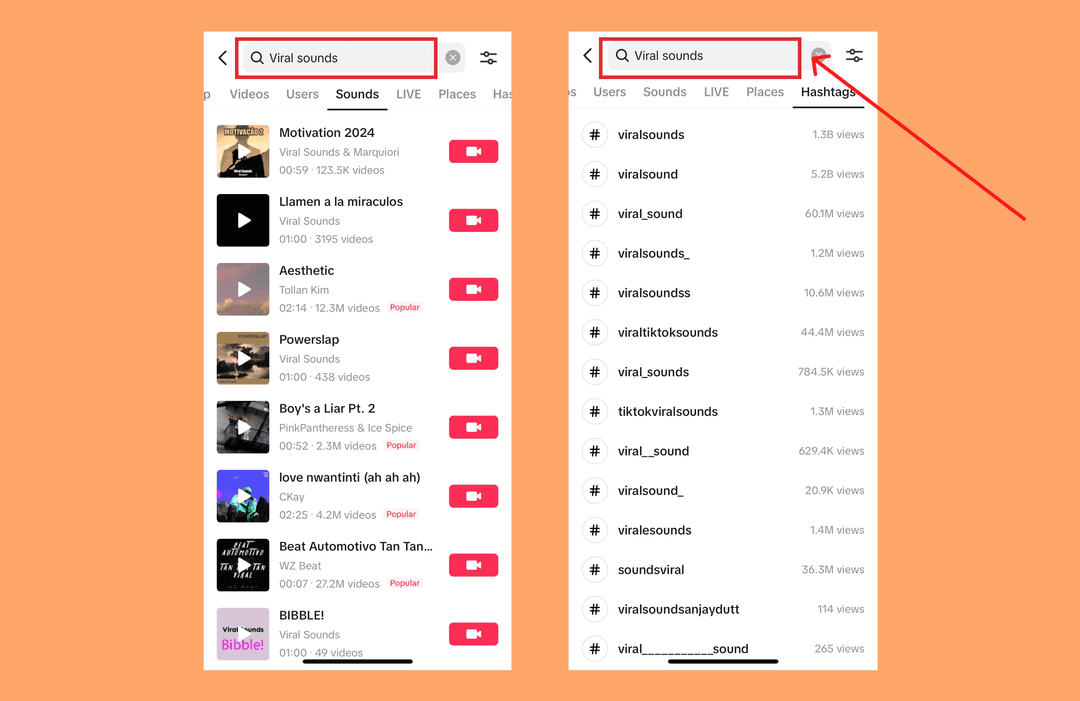
Revid's daily list of trending hashtags by niche saves you the digging. Pick a sound that fits your video instead of forcing one, and add your own twist so it doesn't look like every other video using it.
On hashtag count, the data is clear. In Revid's study, TikToks with 4 hashtags had the best median (77K views, 13.4% past 1M) and 3 hashtags came close at 75K, while videos with no hashtags had 51K and those with 9 or more only 16K. Use 3 or 4 tags: one broad, the rest specific to your niche.
Posts with 3 or 4 hashtags earned the most views. Captions stuffed with 9 or more hashtags did worst of all, with median views cut by about 80%.
Source: Revid analysis of 176,367 TikToks with 1,000+ likes posted between Oct 1, 2025 and Oct 16, 2026 (61,203 creators)
Show the data
| Median views | Share that passed 1M views | |
|---|---|---|
| None | 51.1K | 9.8% |
| 1 | 64K | 11.8% |
| 2 | 71.3K | 12.7% |
| 3 | 75.4K | 13.1% |
| 4 | 77.2K | 13.4% |
| 5 | 67.3K | 12.1% |
| 6 to 8 | 71.8K | 12.7% |
| 9+ | 15.6K | 7.8% |
Prompt to try
Create a 12-second loopable vertical video about a desk setup trick for working from home. Start on a close-up of a tidy desk with the line "This is why I always clear my desk at 5 p.m.", show the before and after in two quick shots, and end on the same close-up so the video flows straight back into the opening line. Calm lo-fi music and minimal on-screen text.
3. Keep videos short and loopable
Length matters less for views than most advice suggests, but it matters for shares. In Revid's study, every length bucket from under 15 seconds to 10 minutes had a median between 58K and 76K views, while videos under 15 seconds got the most shares per view (1.41 per 100). Short videos get passed along; longer ones are not penalized.
Length alone barely moves views: every bucket lands between 58K and 76K median views (the 790 videos over 10 minutes are a small, unusual group). Clips under 15 seconds get shared the most per view.
Source: Revid analysis of 176,367 TikToks with 1,000+ likes posted between Oct 1, 2025 and Oct 16, 2026 (61,203 creators)
Show the data
| Median views | Share that passed 1M views | Shares per 100 views | |
|---|---|---|---|
| Under 15 s | 57.6K | 11.6% | 1 |
| 16 to 30 s | 64.9K | 12.3% | 1 |
| 31 to 60 s | 61.8K | 11.8% | 1 |
| 61 to 90 s | 70.5K | 12.2% | 1 |
| 91 s to 3 min | 63.4K | 11.1% | 1 |
| 3 to 10 min | 76.4K | 12.4% | 1 |
| 10 min+ | 129.6K | 13.8% | 0 |
To build a loop, end on a frame or a line that leads straight back into the opening. A sentence that finishes when the video restarts ("...and that's why I always [hook line]") is the classic version; a last shot that matches the first frame works too. Rewatches add watch time without asking the viewer for anything.
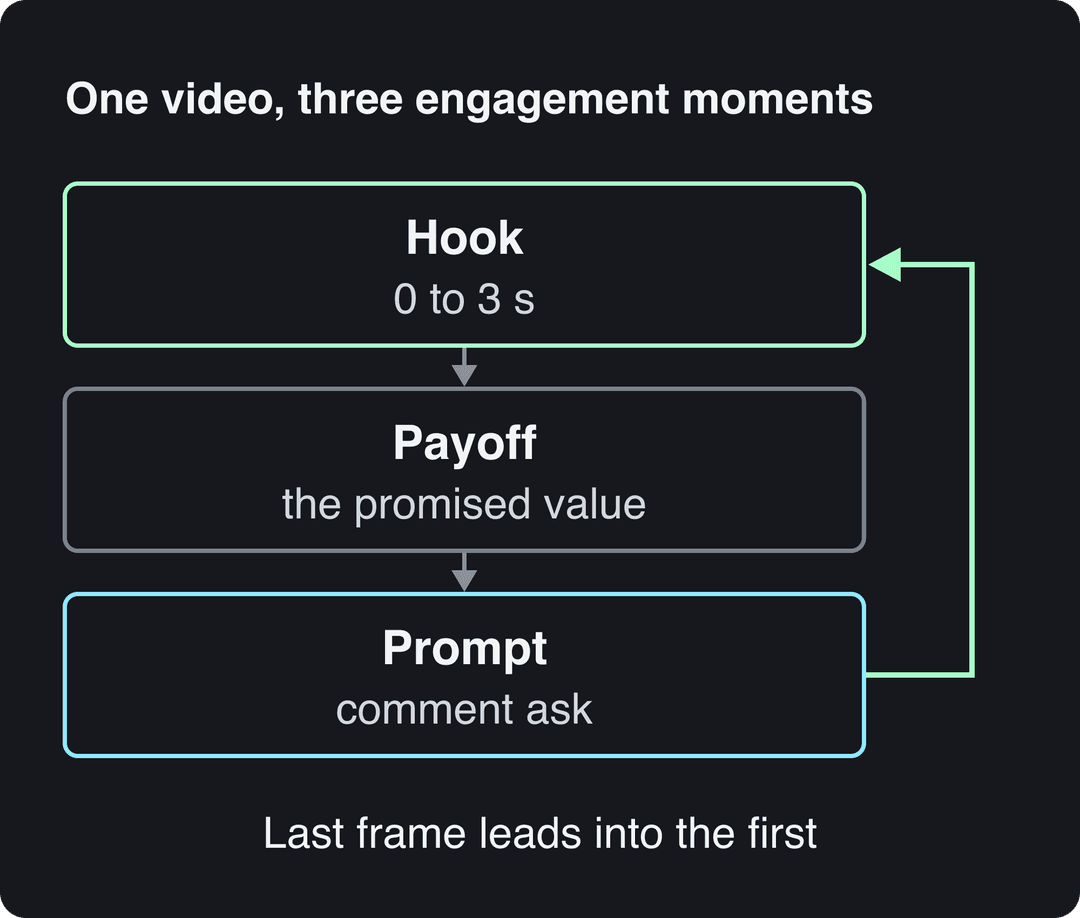
Decision rule: if you want reach and shares, stay under 15 seconds and loop it. If you are in the Creator Rewards Program, make original videos of at least one minute, because shorter ones don't earn.
4. Add captions, on-screen text and a short post caption
Many people scroll with the sound off, so burned-in captions keep them watching and make the video accessible. Use large, high-contrast text, two or three lines at most, and keep it clear of the bottom of the screen where TikTok's buttons and caption sit (Revid's free TikTok safe zone checker shows the exact area).
The video below was captioned automatically with Revid's caption generator.
The text you write under the video counts too. In Revid's study, post captions of 41 to 80 characters had the best median (67K views, 12.5% past 1M), while videos with no caption had 36K. One sentence that adds context or asks a question is enough:
- "Which one would you actually pick, left or right?"
- "Save this for the next time you meal prep on Sunday."
- "Tell me I'm not the only one who does this at work."
5. End with one specific comment prompt
"Like and follow" is the weakest call to action because it asks for the signal people already give. Ask for a comment instead, and make it answerable in one or two words.
Prompts that are easy to answer:
- A choice: "A or B? Wrong answers only."
- A guess: "Guess the price before I reveal it."
- A completion: "Finish the sentence: the worst job I ever had was..."
- A tag: "Tag the friend who does this."
- A follow-up: "Should I post part 2?"
Say the prompt out loud in the last seconds and repeat it in the post caption. Use one prompt per video: three asks in a row read like begging.
6. Reply to comments, with video when you can
Reply to as many comments as you can while the video is still getting views, because every reply gives newcomers a conversation to join. Pin a funny or useful comment to the top so it is the first thing people see.
For the best questions, use TikTok's reply-with-video option. The new video shows the comment on screen, answers something your audience already asked, and sends viewers back to the original. It is also the easiest way to fill your content calendar with ideas your viewers have already validated.
7. Collaborate with duets, stitches and other creators
Duets and stitches let you build on another creator's video and put you in front of an audience that already cares about the topic. Pick creators slightly ahead of you in the same niche, add something of your own (an answer, a counterpoint, a demo) and tag them.
The format matters as much as the partner. In Revid's study, challenges had the highest median views (182K), followed by comedy (155K) and reactions (105K). A joint challenge with another creator combines two of those, and it is original content you both own, unlike a duet or stitch.
8. Post when your viewers are active
TikTok Studio's Viewers tab shows when your viewers were most active over the last 7 days, and the Followers tab breaks follower activity down by hours and days. Start there: it reflects your audience, not an average.
As a starting point, Revid's study of English-language TikToks found that posts at 3 to 6 a.m. US Eastern did best (4 a.m. had the highest median, 120K views) and 5 to 9 p.m. did worst (7 p.m.: 50K). Saturday had the best median of the week (70K). These TikToks come from creators worldwide, so the early US hours also cover daytime in the UK, Europe, India and Asia. The hour-by-hour breakdown is in our guide to the best time to post on TikTok.
Test one new time slot at a time for a couple of weeks before you judge it, so a single lucky video doesn't decide your schedule.
9. Post consistently, in formats you can sustain
Consistency gives TikTok more chances to find your audience and gives you more data on what works. Pick a pace you can keep for months rather than a burst you will abandon, and rotate two or three formats (a tutorial, a reaction, a behind-the-scenes clip) so your feed doesn't repeat itself.
Keep a running list of ideas from your comments, your best performers and videos that did well in your niche, and batch your filming or production once a week.
How to make engagement-ready TikToks with Revid
Revid covers most of this list in one place:
- Search Revid's library of about 2.77 million short-form videos and posts with their engagement data, and run a free deep analysis (up to 60 a day) to see why a video's hook and structure worked.
- Choose "Same energy, new script" or "Make it about your topic" to turn that format into an original video, or "Post the Part 2" to answer the question the original leaves open.
- Or start from your own script or link with the AI TikTok video generator, which builds the scenes, voice-over and synced captions.
- Schedule and publish straight to TikTok, then track each post's views, likes and comments in Revid. If consistency is your bottleneck, an Auto-Mode worker can create a fresh video every day.
FAQ
What counts as engagement on TikTok?
Likes, comments, shares and saves are the interactions you can see on each video, and watch time and rewatches show how long people stayed. Shares and comments are the rarest, which is why they are worth asking for.
Does buying likes or views help TikTok engagement?
No. TikTok excludes fraudulent, paid and artificial views from the qualified views it pays Creator Rewards on, and fake likes don't bring the watch time and comments that real viewers do.
Does an AI-generated label lower engagement on TikTok?
No, according to TikTok: turning on the AI-generated content setting does not affect a video's distribution if it follows the Community Guidelines. TikTok does require the label on realistic AI images, audio or video.
Why did my TikTok engagement suddenly drop?
Check TikTok Studio first: if views fell but likes per view held, the issue is distribution; if likes per view fell, it is the content. In the US, the TikTok USDS Joint Venture, established on January 23, 2026, said it would retrain and update the recommendation algorithm on US user data, so some swings may come from the platform rather than your videos.