How to Get More YouTube Shorts Views in 2026: What Actually Works
YouTube Shorts views come from winning the first second, holding attention to a real payoff and turning winners into series. Here is the full system, with hook formulas, length data and a 30-day plan.
On this page
To get more YouTube Shorts views, win the first second with a specific first frame and first line, hold attention until a real payoff, and turn whatever works into a repeatable series. YouTube's Shorts feed rewards how many people choose to view instead of swiping, how much they watch and whether they seem satisfied, not hashtags or posting time.
Most creators also watch the wrong number. Since March 31, 2025, a Shorts view counts the moment a Short starts or replays, so your counter can climb on people who swiped away in under a second. The YouTube Partner Program pays on engaged views, and from February 1, 2027 a channel needs 10 million qualified Shorts views in the last 90 days to earn Shorts ad revenue in a given month.
What counts as a YouTube Shorts view in 2026
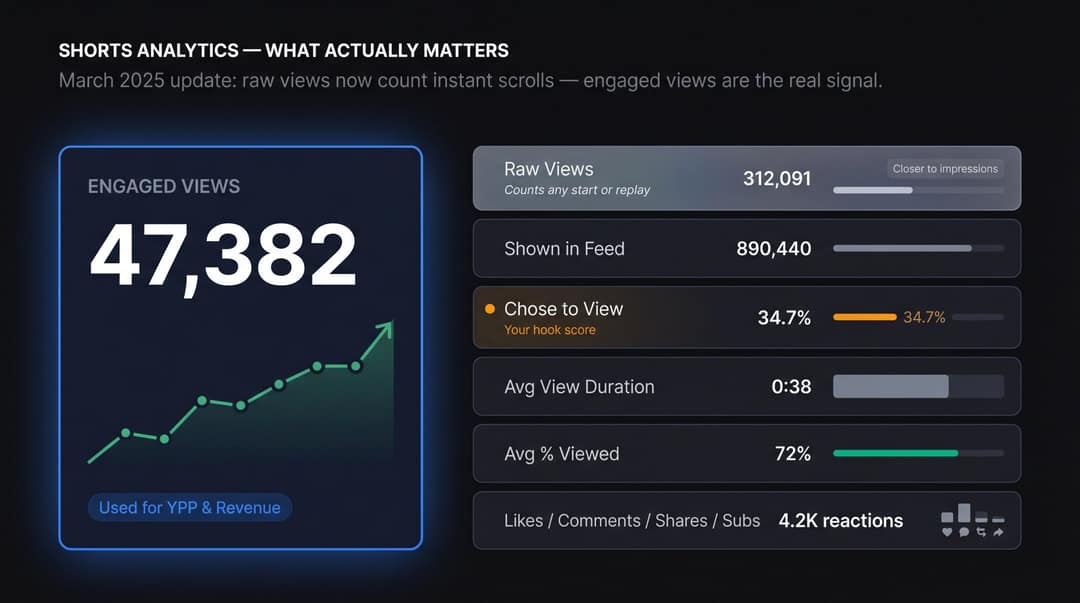
YouTube counts a Shorts view whenever a Short starts to play or replay, with no minimum watch time. Since August 24, 2026, the same rule applies to long-form videos and live streams. Raw views now behave more like impressions than like attention.
The number that reflects real attention is engaged views. YouTube still uses engaged views for YPP eligibility and Shorts revenue sharing, so if you plan to monetize, that is the view count to grow.
| Metric | What it tells you |
|---|---|
| Raw views | How many times the Short started or replayed |
| Engaged views | Views that reflect real attention (used for YPP and revenue) |
| Shown in feed | How often YouTube put your Short in front of someone |
| Chose to view | The share of people shown the Short who watched instead of swiping |
| Average view duration | How long people stayed |
| Average percentage viewed | Whether the length matched the idea |
| Likes, comments, shares, subscribers | Whether viewers cared enough to react or come back |
"Chose to view" is your hook's report card. If it is weak, no amount of posting will fix the Short.
How the YouTube Shorts algorithm decides who sees your Short
YouTube doesn't push channels. It matches each viewer with videos they are likely to watch and enjoy. YouTube's guide to Shorts search and discovery lists the signals: whether viewers choose to view or swipe, average view duration, average percentage viewed, likes and dislikes, satisfaction surveys, and each viewer's history with topics, channels and formats.
YouTube's recommendation documentation adds that the system aims for long-term viewer satisfaction, not just starts. A Short that tricks people into watching can win a view and still teach the system to show you less. For the full mechanics, read our breakdown of how the Shorts algorithm works.
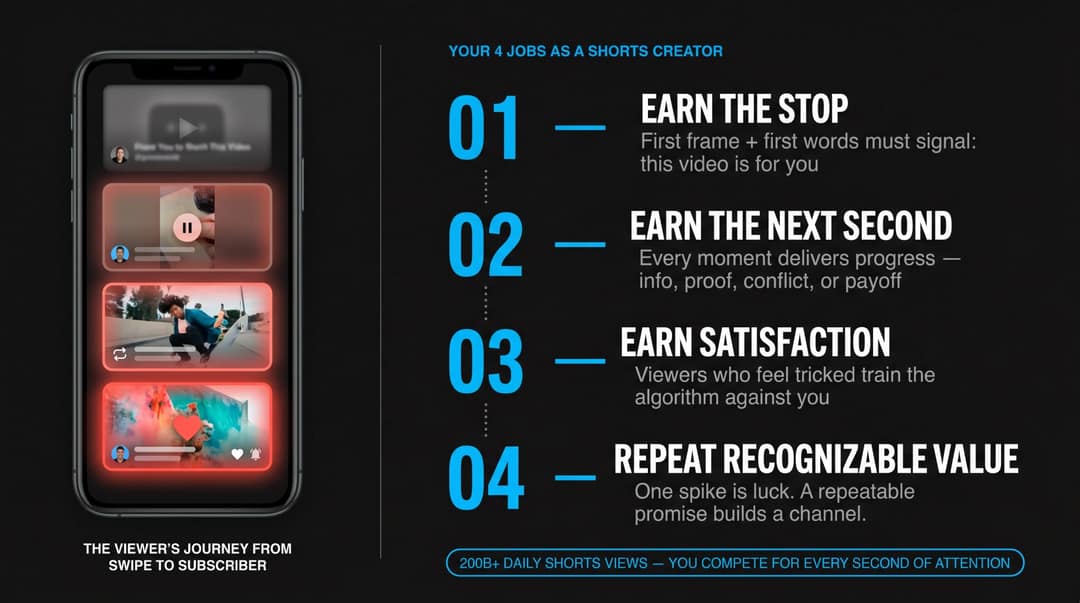
The competition is enormous: Shorts average more than 200 billion daily views, according to YouTube CEO Neal Mohan's 2026 letter. Your Short competes with everything a viewer could watch next, not only with your niche. That gives you four jobs:
- Earn the stop. The first frame, first words and first motion must say "this is for you" before the viewer decides to swipe.
- Earn the next second. Every moment adds something: new information, a visual change, proof, conflict or a payoff.
- Earn satisfaction. Deliver what the hook promised. Viewers who feel tricked hurt your long-term signal.
- Repeat recognizable value. One Short can spike. A repeatable promise builds a channel.
Pick one viewer before you pick a topic
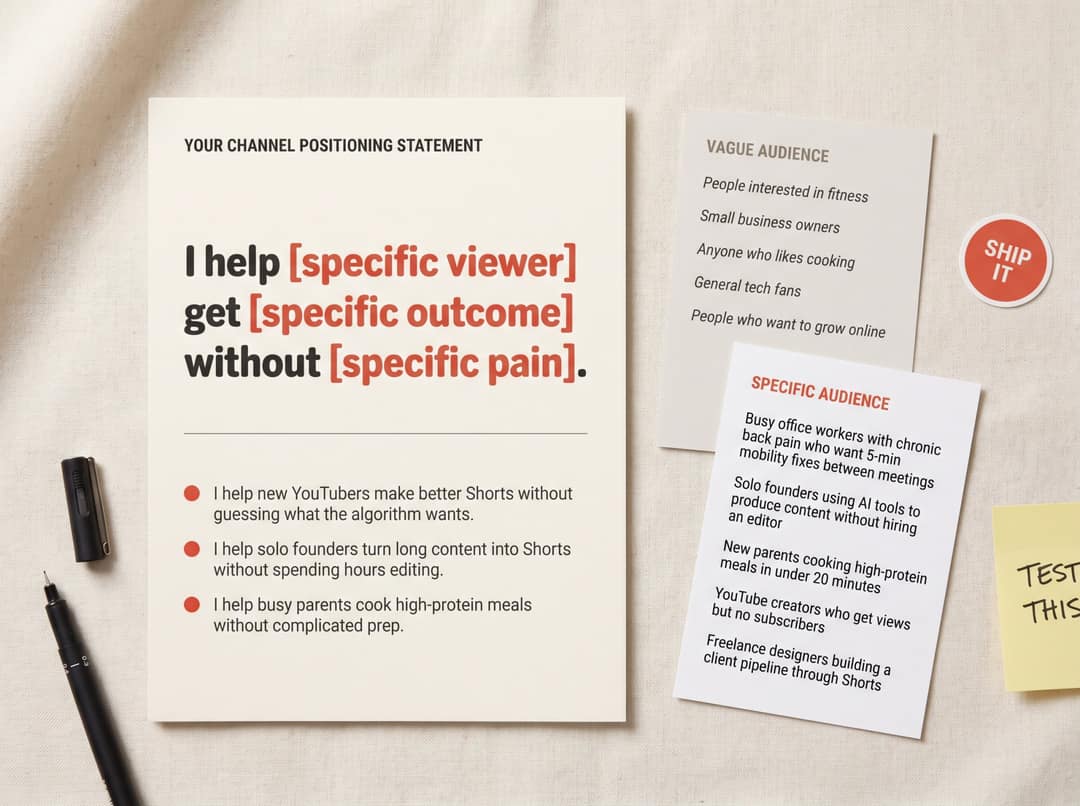
Most Shorts fail before filming because there is no clear viewer. "People interested in fitness" is not a viewer. "Office workers with back pain who want 5-minute mobility fixes between meetings" is.
Write a one-sentence positioning statement: "I help [specific viewer] get [specific outcome] without [specific pain]." For example: "I help solo founders turn long content into Shorts without spending hours editing." With that sentence, your hooks, examples, calls to action and series ideas all get easier to choose.
| Decision | Vague audience | Specific audience |
|---|---|---|
| Hook | Generic curiosity | A named pain or desire |
| Example | Random | Instantly relatable |
| CTA | "Follow for more" | "Follow for one AI workflow a day" |
| Series | Random topics | A repeatable promise |
How to find YouTube Shorts ideas people already want
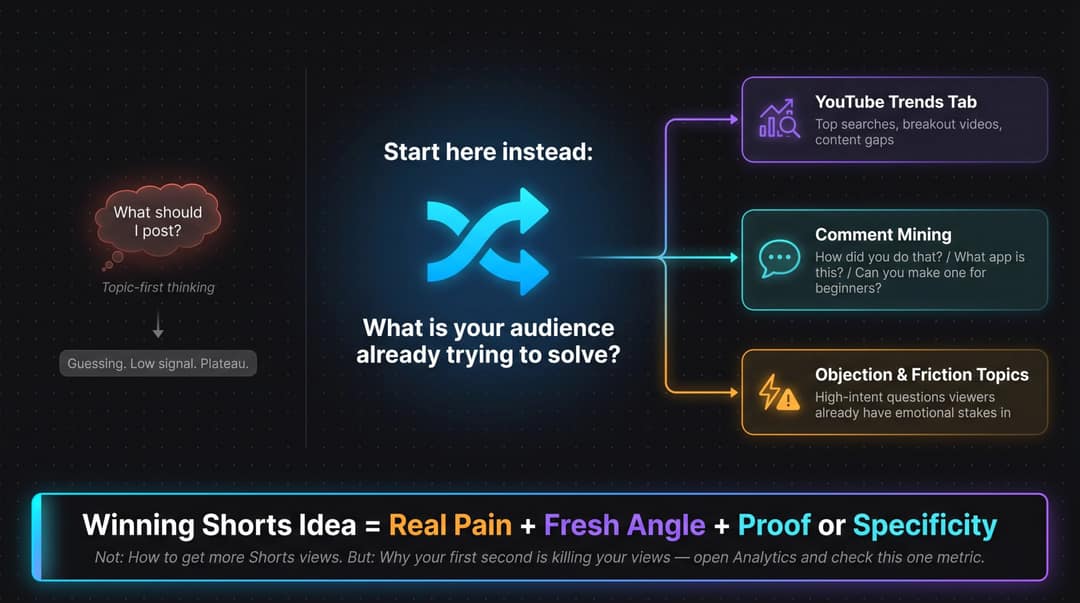
Start with what your audience is already trying to solve, compare, avoid or buy, not with "what should I post?"
- Check the Trends tab. YouTube's Trends and Inspiration tools in YouTube Studio show top searches, breakout videos from similar creators and content gaps where viewers aren't finding enough results.
- Mine comments. "How did you do that?", "What app is this?", "Can you make one for beginners?" and "I tried this and it didn't work" are each a Short waiting to be made.
- Answer objections. Questions like "Do Shorts hurt my long videos?" carry emotional stakes, which makes people stop.
- Copy the format, not the topic. When a Short works, name its format: list, teardown, before/after, hot take. The format is the reusable part.
To see which formats already perform in your niche, Revid's viral video library lets you search about 2.77 million real short-form videos by topic, platform and engagement tier, then turn a proven format into an original Short.
Prompt to try
Make a 25-second YouTube Short for small creators that opens with the line "Your Shorts aren't failing because of hashtags. They're failing in the first two seconds." Show a bold caption on the first frame, then explain one fix: open on the result instead of context, with a quick before/after. Fast cuts, punchy captions, end on a one-sentence takeaway.
How to write YouTube Shorts hooks that stop the swipe
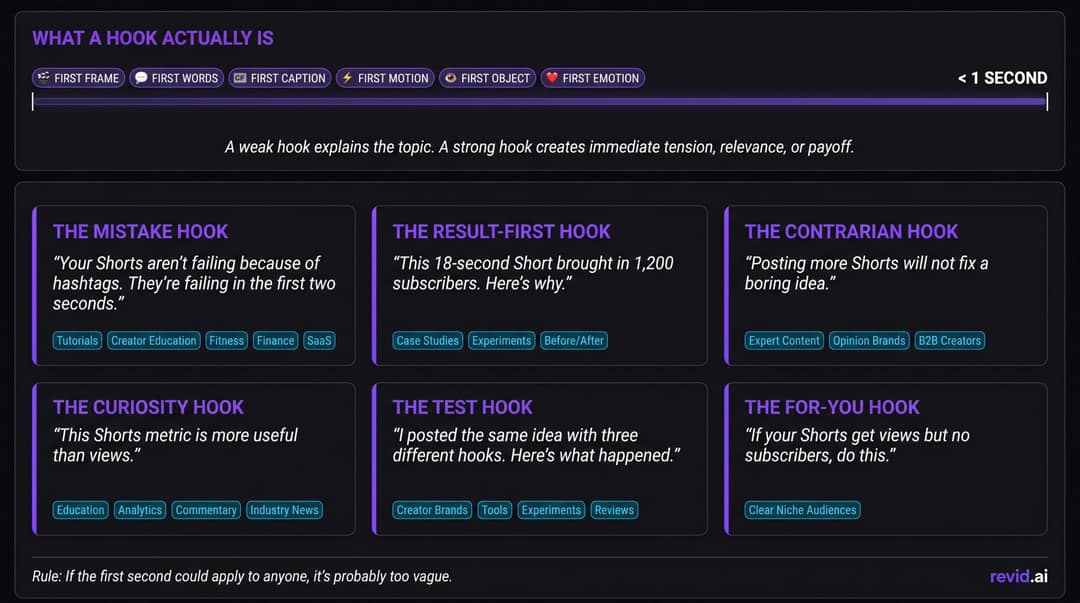
Your hook is the whole first impression: first frame, first caption, first words, first motion. A weak hook explains the topic. A strong hook creates tension, relevance or a visible result.
| Hook type | Example | Best for |
|---|---|---|
| Mistake | "Your Shorts aren't failing because of hashtags. They're failing in the first two seconds." | Tutorials, fitness, finance, SaaS |
| Result first | "This 18-second Short brought in 1,200 subscribers. Here's why." | Case studies, before/after |
| Curiosity | "This Shorts metric is more useful than views." | Education, analytics, news |
| Contrarian | "Posting more Shorts will not fix a boring idea." | Expert and opinion brands |
| Test | "I posted the same idea with three different hooks. Here's what happened." | Experiments, tool reviews |
| For you | "If your Shorts get views but no subscribers, do this." | Clear niche audiences |
Talking less up front tends to help. In Revid's analysis of 176,367 TikToks with 1,000+ likes posted between October 2025 and October 2026, videos with under 40 characters of speech had a median of 123K views and 20.2% passed 1 million, against 68K and 11.9% for videos that talked throughout. This is TikTok data, and it compares videos that already did well, so it shows a pattern rather than a cause, but the lesson carries over to Shorts: let the picture do the first second of work. The full method is in our study of what makes a TikTok go viral.
One rule to keep: if the first second could apply to anyone, it is too vague.
What your Shorts first frame should show
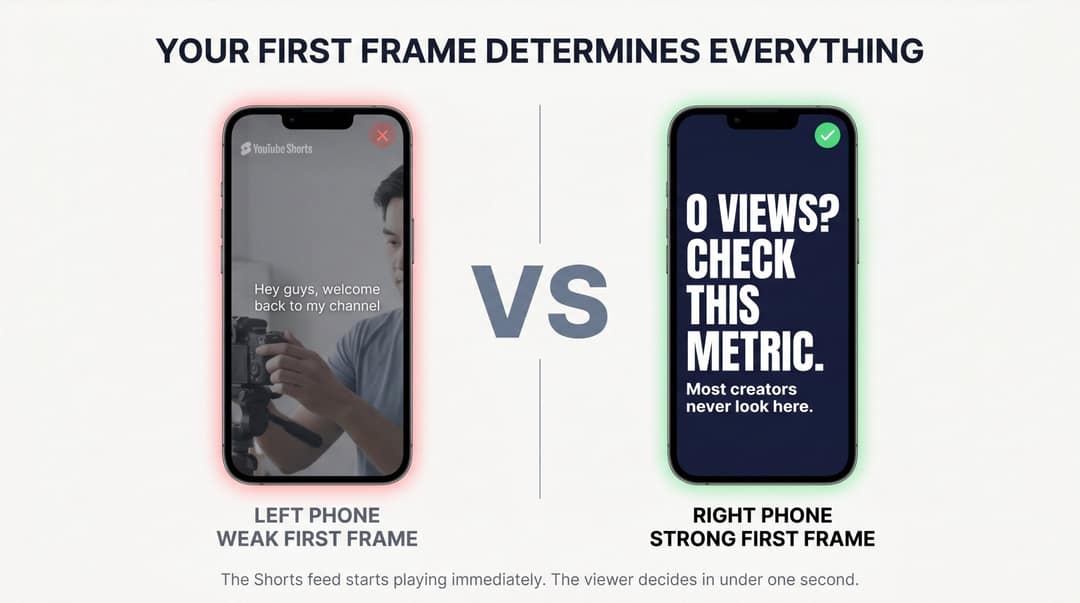
In the Shorts feed the video starts playing immediately, so the first frame does the job a thumbnail does on long-form. Never open on a logo animation, a generic stock clip, a blank title card, a camera setup or "Hey guys". Open on the result, the mistake, a clear emotion, a bold caption, a before/after or a screen recording already in motion.
| Weak first frame | Better first frame |
|---|---|
| Creator adjusting the camera | Bold caption: "0 views? Check this metric." |
| Logo intro | Screen recording of Shorts analytics |
| Random B-roll | Before/after comparison |
| "Hey guys" talking head | "Your hook is too slow. Watch this." |
| Product beauty shot | "This feature saves 12 clicks." |
How long should YouTube Shorts be?
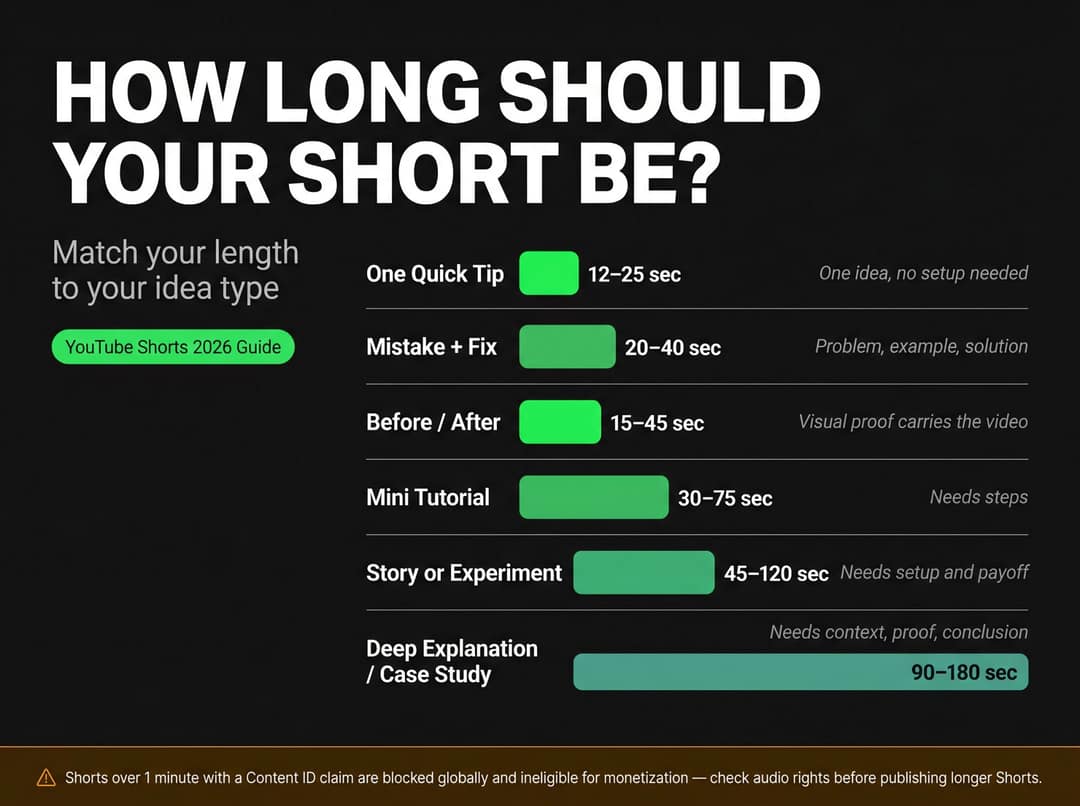
Shorts can be up to 3 minutes: YouTube classifies square or vertical videos up to 3 minutes uploaded on or after October 15, 2024 as Shorts. The best length is the shortest one that fully delivers the promise.
| Idea type | Usual length | Why |
|---|---|---|
| One quick tip | 12 to 25 seconds | One idea, no setup |
| Mistake and fix | 20 to 40 seconds | Problem, example, solution |
| Before/after | 15 to 45 seconds | Visual proof carries it |
| Mini tutorial | 30 to 75 seconds | Needs steps |
| Story or experiment | 45 to 120 seconds | Needs setup and payoff |
| Deep explanation or case study | 90 to 180 seconds | Needs context, proof, conclusion |
Length matters less than most creators think. YouTube publishes no length benchmarks, so the closest large dataset is TikTok: in Revid's 176,367-video study, every length bucket from under 15 seconds to 10 minutes landed between 58K and 76K median views. Clips under 15 seconds had the lowest median (58K) but the most shares per view (1.41 per 100). Revid's larger all-time index of about 2.39 million TikToks favored 16 to 30 seconds (about 141K median), which suggests the edge of very short videos has faded for recent posts.
Length alone barely moves views: every bucket lands between 58K and 76K median views (the 790 videos over 10 minutes are a small, unusual group). Clips under 15 seconds get shared the most per view.
Source: Revid analysis of 176,367 TikToks with 1,000+ likes posted between Oct 1, 2025 and Oct 16, 2026 (61,203 creators)
Show the data
| Median views | Share that passed 1M views | Shares per 100 views | |
|---|---|---|---|
| Under 15 s | 57.6K | 11.6% | 1 |
| 16 to 30 s | 64.9K | 12.3% | 1 |
| 31 to 60 s | 61.8K | 11.8% | 1 |
| 61 to 90 s | 70.5K | 12.2% | 1 |
| 91 s to 3 min | 63.4K | 11.1% | 1 |
| 3 to 10 min | 76.4K | 12.4% | 1 |
| 10 min+ | 129.6K | 13.8% | 0 |
Music limits apply to longer Shorts too: most Shorts Audio Library songs can be used for up to 90 seconds, but some tracks are capped at 60 or 30 seconds.
How to keep viewers watching your Shorts
A Short needs a final payoff and small payoffs along the way: a surprising number, a visual reveal, a completed step, a quick before/after, a pattern interrupt. Each one tells the viewer staying was worth it.
A simple structure for a 30-second educational Short:
| Time | Job |
|---|---|
| 0 to 2 seconds | Stop the swipe with the problem or the result |
| 2 to 6 seconds | Show why it matters |
| 6 to 18 seconds | Teach the core idea with an example |
| 18 to 25 seconds | Proof, contrast or application |
| 25 to 30 seconds | One-sentence takeaway or CTA |
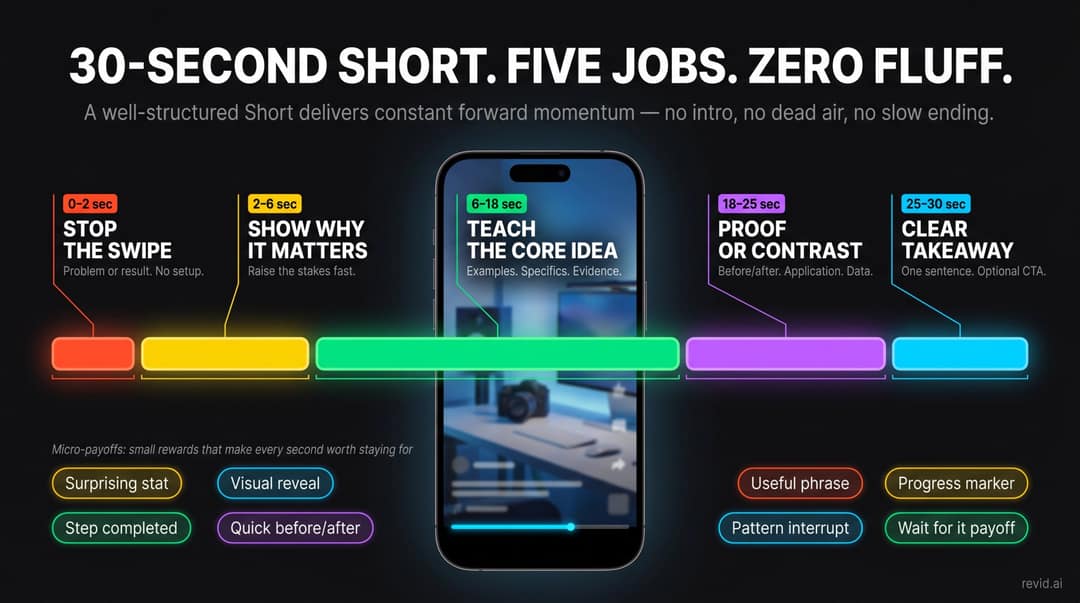
No intro, no "welcome back", no slow ending. Longer Shorts work when the viewer feels constant progress and fail when they feel like a padded long video.
Titles, captions and hashtags for YouTube Shorts
Captions
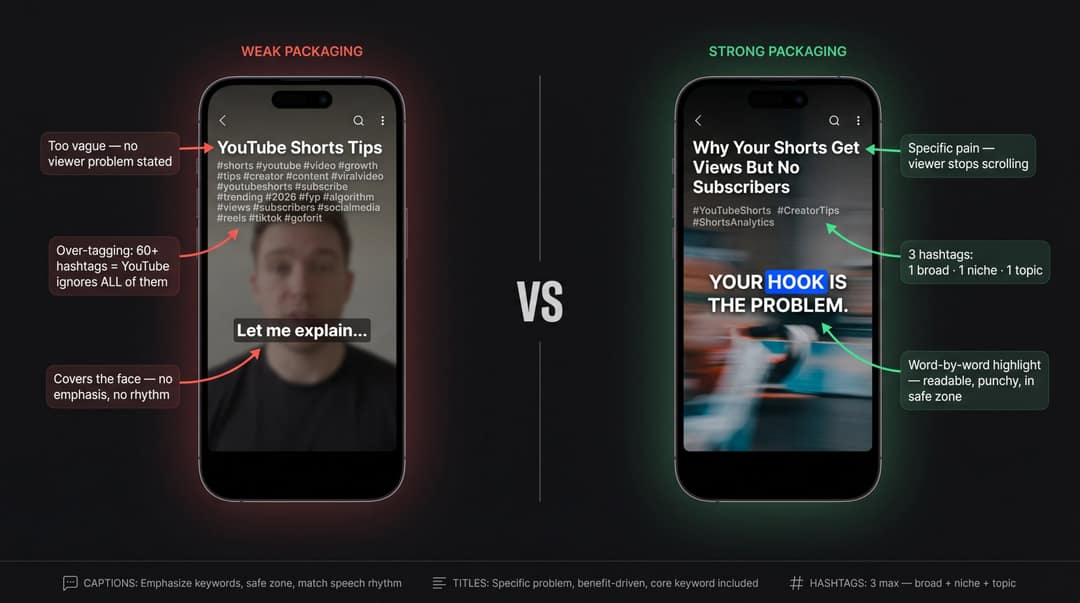
Good captions emphasize key words, match the speaking rhythm, stay readable on a phone and don't cover faces, products or YouTube's buttons. Check placement with the free YouTube Shorts safe zone checker. Bad captions lag behind speech, use low-contrast colors or animate so much they distract.
Titles
Titles matter most in search, on your channel page and in browse surfaces. A Short's title can be up to 100 characters. Make it specific, accurate and in your audience's words.
| Weak title | Better title |
|---|---|
| "YouTube Shorts Tips" | "Why Your Shorts Get Views But No Subscribers" |
| "AI Video Tool" | "I Turned One Blog Post Into 5 Shorts With AI" |
| "Grow on YouTube" | "The Shorts Metric Beginners Ignore" |
How many hashtags to use on YouTube Shorts
Video tags barely matter: YouTube says tags are mainly useful when your title is commonly misspelled. Hashtags help a little more, but YouTube shows up to three hashtags by the title and warns that over-tagging makes them less relevant. With more than 60 hashtags, YouTube ignores all of them and may remove the video from search.
Use three: one broad (#YouTubeShorts), one niche (#CreatorTips) and one specific to the topic (#ShortsAnalytics).
How often should you post YouTube Shorts?
YouTube's Shorts upload guidance asks for a consistent, sustainable schedule and suggests batching, clipping existing videos, replying to comments with Shorts and saving drafts. It does not ask for five a day.
| Frequency | When it makes sense |
|---|---|
| 3 Shorts per week | Quality is hard to maintain right now |
| 5 to 7 Shorts per week | You are in a growth sprint |
| 2 to 3 Shorts per day | You have a proven format, enough ideas and real quality control |
The danger is posting so much you stop learning. Every Short should test one thing: the hook, topic, format, length, first frame, caption style or CTA. Thirty random Shorts teach you little. Thirty Shorts across three controlled series teach you a lot. Judge each one after 72 hours and again after 7 days, not after 30 minutes.
Turn a winning Short into a series
When a Short works, extract the pattern: was it the topic, the hook, the format, the length or the pain it named? Then make controlled variations. If "Your Shorts aren't failing because of hashtags" works, the next episodes are "...because of upload time", "...because you're a small channel" and "Your Shorts are failing because the payoff comes too late."
YouTube now supports this directly: in September 2026 it began rolling out Shorts series, which organizes Shorts into seasons and episodes across web, mobile and TV.
How to repurpose long videos into Shorts
Bad repurposing clips a random moment, keeps the pauses, assumes the viewer knows the speaker and ends mid-thought. Good repurposing is rewriting for Shorts:
- Find the strongest moment in the long video.
- Write a new first 1 to 2 seconds for Shorts.
- Cut everything before the moment becomes valuable.
- Add context with captions or on-screen text.
- Reframe for 9:16.
- End on a complete idea.
- Link back to the full video.
For step 7, YouTube lets you add a related video to a Short so viewers can tap through, and you can create Shorts from your own long-form uploads with a link back to the original. To speed up steps 1 to 5, Revid's YouTube clip maker takes a long video link and returns vertical clips with captions.
How to read your YouTube Shorts analytics
YouTube Studio's Shorts analytics let you compare views, shown in feed and how many chose to view for each Short. Read the pattern, then fix the matching part:
| What you see | Likely problem | What to fix |
|---|---|---|
| Low "shown in feed" | YouTube hasn't found an audience match | Tighten the niche, titles and series consistency |
| High "shown in feed", low "chose to view" | People swipe away | First frame, first words, first caption |
| Good "chose to view", weak view duration | Hook worked, body dragged | Cut setup, bring the payoff forward, add visual progress |
| High retention, few likes or subscribers | Watched but didn't connect | Stronger opinion, identity or series promise |
| High views, no sales or leads | Wrong audience or no bridge to the product | Buyer-intent Shorts: demos, comparisons |
| Raw views up, engaged views flat | Starts and replays without attention | Optimize retention and satisfaction |
After every Short, write one sentence: "This worked (or didn't) because..." Those sentences become your playbook.
How to use AI for Shorts without making generic videos
AI can help you make more Shorts or more forgettable ones. YouTube's channel monetization policy allows AI and automated tools when the final video shows your creative vision and gives educational or entertainment value. It blocks AI content built from generic templates that looks mass-produced, stitched-together AI clips meant to shock, and AI personas posing as experts on health, legal, financial or political topics. On July 15, 2025, YouTube renamed its "repetitious content" rule to "inauthentic content" to make the mass-production point explicit.
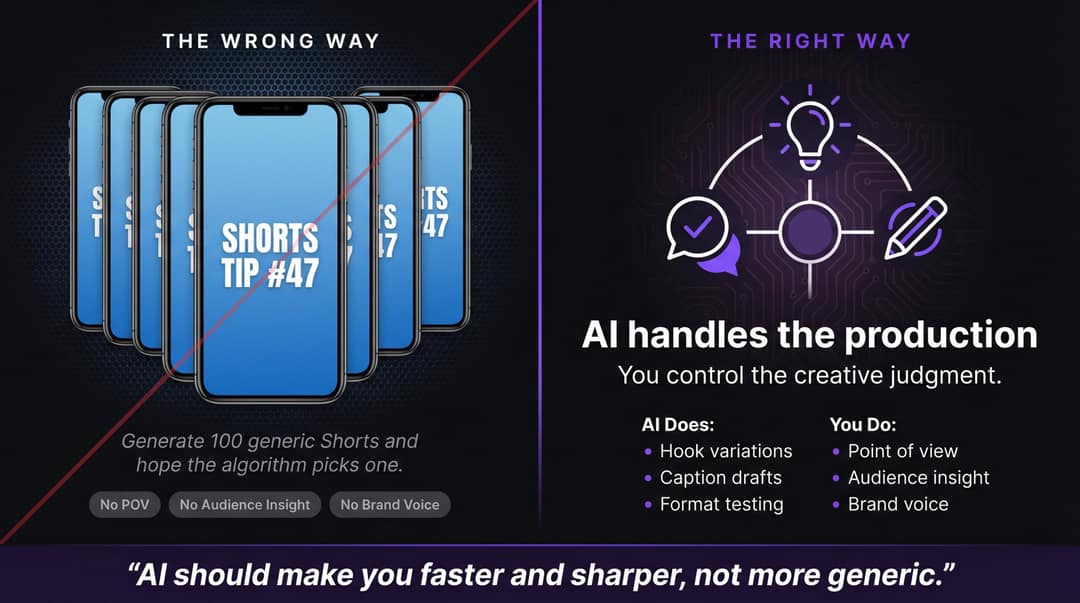
| Let AI handle | Keep human control over |
|---|---|
| Hook and script variations | Point of view and audience insight |
| Caption drafts and formatting | Claims and fact-checking |
| Repurposing long content | Specific examples and brand voice |
| Voice-over drafts and B-roll | The final edit |
If a Short contains realistic altered or synthetic content, such as a real person appearing to say something they didn't, disclose it with YouTube's AI setting. Disclosure alone doesn't limit reach or monetization, and since May 2026 YouTube automatically labels undisclosed videos with significant photorealistic AI.
How to make YouTube Shorts faster with Revid
Most creators who understand this system stall on production. Revid covers that part:
- Draft the script with the free YouTube Shorts script generator, or start from a viral reference and run Revid's free deep analysis (up to 60 a day) to see its hook, timed structure and how to adapt it to your niche.
- Generate the Short in the AI YouTube Shorts generator: visuals per scene, a voice-over in 70+ languages, synced captions in 30 styles and music.
- Fix the first frame, caption and ending in the timeline editor, then publish or schedule straight to YouTube (and TikTok or Instagram) and track each post's views, likes and comments.
- Once a series works, automate video creation with Auto-Mode workers that make a fresh video every day from a prompt or content source (3 workers on the Growth plan, from $39/month).
Keep a human pass on every episode: an automated series still needs a clear angle to stay on the right side of YouTube's mass-production rules.
Template prompt
Create a 20-second YouTube Short using the metric correction template: "Stop judging your Shorts by raw views. Check how many chose to view. If they swipe, fix the first frame." Open on a screen-style shot of an analytics chart, use bold readable captions and a calm, confident voice, and close with a single clear rule.
5 YouTube Shorts templates you can reuse
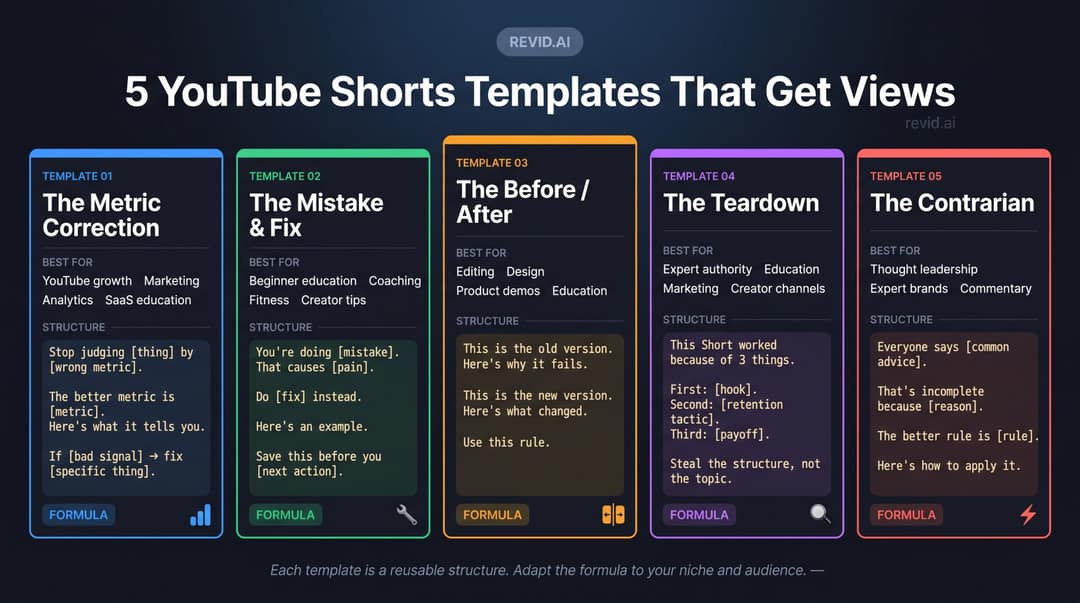
- Metric correction: "Stop judging [thing] by [wrong metric]. The better metric is [metric]. If [bad signal], fix [specific thing]." Example: "Stop judging Shorts by raw views. Check how many chose to view. If they swipe, fix the first frame."
- Mistake and fix: "You're doing [mistake]. That causes [pain]. Do [fix] instead. Here's an example." Example: "You're opening with context. Start with the result instead."
- Before/after: "This is the old version. Here's why it fails. This is the new version. Use this rule." Example: "'How to grow on Shorts' is vague. 'Your Shorts get views but no subscribers because the promise is unclear' has tension."
- Teardown: "This Short worked because of three things: [hook], [retention tactic], [payoff]. Steal the structure, not the topic."
- Contrarian: "Everyone says [common advice]. That's incomplete because [reason]. The better rule is [rule]." Example: "Everyone says post more Shorts. Post controlled variations instead."
A 30-day YouTube Shorts growth plan
Before day 1, set up a tracking sheet: publish date, series, topic, hook, first-frame style, length, format, views, engaged views, shown in feed, chose to view, average view duration, average percentage viewed, subscribers and a one-line takeaway.
| Week | What you test | Goal |
|---|---|---|
| 1 | 5 to 7 Shorts across 2 to 3 content pillars | Find the topics with the strongest early signals |
| 2 | Several hook variations on your best 2 to 3 topics | Raise "chose to view" |
| 3 | The body: shorter vs longer, talking head vs screen recording, example first vs explanation first | Raise view duration and percentage viewed |
| 4 | The winning pattern as a named series of 6 episodes | Build a recognizable promise |
Keep the editing style constant in weeks 1 and 2 so you are comparing topics and hooks, not edits.
YouTube Shorts mistakes to avoid
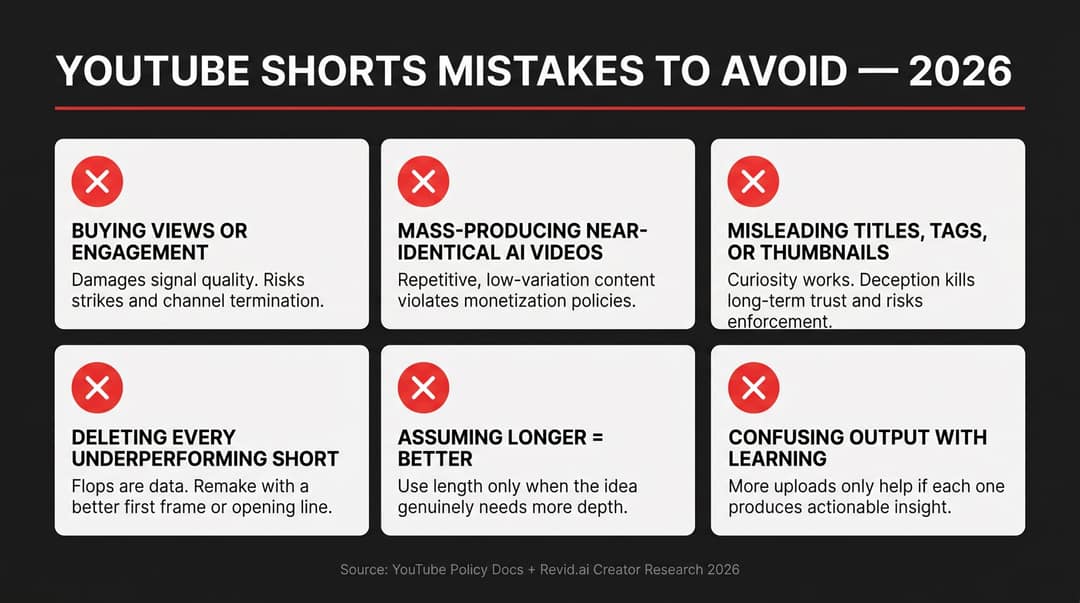
- Buying views or joining engagement swaps. YouTube's spam and deceptive practices policy bans selling engagement and follow-for-follow schemes, as well as misleading titles and hashtags. Violations can lead to removal, strikes or termination.
- Mass-producing near-identical AI videos. A hundred generic Shorts is not a strategy and can cost you monetization.
- Deleting every flop. YouTube says one underperforming video doesn't penalize your channel. Keep weak Shorts unless they are inaccurate, off-brand or risky, and remake strong ideas with a new first frame or first line.
- Assuming longer is better. Three minutes gives you room, not permission to waste time.
- Confusing output with learning. The question is not how many Shorts you posted but what you learned for the next one.
Pre-publish checklist
- Is this for one specific viewer, with demand you have actually seen?
- Does the first frame make sense with the sound off?
- Does something new happen every 1 to 2 seconds, with a clear payoff?
- Are captions readable and inside the safe zone?
- Is the title specific, with 3 hashtags or fewer?
- If it runs past one minute, is all audio cleared? If it uses realistic AI, is it disclosed?
- What is this Short testing, and when will you review it?
FAQ
Why are my YouTube Shorts getting zero views?
Usually because of a basic setting or a weak first second. Check that the Short is public, vertical or square, under 3 minutes and free of copyright claims, then look at "chose to view": if it is low, the first frame is the problem. Our guide to YouTube Shorts not getting views walks through every cause.
Do YouTube Shorts views count toward monetization?
Yes, but only qualified and engaged views count, not raw views. Today a channel can join YPP ad revenue sharing with 1,000 subscribers and 10 million qualified Shorts views in the last 90 days; from February 1, 2027, new applicants need 20 million, and creators keep 45% of their Shorts Creator Pool allocation.
What is the best time to post YouTube Shorts?
There is no universal best time. YouTube's recommendation documentation says there is no evidence that publish time affects long-term performance, though posting when your viewers are active can bring more early views, so check your audience activity in YouTube Studio and keep one consistent slot for a few weeks.
Do Shorts hurt long-form videos?
No, not on their own: YouTube evaluates each video by how viewers respond to it. In AIR Media-Tech's study of 18,000 English-language channels (March 2025 to March 2026), the best results came when Shorts made up 25% to 40% of total uploads, as summarized in our YouTube Shorts statistics.
Can you add a custom thumbnail to a YouTube Short?
Yes, if your account is verified: upload it in YouTube Studio on a computer. YouTube recommends 9:16 at 2160x3840 pixels, and the cover matters mostly on your channel page and in search, since the Shorts feed autoplays the video.