On this page
There was a time when spotting AI-generated video was almost embarrassingly easy. Six fingers. Melting teeth. Eyes that tracked nothing. Mouths that moved slightly before the audio arrived.
That era is over.
The same technology we use at Revid.ai to help creators produce short-form video content has advanced to the point where a convincing talking head, a fabricated product demo, or a fake celebrity endorsement can take less than ten minutes to produce. Most viewers won't catch it on the first watch. Many won't catch it at all.
That doesn't mean you're helpless. It means the old approach (scanning for one obvious flaw) no longer works. What does work is a layered evaluation: visual inspection, audio analysis, source verification, metadata checks, and probabilistic judgment applied together.
This guide covers the 7 clear signs a video may be AI-generated, a practical 15-minute verification workflow, and what responsible AI video creation actually looks like. No single sign proves a video is fake. But when several converge, you have reason to pause. You'll also find a framework for deciding what to do next.
What Counts as an AI-Generated Video?
The term "AI-generated video" is broader than most people realize. It doesn't only mean a fully synthetic scene invented from scratch. It includes any video created or substantially altered using artificial intelligence:
A talking avatar reading a scripted voiceover
A face swap or lip-sync edit applied to existing footage
A cloned voice added to a real video recording
A synthetic person, place, object, or event inserted into a scene
AI-generated b-roll used inside an otherwise real video
Not all of this is deceptive. Legitimate AI-created content is everywhere. AI music videos, AI lyrics videos, and anime-style AI videos are forms of creative expression that don't pretend to be anything else. Educational explainers, fictional storytelling, creative advertising: all of these can involve AI and be completely above board when labeled honestly.
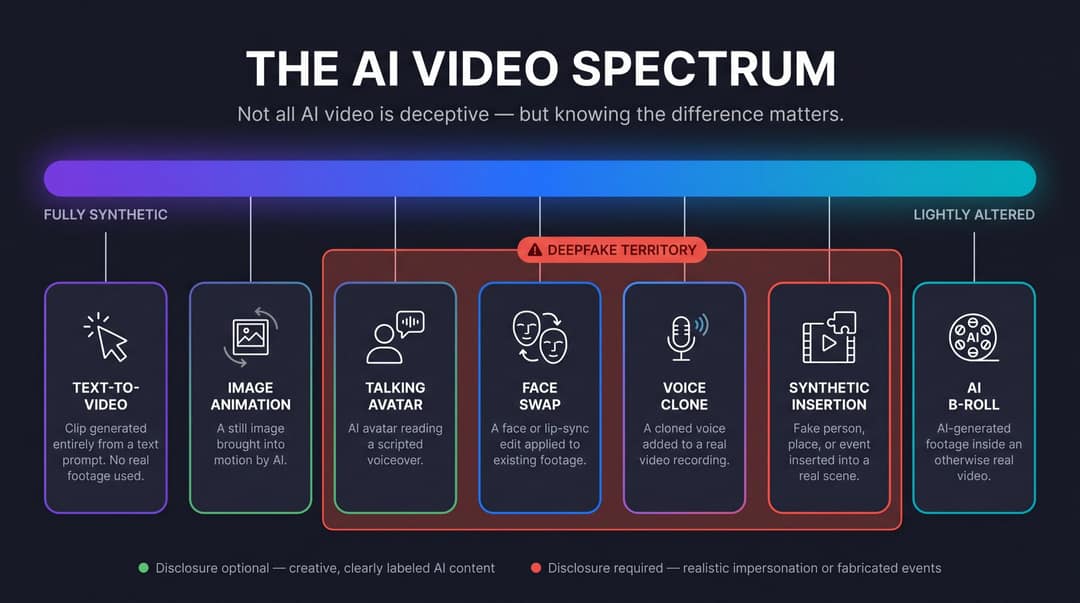
A "deepfake" is a narrower category within that broader space. The UK government's March 2026 deepfake detection report defines synthetic media as video, image, text, or audio generated wholly or partly by AI, while deepfakes specifically are audio-visual content that misrepresents someone or something. Deepfakes can depict real or fictional people, events, or objects, and can cause harm regardless of intent.
The distinction matters because the core problem isn't AI video itself. It's undisclosed realism: content designed to make viewers believe a real person said something they didn't, a real event happened that didn't, or a real place looked a certain way it doesn't. YouTube's policy on altered and synthetic content reflects this clearly: minor production help (captions, idea generation, aesthetic filters) doesn't require disclosure. Realistic impersonation does.
Why Detecting AI Videos Matters in 2026
AI video is now a standard tool for content creation. Millions of people use it for education, entertainment, marketing, and faceless social channels. At Revid.ai, we see creators turn scripts, audio recordings, and articles into publishable short-form video every day using AI video creation tools.
But the same capabilities that make this possible also make scams and disinformation more convincing than they've ever been.
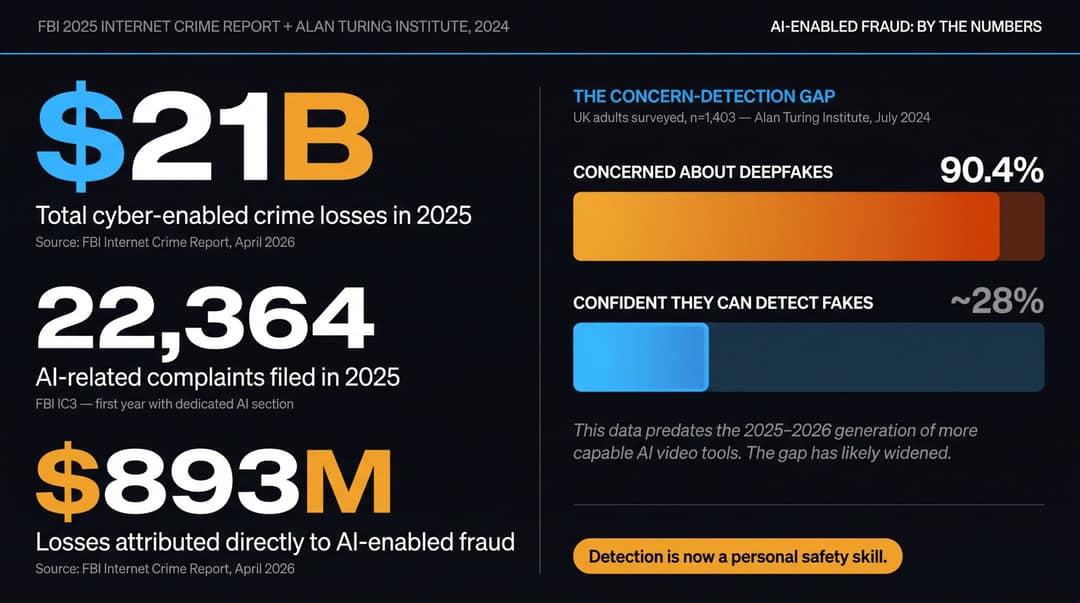
The FBI's 2025 Internet Crime Report, released April 6, 2026, reported that cyber-enabled crimes defrauded Americans of nearly $21 billion. For the first time, the report included a dedicated artificial intelligence section: 22,364 AI-related complaints and nearly $893 million in losses. Scammers are using fake social profiles, voice clones, identification documents, and believable videos of public figures or loved ones.
Public concern tracks with this. A July 2024 survey by the Alan Turing Institute of 1,403 UK adults found that 90.4% were either very or somewhat concerned about the spread of deepfakes, while most respondents weren't confident in their own ability to detect them. That data predates the 2025-2026 wave of more capable video tools, so if anything, that gap between concern and detection confidence has likely widened. More recent data points the same way: Sprout Social's Q3 2026 Pulse Survey found that 84% of consumers are concerned about running into AI-generated deepfakes, and 38% say that concern makes them more skeptical of ads in general.
AI video detection is no longer just a media literacy curiosity. It's a personal safety skill, a financial security skill, and (for brands, journalists, and HR teams) a professional due-diligence skill.
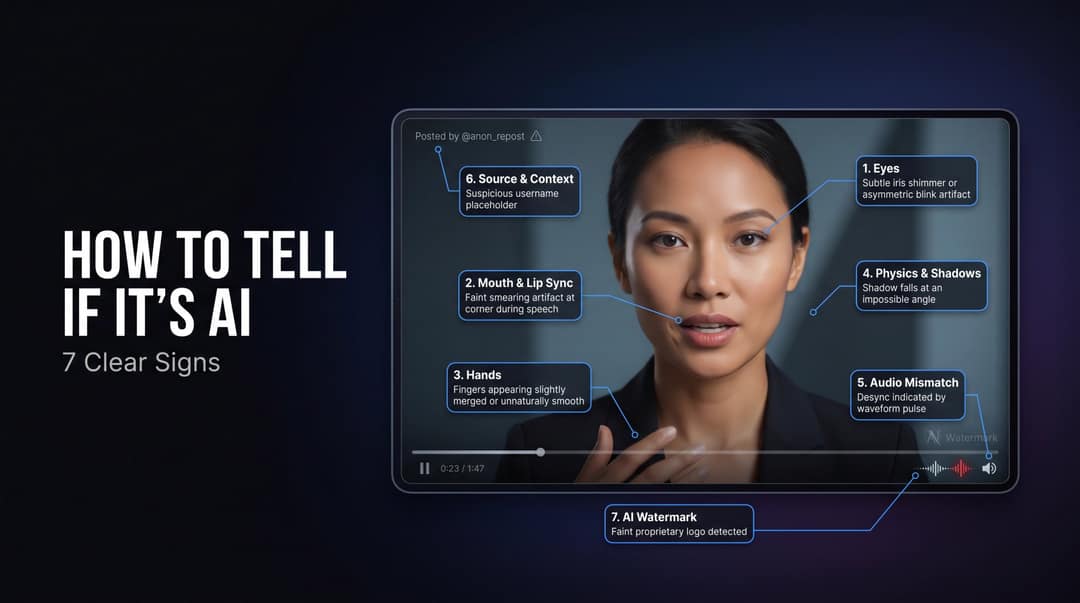
7 Clear Signs a Video Is AI Generated
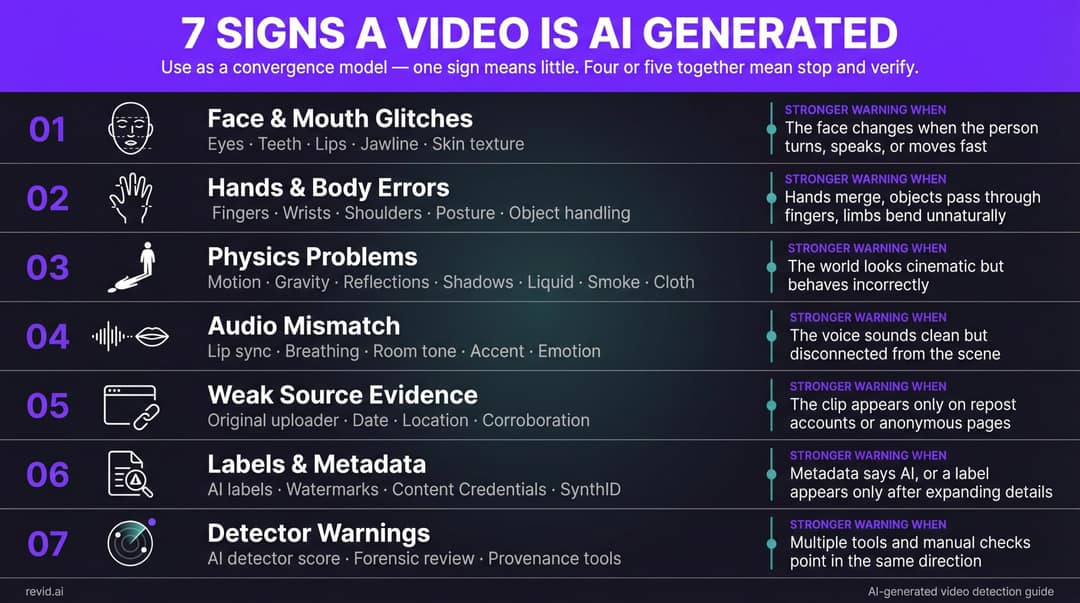
These signs work as a convergence model, not a binary checklist. One sign might mean nothing. Four or five together mean it's time to stop, verify, and think carefully before sharing or acting.
| Sign | What to check | Stronger warning when... |
|---|---|---|
| Face and mouth glitches | Eyes, teeth, lips, jawline, skin texture | The face changes when the person turns, speaks, or moves fast |
| Hands and body errors | Fingers, wrists, shoulders, posture, object handling | Hands merge, objects pass through fingers, limbs bend unnaturally |
| Physics problems | Motion, gravity, reflections, shadows, liquid, smoke, cloth | The world looks cinematic but behaves incorrectly |
| Audio mismatch | Lip sync, breathing, room tone, accent, emotion | The voice sounds clean but disconnected from the scene |
| Weak source evidence | Original uploader, date, location, corroboration | The clip appears only on repost accounts or anonymous pages |
| Labels and metadata | AI labels, watermarks, Content Credentials, SynthID | Metadata says AI, or a label appears only after expanding details |
| Detector warnings | AI detector score, forensic review, provenance tools | Multiple tools and manual checks point in the same direction |
Sign 1: Facial and Mouth Errors in AI-Generated Video
Human faces are extraordinarily difficult to fake consistently. We're extraordinarily good at noticing when something is off, even when we can't name what it is.
Current AI talking-head technology (including tools like our AI Talking Avatar) tends to look strongest when the subject faces directly at the camera and speaks at a moderate pace. The seams show during harder conditions: quick head turns, laughter, side-profile speech, fast phoneme sequences, overlapping audio, or sudden emotional shifts.
What to look for specifically:
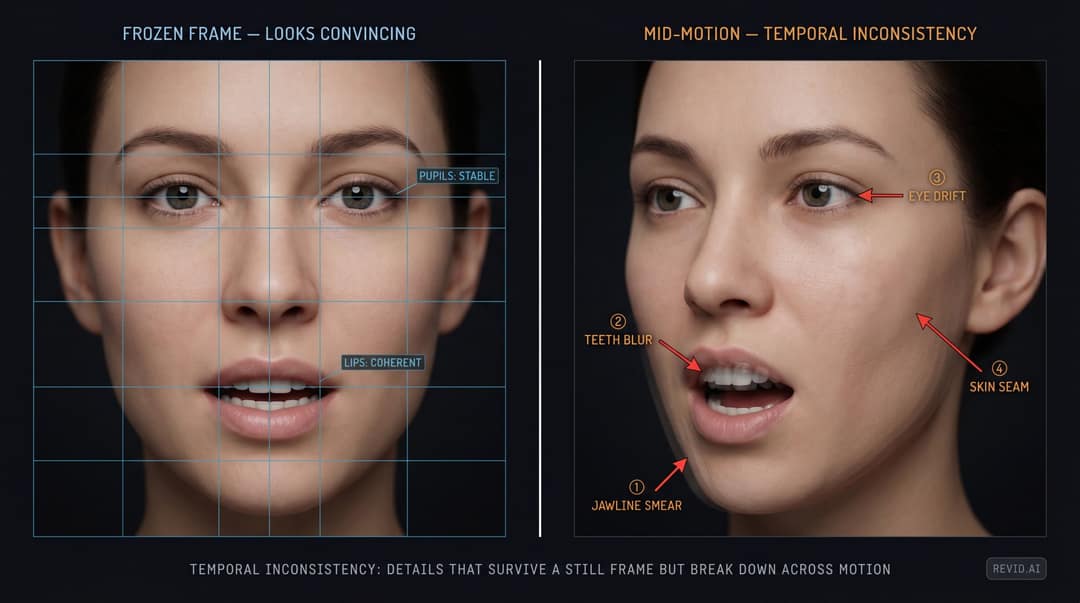
Eyes: Do they track naturally? Blink at plausible intervals? Are the pupils stable across frames?
Mouth: Do the lips form the correct shapes for each word? Not just roughly, but with the subtle transitions between sounds?
Teeth and tongue: Do they blur, flicker, merge, or shift shape mid-sentence?
Jawline and chin: Does the lower face smear or wobble during speech, especially on "m," "b," or "p" sounds?
Skin: Does it look too smooth, too plastic, or inconsistently textured compared to the neck and hands?
Expressions: Does the face show emotion that actually matches the words, not just generic animation?
The technical term for what you're hunting is temporal inconsistency: details that look fine in a single frozen frame but break down across motion. This is why still screenshots are much harder to fake than video.
How to run this check:
Watch the clip once at normal speed. Note what feels off intuitively.
Replay at 0.5x speed. Watch only the mouth for one full pass.
Replay again. Watch only the eyes.
Pause on frames where the head turns, the speaker forms difficult sounds like "f," "v," "p," "b," "th," or "sh," or where emotion peaks.
On false positives: don't call a video AI-generated because someone has unusually smooth skin or odd lighting. Makeup, beauty filters, bad compression, dubbing, motion blur, and smartphone HDR can all create face artifacts in completely genuine videos. Treat facial weirdness as one clue, never as standalone proof.
Sign 2: Unnatural Hands and Body Movement in AI Video
Hands have been the classic AI tell for years. The modern version is subtler than counting fingers, but the underlying reason is the same: current AI video models excel at generating beautiful individual frames. They struggle to maintain cause and effect across time.
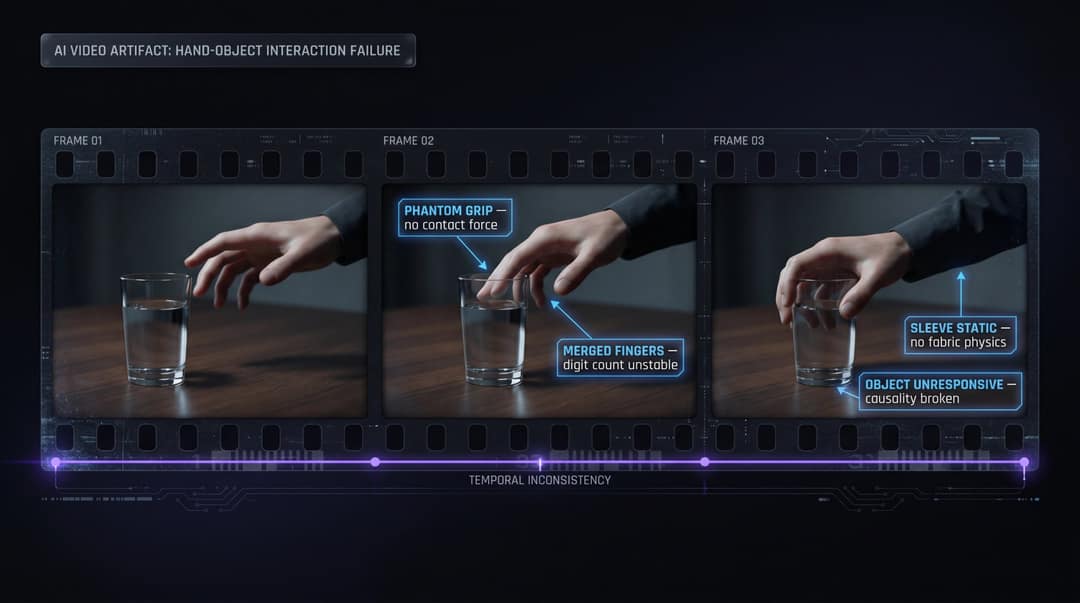
A hand should push a door before the door opens. Fingers should wrap around a glass before it moves. A sleeve should respond when an arm bends. That's not hard for humans. It happens automatically. For current AI systems, maintaining that physical coherence across dozens of frames is genuinely difficult.
What to check:
Fingers that merge, stretch, disappear, or change length between frames
Rings, watches, phones, or pens that appear and vanish
A hand that appears to grip something but doesn't actually make contact
Arms moving without corresponding shoulder involvement
Head movement that's disconnected from the torso
Clothing that doesn't fold, bunch, or react when limbs move
Feet sliding instead of stepping, or walking that looks unnaturally smooth
OpenAI's December 2024 release notes for Sora acknowledged this directly: the deployed version "often generated unrealistic physics and struggled with complex actions over long durations." That's an older data point, and models have improved since, but it confirms that motion realism and physical causality remain active challenges, not solved features.
The practical check: pause the video whenever the person interacts with an object: a cup, phone, door handle, microphone, hair, bag, keyboard, or another person. Ask:
Did the object move because the hand touched it?
Did the fingers actually wrap correctly?
Did the object preserve its shape?
Did the person's body shift weight naturally?
When a video shows someone doing something physically specific, the body usually gives you better evidence than the face.
Sign 3: Physics, Lighting, and Reflection Problems in AI Video
AI-generated videos can look cinematic. They can have gorgeous lighting, dramatic backgrounds, and professional framing. What they often can't do is make the world behave correctly.
Watch for:
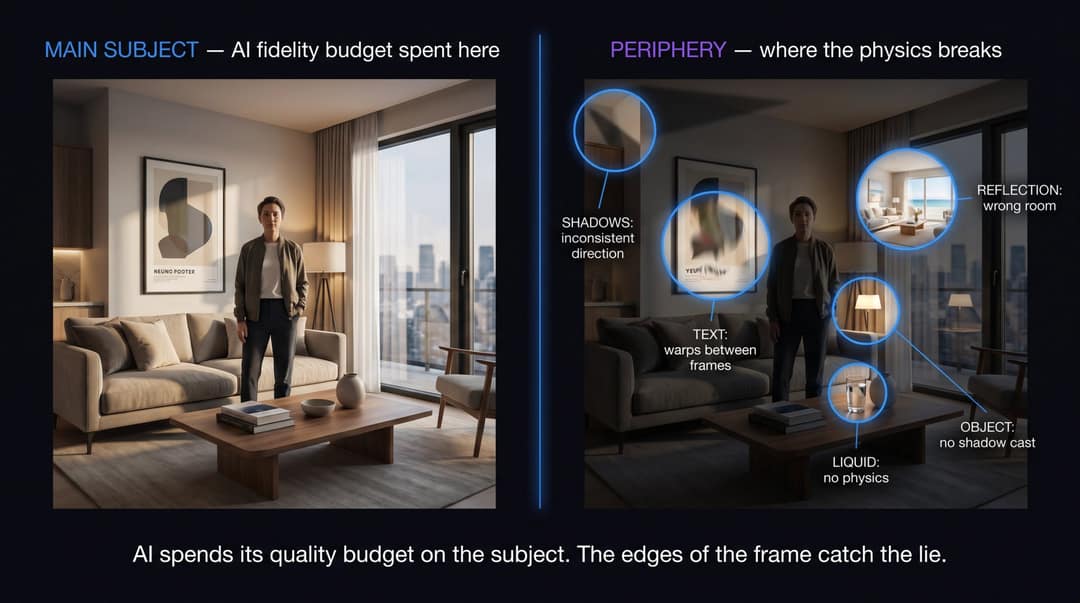
Shadows pointing in different directions within the same scene
Reflections in windows, mirrors, or glasses that don't match the actual room
Mirrors showing the wrong angle, or missing objects that should be visible
Glass, water, smoke, fire, rain, or hair behaving strangely
Background text that warps, blurs, or changes between frames
Objects that change size as the camera moves
Clothing patterns that appear to crawl or shimmer during motion
Camera movement that looks expensive but would be physically impossible
People or vehicles that partially pass through each other
This is especially worth checking for viral clips showing unbelievable events: a celebrity doing something shocking, a sudden disaster, a too-perfect product demonstration, a wild encounter, a protest scene, or a "new technology" that seems too remarkable.
The background test
AI-generated videos tend to spend their "quality budget" on the main subject. The edges of the frame (backgrounds, reflections, signage, crowds, small objects) often reveal the problem faster than the face does. Train yourself to look at the periphery:
-> Street signs and storefront text
-> License plates
-> Posters and billboards
-> Reflections in windows and glasses
-> Background faces in crowd scenes
-> Shadows under feet
-> Hands near reflective surfaces
If the main subject looks flawless but the world around them keeps mutating, that's a meaningful signal.
Sign 4: Audio Mismatches and Voice Cloning Tells in AI Video
Most people look for visual tells. Audio is often the stronger detection channel, and it's less commonly checked.
Listen for:
Lip movement that lags behind the voice (or the reverse)
A voice with no breath, no saliva clicks, no natural pauses between thoughts
Intonation that sounds emotionally flat even when the words suggest strong feeling
Pronunciation that's too perfect, too consistent, unnaturally clean
Sudden accent shifts mid-sentence
Robotic pacing that doesn't vary the way natural speech does
Background noise that cuts in and out artificially
Room echo that doesn't match the visible space
Crowd noise that doesn't react to what's happening on screen
A voice that sounds studio-clean in a noisy outdoor environment
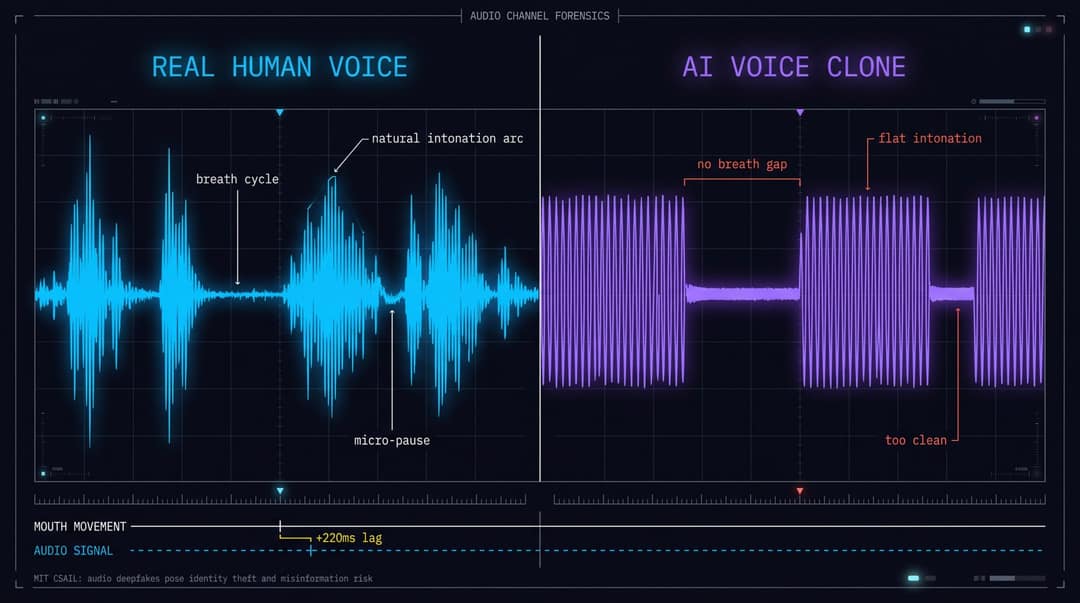
MIT's CSAIL published an analysis in March 2024 noting that audio deepfakes pose serious risks including misinformation, identity theft, privacy violations, and malicious content alteration. Detection typically looks for artifacts introduced by generative models: things like liveness signals, breathing patterns, and intonation rhythms that are difficult to synthesize convincingly. The researchers also cautioned that future models may produce minimal detectable artifacts. Audio deepfake detection is an arms race, not a solved problem.
Worth noting: legitimate audio-to-video tools layer AI-generated visuals onto real audio, which means context matters. An audio podcast with AI-generated visual overlays isn't deceptive. It's clearly a production format. The question is always: does the audio pretend to be something it isn't?
How to check:
Play the video without looking at it. Ask:
Does the voice sound like it was recorded in that room?
Are there natural breath cycles before long sentences?
Does the speaker interrupt themselves or trail off naturally?
Does the emotional tone match the face you've seen?
Do background sounds react to the action?
Then mute the video and watch only the mouth. If the face looks plausible when muted but the illusion breaks when audio returns, you may be looking at dubbed, lip-synced, or AI-generated audio.
A note on live video calls: being on a live video call doesn't prove the other person is real. Deepfake scam scenarios can combine video, voice cloning, and social urgency in real time. For any call that involves a request for money, credentials, legal approval, hiring decisions, or sensitive data, the FBI recommends taking a beat before acting, and verifying identity through a separate, trusted channel.
Sign 5: How to Verify the Source and Context of a Video
Many AI and manipulated videos aren't caught by analyzing pixels. They're caught by asking basic questions about context.
A video becomes suspicious when:
It appears only on anonymous repost accounts with no traceable original
The caption makes an enormous claim but provides no date, location, or specifics
No reputable outlet, official account, or independent eyewitness corroborates it
The account posting it has a pattern of engagement bait, viral outrage, or miracle-product content
Comments are full of "source?" questions that go unanswered
The same clip circulates with different captions in different countries
The language, weather, clothing, signage, or architecture doesn't match the claimed location
The clip is conveniently short and cuts away exactly before verification would become possible
This matters because not every deceptive video is fully AI-generated. Some are miscontextualized: real footage with a false caption. Others are partially synthetic: a real clip with an AI-swapped face, a cloned voice dubbed over, or AI-inserted objects. In all these cases, source verification catches them faster than visual analysis.
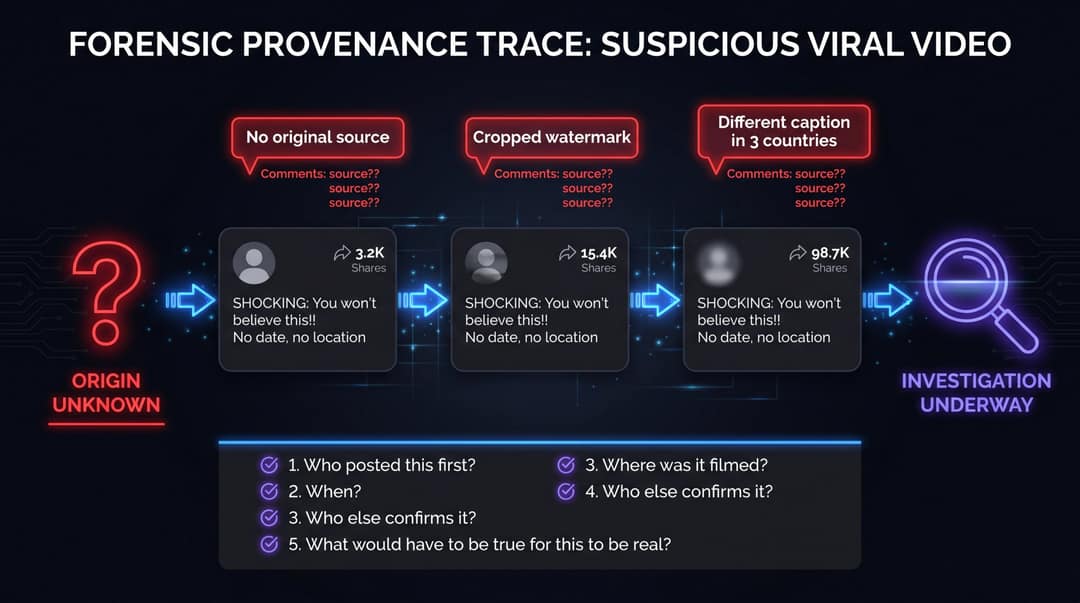
The 5 source questions to ask before anything else:
Who posted this first? (Not who shared it. Who originated it?)
When was it first posted?
Where was it supposedly filmed?
Who else confirms it, independently?
What would have to be true for this video to be real?
For videos touching on news, politics, health, finance, disasters, or investment claims, wait for corroboration. Real events leave more evidence than one low-context clip. As Ofcom's July 2024 deepfake report framed it: deepfakes are a systems problem, not merely a visual artifact problem. Context, corroboration, and source integrity matter as much as pixels.
Sign 6: AI Labels, Watermarks, and Metadata That Reveal Synthetic Content
Some AI-generated videos carry visible or embedded signals that identify their origin. These can include:
A visible watermark from the generation tool
A platform label such as "AI-generated," "altered," or "synthetic"
C2PA Content Credentials
Google SynthID watermarks
Tool-specific provenance metadata
Creator disclosures in the description or caption
Content Credentials and C2PA
The Coalition for Content Provenance and Authenticity (C2PA) provides an open standard for establishing the origin and edit history of digital content. Think of Content Credentials as a "nutrition label" for media: they can show where content came from, what tools touched it, and whether AI was involved.
Adobe's Content Credentials documentation (last updated April 2, 2026) describes these as durable, industry-standard metadata that can show whether content was captured by a camera, generated by AI, or edited with specific tools. Firefly-generated content gets Content Credentials applied automatically.
SynthID
Google DeepMind's SynthID embeds imperceptible watermarks directly into AI-generated images, audio, text, and video. These watermarks are designed to survive common modifications like cropping, filters, frame-rate changes, and lossy compression. Gemini's Veo video generation marks outputs with both a visible watermark and a SynthID watermark embedded in each frame.
OpenAI's Sora included C2PA metadata and visible watermarks by default, with Sora 2 adding both visible and invisible provenance signals. OpenAI discontinued the Sora app on April 26, 2026 and shut down the Sora 2 API on September 24, 2026, so these signals now matter mainly for older Sora clips that are still circulating.
What platforms are doing
| Platform | AI labeling approach | Key fact |
|---|---|---|
| YouTube | Since May 2026, a more prominent label for photorealistic AI content (an overlay on Shorts), auto-applied when its systems detect significant photorealistic AI | Creators must disclose realistic altered/synthetic content |
| TikTok | Auto-labels from C2PA credentials; detection models; requires realistic AI labels | Labeled over 3 billion videos as of July 2026 |
| Meta | Labels organic AI-generated content; stopped removing content solely under manipulated video policy | 82% of 23,000+ respondents in 13 countries supported warning labels |
Sources: YouTube Help, TikTok Newsroom, Meta
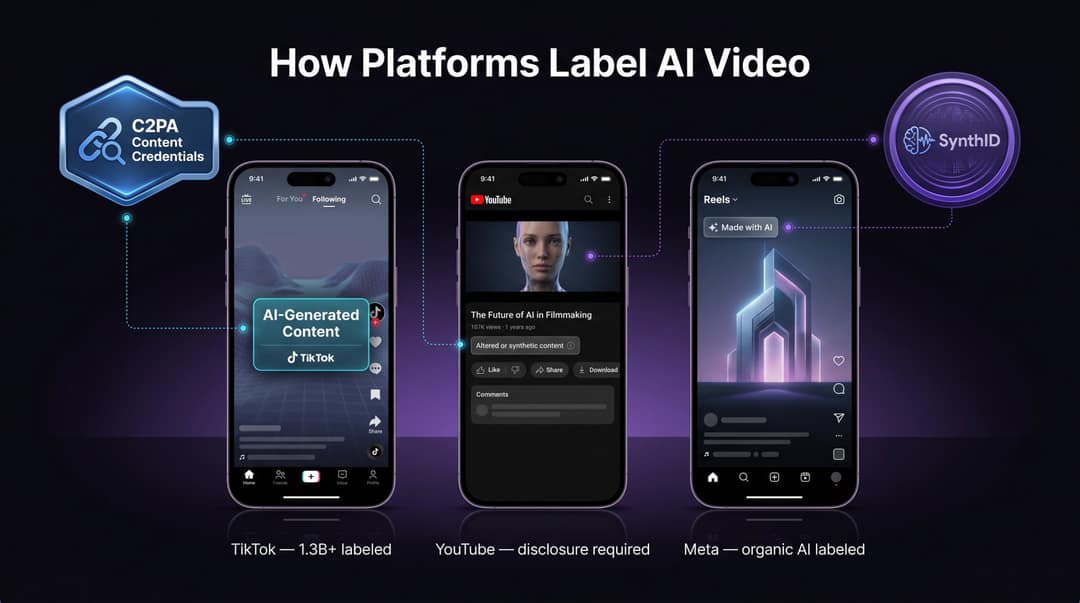
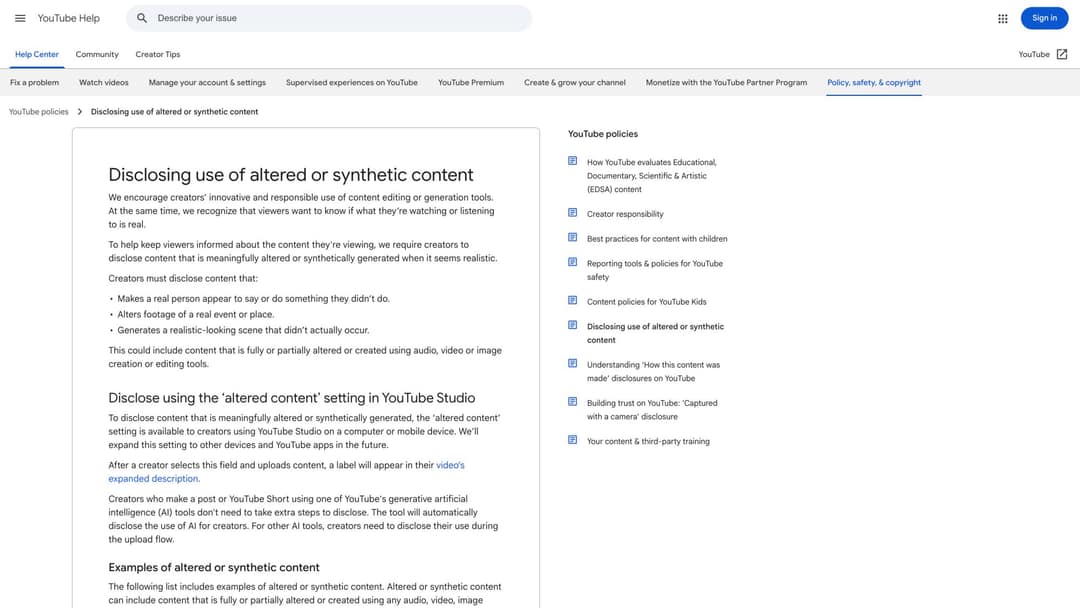
YouTube's actual policy page on altered and synthetic content disclosure — the three bullet points ("makes a real person appear to say something they didn't," "alters footage of a real event," "generates a realistic-looking scene that didn't occur") define exactly when a label is required.
The critical caveat: a missing label is not proof that a video is real.
Metadata can be stripped. Videos can be screen-recorded, cropped, compressed, reuploaded, or edited between platforms, and many of those processes remove provenance signals. The UK House of Commons Library noted in January 2026 that there's no consensus yet on the most effective AI label design, and companies use significantly varying approaches. Use labels and metadata as strong positive evidence when present. Never as your only test in either direction.
Sign 7: What AI Video Detection Tools Actually Tell You
AI video detectors can help you form a hypothesis. They shouldn't be treated as verdict machines.
These tools typically analyze:
Pixel-level artifacts and compression inconsistencies
Face boundary irregularities
Biological signals (micro-expressions, blink patterns, subtle skin variations)
Audio artifacts and lip-sync alignment
Known generator fingerprints
Metadata and provenance signals
The UK government's March 2026 deepfake detection market report documents several detection approaches in use, including Microsoft Video Authenticator, Intel FakeCatcher, Google DeepMind SynthID, and Meta Video Seal. It also candidly lists the challenges: limited high-quality training datasets, inconsistent evaluation metrics, constantly evolving threats, and meaningful user skepticism.
NIST's January 2025 publication on evaluating analytic systems against AI-generated deepfakes frames deepfake forensics as an active, unsolved evaluation problem. It's not a deployed consumer feature you can rely on with high confidence.
The Global Investigative Journalism Network's September 2025 reporter guide states it plainly: the arms race between creators and detectors is ongoing, perfect detection may be impossible, and the goal has shifted from definitive identification to probability assessment and informed judgment.
How to use detectors responsibly: use them to answer "should I investigate this further?" not "is this definitely fake?"
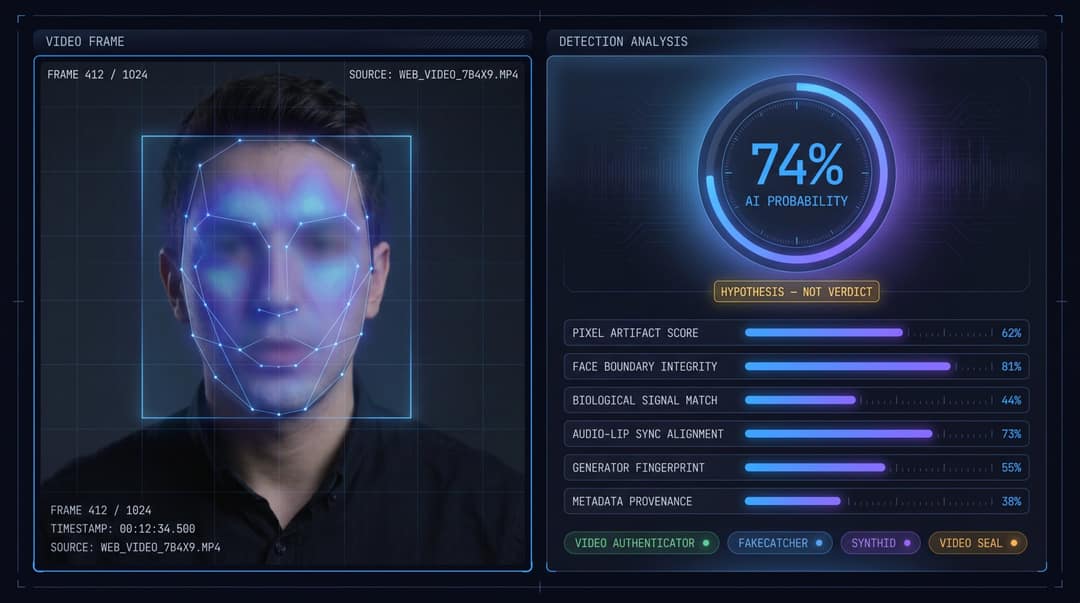
A responsible workflow:
Preserve the original link or file before running any analysis
Confirm the tool analyzes video, not just images
Understand whether it identifies a specific watermark or only estimates probability
When stakes are high, compare results across more than one tool
Always combine detector output with manual visual/audio inspection and source verification
Don't upload private, sensitive, or confidential videos to unknown third-party tools
For journalism, legal proceedings, HR decisions, finance, or security, treat detector output as one piece of evidence. Escalate to trained forensic specialists or platform trust-and-safety teams when consequences are serious. Understanding how AI video content is created can also help you explain what detectors are looking for when you discuss findings with others.
How Revid.ai Approaches Responsible AI Video Creation
We build AI video tools. That's worth saying plainly, because it puts us in an unusual position when writing a guide on AI video detection.
Revid.ai offers our full suite of AI video tools for creating talking avatars, converting audio into video, turning articles and PDFs into short-form content, generating music videos, and producing short-form content for TikTok and other platforms. Our AI Talking Avatar is precisely the kind of technology that creates the detection challenge we've spent this entire guide describing. So does our Audio to Video tool, our Article to Video converter, and our PDF to Video Converter.
We don't think that creates a conflict. We think it creates a responsibility.
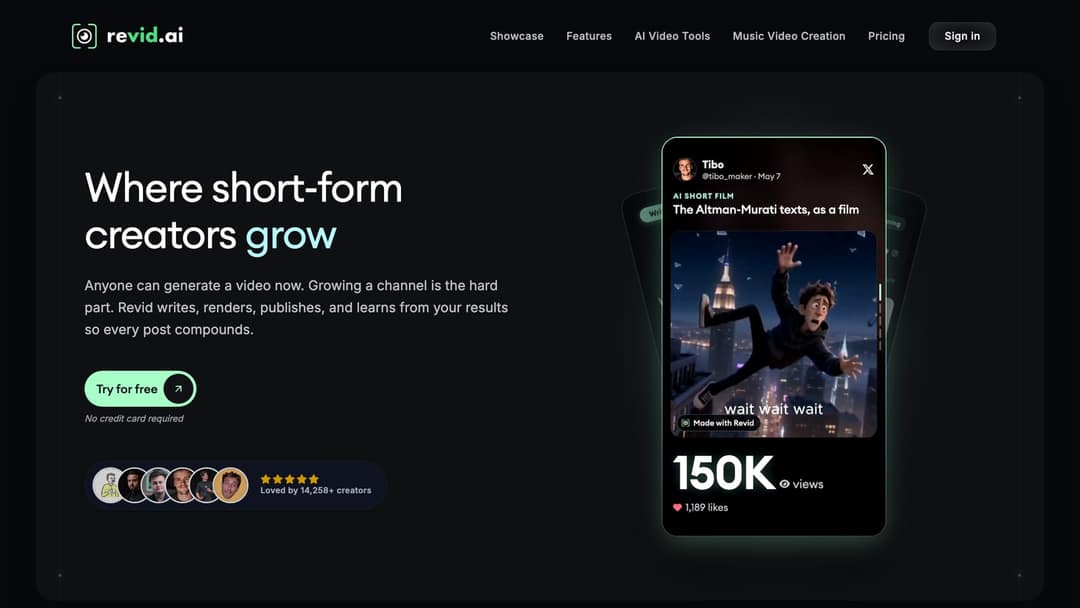
The platform behind this guide: Revid.ai's homepage, where creators turn scripts, audio, articles, and PDFs into publishable short-form video. The tools that make AI video creation accessible are the same ones that make the detection skills in this guide necessary.
The goal at Revid.ai has always been to help creators produce content faster and better, not to help anyone deceive anyone. Every tool we build has legitimate, transparent use cases: education, entertainment, marketing, faceless content channels, music visualization, social repurposing. And every tool can be misused if the creator decides not to label their output honestly.
What responsible AI video creation looks like, in practice:
Keep your project files. Prompts, source assets, scripts, and export dates are your paper trail. If anyone questions whether your content is AI-generated, that documentation is your answer. Our full guide to working with Revid covers how to keep your production workflow organized from first draft to final export.
Label when it matters. If you're creating a realistic talking avatar, a voice clone, or footage of a scene that didn't happen, and it could plausibly be mistaken for reality, label it. Your audience will respect you more for it, not less.
Understand the platform rules. YouTube requires disclosure for realistic synthetic content. TikTok requires labeling for realistic AI-generated content. These aren't bureaucratic boxes to check. They're the emerging baseline for trustworthy AI content creation.
Use AI for what it's good at. Converting an article or a PDF into an explainer video using our Article to Video tool or PDF to Video Converter is a completely legitimate creative workflow. Making a music video with AI or a lyrics video is creative expression. Making a TikTok video from a written script is efficient content creation. None of these require deception.
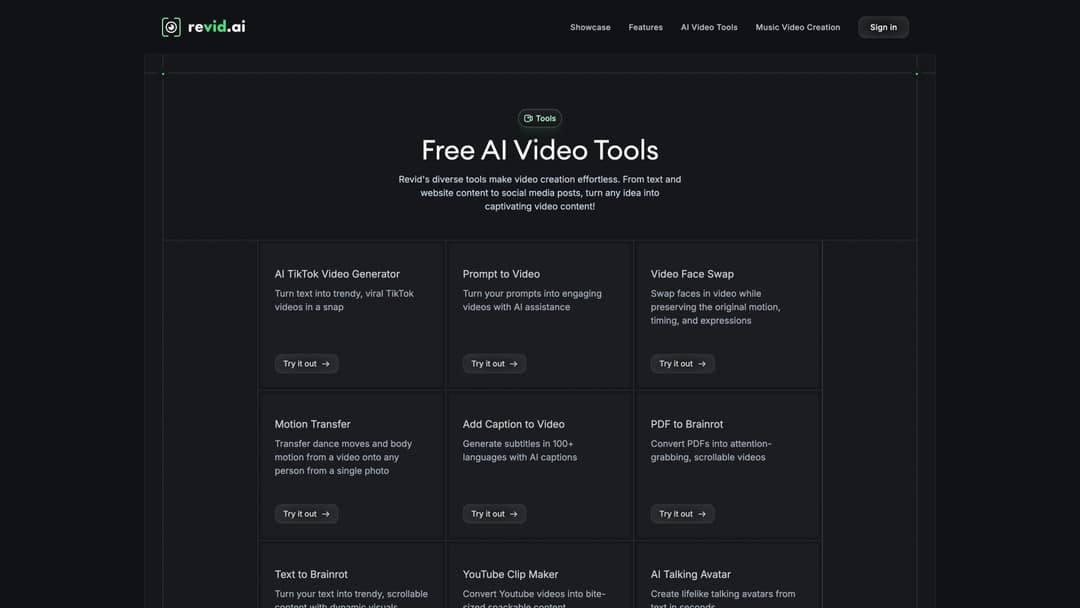
The full Revid.ai tools library — every one of these tools has a transparent, labeled use case. The line between responsible and deceptive AI video isn't the tool. It's whether you pretend otherwise.
The line isn't "did AI make this?" The line is "did you pretend otherwise?"
How to Verify a Suspicious Video in 15 Minutes
When a video is important enough that you'd act on it, share it, or report it: run this workflow first.
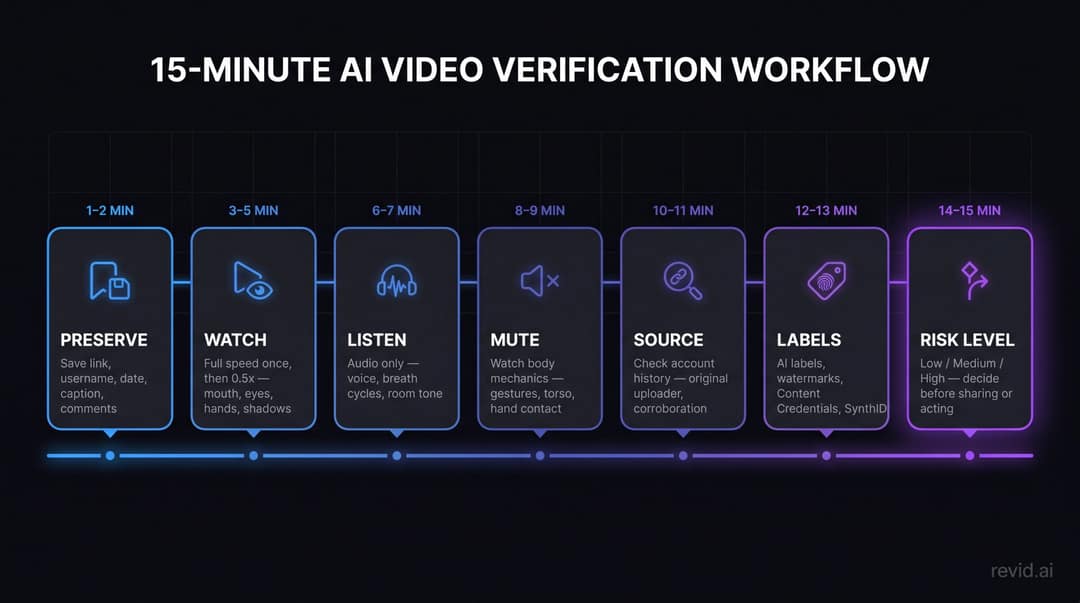
Minutes 1-2: Preserve the original
Don't work from a repost. Open the original platform page if possible. Save:
The link and username
Posting date and caption
Screenshots of comments
Any visible label or disclaimer
Avoid downloading, cropping, or reuploading before you've completed your check. Those actions can strip metadata.
Minutes 3-5: Watch normally, then slowly
Watch once at full speed. Note your intuitive reactions.
Then watch at 0.5x speed, focusing separately on: mouth, eyes, hands, object contact points, shadows, background text, reflections.
Minutes 6-7: Listen without watching
Play the audio while looking away from the screen. Ask:
Does the voice fit the acoustic space of the room?
Are there natural breath cycles before long sentences?
Does the speaker trail off, self-correct, or pause naturally?
Do background sounds react to what's happening?
Minutes 8-9: Watch muted
Mute and observe body mechanics only. Ask:
Do mouth shapes match speech intensity?
Do gestures match emphasis?
Does the torso move with the head?
Do hands interact correctly with objects?
Minutes 10-11: Check the source
Look at the account history. Ask:
Is this the original uploader, or a repost?
Does this account have a real, substantive history?
Is the video corroborated by any official source or independent account?
Does this account primarily post viral outrage, celebrity bait, or miracle products?
Minutes 12-13: Check labels and provenance
Look for platform AI labels, creator disclosures, watermarks, Content Credentials, and SynthID verification options. Remember: the absence of a label tells you nothing about authenticity.
Minutes 14-15: Decide the risk level
| Stakes | What it means | What to do |
|---|---|---|
| Low | Entertainment, memes, clearly fictional content | Enough to avoid resharing as real |
| Medium | Brand reputation, professional credibility, workplace context | Verify with additional independent sources |
| High | Money, identity, health decisions, politics, legal matters, private data | Don't act on the video alone. Verify out of band. |
How to Handle Deepfakes on Live Video Calls
Live deepfakes are harder to verify because the attacker controls the pacing, uses urgency and authority, and has social pressure working for them.
A practical policy for any organization: No financial transfer, credential disclosure, or sensitive approval is authorized by video call alone.
If someone on a live video call asks for any of the following: money transfer, cryptocurrency, gift cards, passwords, bank details, one-time codes, private documents, hiring approvals, legal authorization, or emergency family support, verify through a separate trusted channel before acting.
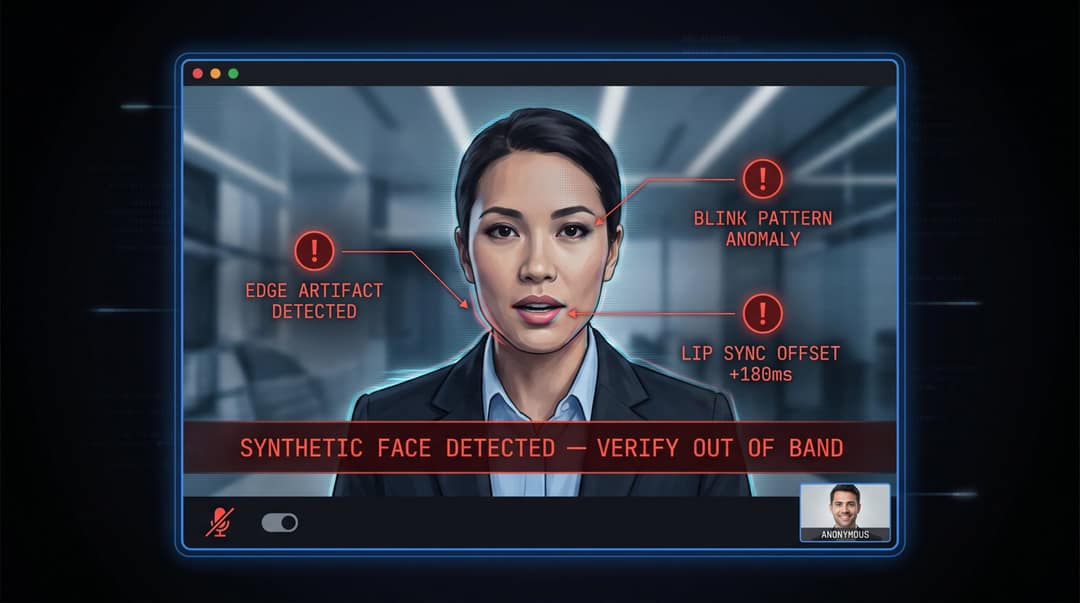
Verification options when you're on a suspicious call:
| Option | How to use it |
|---|---|
| Call back independently | Use a number you already have (not one provided during the call) |
| Internal messaging | Ask for confirmation through a secure internal system |
| Pre-agreed code phrase | Something only the real person would know |
| Two-person approval | Require a second authorized person for sensitive requests |
| Delay and verify | Refuse to act under urgency until identity is confirmed separately |
One important caution: don't rely solely on "ask something only you would know." Attackers frequently gather personal details from social media profiles, data breaches, email compromises, or previous recordings. A question about a shared memory is not a reliable verification method for high-stakes decisions.
What Not to Do When Checking for AI-Generated Video
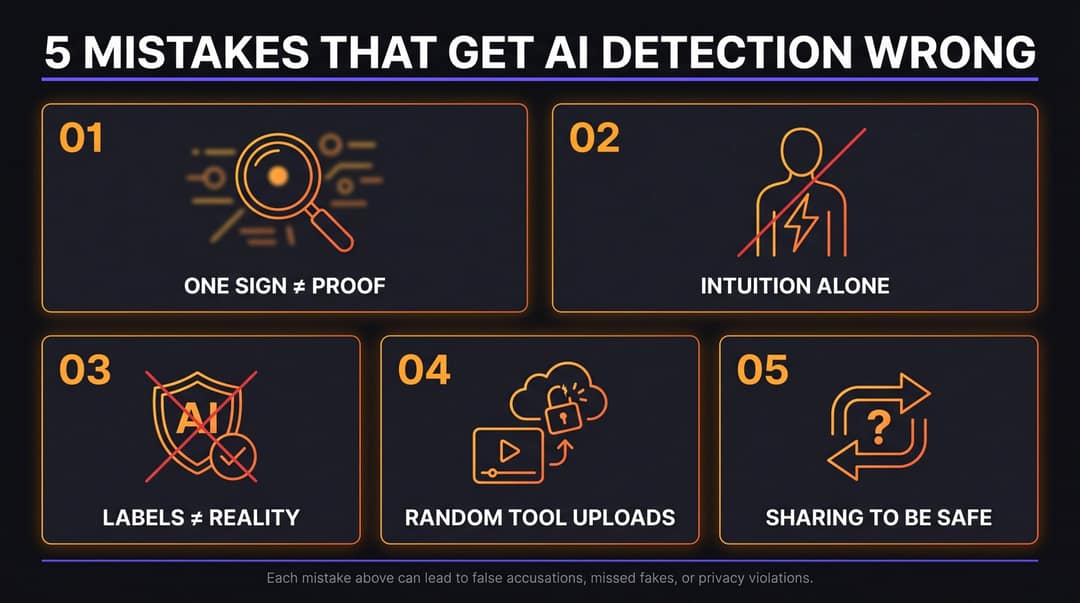
Don't Accuse Someone Based on a Single Visual Artifact
A blurry mouth or a distorted hand can result from compression, motion blur, a bad camera, or poor lighting in a completely genuine video. Publicly accusing someone of creating a deepfake or using AI when you're wrong can cause serious reputational harm. Check multiple signs before forming a judgment.
Don't Trust Your Intuition Alone
Deepfakes are specifically engineered to exploit human intuition. A 2026 study published in Nature Communications Psychology found that people's ability to detect deepfakes varies significantly by video quality and context. People consistently overestimate their own ability to distinguish real from fake. If a video confirms your existing beliefs, fears, or hopes, you're especially at risk of letting your gut override your analysis.
Worth remembering: the videos most likely to fool you are the ones you want to believe.
Don't Assume a Warning Label Solves Everything
Labels help. They don't fully solve the problem. The same Nature Communications Psychology article discusses how people can remain influenced by deepfake content even after seeing a transparency warning. There's also a secondary risk: generalized cynicism, where people begin distrusting legitimate real videos too. Healthy skepticism applied methodically is the goal. Blanket distrust of everything is counterproductive.
Don't Upload Sensitive Videos to Random Detector Tools
Some detector services may store uploads, process them through third-party systems, or lack meaningful privacy guarantees. For sensitive content involving real people, private contexts, or legally significant material, use trusted enterprise-grade tools or work with forensic professionals.
Don't Share It "Just in Case It's Real"
That's the mechanism through which fake videos spread. If you're genuinely uncertain about a video, be explicit about that uncertainty when discussing it:
"Unverified video. I haven't found the original source."
"This clip is claimed to show X. I haven't been able to confirm it."
"May be AI-generated or edited. Treat accordingly."
Being honest about uncertainty is more useful to your audience than treating speculation as news.
How Creators Should Disclose and Label AI-Generated Videos
For creators, the goal isn't to hide the fact that AI was used. It's to use AI responsibly and let your audience know when they're watching something synthetic.
When your video includes realistic AI-generated people, voices, events, or places that could plausibly be mistaken for real, label it clearly.
Disclosure language that works:
"AI-generated video"
"Created with AI"
"Synthetic voiceover"
"AI avatar used"
"Fictional scene generated with AI"
"Dramatization, not real footage"
"Face swap used with permission"
Disclosure language to avoid (too vague):
"Enhanced"
"Edited"
"Inspired by"
"Concept"
"Simulation" (without context)
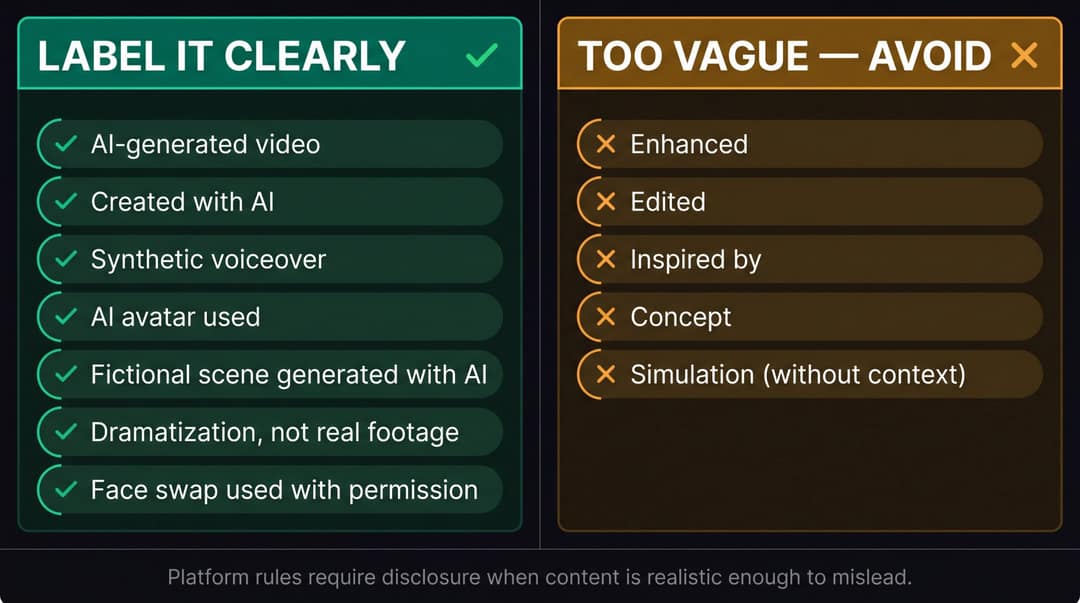
YouTube's altered and synthetic content policy gives specific examples of what requires disclosure: making it appear that someone gave advice they didn't give, cloning someone else's voice without permission, generating realistic footage of real places, or depicting public figures doing things they didn't do. Follow your platform's upload disclosure settings when content is realistic enough to mislead.
If you're using tools like AI Talking Avatar to create a spokesperson, or converting an existing document into video with Article to Video or PDF to Video Converter, keep your project files, source assets, prompts, and export dates organized. Having that documentation makes disclosure easy, supports platform compliance, and protects you if questions arise later.
How to Spot AI Videos on TikTok, Reels, and YouTube Shorts
Short-form videos are harder to verify. They're compressed, cropped, stripped of context, and designed to be consumed in seconds. They also travel far: in Revid's analysis of 292,784 TikToks, AI-generated videos averaged 1.4M views against 661.4k for real footage, and 20% passed 1M views against 10%. The verification instinct that kicks in when you read a questionable news article often doesn't activate when you're scrolling.
Extra things to watch for in short-form content:
Captions making enormous claims without any source information
AI voiceovers paired with unrelated or generic b-roll footage
Reused clips appearing with different stories across multiple accounts
Watermarks that appear cropped or partially visible
Comments full of "source?" or "is this real?" questions with no replies from the poster
Hands and faces during fast cuts (these reveal the most in compressed formats)
Background text that changes between shots
"Too perfect" product demonstrations
Celebrity investment, health, or miracle-product endorsements from accounts with thin history
AI TikTok videos that are clearly labeled are legitimate. The concern is unlabeled realistic content.
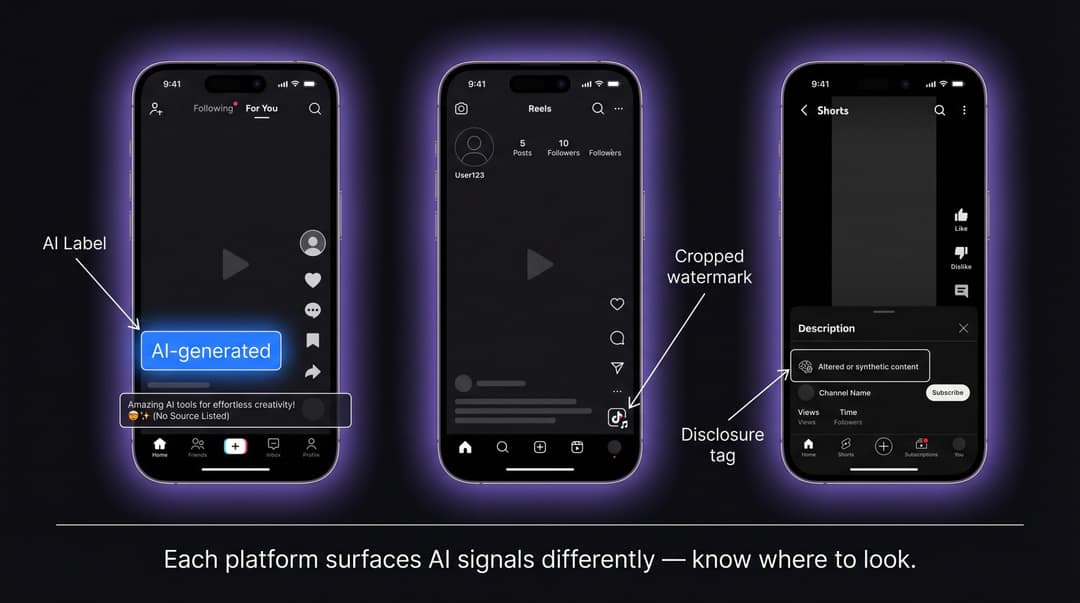
Short-form platforms are built for speed. Verification requires slowing down deliberately.
Before sharing, ask:
Would I believe this if it supported the opposite of what I already think?
That question catches a large number of emotionally engineered fakes, because those videos are typically designed to confirm existing biases.
Common AI Video Scam Patterns You Need to Recognize
A few scenarios appear repeatedly in deepfake and AI video scams. Recognizing the pattern speeds up your verification.
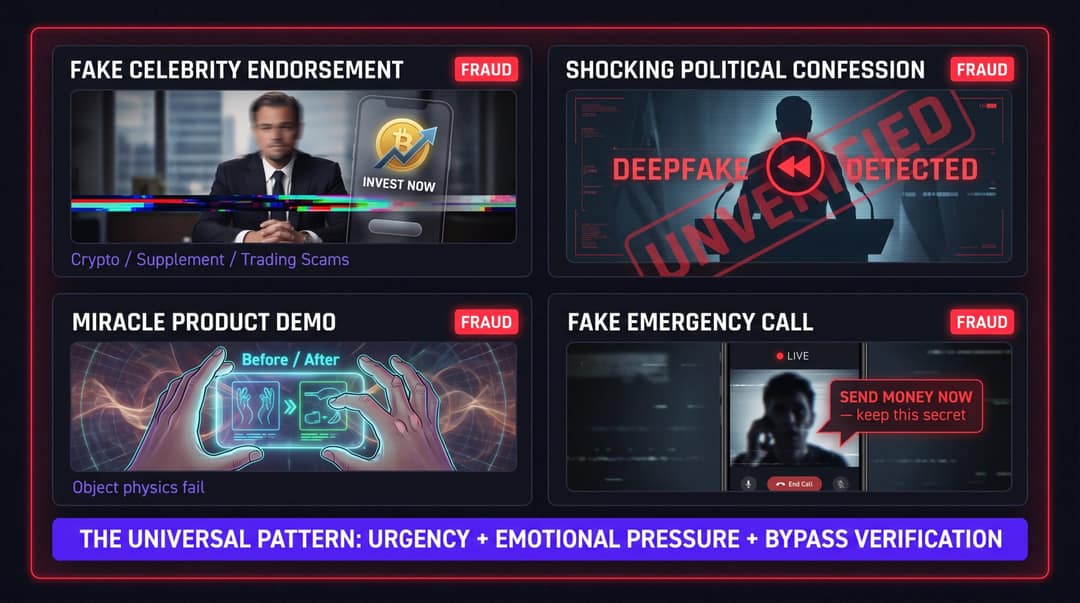
The fake celebrity endorsement
A recognizable person appears to promote cryptocurrency, a supplement, a trading platform, or a giveaway. The face looks almost right, the video is short, and the link goes somewhere suspicious.
What to check: official celebrity channels, the brand's verified accounts, news coverage, lip sync quality, disclosure labels, and whether the footage is reused from old interviews.
The shocking political confession
A public figure appears to admit something, insult a group, endorse a policy, or reveal secret information. The clip is emotionally explosive and surfaces shortly before an election, vote, or major event.
What to check: the original source, full-length footage, official transcripts, reputable news verification, face boundaries during speech, and platform synthetic-content labels.
The miracle product demo
A device appears to do something implausible: repair itself, transform materials, or produce futuristic results.
What to check: object-to-hand contact, physics, reflections, whether the product exists anywhere outside that clip, and whether independent reviews are available.
The fake emergency call
A loved one appears in a video or voice message asking for urgent help (typically money) and pressures you to act quickly and keep it secret.
What to check: call back on a number you already have, contact another family member through an independent channel, refuse to act under urgency. Never send money based solely on a video or audio message.
The pattern across all four: urgency + emotional pressure + a request that bypasses normal verification. Any time those three elements appear together, slow down.
Prompt to try
Make a 40-second vertical explainer titled "3 signs that celebrity crypto ad is a deepfake". Open with the hook "This video of a famous CEO giving away Bitcoin is fake, and here is how to tell." Cover lip sync that drifts, a link to an unknown site, and urgency plus a request for money, then end with "Check the official account before you click." Use clean motion graphics, bold captions and a calm, confident voiceover.
A Simple Scoring System for Evaluating AI Video Risk
When you need a simple decision aid, assign one point for each warning sign:
Face or mouth artifacts present
Hand, limb, or body errors present
Physics, lighting, or reflection problems present
Audio or lip-sync mismatch present
Weak source or no independent corroboration
Suspicious labels, missing provenance, or stripped metadata
Detector or verification tool raises a flag
What your score means:
| Score | Assessment | What to do |
|---|---|---|
| 0-1 | Probably safe, but use context | Don't overreact, but don't assume either |
| 2-3 | Unverified | Don't share as fact; look for original source |
| 4-5 | Likely synthetic, altered, or misrepresented | Treat with skepticism; add warning if discussing |
| 6-7 | High-risk synthetic media | Don't act on it; preserve evidence; escalate if it involves fraud, impersonation, politics, or safety |
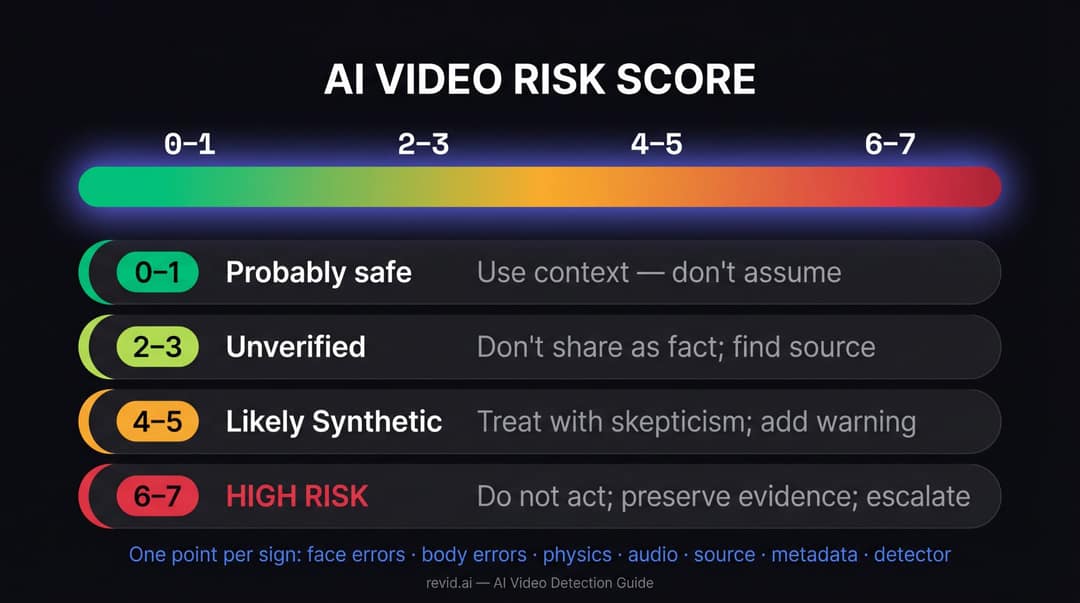
This scoring system isn't scientific. It's a practical decision aid for everyday users, creators, marketers, and teams navigating content with real stakes attached to it.
Frequently Asked Questions
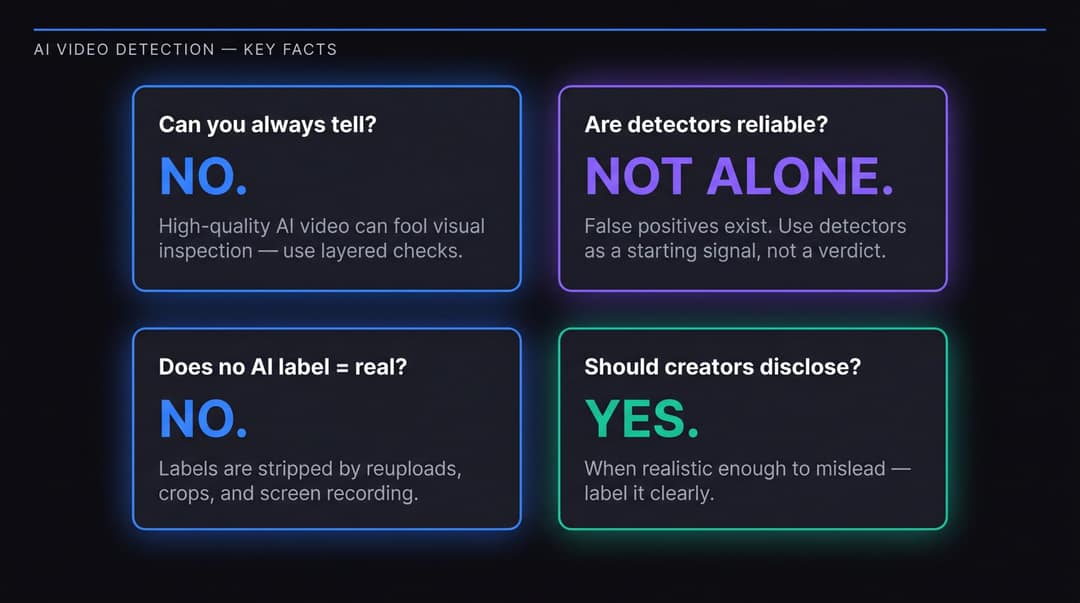
Can you always tell if a video is AI generated?
No. High-quality AI videos can be difficult or impossible to identify by visual inspection alone, especially after compression, editing, reuploading, or cropping. The best approach is layered: visual inspection, audio analysis, source verification, metadata checks, platform labels, and detector tools used together. No single method is sufficient on its own.
Are AI video detectors reliable?
They're useful as a starting signal, but not definitive. Detectors produce both false positives and false negatives, especially when videos are compressed, edited, or generated by newer models the detector wasn't trained on. The GIJN's September 2025 reporter guide recommends combining multiple methods and treating identification as probability assessment rather than certain detection. Use a detector to decide whether to investigate further, not to close the case.
Does an AI label mean the whole video is fake?
Not necessarily. A platform label might indicate the entire video is AI-generated, or it might flag only a specific altered element (a dubbed voice, a swapped face, a generated background). Read the label carefully, check the caption, and examine available metadata before drawing conclusions.
Does no AI label mean the video is real?
No. Labels and metadata can be removed through editing, reuploading, screen recording, or platform processing. Some generation tools don't add public provenance signals, and some platforms don't display them consistently. Absence of a label is not evidence of authenticity.
What's the easiest sign of an AI-generated video?
For most people: mouth-lip mismatch, unusual hand behavior, unrealistic object interaction, and missing source context. But the most reliable warning usually comes from several signs appearing together, not any single one in isolation.
How do I check if a YouTube video is AI generated?
Look for YouTube's "altered or synthetic" content label. Since May 2026, YouTube shows it in a more prominent position for photorealistic AI content (on Shorts, as an overlay on the video itself), and it may apply the label automatically when its systems detect significant photorealistic AI. Then check the original uploader, publication date, comments, description, and source claims. YouTube's policy requires creators to disclose realistic altered or synthetic content that could mislead viewers.
How do I check if a TikTok video is AI generated?
Look for TikTok's AI labels, creator disclosures, and visible watermarks. TikTok uses a combination of creator labels, automated detection models, and C2PA Content Credentials to identify AI-generated content. As of July 2026, TikTok said it had labeled over 3 billion videos as AI-generated, though labels can be removed when content is re-uploaded or edited outside the platform.
Are AI-generated videos legal?
AI-generated videos are not automatically illegal. Legitimate uses include creative, educational, marketing, and entertainment content. Legal and ethical problems arise when AI is used to impersonate someone without permission, create non-consensual sexual content, defraud people, mislead voters, violate platform rules, infringe intellectual property, or falsely present fictional events as real. The specific legal landscape varies by jurisdiction and is evolving rapidly.
Should creators disclose AI-generated videos?
Yes, when the content is realistic enough to mislead viewers about who said something, what happened, where something occurred, or whether a person or event is real. Disclosure protects your audience's trust and keeps you compliant with platform rules. It's also simply the honest thing to do.
Final Checklist: Should You Believe or Share This Video?
Before acting on, sharing, or reporting a suspicious video, work through this:
Does the face hold up during speech, movement, and head turns?
Do the eyes, teeth, lips, and jaw stay consistent across motion?
Do hands and fingers interact naturally with objects?
Do shadows, reflections, physics, and background details behave correctly?
Does the audio match the visible acoustic environment?
Is there breathing, room tone, and natural speech rhythm?
Can you find the original uploader and posting date?
Is there a credible independent source, date, and location for what's claimed?
Do platform labels, watermarks, Content Credentials, or SynthID indicate AI?
Do detector tools flag it? And do manual checks agree?
Is the video pushing urgency, money, trust in a claim, or emotional outrage?
The safest principle is a simple one:
When the stakes are high, don't trust the video alone. Verify the source. Verify the person. Verify the context.
AI-generated video isn't the enemy. Undisclosed deception is. Used responsibly (and that means labeled, sourced, and created with clear intent), AI video tools can help creators explain ideas faster, produce more content, and reach more people. Used carelessly or maliciously, they can damage trust in ways that outlast any individual piece of content.
The skill the future rewards is the ability to do both: create with AI confidently, and recognize when AI is being used to deceive.
At Revid.ai, we build tools for the first half of that equation. This guide is our contribution to the second.