How Long Are Instagram Stories? 24 Hours Live, 60 Seconds per Clip
Instagram Stories stay visible for 24 hours, and each Story video can be up to 60 seconds. This guide covers longer videos, Highlights, drafts and how long a Story should be.

On this page
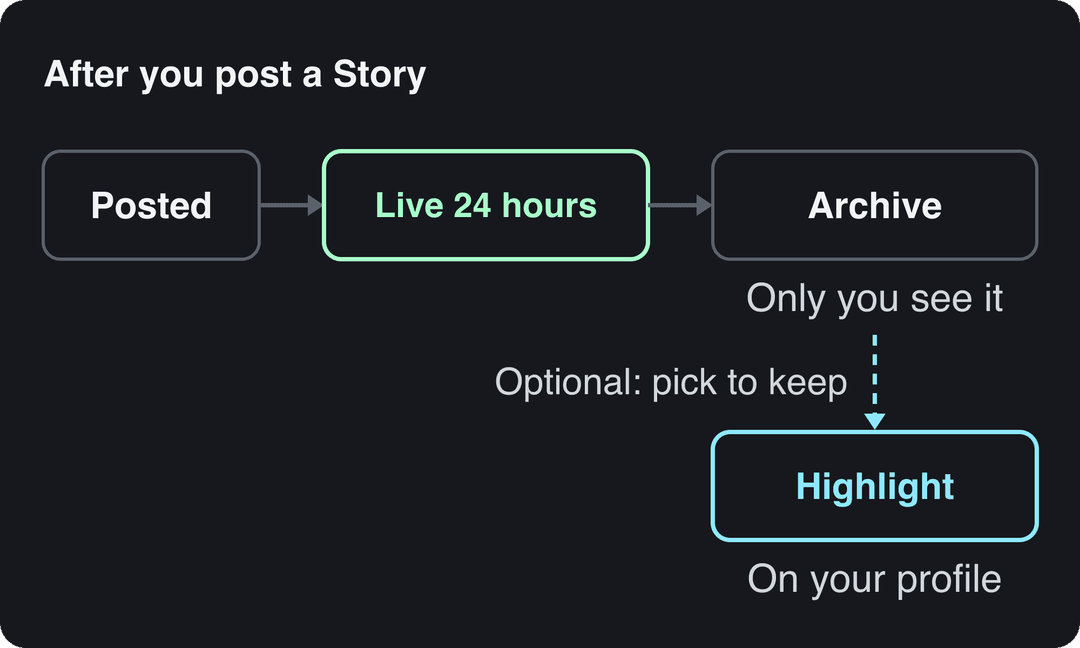
Instagram Stories stay visible for 24 hours after you post them, then disappear from your profile and your followers' Stories tray. Each Story video can be up to 60 seconds long, and anything longer is split into several Stories or trimmed. To keep a Story up past 24 hours, add it to a Highlight.
Much of the advice online still tells you to cut Story videos into 15-second pieces. That was the limit years ago. Chopping a clip that short today adds a tap between every few sentences, and each tap is another point where viewers can leave.
- How long an Instagram Story stays live before it expires
- 24 hours
- Unless added to a Highlight
- Maximum length of a single Instagram Story video
- 60 s
- Longer videos are split or trimmed
- Maximum Story video file size when publishing through Meta's API
- 100 MB
- Meta developer documentation
- Maximum length of an Instagram Reel, the home for longer videos
- 20 min
Instagram Story length at a glance
| Question | Answer |
|---|---|
| How long does a Story stay up? | 24 hours, then it expires |
| How long can one Story video be? | Up to 60 seconds per Story |
| What happens to a longer video? | It is split into several Stories or trimmed |
| How long does a photo stay on screen? | A few seconds, then the next Story plays |
| Can a Story stay up longer? | Only by adding it to a Highlight |
| What orientation works best? | Vertical, 9:16 full screen |
| Limit when posting through Meta's API | 3 to 60 seconds, up to 100 MB |
How long do Instagram Stories last?
An Instagram Story lasts 24 hours from the moment you post it. During that window it shows in your followers' Stories tray at the top of the app and behind your profile picture. After 24 hours it disappears for everyone except you.
The clock runs per Story, not per sequence. If you post one Story at 9 a.m. and another at 6 p.m., the first expires at 9 a.m. the next day and the second at 6 p.m. Your sequence shrinks one Story at a time.
You can't change this window. There is no setting for 12 hours or 48 hours, and no way to extend a live Story. The only ways to keep a Story are your archive (private) and Highlights (public), covered below.
How long can an Instagram Story video be?
A single Instagram Story video can be up to 60 seconds. You can record or upload a clip of up to one minute and it plays as one continuous Story. Meta's developer documentation for publishing Stories through its API lists the same ceiling: Story videos of 3 to 60 seconds and up to 100 MB.
When you upload a video longer than 60 seconds, Instagram doesn't post it as one Story. Depending on your app version, it either cuts the video into consecutive Stories or shows a trimmer so you can pick which part to keep. Either way, nothing over 60 seconds plays as a single Story.
For files and dimensions, shoot or export vertical 9:16 so the video fills the screen without black bars. The full Instagram specs, including Reels and feed, are in our Instagram video format guide.
Prompt to try
Make a 20-second vertical 9:16 video announcing our coffee shop's new oat milk latte. Open with the hook "New on the menu, and it sells out by noon", show close-up shots of the latte being poured, keep one short line of on-screen text per scene, and end with "Available this week only".
How long does a photo stay on screen in a Story?
A photo Story stays on screen for a few seconds, then Instagram moves to the next Story in your sequence. Viewers can hold a finger on the screen to pause it, but most won't.
That short window decides how much text a photo Story can carry. Keep it to one short line, or split a longer message across two or three photo Stories. If your text needs more time than that, turn it into a short video with the text on screen for as long as it takes to read.
How do I make my Instagram Story longer?
You can't make a single Story longer than 60 seconds, but you can make your sequence as long as you need. Three ways:
- Upload the long video and let Instagram split it. Pick the video from your gallery. If Instagram offers to split it into several Stories, keep the parts in order and post them together.
- Split it yourself before uploading. Cut the video into clips of 60 seconds or less in any editor, and end each clip at a natural pause instead of mid-sentence. This gives you control over where each cut lands.
- Post a Reel and share it to your Story. For anything that runs several minutes, a Reel is the better home. Share it to your Story, and viewers tap through to watch the full video.
If you split a video, put a reason to keep tapping at the end of each part: a question, the start of the next point, or text such as "Part 2: the result".
Can you keep an Instagram Story up longer than 24 hours?
Not as a live Story. After 24 hours, a Story leaves the Stories tray no matter what. You have two ways to keep it:
- Story archive (private). If Story archive is turned on in your settings (it is by default), every expired Story is saved there. Only you can see it, and you can repost it or add it to a Highlight later.
- Highlights (public). A Highlight is a collection of Stories pinned under your bio. Stories in a Highlight stay on your profile until you remove them, and anyone who can see your profile can watch them.
To add a live Story to a Highlight, open it and tap Highlight at the bottom of the screen. To add an expired one, open a Highlight or create a new one with the plus button on your profile, then pick Stories from your archive.
How long do Instagram Story drafts last?
When you leave the Story editor and choose to save a draft, Instagram keeps it for a limited time, shown in the app as 7 days. After that the draft is deleted. Instagram tells you the exact period when you save the draft, so check that message if you plan to come back later.
Drafts are not backed up anywhere else. If a Story matters, save the finished video or image to your phone before you leave the editor.
Prompt to try
Create a 45-second vertical tutorial on how to brew pour-over coffee at home, one step per scene with on-screen text naming each step. Hook in the first second: "Your coffee tastes bitter because of step 2." Clean, bright kitchen visuals, calm voiceover and burned-in captions for sound-off viewing.
How long should an Instagram Story be?
The 60-second limit is a ceiling, not a target. A few decision rules:
- If it's a quick update (an announcement, a behind-the-scenes moment, a link), use one or two Stories. Put the point in the first second, because viewers tap forward fast.
- If it's a talking clip, keep each Story to one idea. One idea per minute-long Story beats three ideas crammed into one.
- If it's a tutorial or a story with several steps, use a sequence of Stories, one step each, with on-screen text naming the step.
- If it runs several minutes, post it as a Reel and share the Reel to your Story instead of splitting it into many Stories.
The opening matters more than the length. Lead with the payoff or the problem, not a greeting. Our list of hooks for Reels works for Story openers too.
Design for sound off: many people watch Stories muted, so burn in captions on any Story with speech. The practical how-to is in our guide to captions on Instagram Stories. Keep text and stickers out of the edges where Instagram places its buttons; the Instagram safe zone checker shows those areas for vertical video.
How long can an Instagram post or video be?
Stories are only one format. If your video is too long for a Story, here is where it fits:
| Format | Maximum length | How long it stays up |
|---|---|---|
| Story video | 60 seconds per Story | 24 hours (permanent in a Highlight) |
| Story photo | A few seconds on screen | 24 hours (permanent in a Highlight) |
| Reel | 20 minutes | Permanent |
| Carousel post | Up to 20 photos and videos | Permanent |
Instagram Reels can be up to 20 minutes long, but Reels longer than 3 minutes are not recommended to people who don't follow you. Our guide to Instagram Reels length covers the sweet spots for reach.
Generating in the final shape matters: cropping a wide video to 9:16 cuts off text and faces. Avatar tools such as Synthesia and HeyGen default to 16:9 for training and web use.
Source: Revid data, Amplitude project_built by ratio for text-input tools, Sep 29 to Oct 28, 2026, 50,623 projects.
Show the data
| Share of projects | Projects | |
|---|---|---|
| 9:16 vertical | 83.2% | 42.1K |
| 16:9 wide | 15.2% | 7.7K |
| 1:1 square | 0.9% | 457 |
| 4:5 portrait | 0.7% | 356 |
Make Story-ready videos with Revid
If you post the same idea as a Reel and a Story, it helps to start from a vertical video that already has captions. A short workflow:
- Write a short script or paste a link into the AI Reel generator. Revid writes the scenes, adds a voice-over and synced captions, and renders a 9:16 video.
- Keep the script tight, one idea per 60 seconds, so each part works as a single Story.
- If you already have a landscape or square clip, the resize video tool converts it to portrait 9:16.
- For footage you filmed yourself, the caption generator adds captions in 100+ languages before you upload.
Export the video, then post it as a Reel and share it to your Story, or upload it straight to your Story.
FAQ
Can you change how long an Instagram Story stays up?
No. Every Story expires 24 hours after posting, and Instagram has no setting to shorten or lengthen that. To keep a Story visible, add it to a Highlight on your profile.
Do Stories in Highlights ever expire?
No. A Story added to a Highlight stays on your profile until you remove it or delete the Highlight. The 24-hour limit only applies to the Stories tray.
Why did Instagram cut my Story video short?
Because the video was longer than 60 seconds. A single Story can't play more than one minute, so Instagram split the video into several Stories or kept only the part you selected in the trimmer.
Can people see my Instagram Story after 24 hours?
Only if you added it to a Highlight. Otherwise an expired Story moves to your private archive, where only you can see it.
Sources
- Revid data, Amplitude project_built by ratio for text-input tools, Sep 29 to Oct 28, 2026, 50,623 projects.
Charts and figures checked on November 6, 2026.