How to Create Short Videos from YouTube in 4 Steps (2026)
Turn one long YouTube video into up to 3 vertical clips with Revid's YouTube Clip Maker, trim them in the editor, then export or publish to TikTok, Instagram and YouTube.
On this page
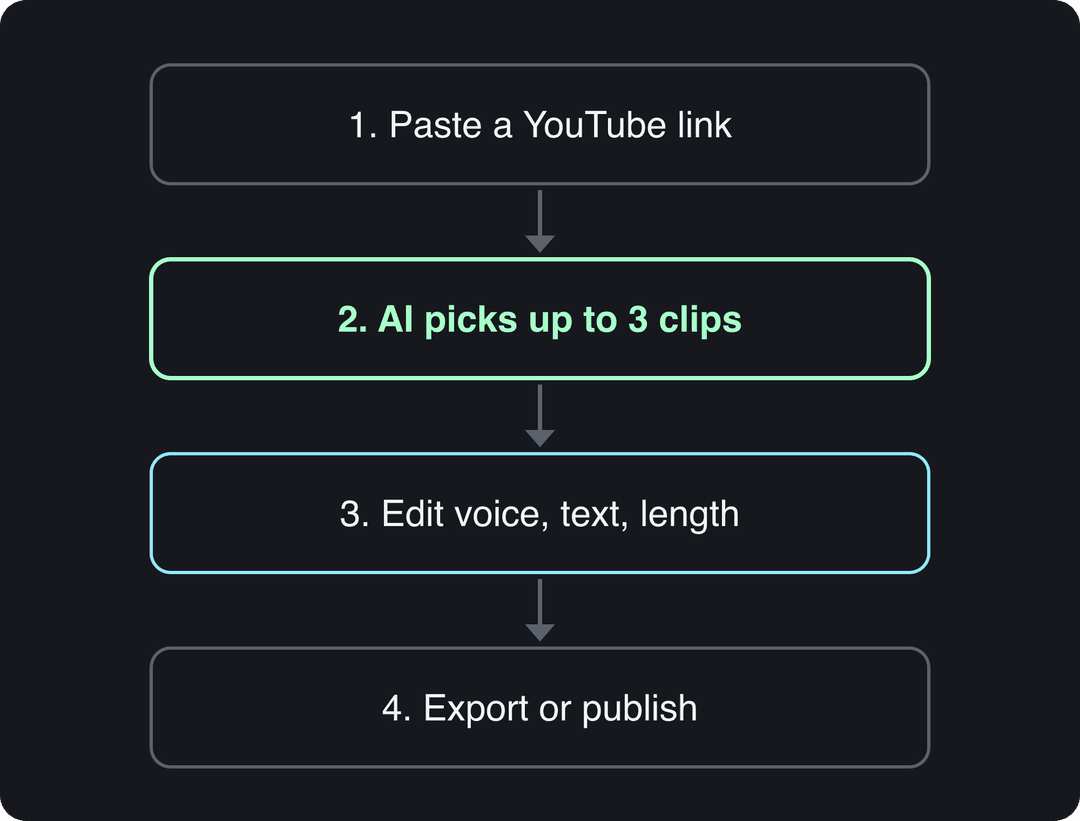
To create short videos from a YouTube video, paste the link into Revid's YouTube Clip Maker, choose 1 to 3 extracts and keep Auto-reframe on. The AI picks the strongest moments, crops them to 9:16 and adds captions. Trim them in the editor, then export or publish to TikTok, Instagram and YouTube.
Clipping long videos feeds a large share of short-form viewing: YouTube said in July 2022 that Shorts sampling long-form videos generated over 100 billion views in April 2022 alone (more in our YouTube Shorts statistics). The costly mistake is clipping a video you don't own. A Short longer than one minute with an active Content ID claim is blocked worldwide and can't be monetized.
How to create short videos from a YouTube video with Revid
The process has four steps: open the tool, paste the link, edit the clips, then export or publish.
Step 1: Open the YouTube Clip Maker
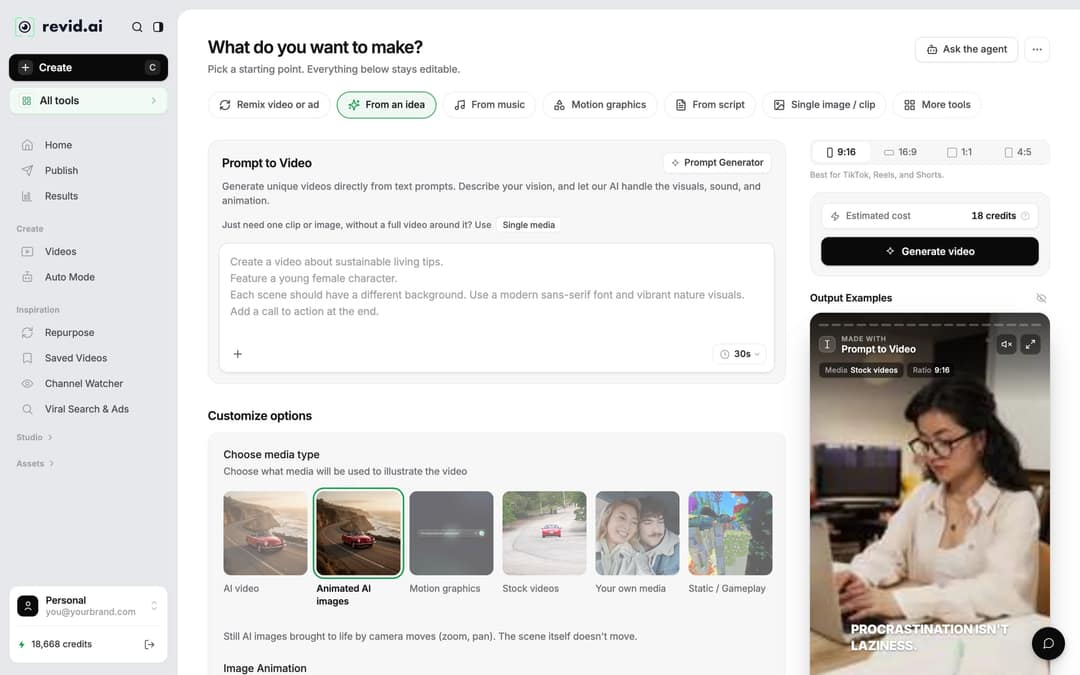
Click Create at the top of the sidebar (or press C). The Create page asks "What do you want to make?" and shows chips such as From an idea, From music and From script. The clip maker is not one of the main chips: open More tools (or the All tools card in the sidebar) and choose YouTube Long to Shorts, the tool behind the YouTube Clip Maker page.
Step 2: Paste the link and choose your extracts
- Paste the URL of the YouTube video into the link field.
- Under "How many extracts do you want?", pick 1, 2 or 3. One extract suits a short video with one clear highlight; 3 suits a long interview, podcast or tutorial with several standalone moments.
- Leave Auto-reframe video on (it is on by default). It crops the horizontal frame to a vertical one around the most relevant part of the shot. Auto-reframe costs 10 credits.
- Check the Estimated cost next to Generate video, then click Generate video. If a build fails, the credits are refunded automatically.
If you remember an older form with an "Add extracts of the video" toggle, that setting is now the "How many extracts do you want?" choice.
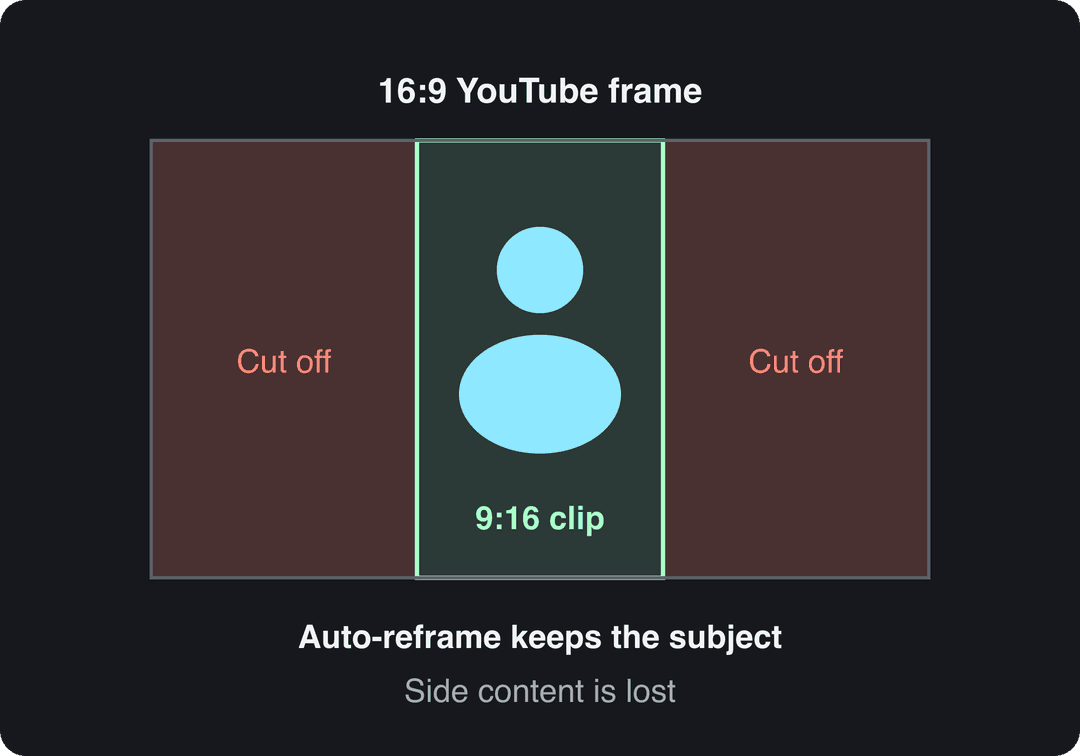
Auto-reframe works best when one person or object carries the shot. If the source relies on text or graphics at the edges of the frame (slides, split screens, gameplay HUDs), check each clip in the editor before posting, because the sides are cut.
Step 3: Edit each clip in the editor
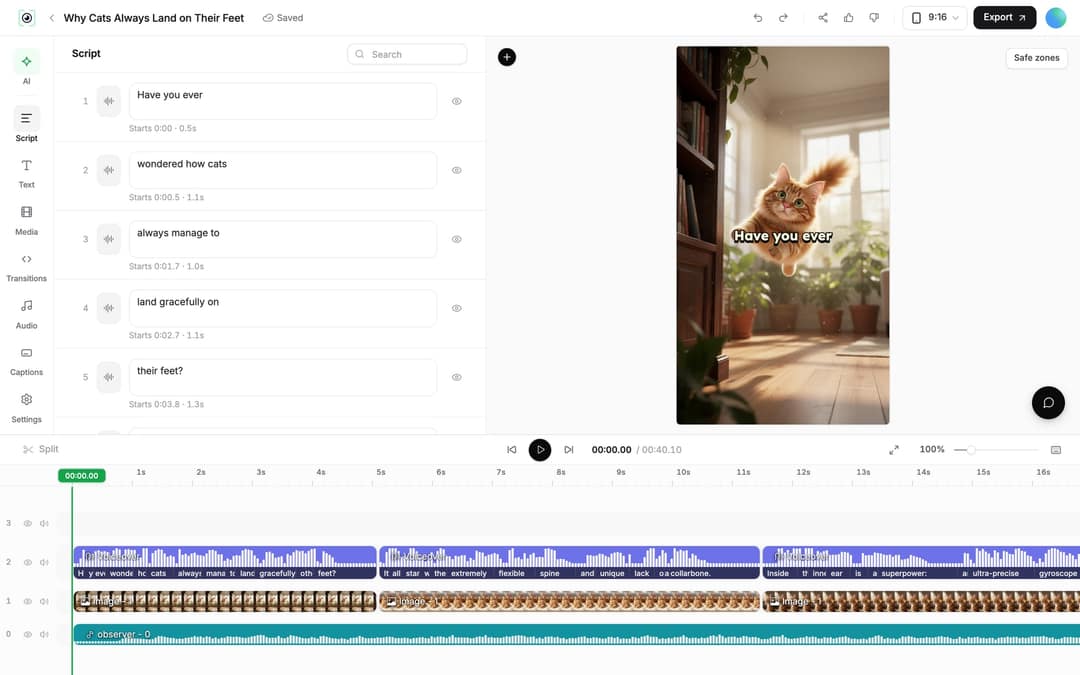
Finished clips land in Videos. Click a clip's card (or choose Open in editor from its menu). The left rail has Script, Text, Media, Transitions, Audio, Captions and Settings.
- Fix caption words: open the Script panel. Every caption segment has its own text box and start time; edit the text and the change applies to the captions.
- Trim: drag the start or end edge of a clip on the timeline, or place the playhead and press S to split. A selected video clip also has a Trim section with start and end times and a Reset button.
- Add a hook line: use the Text panel to put a short title on the first seconds, such as the question the clip answers.
- Restyle captions: the Captions panel holds Revid's 30 caption styles.
- Add or change narration: if you add an AI voiceover, open the Audio panel and click Re-generate after editing the text. Regenerating a voiceover is for paid plans and costs 10 credits per started 500 characters.
Step 4: Export or publish
Click Export in the editor header (it reads Export / Publish on accounts without a paid plan). Revid exports in 720p, 1080p or 4K at 30 or 60 fps. 1080p is the safe default for phone-first platforms. Choose 4K (10 credits) only when the source video was shot in 4K: upscaling a 1080p source adds file size, not detail.
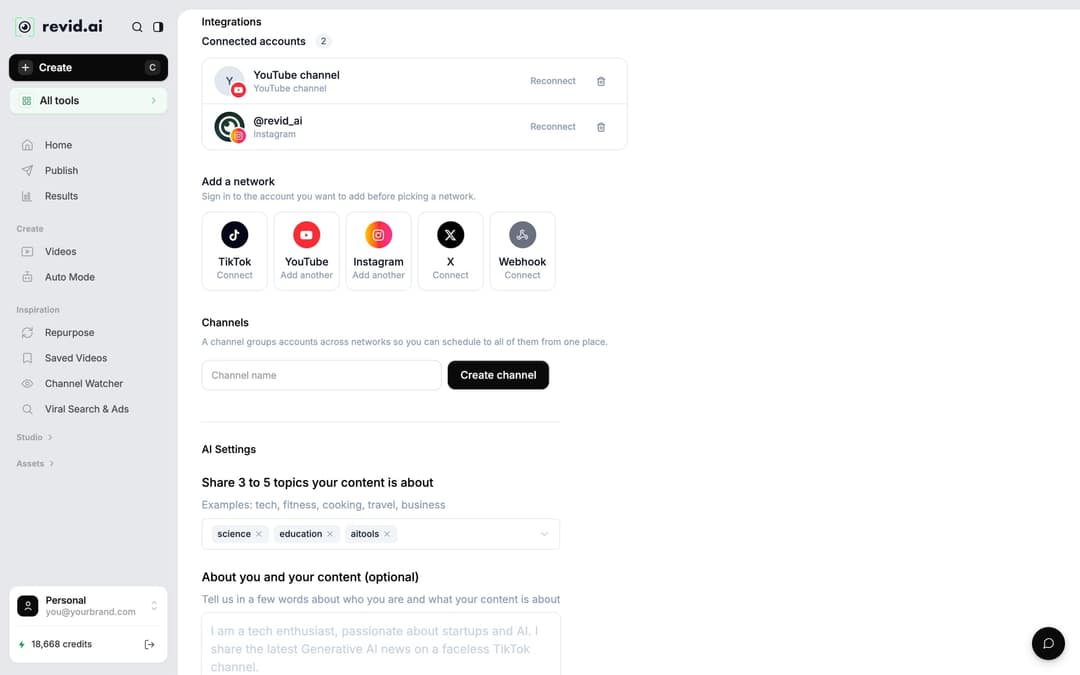
To post without downloading, open the Publish Video dialog from Export / Publish or from Publish on the project card, choose the account under Publish to, then click Publish to post now or Add to queue to schedule it from one queue. Connect your accounts first in Settings > Integrations, which offers TikTok, YouTube, Instagram, X and Webhook.
Clip every new YouTube upload automatically
If you publish long videos every week, an Auto Mode worker can make the clips for you. Auto Mode needs a paid plan: Growth includes 3 workers, Elite 5 and Ultra 10.
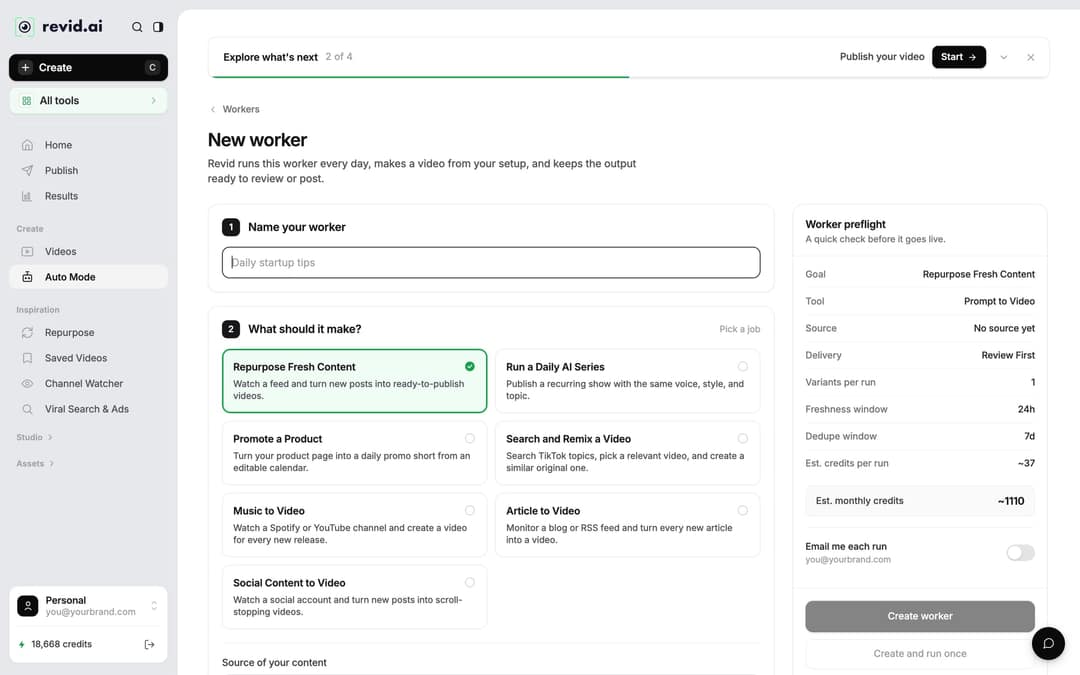
- In the sidebar, open Auto Mode and click New worker.
- Under "Name your worker", give it a name.
- Under "What should it make?", choose Repurpose Fresh Content and paste your YouTube channel or playlist URL as the source. Links to a single video are refused.
- Under "Pick the format", choose YouTube Long to Shorts if you want clips of your own footage. The "YouTube to Shorts" template uses Voiceover Video instead, which narrates a new script rather than cutting your video.
- Choose the delivery: Review First keeps each video in Revid for you to check; Auto Queue sends it to the posting queue of the accounts you select.
- Check Est. credits per run and Est. monthly credits in the Worker preflight panel, then click Create worker.
Each worker runs once a day between 1 AM and 5 AM. A run picks one recent video from the channel that the last 3 runs did not use, and skips the day when nothing new was posted. A run costs what the same video costs when made by hand.
Which Revid tool should you use?
The YouTube Clip Maker is the right start when you want highlights from one long video. For other goals, another tool fits better:
| Your goal | Tool | What you get |
|---|---|---|
| Several highlights from one long YouTube video | YouTube Clip Maker (YouTube Long to Shorts) | 1 to 3 vertical clips from a YouTube link |
| Clips meant for TikTok | YouTube to TikTok converter | Vertical TikTok clips from a YouTube link |
| Clips meant for Instagram Reels | YouTube to Instagram converter | Vertical Reels from a YouTube link |
| The same clip in another language | Translate (project card menu) | A translated copy that keeps the edit, media and captions |
| A short video with no source footage | Prompt to Video | An original video from an idea, with AI voice and visuals |
If your main job is cutting many clips from your own podcasts or streams every week, a dedicated clipping tool may suit you better; see the honest Revid vs OpusClip comparison.
Prompt to try
Make a 45-second vertical video on why most people quit learning guitar in the first month. Open with the hook "You're not bad at guitar, you're practicing the wrong thing." Give three quick fixes with clean motion graphics, a calm, confident voiceover and bold captions.
No YouTube video? Make a short from an idea
You don't need existing footage to create a short video. On the Create page, From an idea turns a written description into a finished video, and From script turns your own script into a voiced video with visuals, captions and music. To compare Revid with other short video makers that start from a prompt, read our roundup of the best AI short video makers.
How long should each short clip be?
Keep each clip as long as the moment needs and no longer, within these platform limits:
| Platform | Maximum length | What to know |
|---|---|---|
| YouTube Shorts | 3 minutes (square or vertical) | Clips over one minute with an active Content ID claim are blocked |
| Instagram Reels | 20 minutes | Reels over 3 minutes are not recommended to non-followers |
| TikTok | 60 minutes (upload) | 10 minutes is the in-app camera limit, not the upload limit |
Length matters less than most creators think. In Revid's analysis of 176,367 TikToks with 1,000+ likes posted between October 2025 and October 2026, every length bucket from under 15 seconds to 10 minutes had a median between 58K and 76K views, and 61 to 90 seconds reached 70K. Clips under 15 seconds had the lowest median (58K) but the most shares per view (1.41 per 100). This is TikTok data on videos that already passed 1,000 likes, so it shows what successful videos have in common, not causes (full TikTok virality study).
Length alone barely moves views: every bucket lands between 58K and 76K median views (the 790 videos over 10 minutes are a small, unusual group). Clips under 15 seconds get shared the most per view.
Source: Revid analysis of 176,367 TikToks with 1,000+ likes posted between Oct 1, 2025 and Oct 16, 2026 (61,203 creators)
Show the data
| Median views | Share that passed 1M views | Shares per 100 views | |
|---|---|---|---|
| Under 15 s | 57.6K | 11.6% | 1 |
| 16 to 30 s | 64.9K | 12.3% | 1 |
| 31 to 60 s | 61.8K | 11.8% | 1 |
| 61 to 90 s | 70.5K | 12.2% | 1 |
| 91 s to 3 min | 63.4K | 11.1% | 1 |
| 3 to 10 min | 76.4K | 12.4% | 1 |
| 10 min+ | 129.6K | 13.8% | 0 |
Decision rule: if the highlight is one joke, reaction or fact, cut it under 30 seconds so it gets shared. If it is a full explanation or story, let it run to 60 or 90 seconds and make the first line state what the viewer will get.
Can you create a Reel from a YouTube video?
Yes. The 9:16 clips Revid makes fit Instagram Reels as they are, and the YouTube to Instagram Reels converter does the same job with Reels as the target. Keep the Reel under 3 minutes if you want Instagram to show it to people who don't follow you yet.
Check the rights before you post
AI makes clipping fast, which makes it easy to forget whose video it is.
Two more YouTube rules apply to clips you plan to monetize:
- Reused content. Content that only reads out material you didn't write, or relies on mostly non-verbal reactions to someone else's video, is not allowed to monetize, and the policy applies to the whole channel.
- AI disclosure. YouTube does not require a disclosure for captions or for cloning your own voice for a voiceover. It does require one for realistic AI content, such as making a real person appear to say something they didn't.
Where clips from long videos fit your strategy
Clipping turns one recording into several chances to be discovered, and each short points viewers back to the full video. More than 400 creators have reached 100,000+ views with videos made on Revid (Revid's own analytics, 2026). For third-party survey data on how brands use the format, see Vidico's short-form video statistics roundup.
Revid is one of several ways to do this. YouTube's own Create button and manual editing also work; this guide to turning a YouTube video into a Short four ways walks through each one.
FAQ
Is Revid's YouTube Clip Maker free?
You can start free: sign-up is free and new accounts get free credits to try video creation, with no credit card needed. Regular creation then uses the monthly credits of a paid plan, from $39/month for Growth (2,000 credits); the pricing page has the live list.
Can I make shorts from someone else's YouTube video?
Only with the owner's permission. Without it, the clip can get a Content ID claim, and on YouTube any Short over one minute with an active claim is blocked worldwide.
What resolution should I export short videos in?
1080p for most clips. Revid also exports in 720p and 4K at 30 or 60 fps; choose 4K only when the source video is 4K.
Can I post the same clip to TikTok, Reels and Shorts?
Yes, a 9:16 clip under 3 minutes fits all three. Revid can publish it now or add it to a queue for TikTok, Instagram and YouTube once the accounts are connected in Settings > Integrations.