On this page
Yes. AI can now generate a music video in which a character sings your song, with mouth movements timed to your vocal. In Revid's AI music video generator you turn on Singer Lip Sync, which works with AI video and lyric timing: by default the singer performs about 30% of the sung parts of the song while story shots fill the rest, and results are best on a clear lead vocal.
You don't need a camera, a singer or a face of your own on screen. This guide is built on Revid's own data: the settings of 54,940 music videos made with Revid in the last 90 days, and the saved projects of 29 public example videos, 16 of which have a singer who lip-syncs. You'll see how much of each video actually sings at each setting, a real shot-by-shot timeline, what creators pick, and how to set it up yourself.
- of AI-video lyric videos kept lip sync on, where the setting was recorded
- 55%
- 4,800 of 8,708 music videos, last 90 days
- of Revid music videos used both settings lip sync needs
- 27%
- AI video and lyric timing: 14,929 of 54,940
- public example videos have a singer who lip-syncs
- 16 of 29
- Each of the 16 contains singing shots
- of each of those videos shows the singer
- 16% to 87%
- Frequency settings from 30% to 100%
- YouTube views on the most-watched lip sync example
- 844,806
- A 37-second video made on the Low tier
- default lip sync frequency
- 30%
- A share of the sung parts since Sep 30, 2026
Can AI make a video of someone singing my song?
Yes, in three different ways. Which one fits depends on whether you want a whole music video or one singing face.
| Option | What you give it | What you get | Best for |
|---|---|---|---|
| Music video generator with lip sync (Revid and others) | The song, a style, an optional brief | A full music video: story shots plus shots of a character singing your lines | Releasing a complete video for a track |
| Photo-to-lip-sync tool (Hedra, Runway and others) | One photo and an audio clip | One face lip-syncing the clip | A close-up performance you edit into another video |
| Filming a real singer | A person, a camera, a day | A real performance | When fans need to see the actual artist |
The first option is the only one that builds the whole video around the song. The second gives you a performance clip, and you assemble everything else yourself.
How does AI lip sync to a song work?
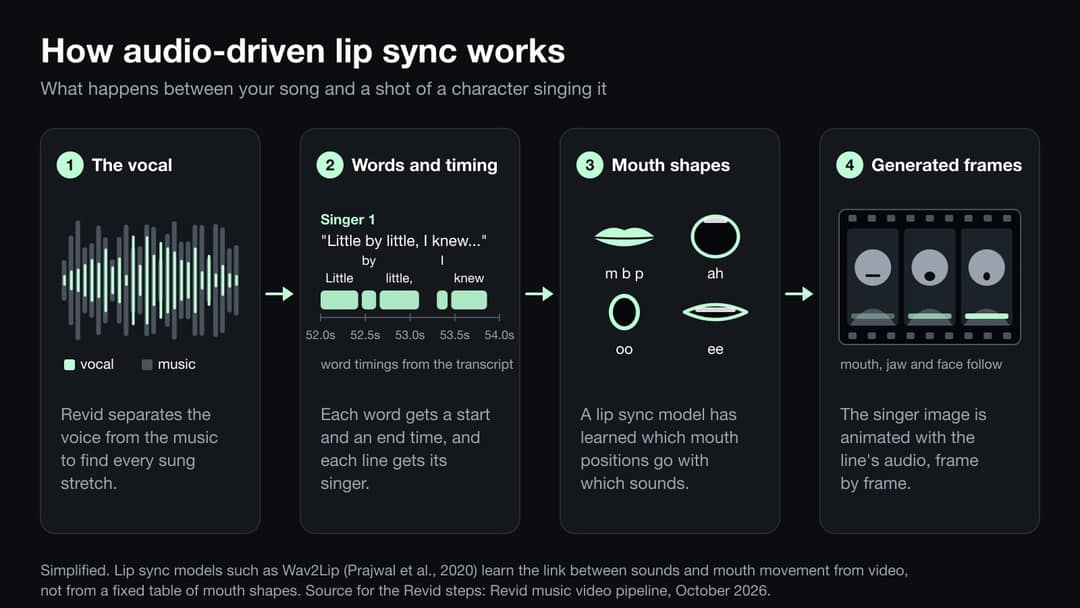
AI lip sync is audio-driven animation. Under the hood it does three things:
- Finds the words and their timing. The vocal is transcribed and each lyric line gets a start and end time. Revid transcribes the vocal whenever you sync a video to the lyrics, which is also what times its word-by-word captions. An AI model then listens to the song to work out how many singers there are, which voice sings each line and where nobody sings, and when it can, Revid separates the vocals from the instruments to catch sung stretches the transcript missed.
- Maps sounds to mouth shapes. Lip sync models learn which mouth positions match which sounds. The well-known Wav2Lip research (Prajwal et al., ACM Multimedia 2020) showed that a model could lip-sync faces it had never seen to new speech by training against a separate "lip-sync expert" network that judges whether audio and mouth match.
- Generates the frames. The face is animated so the mouth, jaw and expression follow the audio, inside a generated shot with camera movement and lighting. In Revid, a still of the singer is first generated in your style (from your saved character when you pick one), then a lip sync model animates it with the audio of that line. The AI video tier you choose also decides which lip sync model renders those shots.
Singing is harder than speech. Sung vowels are held longer, notes bend, rap packs many syllables into a second, and backing vocals and effects blur which voice the mouth should follow. Model makers say the same thing about input quality: Hedra's Character-3 page notes that audio quality heavily affects the output and recommends clean audio without background noise or heavy reverb.
How does Revid's singer lip sync work?
In Revid, lip sync is one option of the music video generator, not a separate tool. The video is built around your track (scenes, lyrics on screen, a consistent style), and a share of its shots show a character singing a line of your lyrics to camera, mouth in sync with the vocal.
| Setting | What it does | Default |
|---|---|---|
| Sync with lyrics or beats | Lip sync needs Lyrics. Beats times cuts to the rhythm and produces no lyrics | Lyrics |
| Media type | Lip sync needs AI video. It is not offered with animated AI images, stock videos or your own media | Animated AI images |
| Enable Singer Lip Sync | Some lines of the lyrics are performed on camera, in sync with the vocal | Off |
| Singer lip sync frequency | How much of the video features lip-synced singing, from 0 to 100% | 30% |
| Number of different singers | Optional manual override for songs with multiple vocalists | Empty |
| Continuous Mode | Joins clips without visible cuts; can't be used together with lip sync | Separate option |
With lip sync off, characters don't sing. If your brief asks to see someone singing while the switch is off, Revid stops on Generate and warns you that their mouth will stay closed.
Revid also shapes where the singing goes. A music video opens on story shots whenever the song leaves room for them, and at lower settings the last lines stay on story shots too, so the video closes on the story rather than on the singer. Here is a real timeline at 30%:
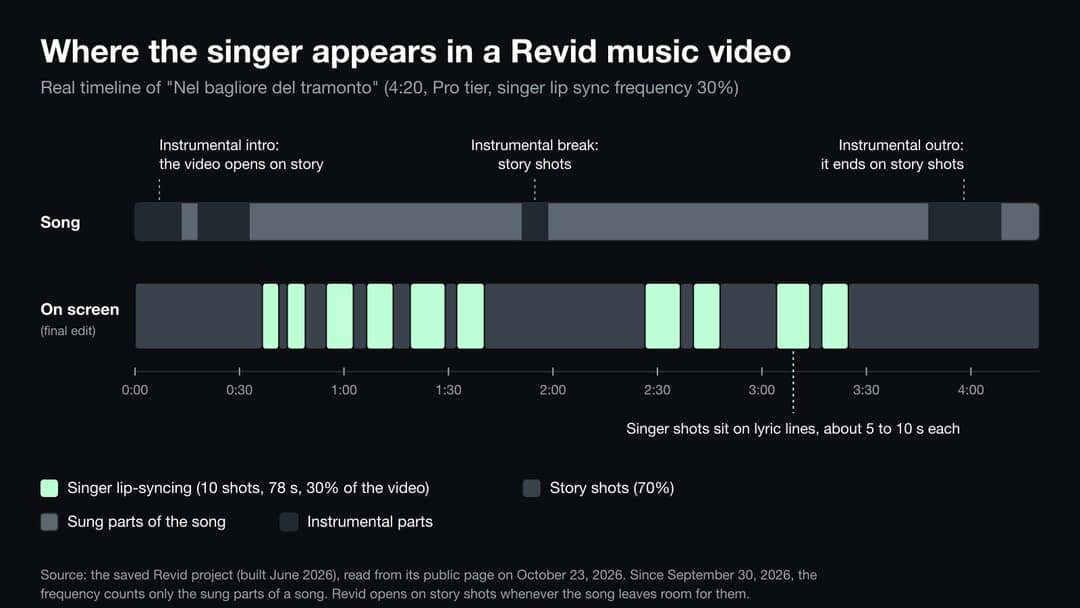
Two inputs outside the settings table make the biggest difference to the result:
- A saved character. Select a consistent character and the singer keeps the same face from the first shot to the last. Characters are created from a PNG or JPEG image and need an active plan.
- The visual direction. Say who sings and who doesn't. The direction for "Little by Little", one of our tutorial examples, says only the lead character sings, the love interest never sings, and background people never lip-sync.
"Little by Little" sets the slider to 35%, and its singer is on screen for 38% of the video. The step-by-step music video tutorial shows its full settings and direction. Here is a direction written on the same pattern: copy it into "Add a visual direction" in the music video generator, then change the names and places.
Visual direction for a lip sync music video
Only MAYA sings. Number of singers: 1. Keep one consistent face for MAYA in every shot and use her saved character. No microphone, no stage, no concert scene. MAYA moves through one continuous story in a small coastal town at dusk: walking home along the harbor, waiting at a bus stop in light rain, sitting on the sea wall. She sings to camera in calm, cinematic moments. The friend she misses appears only in two short memories and never sings. Background people can walk, talk or laugh but must not lip-sync. During instrumental parts, show the town, the sea and the evening light instead of MAYA. Mood: warm, nostalgic, hopeful. Avoid captions or text in the image, sound waves, chaotic edits, distorted faces and hands, and close-ups of lips.
How much of the video actually sings?
To answer this with real numbers, we read the saved projects behind the public example videos on our AI music video maker page and measured, second by second, when a lip-synced singer is the shot you see. Fifteen of those videos are shown here.
Where the slider was set, the singer's share landed near it: 30% gave 30%, 35% gave 38%, 57% gave 64%, 68% gave 71%. At 100%, instrumental parts still stayed on story shots. Default means built before the slider shipped on June 8, 2026. I Still Love You is lower because story cutaways sit on top of its singing shots.
Source: Revid analysis of the saved projects of 15 public example videos from revid.ai/ai-music-video-maker, read from their public pages on Oct 23, 2026. Singer time is timeline time where a lip-synced singer shot is the top layer.
Show the data
| Share of the video showing the singer | Seconds of singing on screen | Lip sync frequency setting | |
|---|---|---|---|
| Mil Vidas Contigo (100%) | 86.6% | 229 | 100% |
| Cold Open (68%) | 71.3% | 94 | 68% |
| Too Many Tabs Open (57%) | 64.1% | 157 | 57% |
| Snake in My Boots (100%) | 56.4% | 114 | 100% |
| Little by Little (35%) | 38.3% | 76 | 35% |
| Tam O An (default) | 34% | 101 | 30% |
| Nel bagliore del tramonto (30%) | 30.2% | 78 | 30% |
| Er passero ferito (default) | 29.1% | 58 | 30% |
| Yürü Koçum Yürü (default) | 28.8% | 40 | 30% |
| Shiva Shambo (default) | 26.9% | 58 | 30% |
| Flash in Neon (default) | 25.8% | 55 | 30% |
| Oj te cuntunu cuntu (default) | 24.4% | 37 | 30% |
| Top Floor Itch (default) | 23.3% | 16 | 30% |
| शिव का चेला, काल का भी काल (default) | 21.3% | 8 | 30% |
| I Still Love You (30%) | 16.4% | 29 | 30% |
Three patterns stand out:
- The slider is a good predictor. In four of the five videos set below 100%, the singer's share landed within about 7 points of the setting, slightly above it, because Revid gives the singer whole lyric lines rather than fractions of them. The fifth, "I Still Love You", has story cutaways on top of its singing shots.
- The default makes a story video. The eight videos shown here that were built before the slider existed, at Revid's 30% default, show the singer for 21% to 34% of the time.
- 100% is a performance video, not a wall-to-wall close-up. "Mil Vidas Contigo" puts the singer on every line with lyrics (229 of its 264 seconds) and keeps the 35 seconds without lyrics on other shots. "Snake in My Boots" reached 56% at the same setting because about 80 of its 202 seconds have no transcribed lyrics; its singer covers 93% of the rest.
| Video | Genre | Style | Tier | Length | Frequency | Singer on screen | Tracked views |
|---|---|---|---|---|---|---|---|
| Mil Vidas Contigo | Latin pop | Realist | Pro | 4:24 | 100% | 87% | Not tracked |
| Cold Open | UK drill | Ultra Realism | Ultra | 2:12 | 68% | 71% | Not tracked |
| Too Many Tabs Open | Pop | Creative | Pro | 4:05 | 57% | 64% | Not tracked |
| Snake in My Boots | Country rock | Default | Pro | 3:22 | 100% | 56% | Not tracked |
| Little by Little | Indie acoustic | Ultra Realism | Pro | 3:17 | 35% | 38% | 21,941 YouTube |
| Tam O An | Turkish pop | Ultra Realism | Low | 4:55 | Default | 34% | 5,197 YouTube |
| Nel bagliore del tramonto | Acoustic folk | Realist | Pro | 4:20 | 30% | 30% | 18,255 YouTube |
| Er passero ferito | Italian folk | Claymation | Low | 3:21 | Default | 29% | 502,816 TikTok |
| Yürü Koçum Yürü | Anatolian rock | Movie | Low | 2:20 | Default | 29% | 36,619 YouTube |
| Shiva Shambo | Afro soul | Default | Low | 3:37 | Default | 27% | 11,928 TikTok |
| Flash in Neon | Synthpop | Creative | Low | 3:33 | Default | 26% | Not tracked |
| Oj te cuntunu cuntu | Italian folk | Photography | Low | 2:32 | Default | 24% | 4,426 TikTok |
| Top Floor Itch | Boom bap | 3D Render | Ultra | 1:10 | Default | 23% | Not tracked |
| शिव का चेला, काल का भी काल | Dark pop | Default | Low | 0:37 | Default | 21% | 844,806 YouTube |
| I Still Love You | Pop ballad | Ultra Realism | Pro | 3:01 | 30% | 16% | 12,946 YouTube |
More public music videos with a singer who lip-syncs
Every video here has Singer Lip Sync on. Cold Open, Snake in My Boots and Too Many Tabs Open are close to performance videos, with the singer on screen 56% to 71% of the time; the others show the singer 16% to 30% of the time and give the rest to the story.
 Vex Rae - Cold Open
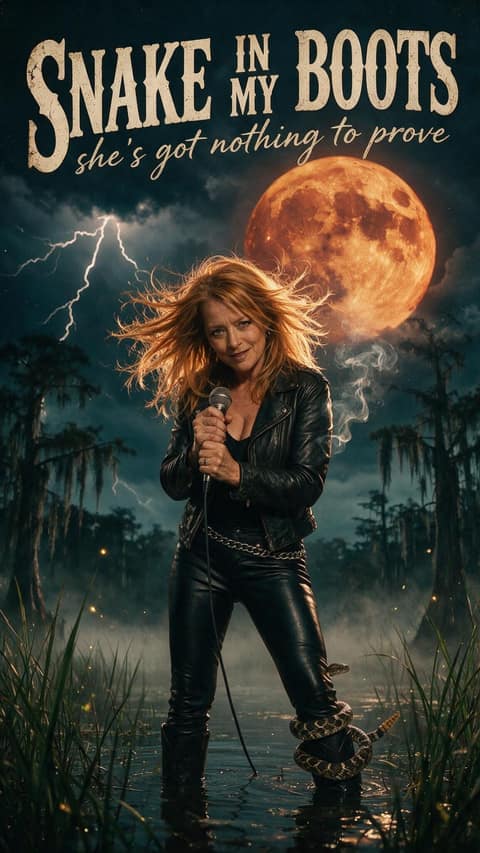 Snake in My Boots
 Too Many Tabs Open
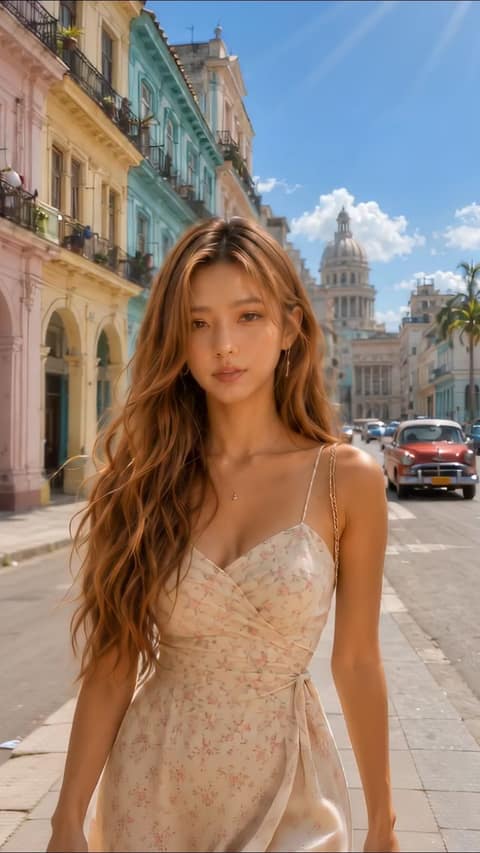 I Still Love You
 Nel bagliore del tramonto
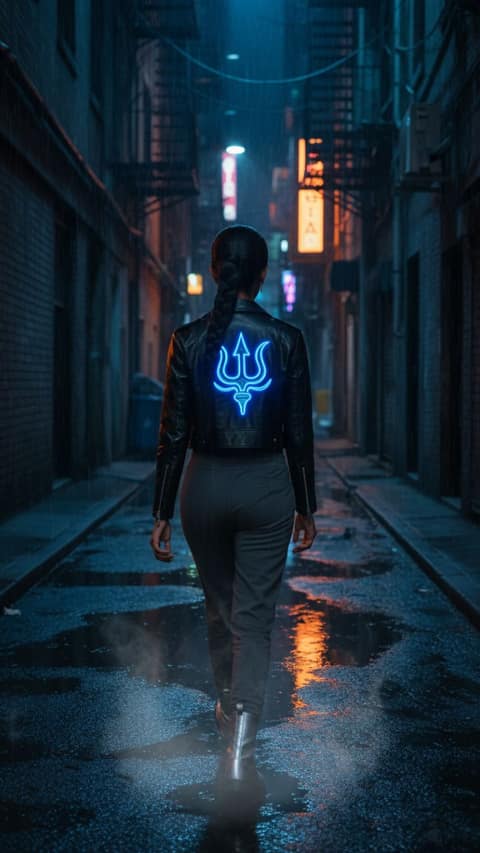 शिव का चेला, काल का भी काल
 Yürü Koçum Yürü
 Shiva Shambo
 Top Floor Itch
How do creators set up lip sync on Revid?
Most music videos made on Revid never reach the lip sync option. It needs two settings at once, AI video and lyric timing, and while 9 in 10 music videos are timed to lyrics, most use animated AI images, the default media type.
Lip sync is offered only when a music video uses AI video and is timed to lyrics. That was 14,929 of 54,940 music videos (27%). Animated AI images, the default, made up 59% of all music videos.
Source: Revid product analytics (Amplitude), music video generations from Jul 25 to Oct 23, 2026 (54,940 generations), pulled Oct 23, 2026.
Show the data
| Music videos | Share of all music videos | |
|---|---|---|
| All music videos | 54,940 | 100% |
| Timed to lyrics | 49,756 | 90.6% |
| Made with AI video | 16,960 | 30.9% |
| AI video timed to lyrics | 14,929 | 27.2% |
Among the music videos where lip sync was offered, the setting was recorded on 8,708, and 55% of those kept it on.
4,800 of the 8,708 music videos that recorded the setting had lip sync on (55%). 6,221 did not record it, so across all 14,929 the share with lip sync on lies somewhere between 32% and 74%.
Source: Revid product analytics (Amplitude), music video generations with AI video and lyric timing from Jul 25 to Oct 23, 2026 (14,929 generations), pulled Oct 23, 2026.
Show the data
| Music videos | Share of the 14,929 | |
|---|---|---|
| Lip sync on | 4,800 | 32.2% |
| Lip sync off | 3,908 | 26.2% |
| Setting not recorded | 6,221 | 41.7% |
The tier mix is the other choice that shapes a lip sync video, because it sets the price per second and the model that renders the singing shots.
The public examples lean toward Pro (7 Low, 7 Pro, 2 Ultra), but the two most-watched lip sync examples, with 844,806 YouTube and 502,816 TikTok views, were made on Low. Low costs 15 credits per 5 seconds of AI video, Pro 50 and Ultra 100.
Source: Revid product analytics (Amplitude), 16,960 AI-video music videos from Jul 25 to Oct 23, 2026; and the 16 public lip sync examples on revid.ai/ai-music-video-maker, read Oct 23, 2026.
Show the data
| All AI-video music videos | Public lip sync examples | |
|---|---|---|
| Low | 74.3% | 43.8% |
| Pro | 21.4% | 43.8% |
| Ultra | 4.2% | 12.5% |
What results should you expect from AI lip sync?
Lip sync is good enough to carry a music video: the 15 examples above have 1,458,934 tracked views between them, from the nine whose posts Revid tracks, and the two most-watched were made on the cheapest tier. It is not frame-perfect on every song, though. As general guidance:
- Clean vocals work best. A lead vocal that sits clearly on top of the mix gives the model an easy signal to follow.
- Effects and dense mixes are harder. Heavy reverb, vocoders, stacked harmonies and loud instruments over the voice can loosen the timing on some lines.
- Very fast rap is the hardest case. When syllables come faster than a mouth can clearly form them, some lines look approximate. Keep the singing shots to the slower or catchier parts, such as the hook.
- Words can be misheard. Lyric timing depends on how well the vocal is transcribed. A dense mix or an unusual pronunciation can put wrong words in the captions, so read them in the editor before you export.
- Realistic faces need more care. Stylized looks such as 3D animation or claymation forgive small motion glitches; ultra realism needs more care with faces and hands.
None of this is final. Every shot can be regenerated on its own in the timeline editor, so a singing shot that looks off costs you one shot, not the whole video.
How to make a lip sync music video in Revid
- Add your song. Open the AI music video generator and upload an MP3 or WAV, or paste a Suno link.
- Keep "Sync with lyrics". Lip sync is not available with beat timing.
- Choose AI video as the media type.
- Turn on Enable Singer Lip Sync and set the frequency. In the examples, 30% to 35% gave a story video with the singer on screen about a third of the time, 57% to 68% gave a video carried by the singer, and 100% put the singer on nearly every line with lyrics.
- Pick a style and the singer. Choose a visual style (Ultra Realism, Realist, 3D Render, Claymation, Anime and more), select a saved character for the singer, and write a short direction that names who sings. The free music video shot planner helps you decide which lines deserve a close-up.
- Test a short cut first. Trim the track to the chorus; a 30-second cut costs a sixth of a 3-minute song.
- Choose the tier and check the price. AI video costs 15 credits per 5 seconds on Low, 50 on Pro and 100 on Ultra, so a 3-minute song costs 540, 1,800 or 3,600 credits. The cost appears before you generate.
- Review and export. Watch every singing shot with the audio, regenerate any that miss, fix the captions, and export in 720p, 1080p or 4K, in 9:16, 16:9, 1:1 or 4:5.
To see lip sync next to other styles, browse the 30 example videos on our AI music video maker page. Rap tracks have their own starting point in the AI rap video generator, and songs without vocals are better served by beat timing or the AI music visualizer.
What are the alternatives to Revid for AI singing videos?
Several tools can make a character sing. They split into full music video generators and single-face tools.
| Tool | Type | Lip sync | Note |
|---|---|---|---|
| Revid | Music video generator | Optional, on AI video with lyric sync | Full song, lyric captions, editor and publishing in one place |
| Neural Frames | Music video generator | Yes | Deepest audio reactivity (visuals can follow separate stems); download only |
| Solmi | Music video generator | "Singing video" format | Suno links, a storyboard you approve, direct publishing |
| Kaiber | Music video generator | Character Lip Sync workflow | Stylized, animated visuals |
| Runway | AI video platform | Photo plus audio clip, or performance transfer from a video of you | Its lip sync guide does not mention singing |
| Hedra Character-3 | Photo-to-video model | Image plus audio | Described as suited to talking and singing video |
The music video generator rows come from our comparison of 11 AI music video generators, checked September 30, 2026, with sources for each tool. Runway's performance transfer is worth knowing about: if you can film yourself singing on a phone, its Act-Two workflow transfers your mouth movements, expressions and timing to a character, so the timing comes from your own performance.
If you'd rather film, our guide to what a music video costs in 2026 has sourced budgets for each tier.
Can I make a real artist or a celebrity sing my song?
Not without their permission. Making a real person appear to sing something they never sang is exactly the kind of content platforms single out: YouTube requires disclosure when AI makes a real person appear to say or do something they didn't do, or generates a realistic scene that didn't happen. Use an original character, or a character created from your own photo, and disclose realistic AI people when the platform asks.
Method
- Usage data: Revid's product analytics (Amplitude), every music video generated with the music video generator from July 25 to October 23, 2026: 54,940 generations, with their media type, timing, AI video tier and lip sync setting. A generation is one build, so one creator can count several times. The lip sync setting was not recorded on 6,221 of the 14,929 builds where it was offered.
- Example videos: the 30 public examples on our AI music video maker page. On October 23, 2026 we read each one's saved settings and timeline from its public page. 29 pages loaded and one no longer has a public page. 16 of the 29 have Singer Lip Sync on, and all 16 contain singing shots; none of the 13 with it off does. One of the 16 is counted in the tier chart but left out of the table, chart and gallery because its style is named after a film studio.
- Singer time: the seconds of the final timeline where a lip-synced singer shot is the top layer, divided by the video's length. We checked frames from the exported video of "I Still Love You" against its timeline.
- Views: YouTube or TikTok views Revid tracks for an example's post. "Not tracked" means no post is linked, not zero views.
- Limits: the examples were chosen by Revid to show what the tool can do, so they are not a random sample. All were built before September 30, 2026, when the frequency started counting only the sung parts. No usage trends over time are shown.
FAQ
Can AI lip sync a rap song?
Yes, but very fast verses are the hardest case for lip sync. Put the singing shots on the hook and slower lines, keep the frequency moderate, and check the close-ups in the editor. Stylized looks such as 3D animation forgive small glitches better than ultra realism. Among the public examples, "Cold Open", a UK drill track made on Ultra in the Ultra Realism style, set the frequency to 68% and shows the rapper 71% of the time.
Can the AI singer look like me?
Yes. Create a consistent character from a PNG or JPEG photo of yourself (characters need an active plan), select it in the music video generator, and the singing shots use that face. Only use photos of yourself or of someone who agreed.
Does lip sync work with beat sync?
No. Singer lip sync is only offered when the video is synced to the lyrics and uses AI video. Beat sync cuts on the rhythm and produces no lyrics, so there are no lines to sing.
Can two singers sing a duet?
You can tell Revid how many singers the song has with "Number of different singers", an optional manual override for songs with multiple vocalists. Revid's analysis listens to the voices to tell the singers apart and gives each singing shot to one of them. Describe both characters in the visual direction, or select a saved character for each, so each one keeps their look.
How much does a lip sync music video cost?
AI music videos on Revid are priced per second of AI video: 15 credits per 5 seconds on Low, 50 on Pro and 100 on Ultra, so a 3-minute song costs about 540, 1,800 or 3,600 credits (about $10.50, $35 or $70 of credits on the Growth plan, $39 a month for 2,000 credits). The exact cost for your settings is shown before you generate.
Do I have to label an AI singing video?
It depends on how real it looks. YouTube asks you to disclose realistic AI content, including a real person made to appear to do something they didn't do and, per its rules, AI-generated music that is the main focus of the video. Clearly unrealistic visuals, such as animation, don't need disclosure on their own.
Sources
Checked on October 23, 2026.
- K R Prajwal, Rudrabha Mukhopadhyay, Vinay Namboodiri, C V Jawahar, "A Lip Sync Expert Is All You Need for Speech to Lip Generation In The Wild", ACM Multimedia 2020.
- Hedra, "Hedra Character-3" model page.
- Runway, "AI lip sync" guide.
- YouTube Help, "Disclosing use of GenAI content".
- Revid, AI music video generators compared, checked September 30, 2026.
- Revid University, How to make a great AI music video from your song, October 21, 2026.
- Revid product analytics (Amplitude), music video generations from July 25 to October 23, 2026 (54,940 generations; lip sync setting recorded on 8,708 of the 14,929 where it was offered), pulled October 23, 2026.
- Revid, saved projects of the public example videos on the AI music video maker page, read from their public pages on October 23, 2026 (29 of 30 readable; 16 with lip sync).