AI TikTok Video Generator: From Script to Posted TikTok (2026)
Revid's AI TikTok video generator (now "From script" on the Create page) turns a script, an idea or a link into a finished vertical TikTok and posts it. Here are the current steps, what each part costs in credits, and what 176,367 TikToks say about faceless videos.
On this page
Revid's AI TikTok video generator turns a script, an idea or a link into a finished 9:16 TikTok. It writes or uses your script, builds a visual for each scene, and adds an AI voice-over, synced captions and music. You edit it, then publish or schedule it to TikTok. In the current app, start from "From script" on the Create page.
The videos it makes are faceless by default, which is an advantage. In Revid's analysis of 176,367 TikToks with 1,000+ likes posted between October 2025 and October 2026, faceless videos had a median of 114K views, against 67K for videos with one person on camera. The common mistake is burying good visuals under nonstop narration. The data on that is further down.
What the generator does at each step
Every part of the video stays editable after generation.
| Part | What Revid does | What you can change |
|---|---|---|
| Script | Writes one from your idea, or uses your script or link | Edit any line in the editor's Script panel, or draft it first with the TikTok script generator |
| Visuals | Builds one visual per scene (default media type: Animated AI images) | Switch to AI video (Seedance 2.5, MiniMax Hailuo H3, Wan 3.0 or Google Veo 3, chosen per scene), Motion graphics, Stock videos, Your own media or Static / Gameplay |
| Voice-over | Reads the script with an AI voice | 1,000+ voices in 70+ languages; voice cloning on Elite and above |
| Captions | Adds captions synced to the voice | 30 caption styles, automatic captions in 100+ languages |
| Music | Adds a background track | Swap or remove it in the Audio panel |
| Editing | Lays the scenes out on a timeline | Trim, split, replace or regenerate any scene |
| Export | Renders the vertical video | 720p, 1080p or 4K, at 30 or 60 fps |
| Publishing | Posts now or adds the video to your queue | TikTok, Instagram, YouTube and X from one queue, or download the file |
Two things separate it from a blank-prompt generator. Revid includes a library of about 2.77 million real short-form videos with their public engagement data, so you can start from a format audiences already watch and remix it into an original video. And in automations and several tools, the script writer first pulls transcripts of related TikToks with more than 10,000 likes and uses them as references for style and story.
Where the AI TikTok video generator lives in Revid now
The Create page was redesigned in October 2026. The tool once labeled "AI TikTok Video Generator" is now called Voiceover Video, and you reach it through the "From script" chip. Older guides that mention a "Create New Video" button or a "Short Video Generator" menu are out of date. The sidebar button is now "Create", and the starting points are chips at the top of the page.
| You want to start from | Pick this on the Create page |
|---|---|
| A full script or a link | From script (Voiceover Video) |
| A one-line idea or topic | From an idea (Prompt to Video) |
| A viral video or ad you want to remix | Remix video or ad |
| A song | From music |
| An article or blog post | More tools > Article to Video |
| A long YouTube video | More tools > YouTube Long to Shorts |
How to make a TikTok video with AI in Revid
1. Open Create and pick your starting point
Click "Create" at the top of the left sidebar (or press C). The page asks "What do you want to make?". Choose "From script" if you already have a script or a link. Choose "From an idea" if you only have a topic and want Revid to write the script.
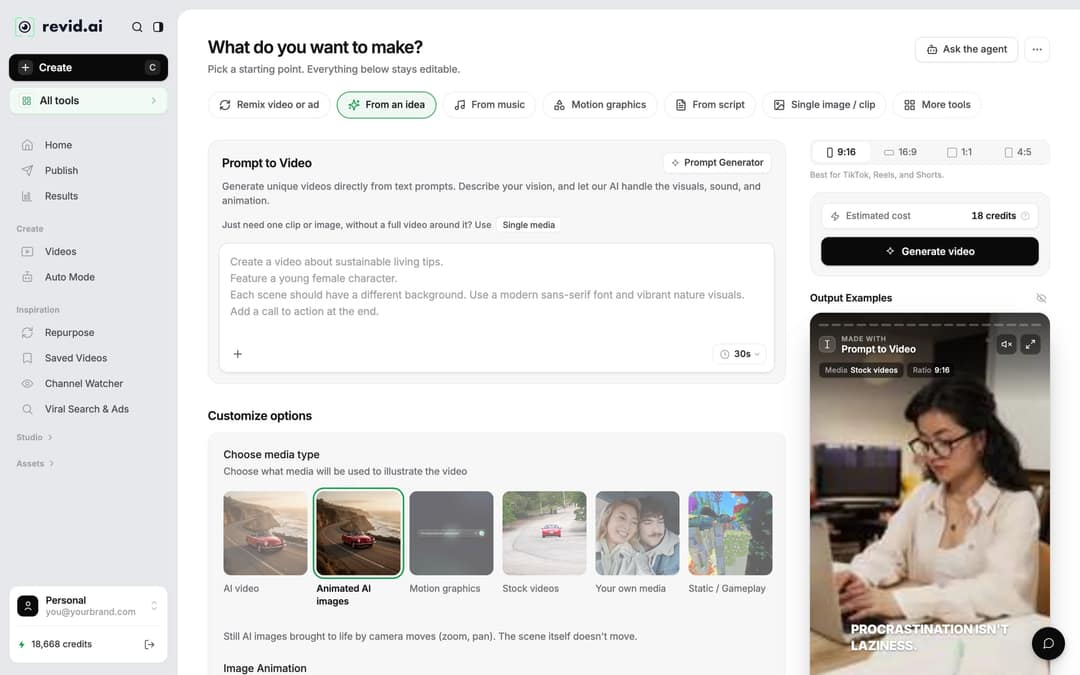
Prompt to try
Make a 30-second TikTok on 3 mistakes people make when repotting a monstera. Open with the hook: "You're killing your monstera every time you repot it." Show each mistake as its own scene with close-up plant visuals, a calm voice-over and bold captions.
2. Write the script, hook first
Script tools label the text box "Your video narrator script". A specific idea gives a tighter script than a vague one: "3 mistakes people make when repotting a monstera" beats "plant tips". Read the first line before anything else, because that line is your hook. If it would not stop you scrolling, rewrite it. The TikTok hooks list has patterns you can adapt.
The script box understands three formatting tricks:
- New line: starts new content, which helps split the video into scenes.
- [Square brackets]: notes for the visuals, not read aloud (for example, [golden dragon over a city]). ElevenLabs v3 and v4 voices read bracketed words as acting cues such as [whispers].
<break time="1.0s" />: a pause of up to 10 seconds. ElevenLabs and MiniMax voices honor it; Gemini and Kling voices drop it with no pause.
3. Choose the media type and the 9:16 ratio
Under "Choose media type", pick how the scenes look: "AI video" (needs a paid plan), "Animated AI images" (the default: still AI images with camera moves), "Motion graphics", "Stock videos", "Your own media" or "Static / Gameplay". In the ratio picker, keep 9:16 for TikTok. The other options are 16:9, 1:1 and 4:5.
4. Check the estimate and generate
The footer shows "Estimated cost" in credits next to "Generate video". Change the media type or length and the estimate updates before you spend anything. If a build fails, Revid refunds its credits automatically.
5. Edit the script, the voice and the scenes
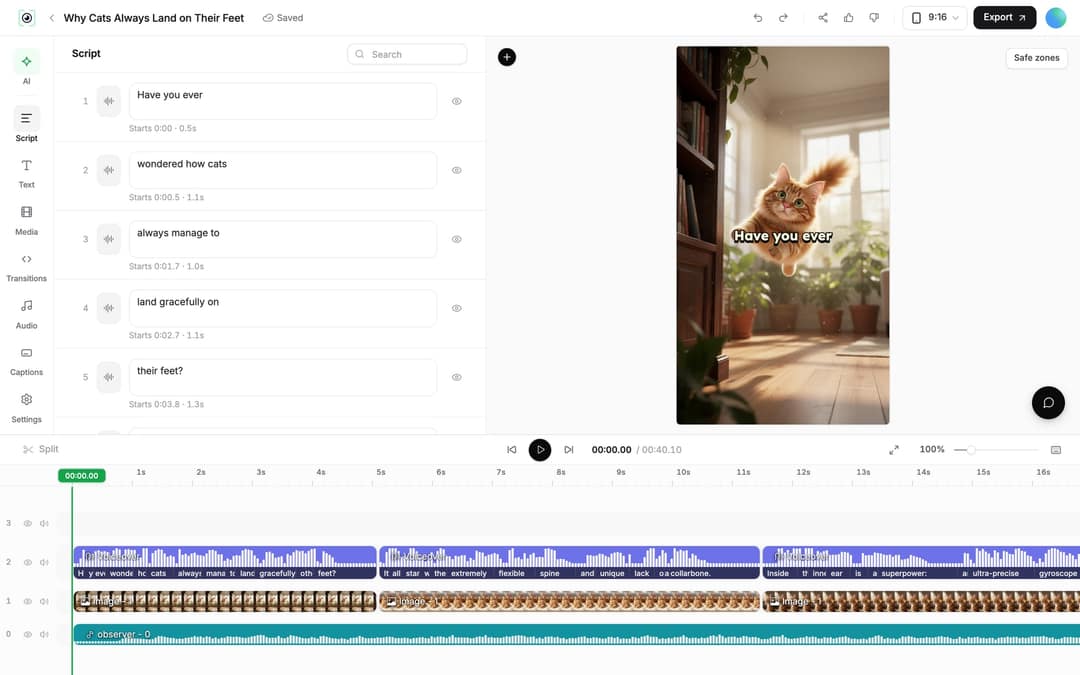
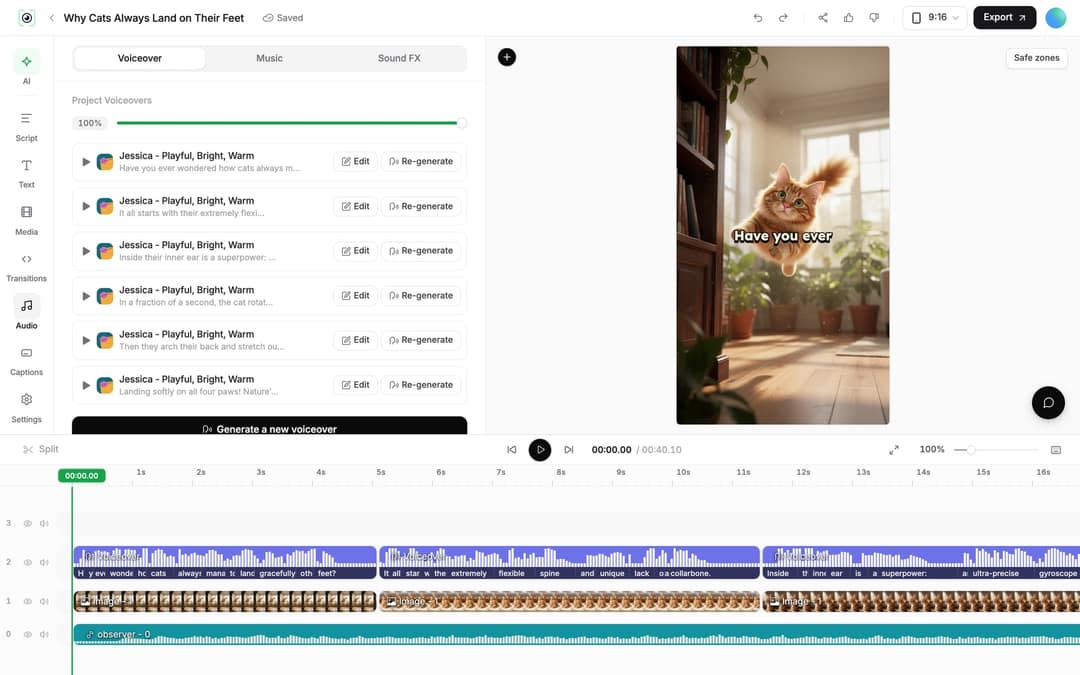
Open "Videos" in the sidebar and click the video card (or choose "Open in editor" from its menu). The left rail lists Script, Text, Media, Transitions, Audio, Captions and Settings.
- Fix a line: in the Script panel, edit any caption segment's text. Revid shows "Caption updated. Re-generate voice if timing changed."
- Regenerate the voice: in the Audio panel, click "Re-generate" on the voiceover, then "Generate Voice". Keep "Keep timeline in sync" on so clips, texts and music follow the new timing. This costs 10 credits per 500 characters and needs a paid plan.
- Swap a scene: select an image or video clip and click "Replace" to pick another file from the Media library. An AI video clip also offers "Regenerate from prompt" (tabs "Re-animate", "New image + video", "Edit with AI"). An AI image offers "Regenerate/Edit image".
- Trim: drag a clip's start or end edge on the timeline, or use "Split" (key S) at the playhead. A selected video clip also has a "Trim" section with exact start and end times.
6. Connect TikTok and publish
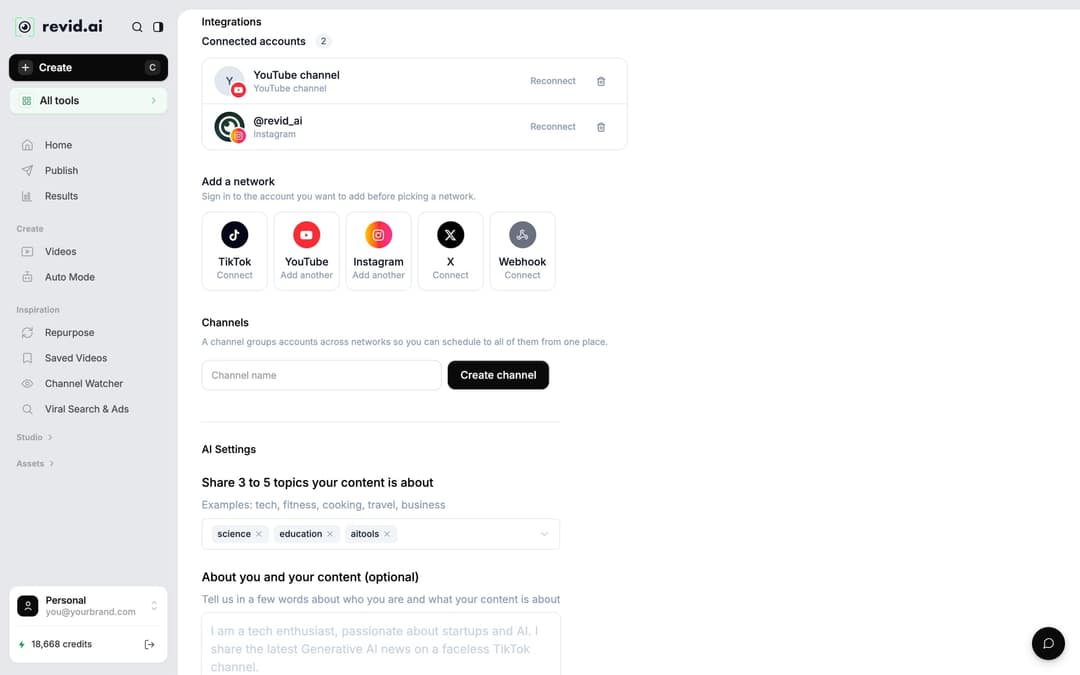
Connect your account once: go to Settings, then "Integrations", and pick TikTok under "Add a network". Sign in to the TikTok account you want first. The Publish page also has a "Connect" shortcut.
Then click "Export" in the editor ("Export / Publish" on free accounts), or "Publish" on the project card. The "Publish Video" dialog lets you choose accounts under "Publish to", then post right away with "Publish" or schedule with "Add to queue". You can publish to TikTok, Instagram and YouTube from the same queue. Scheduled and past posts appear on the Publish page, and each post's views, likes and comments appear under Results. To export the file instead, choose 720p, 1080p or 4K (4K export costs 10 credits).
Post a TikTok every day with Auto Mode
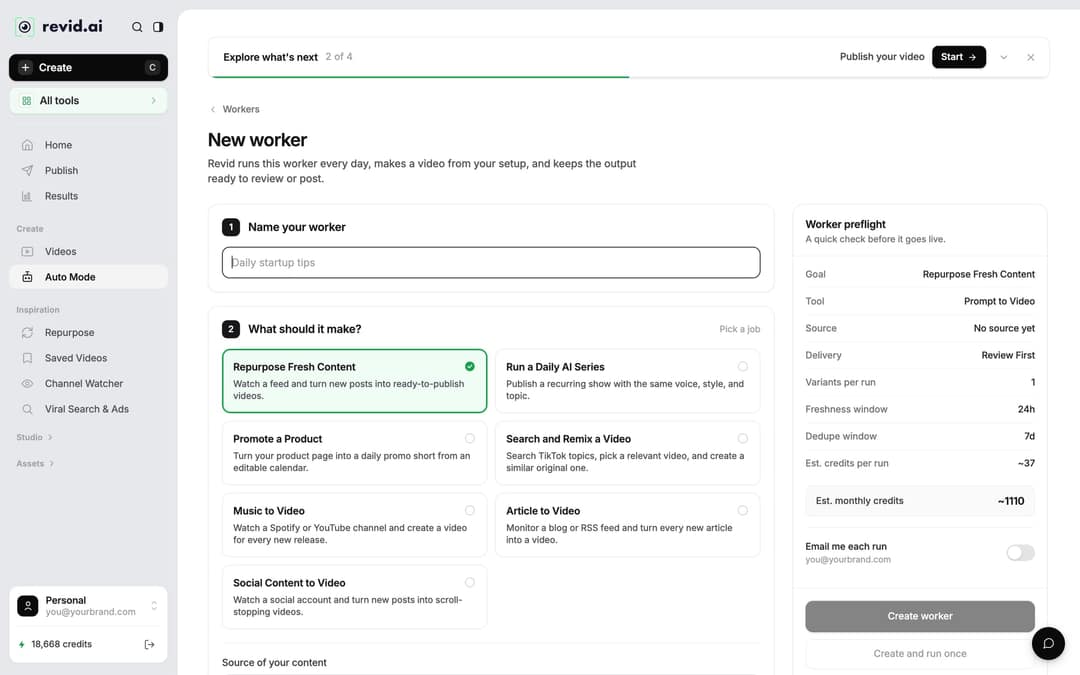
If you want a new video daily without opening Create each time, use an Auto Mode worker. In the sidebar, click "Auto Mode". Type a topic in the "Daily AI series" box, or click "New worker" to build one step by step:
- Name your worker (for example, "Daily startup tips").
- What should it make? Pick a job. "Run a Daily AI Series" writes a new episode from a broad topic. "Search and Remix a Video" searches TikTok for your queries and makes an original video from a strong match. "Repurpose Fresh Content" turns new posts from a channel, blog feed, subreddit or account into videos.
- Pick the format: choose the tool, media type, voice and music, as on the Create page.
The "Worker preflight" panel shows "Est. credits per run" and "Est. monthly credits" before you click "Create worker". A run costs what the same video costs when made by hand. Workers run once a day between 1 AM and 5 AM. By default, delivery is "Review First", so videos wait in Revid for you to check. Choose "Auto Queue" and select a connected account if you want them posted automatically. Growth includes 3 workers, Elite 5 and Ultra 10. More on automating video creation.
Prompt to try
Create a 20-second faceless TikTok showing a rusty old bike restored step by step, from grime to shiny finish. Use a single spoken hook at the start: "Watch this $10 bike come back to life." After that, no narration, just satisfying close-up scenes, upbeat music and short captions.
Why faceless, short-voice TikToks perform
In Revid's TikTok index, faceless videos reached a median of 114K views, and 17.4% passed 1 million. Videos with one person on camera reached 67K and 12.7%. The gap held inside formats too: faceless tutorials had a 156K median against 52K for on-camera tutorials. The method and every chart are in our study of what makes a TikTok go viral.
Faceless videos earned a median of 114K views, against 67K for videos with one person on camera, and passed 1M views 38% more often.
Source: Revid analysis of 176,367 TikToks with 1,000+ likes posted between Oct 1, 2025 and Oct 16, 2026 (61,203 creators)
Show the data
| Median views | Share that passed 1M views | |
|---|---|---|
| Animals | 147.4K | 24.1% |
| Faceless | 113.9K | 17.4% |
| Groups of people | 96.1K | 16% |
| Objects or products | 70.8K | 13.2% |
| One person on camera | 67.4K | 12.7% |
Two limits matter. The index only holds TikToks that already passed 1,000 likes, so it compares videos that did reasonably well. The figures show what top videos have in common, not what causes views. Perspective and format come from Revid's AI analysis of each video.
How much the voice talks matters as well. Videos with under 40 characters of speech (a line or two) had a 123K median, and 20.2% passed 1 million views. Videos that talked throughout (300+ characters of speech) had 68K and 11.9%. Silent videos had 73K.
Videos with just a few spoken words (a line or two) beat both silent videos and videos that talk the whole way through, which were the most common and the weakest.
Source: Revid analysis of 176,367 TikToks analyzed by AI, with 1,000+ likes posted between Oct 1, 2025 and Oct 16, 2026 (61,203 creators)
Show the data
| Median views | Share that passed 1M views | |
|---|---|---|
| No speech | 73.3K | 14.3% |
| Under 40 | 122.7K | 20.2% |
| 40 to 120 | 97.2K | 17.6% |
| 120 to 300 | 91.6K | 16.8% |
| 300+ | 67.7K | 11.9% |
The decision rule for your script is simple. If the topic works visually (a transformation, a satisfying process, a reveal), keep the voice-over to a one-line hook and let the scenes carry the video. If it is an explainer or a story, full narration is fine, but cut every sentence that does not move the viewer forward.
Settings to check before you post
| Setting | What to use | Source |
|---|---|---|
| Aspect ratio and size | 9:16 at 1080x1920 | TikTok Creator Academy recommendation |
| Length | Any length works. In Revid's 12-month data, medians ranged from 58K to 76K views across length buckets, with 61 to 90 s slightly ahead at 70K | Revid TikTok study |
| Hashtags | 3 or 4 (4 hashtags had the best median, 77K; 9 or more only 16K) | Revid TikTok study |
| Caption | 41 to 80 characters had the best median (67K); no caption 36K | Revid TikTok study |
| AI label | Turn on TikTok's AI-generated content setting when the video has realistic AI images, audio or video | TikTok Support |
If you plan to earn from TikTok's Creator Rewards Program, only original videos at least one minute long count.
What it costs
Sign-up is free, and new accounts get free credits to try video creation, with no credit card needed. Regular creation then uses the monthly credits of a paid plan. Growth costs $39/month ($32/month billed yearly) for 2,000 credits, Elite $89 for 5,000 and Ultra $199 for 12,000. Your balance shows as "N credits" at the bottom of the sidebar.
As a guide, a 30-second video with Pro AI visuals and a voice-over costs about 40 to 80 credits, so Growth covers a video most days of the month at that level. The main costs:
| Item | Credits |
|---|---|
| Voice-over | 10 per 500 characters |
| AI images (Low / Pro / Ultra) | 1 / 4 / 16 per image |
| AI video (Low / Pro / Ultra) | 15 / 50 / 100 per 5 seconds |
| Veo 3 or MiniMax Hailuo H3 | 100 per 5 seconds |
| Seedance 2.5 at 1080p / Seedance 4K | 250 / 500 per 5 seconds |
| Motion graphics (Low / Pro / Ultra) | 2 / 3 / 5 per second, 15 seconds minimum |
| 4K export | 10 |
Use premium models only for the scenes that need them, such as the hook or the reveal. If you run short, one-time credit packs start at 1,000 credits for $49. The live price list is on the Revid pricing page.
When another tool fits better
If you already film your own footage and only want to cut it by hand, a manual editor such as CapCut is the better fit. The Revid vs CapCut comparison lays out the difference. Revid is built for the opposite case: you have an idea or a link, not footage, and want a finished, posted TikTok.
FAQ
Is the AI TikTok video generator free?
You can start for free. Sign-up is free, new accounts get free credits to try video creation, and a free account can search Revid's viral video library. Regular creation then uses the monthly credits of a paid plan, starting at $39/month for 2,000 credits.
Can AI-generated TikToks earn money from the Creator Rewards Program?
Yes, if the account and video qualify. You need to be 18 or older, with at least 10,000 followers, 100,000 video views in the last 30 days and a Personal account. Only original videos at least one minute long earn; photo-only, text-only and lightly modified reposts do not count.
Do I have to label AI-generated TikToks?
Yes, when the video contains realistic AI-generated images, audio or video. The label reads "creator labeled as AI-generated", and TikTok says it does not reduce distribution for videos that follow the Community Guidelines.
Can I use my own voice instead of an AI voice?
Yes, on the Elite plan and above, which include voice cloning. On every plan you can choose from 1,000+ AI voices in 70+ languages.
Can I make the same TikTok in another language?
Yes. Choose "Translate" in the project card menu, pick a target language, and Revid keeps the edit, media, timing and captions while re-voicing the script. It costs 10 credits per 500 characters of voice.