On this page
The best AI video app depends on what you start with. For an idea or link that should become a finished, published short, use Revid; for controlled cinematic clips, Runway; for editing your own footage on a phone, CapCut; for clipping long recordings, OpusClip; for AI presenters, HeyGen or Synthesia.
Most of these apps rent the same engines. Google Veo, Seedance, Kling, Wan and MiniMax Hailuo are sold through APIs to many video tools, so two apps sending the same prompt to the same model get comparable clips. What separates them is everything around the model: the input it accepts, the script, the editing, and whether the video ever reaches TikTok. The list also keeps moving: OpenAI closed the Sora app on April 26, 2026 and shut down the Sora 2 API on September 24, 2026, so any roundup still recommending Sora is out of date.
The 10 best AI video apps at a glance
Prices and free plans below come from Revid's comparison pages, checked in August and September 2026. Confirm them on each site before you pay.
| App | You start with | Best for | Entry price | Free option |
|---|---|---|---|---|
| Revid | An idea, script, link, song or viral video | Finished shorts, published to TikTok, Instagram and YouTube | $39/month ($32 billed yearly) | Free sign-up with free credits to try creation, no card needed; regular creation uses paid credits |
| Runway | A prompt, image or clip | Cinematic shots with camera control | From $15/month | 125 one-time credits, watermarked |
| CapCut | Footage you filmed | Fast mobile and desktop editing | About $9.99/month | Full editor with 1080p export |
| InVideo AI | A prompt, script or URL | Stock-based first drafts edited by chat | From $20/month | Watermarked, weekly limits |
| OpusClip | A long video or podcast | Clipping into Shorts, Reels and TikToks | From $15/month | 1080p, watermarked captions, files expire after 3 days |
| VEED | Footage or a prompt | Browser editing, subtitles, dubbing | Roughly $10 to $24/month | 720p with watermark |
| Pika | A prompt, image or your footage | Playful effects and quick clips | From $8/month (billed yearly) | No monthly credits, no watermark, no commercial license |
| Luma Dream Machine | A prompt or image | Motion-heavy generated scenes | Check Luma's pricing page | Check Luma's site |
| Synthesia | A script | Training and multilingual presenters | From $29/month | Up to 10 minutes a month, 9 stock avatars |
| HeyGen | A script | Realistic avatars and video translation | From $29/month ($24 billed yearly) | 3 watermarked videos a month, up to 1 minute |
1. Revid: best for turning an idea or link into a published short
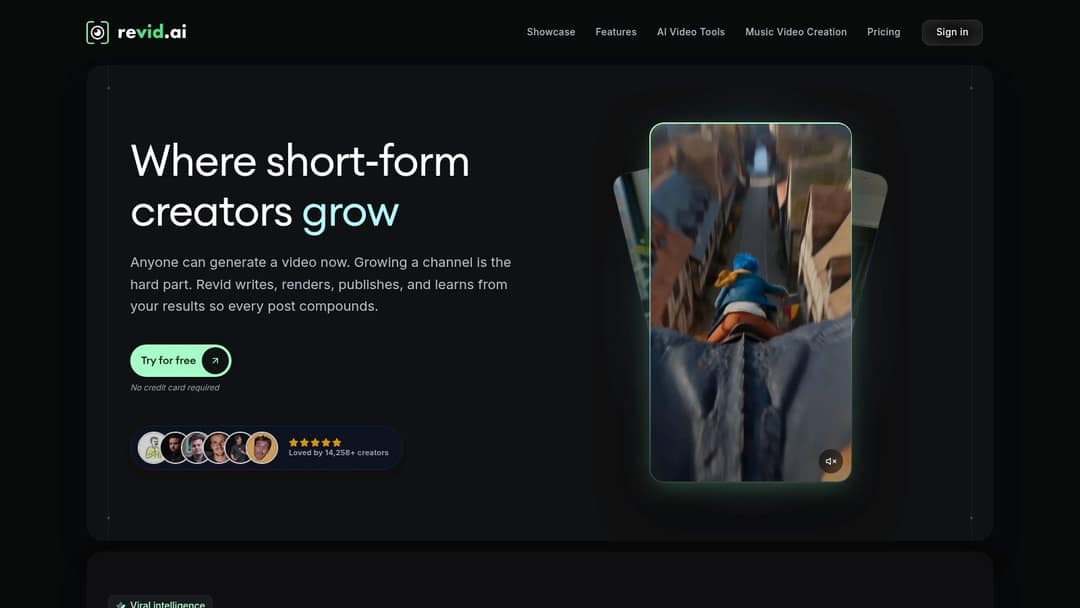
Revid is an AI video platform that turns an idea, a link or a proven viral format into finished short-form videos and publishes them to TikTok, Instagram and YouTube. It runs in the browser and is built for founders and small business owners, and it is also used by creators, agencies and faceless channels.
The difference is where a video starts. Revid includes a searchable library of about 2.77 million real short-form videos and posts with their public engagement data. You can start from a blank prompt, or from a format audiences already watch and turn it into an original video. When Revid writes a script from a prompt in several tools, it first retrieves transcripts of related TikToks with more than 10,000 likes and uses them as references.
Each scene can use Seedance 2.5, MiniMax Hailuo H3, Wan 3.0 or Google Veo 3 (plus lower-cost tiers) under one credit system. You also get 1,000+ AI voices in 70+ languages, automatic captions, music and a full timeline editor. Export goes up to 4K at 30 or 60 fps, and you can publish or schedule to TikTok, Instagram and YouTube from one queue.
Pricing is credit-based. Sign-up is free, with no credit card needed, and new accounts get free credits to try video creation; regular creation then uses the credits of a paid plan, from $39 a month (Growth, 2,000 credits, or $32 a month billed yearly). A 30-second video with Pro AI visuals and a voice-over costs about 40 to 80 credits, and you see the estimate before generating. The live list is on Revid's pricing page.
The trade-off: Revid is not the tool for long-form film editing or for cutting only your own footage by hand, where CapCut or a professional editor fits better. Revid's own analytics count 400+ creators who have reached 100,000+ views with videos made on Revid. That shows the workflow ships videos people watch; it is not a forecast for your account.
Prompt to try
Make a 30-second vertical video for small business owners titled "3 signs your website is losing you customers." Open with the hook "Your website might be scaring buyers away." Use clean AI visuals of a laptop and a frustrated shopper, a calm confident voice, bold captions and upbeat background music.
How to make a short with Revid
- Open the AI video generator and paste an idea, a script or a link (a blog post, YouTube video, TikTok, X post or Reddit thread).
- Or search the viral library by topic, open a video and choose "Same energy, new script" to keep its recipe with new words and visuals.
- Review the script, voice and captions, and swap the AI model on any scene in the timeline editor.
- Export in 720p, 1080p or 4K, or publish and schedule straight to TikTok, Instagram and YouTube.
For Instagram, the AI reel generator turns text into a vertical Reel in the same way.
2. Runway: best for cinematic, controllable generated clips
Runway is a model lab for people who care about the shot. Its Gen-4.5 model is one of the highest-rated for generation quality, and the app gives you shot-level control: camera moves, plus Aleph for relighting and object removal. It also gets frontier features early, such as native audio, world models and motion transfer, and offers a developer API and MCP server.
Use it when you already know the shot you want. Start from a reference image when a character or product must stay consistent, generate short pieces, then assemble them elsewhere. Runway gives you clips, not finished videos: the script, voice, captions, assembly and publishing are up to you.
Plans start at $15 a month (Standard). The free plan is 125 one-time credits, watermarked, on select models. See Runway for current plans, or the Revid vs Runway comparison if you need finished vertical videos rather than raw shots.
3. CapCut: best mobile app for editing your own footage
CapCut is the practical pick when the footage exists and the bottleneck is editing. It runs on mobile and desktop, with auto-captions, trend templates that drop your clips into viral formats, and the tightest TikTok integration of any editor. Pro adds speaker-identified captions and a large effect library.
The free tier is generous: the full editor with 1080p export and auto-captions. Premium templates and effects, and most AI features, are paid, with Standard at about $9.99 a month. Check which effects your edits rely on before you build a routine around them.
CapCut edits; it does not generate a video from text. Templates can also make several accounts look alike. It shines for talking-head clips, product footage, quick demos and trend formats. Try CapCut, and read Revid vs CapCut if you want videos without filming.
4. InVideo AI: best for a full draft from a prompt or URL
InVideo AI builds a first draft from a prompt, script or link, then lets you edit it by typing commands in a chat instead of working on a timeline. It draws on a 16M+ stock library (with metered iStock assets on paid plans), a menu of third-party AI models, and AI avatars and voice clones from the entry tier.
The weak spot is visual specificity. Stock-based drafts look generic when the product or audience needs a distinct look, so give it a precise script, name the viewer, and replace repetitive clips with your own assets. Review claims, pronunciation and music before export.
The Starter plan is about $20 a month per seat; the free plan is watermarked with weekly limits. Visit InVideo AI, and see Revid vs InVideo for a side-by-side on editing control and publishing.
5. OpusClip: best for clipping long videos into Shorts
OpusClip starts from a recording you already have: a podcast, stream, webinar or interview. It finds moments worth posting, ranks them with a virality score, reframes faces to 9:16 and adds animated captions. Paid tiers add posting and scheduling, and it has its own API and MCP server for automated clipping.
Treat the score as triage, not a promise. Check that every cut keeps enough setup and does not change what the speaker meant, and move complex edits into a full editor.
Plans start at $15 a month. The free plan exports 1080p with watermarked captions, and media expires after 3 days. Go to OpusClip if your archive holds long content you are not reusing, or read Revid vs OpusClip if you need new videos without source footage.
6. VEED: best browser editor for teams and translation
VEED is a full manual editing toolbox in the browser: a multi-track timeline, screen recording, brand kits and some of the best-known auto-subtitles and translation. It adds AI dubbing, eye-contact correction, 30+ stock avatar presenters, and AI clip generation inside the editor when you need a shot.
It suits social teams who review each other's work and publish in several languages. Heavy projects can feel slower than desktop software, and pricing gets harder to read when subscriptions, AI credits and seats overlap.
Entry plans run roughly $10 to $24 a month; the free plan exports 720p with a "Made with VEED" watermark. Use VEED when collaboration and localization matter most.
7. Pika: best for playful effects and quick clips
Pika is built for fast experiments. Its signature effects (Pikadditions, Pikaswaps and Pikaffects) insert AI characters and objects into footage you filmed or transform a scene, and generations take about 1 to 2 minutes. Credits roll over.
Use it for the scroll-stopping moment, not the whole video. Consistency across longer sequences varies, so generate the insert, then add captions, voice and music elsewhere.
Paid plans start at $8 a month billed yearly. The free account has no monthly credits (you buy one-time packs), includes all models with no watermark, and carries no commercial license, so it is not for client or brand work. Visit Pika.
8. Luma Dream Machine: best for motion-heavy scenes
Luma Dream Machine generates clips from text or an image, and creators pick it when movement and scene energy carry the idea: atmospheric shots, product mood clips, transitions. It is a clip generator, so narration, captions and multi-shot pacing still need an editor.
Small wording changes can alter the subject or motion, so it works best for standalone shots rather than campaigns that need the exact same product in every scene. Check plans and limits on Luma's own site, since they change often.
9. Synthesia: best for training and multilingual presenters
Synthesia is the corporate pick for presenter-led video: write a script, choose an avatar (its Express-2 avatars use full-body gestures), and build slides into a video in 140+ languages. SCORM and LMS export, SSO and enterprise controls make it fit training and internal communication, and you can re-render a video when the policy changes.
It is not built for cinematic b-roll or feed-native social formats, and an avatar delivers a weak script just as smoothly as a good one. Plans start at $29 a month; the free plan covers up to 10 minutes of video a month with 9 stock avatars. See Synthesia, or Revid vs Synthesia for social video instead of training.
Input
Create a short vertical product promotion video for InnerNote. Positioning: LinkedIn posts that actually sound like you, not a robot.
Output
10. HeyGen: best for realistic avatars and translation
HeyGen has some of the most realistic avatars and digital twins available, plus video translation with lip sync across 175+ languages. It also offers LiveAvatar for real-time, interactive avatars, and G2 rated it its top AI video platform (4.8/5, Summer 2026).
It works when the presenter is the message: product demos, explainers, localized ad variants. Most campaigns still need a second app for b-roll and platform cutdowns. Plans start at $29 a month ($24 billed yearly); the free plan gives 3 watermarked videos a month, each up to 1 minute. Try HeyGen.
Which AI video app should you choose?
Pick by your starting material, not by the feature list:
- If you have an idea or a link and need a published vertical video, use Revid (or InVideo AI for a stock-based draft).
- If you have footage you filmed, use CapCut on a phone or VEED in a team browser workflow.
- If you have a long recording, use OpusClip.
- If you have a script and need a face, use HeyGen for realism and translation, Synthesia for training at scale.
- If you need one striking shot, use Runway for control, Pika for effects, Luma for motion.
If your main job is paid social ads, this third-party comparison of AI video ad creators covers that niche in more depth.
Which AI video apps support bulk content creation?
Revid is built for volume: Auto-Mode workers create a fresh video every day from a prompt or a content source (3 on Growth, 5 on Elite, 10 on Ultra), and a Search and Remix automation picks a high-engagement reference on your topic and generates an original video from it on a schedule. Developers and AI agents can do the same through the API, MCP server and CLI. OpusClip covers the other kind of volume: many clips from one long recording.
Volume has a ceiling set by the platforms. YouTube does not let AI content made with generic templates that looks mass-produced earn money, while AI tools are allowed when the result shows your creative vision and gives real value. Batch the production, not the thinking: every video still needs its own angle.
Which apps let you start from scratch or build on someone else's video?
Runway, Pika, Luma, InVideo AI and Revid all start from a prompt. Building on an existing video is rarer. In Revid you open any video in the library and choose what to make from it: "Same energy, new script", "Make it about your topic", "Post the Part 2", "Same footage, new look", "React on camera", "Your face in it" or "Reuse the script". A free deep analysis (up to 60 a day) explains why a video worked: the hook, the timed structure and a checklist to replicate it.
Keep it original. You are responsible for the rights to anything you reuse, and platforms push down light reposts: since March 2026, Facebook treats reposts with only borders, captions or speed changes as unoriginal and deprioritizes them.
What is the best app for realistic, cinematic AI video?
For a single cinematic shot from text or an image, Runway gives the most control, and Luma is worth testing when motion drives the scene. For a finished multi-scene vertical video, Revid lets you pick the model per scene (Google Veo 3, Seedance 2.5, MiniMax Hailuo H3 or Wan 3.0) and adds the script, voice, captions and music. Decision rule: if you will edit the shot into something else, use a model lab; if the video should be ready to post, use a full pipeline.
Which apps can edit real footage with generative AI?
Several apps now apply generative AI to video you shot, not just photos. Runway's Aleph relights scenes and removes objects. Pika's Pikadditions and Pikaswaps add or replace characters and objects in your footage. Revid's "Same footage, new look" restyles footage with AI, and face swap puts your face into a video. VEED handles the practical fixes: eye-contact correction and AI dubbing.
Which AI video apps work in real time?
Of the ten, HeyGen is the one offering real-time, interactive avatars (LiveAvatar), for conversational uses where a presenter responds live. The others generate clips or videos in minutes, not live. If what you need is turning live streams into Reels, that is a clipping job: OpusClip turns streams into short clips after the fact.
Revid vs HeyGen: which one fits?
Choose HeyGen when a realistic presenter is the whole video: digital twins, real-time avatars and translation with lip sync. Choose Revid when you need a complete short-form video (generated scenes, voice, captions, music) in formats beyond a talking head, published directly to TikTok, Instagram and YouTube with Auto-Mode. The full, sourced Revid vs HeyGen comparison lists where each wins.
What changed in AI video apps in 2026
Labeling is now standard. TikTok requires you to label AI-generated content with realistic images, audio or video, and says the label does not affect distribution if the video follows its guidelines. YouTube requires disclosure of realistic AI content in YouTube Studio and, since May 2026, labels undisclosed photorealistic AI automatically. Meta shows an "AI info" label on Instagram, Facebook and Threads.
Audiences treat AI video differently by platform. In Revid's study of AI videos vs real footage, AI-generated TikToks averaged twice the views of real footage, while on X, Instagram and Threads AI visuals clustered in the lowest engagement tier. Reporting on realistic AI video, such as this overview of AI video generators going mainstream, also warns about deepfakes and misuse, so check consent and rights before you publish.
The category is growing fast: Grand View Research values the AI video generator market at USD 788.5 million in 2025 and projects USD 3.4416 billion by 2033. Expect more apps and more shutdowns, which is another reason to avoid locking into a single model.
How to test an AI video app before you pay
- Pick one real project, such as next week's post, and run the same source through two or three apps.
- Track the credits or minutes each version costs, including revisions.
- Time how long it takes to fix a weak hook or replace a wrong visual.
- Check captions, names and pronunciation word by word.
- Watch the export on your phone, in the app where it will run, before you commit.
FAQ
Are there any free AI video apps?
Yes, with limits. CapCut's free tier exports 1080p with auto-captions, and Runway, OpusClip, VEED, Synthesia and HeyGen have watermarked or capped free plans. Pika's free account has no watermark but no monthly credits and no commercial license, and Revid's free sign-up includes free credits to try video creation, with regular creation on paid credits.
What AI app makes videos from text?
Revid and InVideo AI turn a prompt, script or link into a full video with voice-over and captions. Runway, Pika and Luma turn text into single clips that you assemble yourself, and Synthesia and HeyGen turn a script into a presenter video.
What is the best AI video app for iPhone or Android?
CapCut is the strongest mobile-first choice in this list for editing footage on a phone. Many AI generators, Revid included, run in the browser, so check each app's store listing if you must work only from a native mobile app.
Can you make money with AI videos on YouTube?
Yes, if the final video shows your creative vision and gives educational or entertainment value. YouTube blocks monetization for mass-produced template AI content, stitched clips meant to shock, and AI personas posing as human experts on health, legal, financial or political topics.
What length should an AI Reel be?
Keep Instagram Reels under 3 minutes if you want reach beyond your followers. Reels can run up to 20 minutes, but Instagram does not recommend reels longer than 3 minutes to non-followers.