How to Start a Faceless YouTube Channel in 7 Steps (2026)
A step-by-step guide to starting a faceless YouTube channel in 2026: picking a niche, setting up an anonymous brand, producing videos without a camera, and staying monetizable under YouTube's AI rules.
On this page
To start a faceless YouTube channel, pick a niche with enough topics for dozens of videos and set up a channel under a brand name. Make each video from a script, a voiceover and visuals (screen recordings, stock footage, animation or AI clips). Publish on a steady schedule and add your own angle, because that is what YouTube monetizes.
The usual failure is not reach, it is monetization. On July 15, 2025, YouTube renamed its "repetitious content" policy to "inauthentic content" to make clear it covers repetitive, mass-produced videos. Its rules also say AI content built from generic templates, without the creator's own insight, cannot earn. Every step below is built to pass that review, not just to fill an upload calendar.
What is a faceless YouTube channel?
A faceless YouTube channel publishes videos where the creator never appears on camera. The script, the voice and the visuals carry the video instead. Common formats include narration over stock footage or animation, screen recordings, gameplay, hands-only demos, and AI-generated scenes.
Viewers subscribe for the topic and the format rather than a personality. That is why faceless channels live or die on niche choice and scripting. The same workflow works for faceless content creators on TikTok and Instagram, so one script can feed several platforms.
Do faceless videos get fewer views?
Not on short-form. In Revid's analysis of 176,367 TikToks with 1,000+ likes posted between October 2025 and October 2026, faceless videos had a median of 114K views, and 17.4% passed 1 million. Videos with one person on camera had a median of 67K, and 12.7% passed 1 million. The full method is in our study of what makes a TikTok go viral.
Faceless videos earned a median of 114K views, against 67K for videos with one person on camera, and passed 1M views 38% more often.
Source: Revid analysis of 176,367 TikToks with 1,000+ likes posted between Oct 1, 2025 and Oct 16, 2026 (61,203 creators)
Show the data
| Median views | Share that passed 1M views | |
|---|---|---|
| Animals | 147.4K | 24.1% |
| Faceless | 113.9K | 17.4% |
| Groups of people | 96.1K | 16% |
| Objects or products | 70.8K | 13.2% |
| One person on camera | 67.4K | 12.7% |
Two limits apply. This is TikTok data, not YouTube data. The index also only holds videos that already reached 1,000 likes, so it shows what successful videos have in common, not proof that hiding your face causes more views. Still, it answers the main fear: audiences watch videos without a host when the idea and the editing hold up.
How to create a faceless YouTube channel, step by step
- Pick a niche and a format you can repeat.
- Set up the channel under a brand name and verify it.
- Write scripts with a real angle.
- Record or generate the voiceover.
- Build the visuals and edit for retention.
- Package each upload: title, thumbnail, description.
- Mix Shorts and long-form, then adjust from your analytics.
Step 1: Pick a niche you can fill every week
A good faceless niche passes three tests:
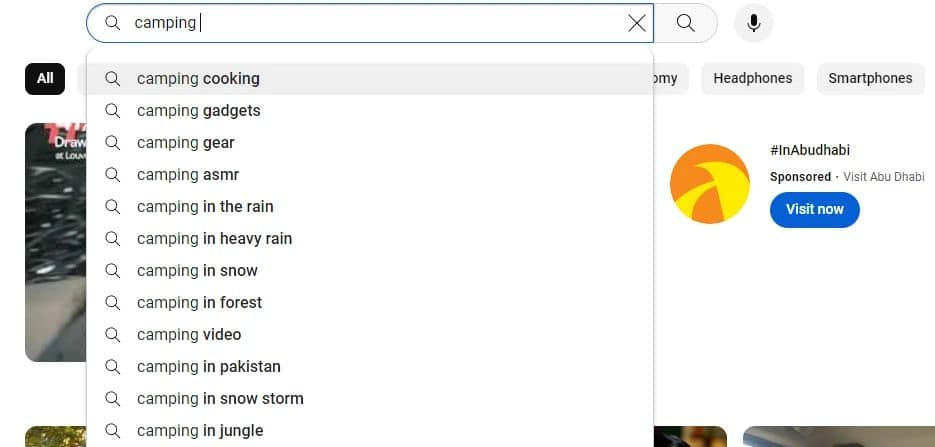
- Demand: type the idea into YouTube search and note the autocomplete suggestions. Then filter for videos uploaded this month. If recent videos from small channels get views, there is room. If only years-old videos do, the topic is fading.
- Money: ask who would pay to reach this audience. Software, finance, business and tech audiences attract advertisers and affiliate programs. Pure entertainment usually earns less per view and depends on volume.
- Supply: write 20 video titles in one sitting. If you stall early, the niche will not survive a weekly schedule.
Then pick a format you can repeat, because format choice matters. In the same Revid TikTok study, faceless tutorials had a median of 156K views (22.1% past 1 million), against 52K (10%) for on-camera tutorials. Faceless comedy reached 327K, against 136K on camera.
Faceless tutorials earned about 3x the median views of on-camera tutorials (156K vs 52K).
Source: Revid analysis of 176,367 TikToks with 1,000+ likes posted between Oct 1, 2025 and Oct 16, 2026 (61,203 creators)
Show the data
| Median views | Share that passed 1M views | |
|---|---|---|
| Faceless tutorials | 155.6K | 22.1% |
| Product or object tutorials | 80.7K | 14.9% |
| On-camera tutorials | 52.5K | 10% |
| Faceless storytelling | 72.7K | 13.3% |
| On-camera storytelling | 64.4K | 11.7% |
| Faceless comedy | 326.7K | 26.4% |
| On-camera comedy | 135.5K | 20.7% |
| Format | What viewers see | Typical tools | Works well for |
|---|---|---|---|
| Narrated explainer | Stock footage, animation or AI scenes under a voiceover | Script tool, mic or AI voice, video generator | History, science, finance |
| Screen recording tutorial | Your screen and cursor | Screen recorder, editor | Software, tech, productivity |
| Hands-only demo | Hands and objects, often filmed from above | Phone, tripod or overhead mount | Cooking, crafts, product reviews |
| Gameplay commentary | Captured gameplay | Capture software, mic | Gaming |
| Story or ranking | Visuals plus on-screen text | Video generator, animated text | True crime, Reddit stories, top lists |
| Ambient or guided audio | Loops, nature footage, visualizers | Stock or AI loops, licensed music, calm narration | Sleep, study, meditation |
For a longer list of niches with income angles, see these faceless YouTube channel ideas.
Step 2: Set up the channel
To set up a faceless YouTube channel:
- Use a separate Google account or a Brand Account, so the channel does not carry your personal name.
- Create the channel from your profile menu. Choose a brand name that signals the topic, and claim a matching handle.
- Verify the account with a phone number. Verification gives you custom thumbnails and uploads longer than 15 minutes, which is the default limit.
- Write the channel description (up to 1,000 characters): who it is for, what you publish and how often. Put the topic phrase in the first sentence.
- Add a banner and profile image built from a logo or symbol. Use the same colors and fonts you will use on thumbnails.
- In YouTube Studio, set upload defaults (description template, category, tags) so every video starts consistent.
Viewers only see the brand. YouTube and AdSense still need your real details to pay you.
Prompt to try
Make a 60-second faceless history video titled 'The Betrayal That Sealed Rome's Fate.' Open with the hook: 'Caesar trusted the one man who would stab him first.' Tell it in three quick beats (rising tension with the Senate, the assassination, the civil war) in a calm storyteller voice over dark cinematic visuals with bold captions, and end by asking viewers who they would have trusted.
Step 3: Write scripts with a real angle
With no face on screen, the script is the personality. A one-line prompt is the fastest way to a weak one. Compare this:
Write a script about the Roman Empire.
with this:
Act as a history storyteller for a YouTube channel. Write a 1,500-word script titled 'The Betrayal That Sealed Rome's Fate.' Conversational tone. Open with a hook about loyalty and betrayal. Three acts: rising tension between Caesar and the Senate, the assassination, and the civil war that followed. Include specific historical details and end with a question for viewers.
The second prompt gives the AI a tone, a structure and a goal. Then do the part that keeps you monetizable:
- Check every fact.
- Add something the sources do not have: a comparison, a ranking, a calculation or an opinion.
- Rewrite the opening in your own words.
YouTube treats videos that only read out text you did not write (website copy, news feeds) as reused content, and that policy applies to the whole channel. For other parts of the workflow you can hand to software, this overview of AI applications in digital marketing is a useful map.
A simple structure for faceless scripts:
- Hook: state the promise or the most surprising fact before any intro.
- Context: say why it matters to the viewer.
- Body: 3 to 5 beats, each with a visual idea noted next to it.
- Payoff: deliver the answer, then point to a related video.
Step 4: Record or generate the voiceover
Viewers forgive average visuals but leave over bad audio. You have two routes:
- Your own voice: a decent USB or lapel mic in a quiet room with soft furnishings beats an expensive mic in an echoey kitchen. Record in short takes and cut breaths and mistakes.
- An AI voice: tools such as ElevenLabs, Murf or Lovo produce natural narration. Skip the default voice and pick one that fits the mood (calm for true crime or meditation, brighter for gadgets). Then adjust speed and pauses: a short pause before a reveal does a lot.
Either way, layer quiet music and light sound effects under the voice, such as a whoosh on a transition or a click when text appears. That layer is what makes a faceless video feel finished.
Step 5: Build the visuals and edit for retention
Treat visuals as the cast, not filler. These faceless video retention techniques do the work a host's face would do:
- Skip literal matches. "Success" does not need a boardroom handshake. A climber reaching a summit says more.
- Keep one look. Do not cut from bright cinematic clips to grainy handheld footage.
- Vary shot sizes. Alternate wide, medium and close shots to keep the eye moving.
- Animate key words. Put key phrases on screen in sync with the narration (kinetic typography).
- Use J-cuts and L-cuts. A J-cut starts the next clip's audio before its picture appears. An L-cut lets the previous audio run over the new picture. Both smooth out transitions.
- Caption everything. Add automatic captions for viewers watching on mute.
Open with the payoff in the first seconds, before any logo or greeting. For music, use the free YouTube Audio Library or a licensed catalog such as Epidemic Sound's royalty-free music library. Unlicensed audio is a real risk: any Short longer than one minute with an active Content ID claim is blocked globally and cannot be monetized.
https://www.youtube.com/embed/Fu3vhFlXV0w
Step 6: Package every upload
Faceless thumbnails cannot rely on a reaction face. Use one strong object or scene, two to four words of text, and high contrast. Put the search phrase near the start of the title. Write the first lines of the description as a plain summary of the video, and add chapters for long videos. On desktop, YouTube Studio's Test & Compare can A/B test up to 3 titles and thumbnails on long-form videos (Shorts are not eligible). For more on discovery, see this guide to optimizing YouTube videos and our tips on growing a faceless channel's traffic.
| Item | Limit or spec |
|---|---|
| Title | 100 characters |
| Description | 5,000 characters |
| Tags | 500 characters in total |
| Video thumbnail | 3840x2160 recommended (16:9, minimum width 640 px), up to 50 MB on desktop or 2 MB on mobile, verified accounts only |
| Shorts thumbnail | 2160x3840 recommended (9:16, minimum height 640 px), uploaded in YouTube Studio on a computer, verified accounts only |
| Upload length | 15 minutes by default, longer after verification, up to 256 GB or 12 hours |
| Shorts | Square or vertical videos up to 3 minutes |
Step 7: Mix Shorts and long-form, then adjust
Shorts bring discovery, while long-form carries most of the ad revenue. AIR Media-Tech's study of 18,000 English-language channels found the best results when Shorts made up 25% to 40% of a channel's uploads. More context is in our YouTube Shorts statistics. Use Shorts as trailers that point to a full video. Check the retention graph in YouTube Studio after each upload, fix the moment where viewers drop, and make more videos on the topics that hold attention.
How to make faceless YouTube videos with Revid
Revid turns a script, a prompt or a link into a finished faceless video, so steps 3 to 6 happen in one place:
- Open the faceless AI video generator. Paste your script, a topic prompt, or a link to an article or video you want to cover.
- Pick a voice from 1,000+ AI voices in 70+ languages and one of 30 caption styles. Revid writes or follows the script and picks visuals scene by scene: stock footage, AI images, or AI video from Seedance 2.5, MiniMax Hailuo, Wan 3.0 or Google Veo 3, chosen per scene. It also adds music.
- Fix any scene in the timeline editor, then export in 1080p or 4K.
- Publish or schedule to YouTube, TikTok and Instagram from one queue. For vertical clips, use the AI YouTube Shorts generator.
To start from a format that already performs, search Revid's viral video library of about 2.77 million videos with engagement data. Use one as a reference: Revid keeps its structure and pacing, then writes new words and visuals. Sign-up is free and includes library search, plus free credits to try making videos. Regular creation uses the monthly credits of a paid plan, starting at $39/month. Auto-Mode workers can create a video every day from a prompt. On YouTube, review and edit each one before it goes out, for the policy reasons below.
How to create a faceless YouTube channel for free
Creating the channel costs nothing, and you can make your first videos with free tools:
| Task | Free option |
|---|---|
| Channel, uploads, analytics | YouTube and YouTube Studio |
| Music | YouTube Audio Library |
| Voice | Your own voice and a phone or USB mic |
| Screen and gameplay recording | OBS Studio |
| Editing and captions | CapCut free tier (full editor, 1080p export, auto-captions) |
| Thumbnails and banner | Canva free plan |
The trade-off is time: with free tools, you do the scripting, voice, sourcing and editing yourself. Revid's free account lets you search the viral library and run Deep analysis on up to 60 videos a day to see why a video worked. New accounts also get free credits to try generating videos.
How to make an anonymous YouTube channel
If the goal is to start a YouTube channel but protect your identity, separate the channel from your personal life at every layer:
- Account: create a new Google account or a Brand Account, with a channel name that is not your own and an email you use only for the channel.
- Footage: check every frame for reflections, mail, family photos, recognizable views from windows and notifications in screen recordings. Turn off location tagging on your phone camera.
- Voice: use an AI voice if you do not want your voice recognized.
- Links: do not link personal social profiles. Create channel-branded ones instead.
- Sponsors: handle all brand deals through the channel email.
Viewers never see who runs the channel. YouTube and AdSense still need your real identity and payment details to pay you.
How to start a faceless gaming channel
Gaming is the easiest faceless format to start, because the game supplies the visuals. Record gameplay with OBS Studio or your console's built-in capture. Add commentary, either live or as a scripted voiceover, and cut the dead time. Raw gameplay with no commentary or editing is the weakest version, both for retention and for YouTube's originality rules. Check each game publisher's video policy before you monetize, since some restrict certain footage. To turn long streams into vertical clips, Revid's gaming clip generator adds a voiceover and subtitles to stream footage.
Prompt to try
Create a 45-second vertical guided breathwork short called '1-Minute Reset for Stress.' Open with: 'Stressed right now? Breathe with me for one minute.' Use a slow, calm voice with clear pauses, soft nature visuals like mist over a lake, gentle ambient music and minimal captions.
How to grow a faceless meditation channel
Meditation is one of the cleanest faceless formats, because viewers want a usable session, not a host. The voice, the pacing and the sound design are the product. A growth strategy that holds up:
- Split by use case, not by vague calm. Run separate series for falling asleep, getting back to sleep after night waking, breathwork for stress, study focus and morning routines, plus ambient loops for background listening. Sleep sessions slow down, focus sessions need light structure, and short resets get to the point in seconds.
- Vary length inside each series. Short sessions and Shorts bring first-time viewers, mid-length guided sessions suit daily use, and long loops or overnight tracks add watch time.
- Build playlists as pathways. "Sleep tonight", "Anxiety relief", "Study focus": a viewer who finishes one session should land in the next without making a choice.
- Package quietly and literally. Lead titles with the outcome ("10-Minute Breathwork for Stress Relief", "Sleep Meditation for Night Waking"). Use calm, legible thumbnails instead of loud ones.
- Open with the purpose. Name the use case in the first seconds, skip the channel intro, then settle into a steady cadence.
Two things sink meditation channels: unlicensed background music, and scripts that promise medical outcomes. Write "help you wind down", not "cure insomnia". If you use an AI voice, listen back before publishing, because pauses in the wrong places make a session unusable. For short-form angles, browse these viral meditation guide videos. The niche monetizes well in layers: ads once you are in YPP, channel memberships for ad-free or extended sessions, downloadable audio packs, and relevant affiliate products such as journals or sleep accessories.
Can a faceless YouTube channel make money?
Yes. YouTube's rules allow AI and automated tools in monetized videos when the final product shows the creator's creative vision and gives educational or entertainment value, for example AI used to edit scripts or create a background visual. A profitable faceless YouTube channel usually combines three income lines: ads, affiliate links and its own products.
To earn ad revenue, you first need to join the YouTube Partner Program (YPP):
| Route | Today | New applicants from February 1, 2027 |
|---|---|---|
| Long-form | 1,000 subscribers + 4,000 public watch hours in the last 12 months | 1,000 subscribers + 8,000 qualified watch hours in the last 365 days |
| Shorts | 1,000 subscribers + 10 million qualified Shorts views in the last 90 days | 1,000 subscribers + 20 million qualified Shorts views in the last 90 days |
| Fan funding tier (no ad revenue) | 500 subscribers + 3,000 watch hours or 3 million Shorts views | Unchanged |
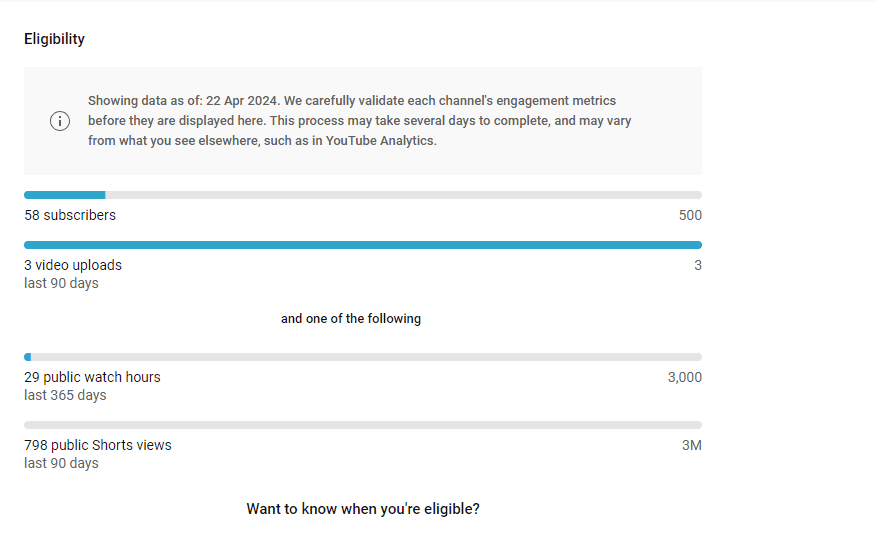
Watch hours from the Shorts feed do not count toward the 4,000 hours. You also need:
- residence in an eligible country
- no active Community Guidelines strikes
- 2-Step Verification and access to advanced features
- a linked AdSense for YouTube account
Review typically takes about a month. From February 1, 2027, channels already in YPP keep their place. However, earning Shorts ad revenue in a given month will then require 10 million qualified Shorts views in the last 90 days.
YouTube publishes no standard RPM (creator earnings per 1,000 views, after YouTube's share), so ignore fixed per-niche rates. AIR Media-Tech's September 2026 analysis of 274 channels found Shorts RPM was 3% to 14% of long-form RPM in almost every niche. Most channels needed 11,000 to 34,000 Shorts views to earn what 1,000 long-form views generate, and US Shorts RPM was $0.328 per 1,000 views. If income is the goal, long-form videos are what earn.
YouTube will not monetize:
- AI content made with generic or unoriginal templates that looks mass-produced, without your own insight
- videos that stitch unrelated or inconsistent AI clips together to shock viewers, or that use realistic visuals to fake events
- AI-generated personas presented as human experts giving health, legal, financial or political advice (a real risk for finance channels with an AI presenter)
- videos that only read out material you did not write, or that rely on mostly non-verbal reactions
Do not wait for YPP to start earning. Add relevant affiliate links (the software in a tutorial, the audiobook behind a history video) from your first upload, and mention them in the voiceover. Once viewers trust you, sell your own products with no inventory: a guide, templates or a checklist built around your niche. Sponsors care about a defined audience more than a face, so a narrow faceless channel can land brand deals too. For more monetization models beyond ads, see FLYP's articles on how to monetize YouTube.
How to make a successful faceless YouTube channel: mistakes to avoid
- Bad audio: muffled or robotic narration loses viewers faster than plain visuals.
- Inconsistent branding: matching thumbnails, fonts and music let viewers recognize you in their feed.
- Copyright shortcuts: unlicensed music or clips bring claims and strikes. Use royalty-free or licensed sources.
- A niche with no money angle: low ad value plus no affiliate or product fit means views that barely pay.
- Going quiet: under current rules, YouTube may turn off monetization for channels that have not uploaded a video or posted to the Posts tab for 6 months or more.
- Hiding realistic AI: since May 2026, YouTube automatically labels undisclosed videos with significant photorealistic AI, so disclose it yourself.
For a second checklist, this guide to starting a faceless YouTube channel with AI covers common setup mistakes.
FAQ
How long does it take to monetize a faceless YouTube channel?
There is no fixed timeline. It depends on how fast you reach 1,000 subscribers plus either 4,000 watch hours in 12 months or 10 million Shorts views in 90 days. After you apply, YouTube's review typically takes about a month, and affiliate links can earn from your first upload.
Are faceless YouTube channels still profitable in 2026?
Yes, when each video adds an original angle and the channel earns from more than ads. Channels built from generic, mass-produced AI templates are the ones YouTube refuses to monetize, while faceless tutorials, explainers, gaming commentary and guided audio still qualify.
Do you have to disclose AI voices or AI visuals on YouTube?
Only for realistic content that could mislead viewers, such as making a real person appear to say something or showing a realistic scene that never happened. You disclose it with the "AI use" setting in YouTube Studio. AI-written scripts, captions and thumbnails are exempt, and so is cloning your own voice for voiceovers, and disclosure does not by itself limit reach or earnings.
Can a faceless channel grow with Shorts only?
Yes. Today, 1,000 subscribers plus 10 million qualified Shorts views in 90 days qualifies for YPP. Shorts earn far less per view than long-form, though, so most faceless channels add long videos once their Shorts find an audience.
How often should a faceless channel upload?
As often as you can keep quality steady: a fixed weekly rhythm beats bursts. From February 1, 2027, YouTube counts a YPP channel as active with 2 long-form videos or 5 Shorts uploaded every 90 days (or enough watch hours or Shorts views), so treat that as the floor, not the goal.