Video Editing Software for YouTube Shorts: The Best Picks for 2026
The best video editing software for YouTube Shorts in 2026, matched to where your footage starts, plus the export settings and the one-minute music rule that blocks uploads.
On this page
The best video editing software for YouTube Shorts depends on where your footage starts: CapCut for fast phone edits, DaVinci Resolve or Premiere Pro for desktop control, and an AI generator like Revid when you start from a script, a link or a long video. All should give you a 9:16 timeline, editable captions and a 1080x1920 export.
The editor matters less than one rule many creators learn after an upload fails. Shorts can now run up to 3 minutes, but any Short longer than one minute with an active Content ID claim is blocked worldwide and cannot be monetized. Add a popular track to a 90-second edit and the video is dead on arrival. Below are the picks, the export settings that work, and a quick way to choose.
The best Shorts editors at a glance
| Tool | Best for | Where it runs | Cost (confirm with the vendor) |
|---|---|---|---|
| CapCut | Fast edits of clips you filmed | Mobile, desktop, web | Free tier with 1080p export; Standard about $9.99/month |
| YouTube Shorts camera | Quick one-take Shorts, no extra app | YouTube mobile app | Free |
| InShot | Simple trims, text and music | Mainly mobile | Free, with premium features |
| Edits (Instagram) | Generated captions, clean export | Android, iPhone | Free, no watermark |
| DaVinci Resolve | Precise cuts, color and audio | Desktop | Free version; paid Studio version |
| Adobe Premiere Pro | Adobe users and teams | Desktop | Subscription |
| Revid | Shorts from a script, link or long video | Browser | Free sign-up with free trial credits; paid plans from $39/month |
| OpusClip | Clipping podcasts and streams | Browser | From $15/month; free plan with watermarked captions |
The list is in no particular order. Prices change often, so check each vendor before you subscribe. For a wider list that also covers TikTok and Reels, see our roundup of video editing apps for social media.
What does video editing software for creating YouTube Shorts need?
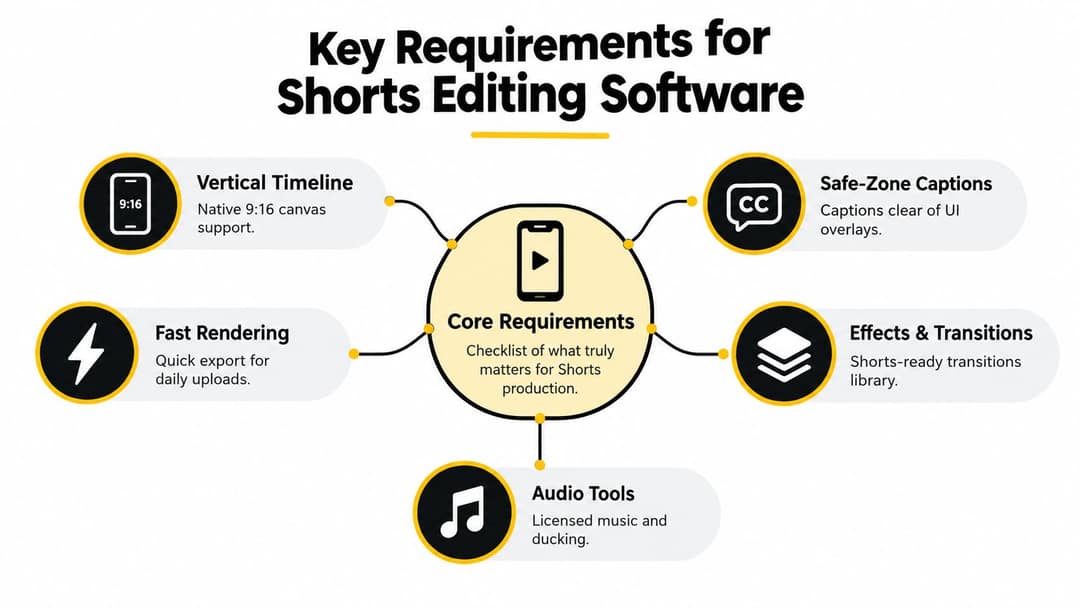
Judge the effects library last. Check these first, because they decide how much rework every Short costs you.
- A native 9:16 timeline. Build vertical from the start instead of cropping a 16:9 project at export. Cropping works for a centered talking head but cuts off product demos, screen recordings and second speakers at the edges, and letterboxed black bars waste the screen.
- Editable auto-captions. Many viewers watch on mute, so captions carry the message. You need to correct names, jargon and numbers before export, and keep text clear of the title, channel name and buttons YouTube lays over the frame. Our YouTube Shorts safe zone checker shows where those overlays sit.
- Fast, hardware-accelerated export. An app can feel quick and still render slowly. Adobe documents that Premiere can use a compatible GPU or Apple silicon to speed up H.264 and H.265 encoding, but support depends on your hardware and format (Adobe's hardware-accelerated encoding requirements). Time a one-minute vertical export on your own machine before you commit.
- Music you can actually use. An editor's built-in track library does not clear YouTube's Content ID. For Shorts over one minute, use the Shorts audio library inside YouTube or music you hold the rights to.
- Templates and versions. Save your caption style, colors, intro and end card once, then duplicate a project to test a new hook without touching the original. If you fix the same framing problem in every edit, the fix belongs in your template.
What export settings should YouTube Shorts use?
| Setting | Use | Why |
|---|---|---|
| Aspect ratio | 9:16 vertical (square also qualifies) | Square or vertical videos up to 3 minutes are classified as Shorts |
| Resolution | 1080x1920 | Full HD vertical, sharp on phones without huge files |
| Frame rate | Your source rate, kept constant (30 or 60 fps) | Variable rates can stutter or drift out of sync after processing |
| Format | MP4 with H.264 video and AAC audio | The most compatible upload combination |
| Length | Up to 3 minutes; one minute or less with claimed music | Longer Shorts with a Content ID claim are blocked |
| Title | Up to 100 characters | YouTube's limit for Shorts titles |
YouTube's guide to getting started with Shorts confirms you can upload a Short from a computer or a phone, so any desktop editor works. When the file is ready, our walkthrough on how to upload YouTube Shorts covers titles, covers and scheduling.
The best video editing software for YouTube Shorts, reviewed
CapCut: the fastest editor for clips you filmed
CapCut is built for short-form speed: a vertical timeline, auto-captions, trend templates and a huge effects library on mobile, desktop and web. The free tier includes the full editor and 1080p export. Premium templates, effects and most AI features need a paid plan (Standard is about $9.99/month).
The risk is visual noise. If every Short uses a different template, your channel looks assembled from trends. Pick one caption style and a couple of transitions and stick to them.
YouTube's built-in Shorts editor: zero setup
The Shorts camera in the YouTube app lets you record or import clips, trim them, add text and pick songs from the Shorts audio library, which keeps your music inside YouTube's rules. Use it for quick one-take Shorts. Skip it for anything that needs layered edits, careful caption correction or a reusable brand template.
InShot: simple mobile edits
InShot covers trimming, canvas resizing, text, stickers and music balance on your phone, with a free version and paid premium features. It is easier to learn than a desktop editor. It has no team review and limited multi-layer control, so you will outgrow it once you publish branded content every day.
Edits by Instagram: free captions, clean export
Instagram's standalone Edits app for Android and iPhone generates captions, makes cutouts and exports without a watermark, so the file is clean for YouTube too. It is a good free companion for creators who post the same vertical video to Reels and Shorts.
DaVinci Resolve: precision on a free desktop editor
Resolve's free version gives you frame-accurate cuts, serious color grading and audio repair, and a paid Studio version adds more. Set the timeline resolution to 1080x1920 for vertical work. The learning curve is steeper than any app above, but once your Shorts template exists, the workflow is quick:
Adobe Premiere Pro: for Adobe teams
Premiere Pro suits editors already working in Creative Cloud, teams that share projects, and footage that needs detailed audio and caption work. It is subscription software. Adobe has wound down Premiere Rush, the lighter cross-device app many older guides recommend, so don't build a new workflow on it.
Revid: Shorts from a script, a link or a long video
Revid fits a different job: you have no footage, or you have a long video and need many Shorts from it. It writes the script, generates scene visuals (stock footage, AI images or AI video), adds a voice-over in 70+ languages, synced captions and music, then lets you fix any scene in a timeline editor and publish straight to YouTube. Instead of a blank prompt, you can start from a format in its library of about 2.77 million real short-form videos with their engagement data. If you are weighing it against a manual editor, read Revid vs CapCut.
OpusClip: clipping podcasts and streams
If your main need is cutting recordings you already have into clips, a dedicated clipping tool fits best. OpusClip finds highlights, ranks them with a virality score, reframes talking heads to vertical and adds animated captions. Plans start at $15/month; the free plan exports 1080p with watermarked captions and deletes media after 3 days. See how it differs in Revid vs OpusClip.
How do you choose a Shorts editor?
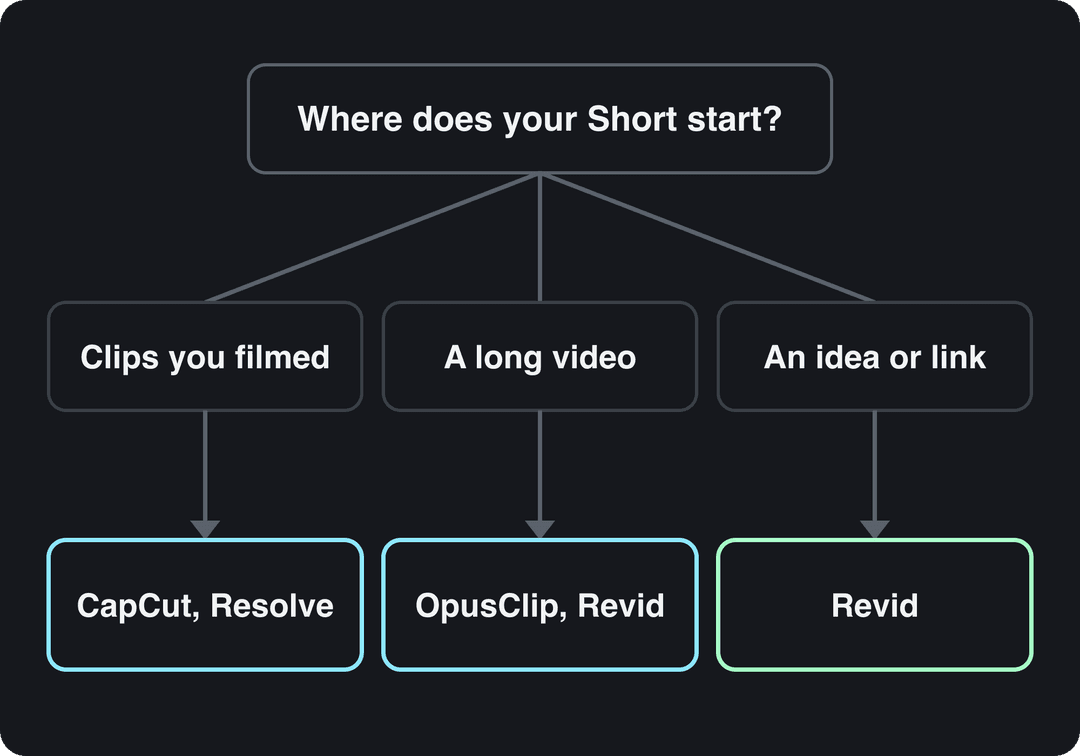
Use these decision rules:
- If you film on your phone and post the same day, use CapCut or the YouTube app.
- If the edit carries the story (demos, tutorials, comedy timing), finish on desktop in Resolve or Premiere Pro.
- If you have podcasts, streams or long videos, use a clipping tool.
- If you start from an idea, an article or a product link, use an AI generator such as Revid.
- If you publish daily across several accounts, prioritize templates, batch export and scheduling over effects.
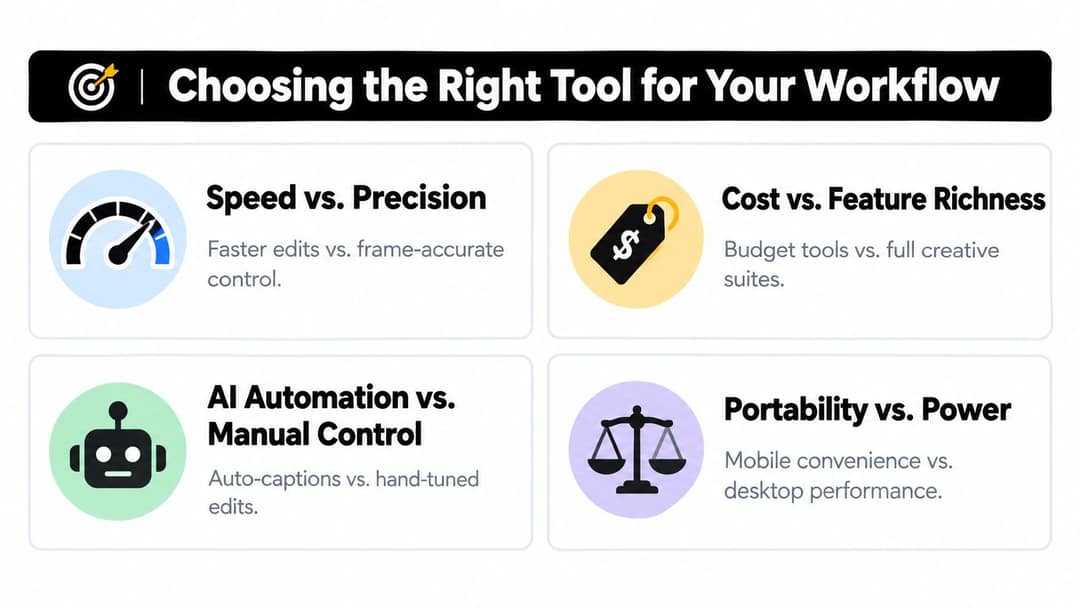
Every editor gives something up. Template apps are fast but imprecise; desktop editors are precise but slow to learn; free tools hide their best features behind paid plans. AI can find clips, remove pauses and draft captions, but it can also misread a name or pick a moment without context, so keep a human check on anything factual or branded.
How to make a YouTube Short with Revid
- Open the AI YouTube Shorts generator and paste an idea, a script, or a link to an article or product page. To cut an existing long video instead, paste its link into the YouTube clip maker.
- Choose the visual style per scene: stock footage, AI images, or AI video from models such as Seedance 2.5, MiniMax Hailuo H3, Wan 3.0 and Google Veo 3.
- Pick a voice (1,000+ voices in 70+ languages) and one of 30 caption styles. Already have footage? The AI caption generator adds captions in 100+ languages.
- Fix pacing, text or any scene in the timeline editor.
- Export at 1080p and 30 or 60 fps, or publish and schedule straight to YouTube.
Sign-up is free and new accounts get free credits to try video creation, no credit card needed. Regular creation then uses the credits of a paid plan, starting at $39/month (Growth, 2,000 credits). Rewrite anything that reads generic before you publish, and turn on the AI use setting in YouTube Studio for realistic AI scenes; YouTube says the label alone does not limit reach or earnings.
Shorts editing workflows by creator type
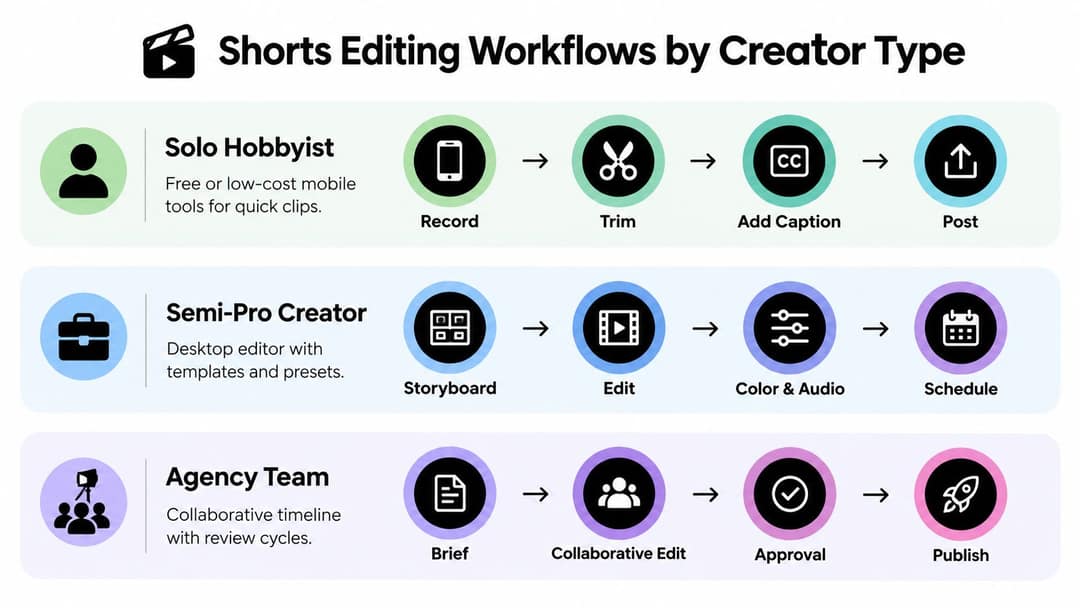
Solo creator
Cut the number of decisions between recording and posting. Import into a mobile editor, remove dead space, apply your saved caption style, balance voice against music and export. Then read every caption and watch the first seconds on mute before you publish.
Small business or semi-pro creator
Build one master project with brand colors, caption placement, title style, music levels and an end card, plus alternate layouts for talking-head, screen-recording and product clips. Draft fast in CapCut or Revid, then do the final brand check by hand. Duplicate the project for each call to action (visit the product page, watch the long video, join the list) instead of editing the original.
Prompt to try
Make a 45-second faceless YouTube Short about why the Titanic's lookouts had no binoculars. Open with the hook: "The Titanic's lookouts were missing one simple tool." Use dark cinematic visuals, a calm documentary voice and bold captions placed clear of the bottom of the frame.
Agency or faceless channel
You need a queue, not just an editor. Start every Short from a brief that names the hook, claims, audience, visual source, caption language, music rights and intended action. For remote teams, this piece on the remote creative director role helps split responsibilities between direction, editing and review. Then run each draft through four checks:
- Content: hook, claims, names and quotes are correct.
- Visual: crops keep context and graphics don't cover the subject.
- Accessibility: caption timing, spelling and contrast hold up.
- Delivery: the exported file looks right on a phone.
Is a paid Shorts editor worth the money?
Shorts reach is enormous: YouTube CEO Neal Mohan said in June 2025 that Shorts were averaging over 200 billion daily views. A third-party roundup of YouTube Shorts statistics gathers more numbers, and our sourced YouTube Shorts statistics page checks each figure against its original source.
Pay per view is small. Monetizing creators keep 45% of the Shorts Feed ad revenue allocated to them, and YouTube said in its Shorts revenue sharing update that more than 25% of Partner Program channels were earning through it one year after launch. AIR Media-Tech's September 2026 analysis of 274 channels found Shorts RPM was 3% to 14% of long-form RPM in almost every niche, so most channels need 11,000 to 34,000 Shorts views to earn what 1,000 long-form views do. Rates swing by audience and niche, as this third-party compilation of Shorts RPM figures shows.
So judge an editor by its cost per published Short (subscription plus your hours), not its sticker price. If your Shorts feed a long-form channel, a product or a service, a paid tool that saves hours pays for itself. If you rely on Shorts ad revenue alone, start free. From February 1, 2027, earning Shorts ad revenue in a given month will also require 10 million qualified Shorts views in the last 90 days, which rewards consistent output over expensive one-off edits. YouTube's post on supporting the next wave of creative entrepreneurs covers the other ways it pays creators.
How to test an editor before you commit
- Export the same 30-second vertical sequence from each candidate, with identical captions and music.
- Upload each file as a private or unlisted Short.
- Watch on a phone and check caption edges against the overlays, motion, audio sync and compression after processing.
- Note the export time, the number of caption fixes and the edits you made before you would publish.
- Keep the tool with the lowest total time per approved Short.
FAQ
What is the best free video editing software for YouTube Shorts?
CapCut's free tier is the strongest all-round option, with the full editor, auto-captions and 1080p export. DaVinci Resolve's free version is better for precise desktop edits, and the YouTube app's Shorts camera is enough for quick one-take clips.
Can I edit and upload YouTube Shorts on a computer?
Yes. YouTube accepts Shorts uploads from a computer or a phone, so any desktop editor that exports a vertical 1080x1920 file works.
How long can a YouTube Short be?
Up to 3 minutes, for square or vertical videos uploaded on or after October 15, 2024. Keep it to one minute or less if it uses music with a Content ID claim.
Can I add a custom thumbnail to a YouTube Short?
Yes, if your account is verified: upload it in YouTube Studio on a computer. YouTube recommends 9:16 at 2160x3840, with a minimum height of 640 px.
Can Shorts made with AI editing tools be monetized?
Yes, if the result shows your creative vision and gives educational or entertainment value. YouTube does not monetize mass-produced AI content made from generic templates, and you must disclose realistic AI-generated scenes with the AI use setting in YouTube Studio.