On this page
The best TikTok video editor depends on what you start with. Use CapCut for footage you filmed, Descript or VEED for long recordings, Canva or Adobe Express for branded templates, and Revid when you start from an idea or a link and need the whole video generated.
The common mistake is choosing by feature list. Most production time is lost before the timeline: transcribing a podcast, rebuilding a brand layout for every post, or writing a script from nothing. An editor that matches your starting material removes that step, and that saves more time than any transition pack.
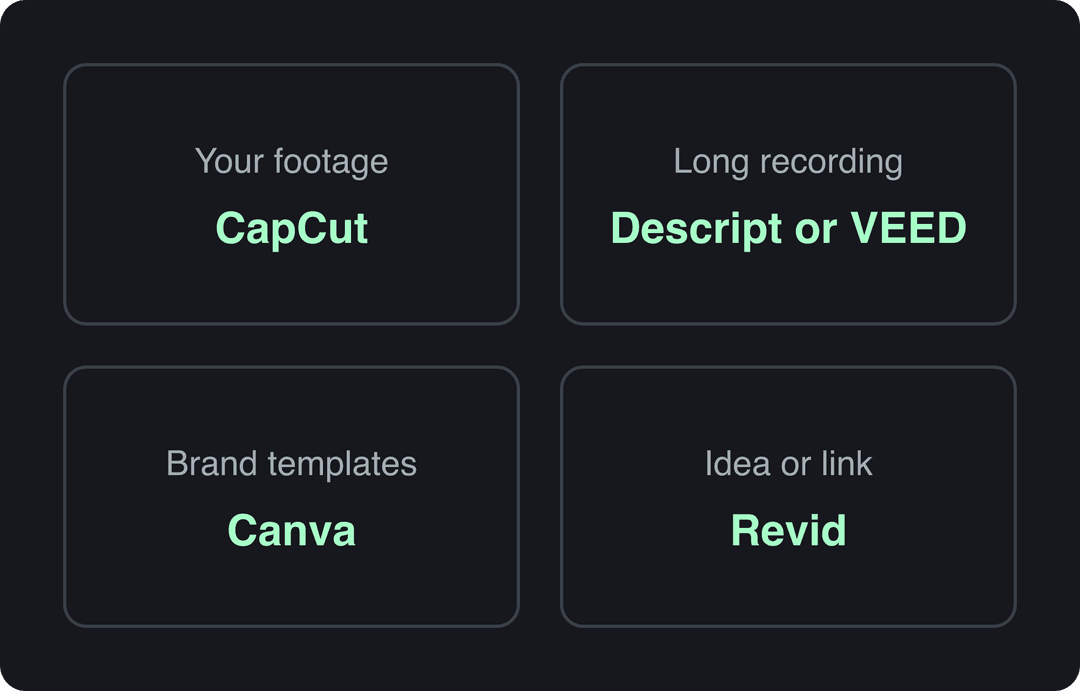
TikTok video editors compared at a glance
| Tool | Fastest at | Starts from | Free option | Paid entry price |
|---|---|---|---|---|
| Revid | Idea or link to finished, published video | Prompt, script, link, audio, viral reference | Free sign-up with free credits to try; regular creation uses paid credits | $39/month ($32 billed yearly) |
| CapCut | Fast edits of your own footage | Your clips | Full editor, 1080p export | About $9.99/month (Standard) |
| TikTok's built-in editor | Quick in-app edits | Clips recorded or uploaded in TikTok | Free | Free |
| Adobe Express | Branded template videos | Templates and brand kit | Yes | Varies by region |
| Canva | Brand consistency and team approvals | Templates | 1.6 million+ templates | From €110/year (Pro) |
| VEED | Captions and repurposing recordings | Long recordings | Watermarked, 720p | Roughly $10 to $24/month |
| Kapwing | Browser collaboration and review | Talking-head recordings | 720p with watermark | Check the site |
| Microsoft Clipchamp | Simple exports for Microsoft 365 teams | Footage, screen recordings | Yes | Premium via Microsoft plans |
| InVideo | Prompt-driven promo drafts | Prompt | Watermarked, weekly limits | From $20/month |
| Descript | Transcript-based editing | Podcasts, interviews, tutorials | 60 media minutes/month, 720p | $24/month ($16 billed yearly) |
Competitor prices come from Revid's comparison pages (checked August to September 2026). They change often, so confirm on each tool's site before you pay.
How do TikTok video maker tools compare for editing speed?
Your starting material sets your speed more than the software's render time does. The fastest tool is the one that skips the step you would otherwise do by hand.
| If you start with | Fastest path | What still takes time |
|---|---|---|
| Clips you filmed on your phone | CapCut or TikTok's own editor: cut, caption and post from one app | Picking takes, timing text to the beat |
| A podcast, webinar or interview | Descript (edit the transcript) or VEED AI Clips | Choosing the moments, fixing caption errors |
| Brand assets and a recurring format | Canva or Adobe Express templates | Swapping in content, approvals |
| An idea, article or product link, no footage | Revid or InVideo generate script, visuals, voice and captions | Reviewing the hook, facts and pronunciation |
| A schedule of many posts a week | Revid Auto-Mode or the Revid API | Spot-checking drafts before they publish |
A simple decision rule: if most of your editing time goes to captions, move to a transcript-based tool. If it goes to building scenes from scratch, move to a generator. If it goes to layout, lock a template and stop redesigning.
Prompt to try
Make a 30-second vertical TikTok for a small coffee roaster on why fresh beans taste better. Open with the hook "Your coffee is probably stale, and here's how to tell." Use fast stock footage of roasting and brewing, an upbeat voice-over and bold synced captions, and end with one simple tip viewers can try tomorrow.
The 10 TikTok video editors, tool by tool
1. Revid: best when you start from an idea, a link or a viral format
Revid is an AI video platform that turns an idea, a script, a link, an audio file or a reference video into a finished vertical video. It handles the script, scene-by-scene visuals (stock footage, AI images, AI video or motion graphics), a voice-over in 70+ languages, synced captions and music, and it publishes directly to TikTok, Instagram and YouTube. Its AI TikTok video generator solves the problem that comes before editing: you have a topic but no footage.
What sets it apart is where a video starts. Revid includes a searchable library of about 2.77 million real short-form videos with their public engagement data. You can pick a format audiences already watch, and Revid writes an original script on the same structure, hook and pacing. One subscription covers several AI video models (Seedance 2.5, MiniMax Hailuo H3, Wan 3.0 and Google Veo 3), and you can choose a model per scene.
How to make a TikTok with Revid:
- Open the AI TikTok video generator and paste a script, a prompt or a link (a blog post, a YouTube video, a Reddit or X post).
- Or start from a video in the viral library and choose "Same energy, new script" or "Make it about your topic".
- Pick a voice and one of 30 caption styles, then review every scene in the timeline editor.
- Export in 720p, 1080p or 4K at 30 or 60 fps, or publish and schedule straight to TikTok.
The trade-offs: sign-up is free and new accounts get free credits to try video creation, but regular creation uses the monthly credits of a paid plan. Growth costs $39/month ($32/month billed yearly) for 2,000 credits; see current Revid pricing for the live list. Treat every output as a draft and check facts, pronunciation and whether each visual matches its line. If your work is hand-editing footage you filmed, a manual editor such as CapCut fits better.
Best for founders, small businesses, faceless channels and social managers who publish several videos a week and start from ideas rather than footage.
2. CapCut: best for fast edits of footage you filmed
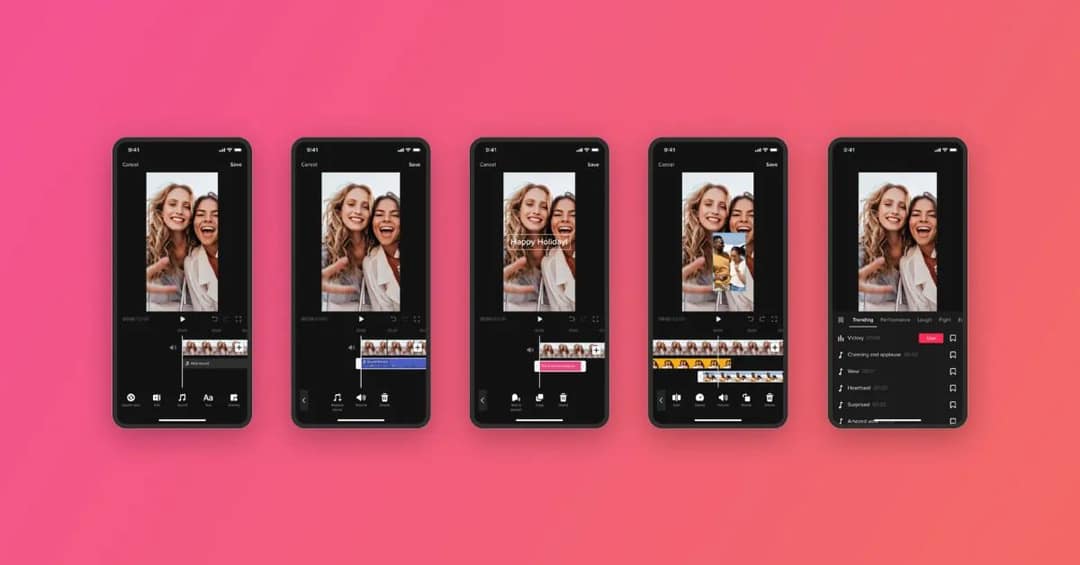
CapCut, built by ByteDance, runs on mobile, desktop and the web. You can start a cut on your phone and finish it on a laptop. Its templates, effects, auto-captions, text-to-speech and direct sharing to TikTok match the trend-led style of the platform, so a solo creator can cut, caption and post without leaving the app.
The free tier includes the full editor and 1080p export with auto-captions. Premium templates, effects and most AI features are paid, with Standard at about $9.99/month (pricing varies by region and platform, so check at checkout on CapCut's website).
Use CapCut for:
- Template-driven posts that copy a trending rhythm.
- Captioned talking-head videos where you cut pauses and style the first seconds.
- Cross-device editing between phone, desktop and browser.
Its limits are detailed color correction, advanced audio mixing, compositing and team brand controls. CapCut edits footage you already have; it does not write or generate the video for you, which is the main difference covered in how CapCut compares with an AI generator. If it does not suit you, this list of CapCut alternatives covers more options.
3. TikTok's built-in editor: best for free, native edits
The editor inside the TikTok app (and in TikTok Studio) costs nothing and keeps you in the platform's own framing. TikTok has added multi-track editing, overlays, clip stacking, sound effects, speed changes and AI effects, as described in TikTok's announcement of its editing tools.
Know the limits before you plan around it. The in-app camera records up to 10 minutes, while uploaded videos can run up to 60 minutes. TikTok Studio Web accepts landscape or vertical uploads in 1080p, 2K or 4K, with files up to 30 GB. TikTok's help page on editing, posting and deleting videos walks through each step.
Choose it for quick, single-account posts. Skip it when you need brand kits, precise timeline control, or the same edit published to Reels and Shorts.
4. Adobe Express: best for branded speed without a timeline
Adobe Express turns short-form production into a design-system task. It offers drag-and-drop templates, one-click resizing, captions, a scheduler and brand kits, so a non-editor can produce recurring announcements, product explainers and quote videos that stay on brand. Adobe also lists TikTok-related integrations, including a TikTok add-on and a Commercial Music Library for business use, on the Adobe Express site.
Paid tiers add 4K export, though plans and prices vary by region. The ceiling is timeline precision: keyframing, audio cleanup and color finishing are limited, and heavy template use can make posts look predictable. Use it when many people must create within the same visual rules.
5. Canva: best for brand consistency across a team
Canva's video editor sits inside its design suite, so brand assets, thumbnails and social posts live in one workspace. The TikTok workflow is simple: start from a vertical template, import footage, add captions and animations, apply the brand kit, then resize for other channels. Collaboration and approval tools matter most when a designer builds the system and a social manager publishes daily.
The free plan includes 1.6 million+ templates; Pro starts at €110/year on Canva's website. Heavy video projects feel slower than a dedicated editor, and rhythm-dependent edits or layered sound design are not its strength. Lock your visual system first, then use templates to speed up production rather than to define the brand.
6. VEED: best for captions and repurposing long recordings
VEED is a browser editor built around auto-subtitles, word-level animated captions, translation, TikTok canvas presets and AI Clips, which finds and cuts sections from long videos. It fits podcasts, webinars, interviews and courses, where accessibility and localization are part of the brief.
The free plan exports at 720p with a watermark; paid entry runs roughly $10 to $24/month on VEED's website. Automated captions and translations still need a pass for names, jargon and punctuation. VEED is weaker when you start from a blank concept and need a script and visuals, which is the gap covered in VEED compared with Revid.
7. Kapwing: best for browser collaboration and quick approvals
Kapwing solves the review problem. Upload a talking-head recording, remove silences with Smart Cut, trim by editing the transcript, generate subtitles, then share a link so a client or approver can comment. Translation and dubbing support 100+ languages, according to Kapwing.
The free plan caps exports at 720p with a watermark, and 4K needs a paid plan. Heavy, multi-layer projects can strain the browser. Choose Kapwing when the bottleneck is review cycles, not visual effects.
8. Microsoft Clipchamp: best for teams already on Microsoft 365
Clipchamp keeps the learning curve low with TikTok templates, 9:16 presets, stock assets and brand-kit support. It covers short announcements, product clips, screen recordings and simple promos, and it fits naturally into Windows and Microsoft 365 workflows (Microsoft Clipchamp).
Premium tiers add 4K export, and some premium features come with certain Microsoft subscriptions, so check your account's plan before buying anything else. Collaboration is lighter than in Canva or Kapwing, and color, sound design and effects are basic. It is a dependable business editor, not a trend lab.
9. InVideo: best for prompt-driven promo drafts
InVideo starts from a brief rather than footage. Its chat-style agent lets you edit by typing commands instead of working on a timeline, and it draws on a 16M+ stock library, AI avatars and voice clones from the entry tier. Plans start at $20/month per seat, with a watermarked free plan, on InVideo's website. For an outside view of product-video use, see a third-party InVideo comparison from UGC Copilot.
AI models and premium assets consume credits, so generate several real drafts during a trial before scaling. Without a timeline, fixing one scene often means re-prompting. Revid adds a timeline editor, a viral video library and direct scheduling in the same plan; the full breakdown is in Revid vs InVideo.
10. Descript: best for transcript-driven talking-head TikToks
Descript treats video as text. Delete a sentence in the transcript and the matching footage disappears. It removes filler words, cleans audio with Studio Sound, offers an AI co-editor called Underlord, and turns long recordings into clips with Create Clips. For podcasts, tutorials and interviews, a transcript is a faster editing surface than a timeline.
The free plan gives 60 media minutes a month with 720p export; paid plans start at $24/month, or $16/month billed yearly, on Descript's website. It is not built for heavy motion graphics, and it needs source footage to work with. If you have no recording, a generator is the shorter path, as explained in Revid vs Descript.
What tools can make dozens of TikTok-style product videos every day?
At that volume, manual editors stop working. You need a tool that reads a product page and generates the video, then a way to run it on a schedule.
- From a product URL: Revid's product video generator reads the product page, keeps the real photos, writes the script and generates a vertical video with voice and captions. A Shopify version works the same way from a Shopify product link.
- On a schedule: Revid's Auto-Mode workers create a fresh video every day from a prompt or a content source (3 workers on Growth, 5 on Elite, 10 on Ultra), and can publish to TikTok directly.
- In batches from code: the Revid REST API, MCP server and CLI are included on every paid plan, so a script or an AI agent can render many videos from a product feed.
- For ad testing: Creatify focuses on paid ads and can batch-generate up to 50 ad variants from a URL.
Decision rule: if the videos are organic posts, generate from the product page and schedule. If they are paid ads you will A/B test, use an ad-first tool and refresh creatives often. Either way, a person should approve product claims before anything goes live.
What to look for in collaborative clipping software for TikTok and Reels
If your team needs to batch-resize clips and translate captions together, check these six things in a trial:
- Shared workspace: one project library and shared credits, not files emailed back and forth. Revid, Canva and Kapwing all support teams.
- Link-based review: comments on the project itself, as in Kapwing and Canva.
- Batch resizing: presets for 9:16, 4:5, 1:1 and 16:9 that reframe without cutting off faces or text.
- Caption translation that keeps timing: Revid's video translator translates an existing project while keeping the edit, media and captions; VEED and Kapwing translate subtitles in the browser.
- Brand kit: fonts, colors and caption styles locked for everyone.
- Clean exports: no watermark and at least 1080p on the plan you will actually pay for.
Keep it light: if a tool needs a powerful desktop to run, collaboration usually suffers.
Which editor can reverse a clip, add AI captions and post straight to TikTok?
CapCut does all three in one app. Select the clip and use Reverse in the editing toolbar, generate auto-captions and edit any wrong words, then share directly to TikTok from the export screen. TikTok's own editor also posts natively and adds auto-captions, but CapCut gives you more control over each clip.
If you also need the script and visuals generated, Revid adds synced captions in 100+ languages and direct TikTok publishing, but you would edit your own footage elsewhere.
Before you publish: export and labeling checklist
- Size: TikTok's Creator Academy recommends 9:16 at 1080x1920 pixels.
- Safe zone: keep captions and key text clear of TikTok's buttons and description; the TikTok safe zone checker shows exactly where.
- Check it on TikTok: watch the uploaded post on a phone, not only the preview inside the editor.
- Captions: proofread names, jargon and line breaks; auto-captions get these wrong most often.
- Discoverability: strong edits still need a findable caption and topic. A video SEO playbook from Surnex covers search intent, titles and descriptions.
- Context: for broader platform numbers, Zebracat keeps a roundup of TikTok statistics; it is a vendor page, so trace each figure to its original source before you quote it.
FAQ
How can I make professional-looking TikToks with minimal experience?
Start from a template or a generator instead of a blank timeline. CapCut templates work if you have footage; Revid generates the script, visuals, voice and captions from an idea or link. Then keep text inside the safe zone and proofread captions.
Which AI video editing tools are worth trying in 2026?
Pick by job: Revid for generating complete TikToks from ideas, links or viral formats; Descript and VEED for editing and clipping recordings with AI; InVideo for prompt-driven promo drafts. Test each with your own material during a free plan or first month.
Is TikTok's built-in editor good enough?
For quick posts on one account, yes: it is free and keeps native framing. Move to a dedicated editor when you need brand kits, team review, precise timing or the same video on Reels and Shorts.
What resolution should I export TikTok videos in?
Export 9:16 at 1080x1920, the size TikTok's Creator Academy recommends. TikTok Studio Web also accepts 2K and 4K uploads, so a higher export is fine if your editor supports it.
Can I edit a TikTok on my computer?
Yes. TikTok Studio Web accepts uploads up to 60 minutes and 30 GB, and CapCut, Canva, VEED, Kapwing, Clipchamp, Descript and Revid all run on desktop or in the browser.