On this page
To write an AI video prompt that works, brief one shot instead of describing a vibe: name the subject, the physical action, the setting, the camera move, the lighting, the style and the audio. Set aspect ratio and duration in the tool's settings, keep one scene per generation, and change one variable at a time when you iterate.
The model is rarely the problem. Google Veo, Seedance, Kling and MiniMax Hailuo are sold through APIs to every video tool, so two people who send the same prompt to the same model get comparable clips. What changes the result is the input: "make a cinematic video about productivity" leaves every decision to the model, and its guess drifts toward the generic average that viewers scroll past.
What a good AI video prompt looks like
A working prompt reads like a shot brief for a camera crew. It says what the viewer sees, what moves, where the camera is, what the light and sound are, and what the video is for. The full formula has ten parts:
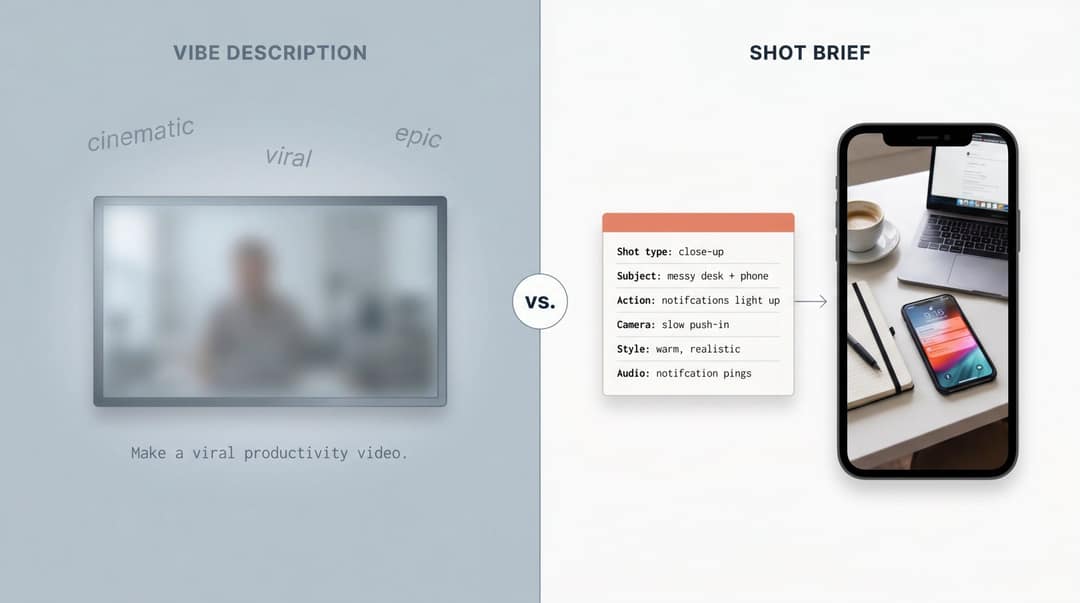
Goal + Platform + Shot type + Subject + Action + Setting + Camera + Look + Audio + ConstraintsHere is the difference on the same productivity video. The vibe description:
Make a viral productivity video.The shot brief:
Create a 9:16 TikTok-style educational video opening.

Shot type: close-up product shot.
Subject: a messy desk with a laptop, notebook, coffee cup and phone.
Action: the phone lights up with distracting notifications, then the notebook slides into frame with the words "3-minute focus reset."
Camera: slow push-in from slightly above, shallow depth of field.
Style: clean creator aesthetic, soft daylight, warm neutral colors, realistic.
Audio: subtle notification pings at the start, then calm upbeat background music.
Constraint: keep the first frame readable, with space at the top for a bold caption.The first prompt asks the model to guess your audience, visuals, pacing and format. The second gives it a scene it can shoot.
The 10 parts of an AI video prompt
| Part | What to write | Weak | Strong |
|---|---|---|---|
| 1. Goal | The job the video does | "A cool product video" | "A product demo that shows freelancers the benefit in under 10 seconds" |
| 2. Platform | Where it runs and what the first second must do | "For social media" | "A 9:16 TikTok with a visual hook in the first second" |
| 3. Shot type | How the camera frames the scene | Nothing | "Close-up", "overhead", "POV", "tracking", "screen-recording style" |
| 4. Subject | Who or what, with only the details that must stay visible | "A person working" | "A tired freelance designer in a black hoodie at a desk covered with sticky notes" |
| 5. Action | A physical verb, not a mood | "The founder is successful" | "Refreshes the dashboard, sees the graph spike, freezes, then laughs in disbelief" |
| 6. Setting | Where it happens | "An office" | "A small kitchen table before sunrise" |
| 7. Camera | One movement per shot | "Cinematic camera" | "Slow push-in from slightly above, shallow depth of field" |
| 8. Look | Lighting, color and one style | "Cinematic lighting, epic" | "Soft morning window light, warm beige, muted blue-gray background, realistic" |
| 9. Audio | What the viewer hears | Nothing | "Quiet room tone, soft keyboard typing, one notification ping, calm voiceover" |
| 10. Constraints | What must stay fixed | "Make it good" | "One continuous shot, same outfit throughout, text in the center of the frame" |
Action is where most prompts improve fastest. Adobe's guide to writing Firefly video prompts recommends specific verbs and adverbs, including pacing words such as "slow", "rapid" or "sudden" when motion timing matters.
For the camera, Google's Veo 3.1 prompting guide builds prompts from five parts (cinematography, subject, action, context, style and ambiance) and recommends naming camera motion, composition, lens and focus when they shape the shot. Use one move per shot. If you need the vocabulary, Revid's free AI video prompt generator suggests camera directions.
For the look, OpenAI's Sora 2 prompting guide frames prompting as briefing a cinematographer and recommends describing the quality of light plus a small palette of three to five colors. OpenAI closed the Sora app on April 26, 2026 and removed Sora 2 from its API on September 24, 2026, but the guide's advice carries over to the models still running. Pick one style: "cinematic anime Pixar documentary cyberpunk UGC" gives the model nothing coherent to aim at.
For audio, models with native sound (Veo generates synchronized audio) respond to sound cues in the prompt. Leave audio out and the model picks for you.
How do I specify aspect ratio, duration and timing beats in an AI video prompt?
Set aspect ratio, duration, resolution and export format in the tool's settings, and use the prompt for the scene. Modern AI video tools separate these two layers, and mixing them weakens results: "make this exactly 9:16" buried in a paragraph can conflict with a format setting the tool applies anyway.
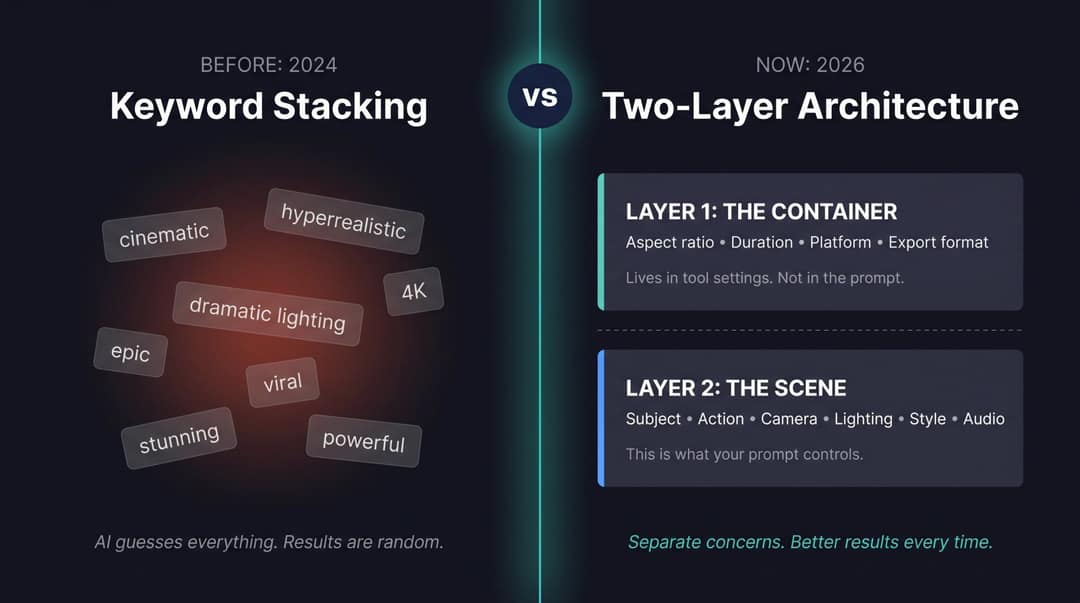
| Layer | What it controls | Where it goes |
|---|---|---|
| Container | Aspect ratio, duration, platform, resolution, voice, caption language | Tool settings |
| Scene | Subject, action, camera, setting, lighting, style, audio, pacing | Prompt or script |
Duration has a second limit: models generate short clips. Veo 3.1 in the Gemini API, for example, produces 4, 6 or 8-second clips, so a 30-second short is a sequence of generations edited together, not one prompt.
For timing beats inside one clip, write timestamp blocks. They force you to decide what happens when:
[0:00 to 0:02]
Close-up of a messy desk. Phone notifications stack rapidly. Caption: "This is why your content takes forever."

[0:02 to 0:05]
The camera pushes in as the messy folders collapse into one clean workflow: Script → Voice → Video.

[0:05 to 0:08]
A finished vertical video preview appears with captions, music and a publish button. Caption: "Build the system once."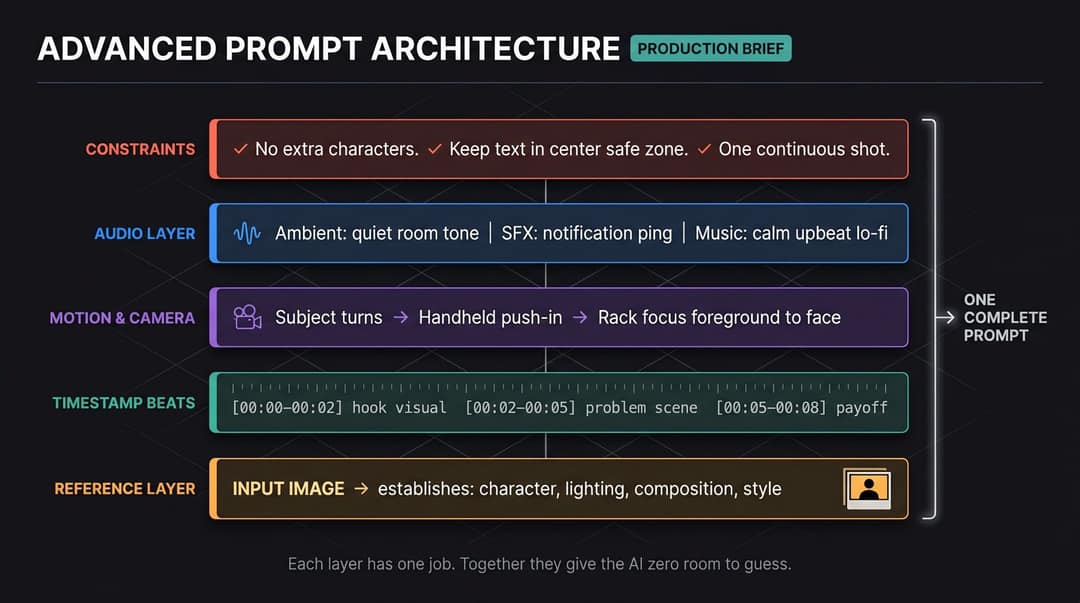
Two rules that fix most AI video prompts
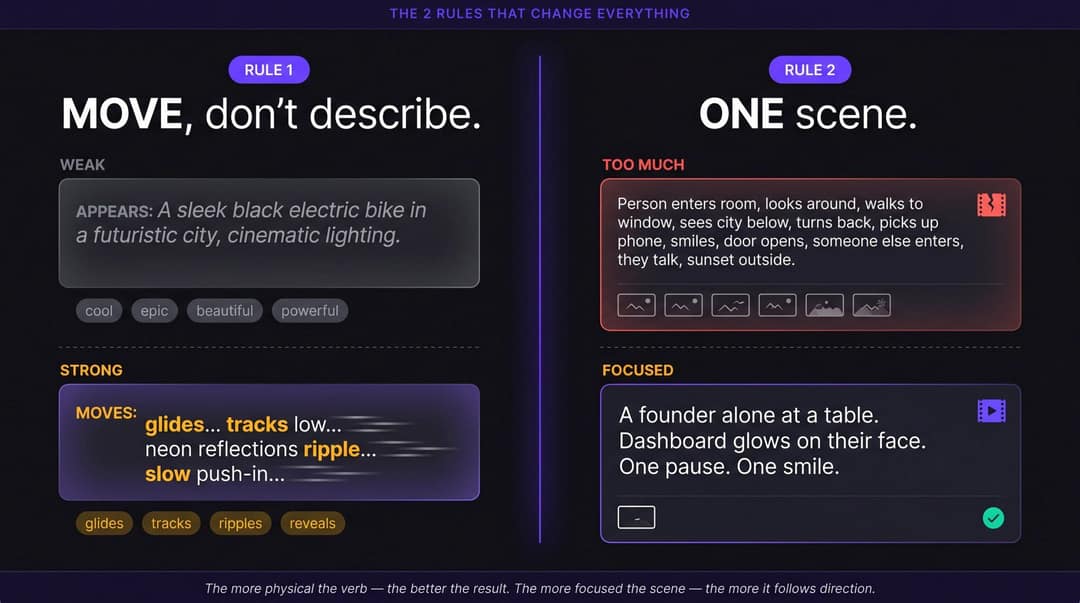
Prompt for motion, not appearance
Video is not an image with extra seconds. An image prompt describes how something looks; a video prompt describes what changes over time.
An image prompt:
A sleek black electric bike in a futuristic city, cinematic lighting.A video prompt:
A sleek black electric bike glides through a rain-soaked futuristic city street at night. The camera tracks low beside the front wheel as neon reflections ripple across the wet pavement. Steam rises from a street vent as the bike passes. The shot ends with a slow push-in on the glowing dashboard.With image-to-video, the reference image already sets the subject, setting and style, so spend the text prompt on subject motion, camera motion and scene motion.
- Weak motion words: cool, epic, engaging, beautiful, powerful.
- Strong motion words: slides, turns, leans, pours, snaps open, drifts, reveals, tracks, pans, pushes in, pulls back.
Prompt to try
A 9:16 vertical opening shot, 8 seconds. A founder sits alone at a kitchen table before sunrise, laptop open, a blue analytics dashboard glowing on their face; they refresh the page, pause, then smile as the graph spikes upward. Slow handheld push-in, warm practical lamp, quiet room tone, realistic documentary style. Top caption: "The night it finally worked."
One scene per generation
Most models drop instructions when one clip has to hold several scene changes. OpenAI's guidance notes that shorter clips follow instructions more reliably and recommends breaking a story into shot blocks.
Too much for one clip:
Show a founder waking up, checking analytics, filming a TikTok, meeting investors, launching a product, and celebrating with customers in a cinematic montage.Better, as the first shot:
A founder sits alone at a kitchen table before sunrise, laptop open, blue analytics dashboard glowing on their face. They refresh the page, pause, then smile as the graph spikes upward. Slow handheld push-in, quiet room, warm practical lamp, realistic documentary style.Then write the next shot as its own prompt. For TikTok, Reels and Shorts this is also the better edit: you need 5 to 12 usable moments cut together, not one perfect 60-second generation.
How do negative prompts work in AI video generation, and when should you use them?
A negative prompt tells the model what to leave out. It comes in two forms: a separate negative prompt field that some generators offer, and "no X" phrases written into the main prompt. The second form is unreliable, because naming an object gives the model something to render, and AI video guides warn that negative phrasing can produce the opposite of what you asked.
Use them in this order:
- Rephrase as a positive description first. It gives the model a target instead of a prohibition.
- If the tool has a dedicated negative field, use it for a short list of recurring artifacts: distorted hands, extra people, garbled text, readable logos.
- Keep preservation rules positive and specific: "the same red jacket in every shot" works better than "don't change the outfit".
| Instead of | Write |
|---|---|
| "No people" | "An empty hallway" |
| "No buildings" | "An open natural area with only hills, grass and sky" |
| "No cuts" | "One continuous shot" |
| "No logos" | "A small unbranded serum bottle" |
| "Not too dramatic" | "Calm, steady pacing, natural expressions" |
How to write AI video prompts for TikTok, Reels and Shorts
Write the hook first
On short-form platforms the prompt has to plan the first second before anything else. TikTok's creative best practices for ads recommend prioritizing the hook in the first six seconds, communicating the proposition in the first three, and using vertical 9:16 creative with clear text overlays. Answer four questions before you write the scene:
- What does the viewer see in the first frame?
- What text appears in the first second?
- What is the first spoken line?
- Why would someone keep watching?
A weak opening is a topic: "Create a video about saving time with AI." A strong one is a scene:
Opening frame: a creator staring at a 12-tab browser window with a stressed expression. Large caption at the top: "You're not slow. Your workflow is broken." In the first second, the cursor rapidly jumps between tabs while notification sounds overlap.Make the first line a claim. Among the 1,588 TikToks over 100 million views in Revid's index, 51% of the videos with a transcript open with a statement and only 16% with a question. If you want third-party retention benchmarks, Vidico's 2026 short-form video statistics collects them.
Short-form prompt template
Create a vertical 9:16 short-form video for [platform].

Target viewer: [specific audience].
Hook: [first visual + first caption + first spoken line].
Pacing: [fast cuts / one continuous shot / a new beat every 1 to 2 seconds].
Visual style: [UGC / faceless / cinematic / tutorial / meme / product demo].
Caption style: [bold word-by-word / clean subtitle / large top text].
Safe zone: keep key text away from the right-side and bottom UI areas.
CTA: [comment, follow, click, try, save, share].Platform rules that change the prompt
| Platform | What the platform says | What it means for the prompt |
|---|---|---|
| TikTok | Uploads can run up to 60 minutes; TikTok recommends 9:16 at 1080x1920 | Compose for a tall frame; for paid ads, check TikTok's auction in-feed ad specs |
| YouTube Shorts | Square or vertical videos up to 3 minutes uploaded on or after October 15, 2024 count as Shorts (YouTube's help page on three-minute Shorts) | One idea per beat; the 3-minute ceiling is not a target |
| Instagram Reels | Reels can run 20 minutes, but those over 3 minutes are not recommended to non-followers (Instagram's help page on recording reels) | Get to the point fast when discovery is the goal |
A great clip still fails if the interface covers the caption. Ask for text in the center of the frame, away from the bottom and right edge, and check placement with Revid's free TikTok safe zone checker. Then cut the words: "Here are the three most important things you need to know before writing your next AI video prompt" is a bad caption. Three short ones work better:
"Your prompt is too vague"
"Video needs motion"
"Use this formula"How do you generate a first-person POV shot with AI video tools when prompting alone fails?
Typing "POV" is often not enough: many models read it as a style tag and still show a person facing the lens. When that happens, stop adding adjectives and change what the model receives.
- Describe what the lens sees, not the label. "First-person view at eye height. The viewer's own hands enter the bottom of the frame and pick up a coffee cup. Only hands and forearms are visible."
- Give the camera a body. "Head-mounted camera with a slight walking bob, looking down at the keyboard, then up at the screen."
- Shorten the action. One movement per clip. POV breaks first when the same clip also has to handle a scene change.
- Switch to image-to-video. Generate or shoot a first frame from a first-person angle, then prompt only the motion. Revid's image to video tool takes a reference image and animates it.
- Try another model for that scene. Models differ on camera perspective. In Revid you can render one scene with Seedance 2.5 and the next with Google Veo 3 under the same credits.
- Start from a POV video that already works. Revid's reference analysis breaks a video into composition, a shot-by-shot structure and editing, then writes new visuals on the same structure.
For ready-made first-person formats, Revid's POV video generator is built for this style.
The extra attempts are worth it on TikTok. In Revid's analysis of 176,367 TikToks with 1,000+ likes posted between October 2025 and October 2026, POV videos had a median of 107K views and 19% passed 1 million, against 48K and 9.2% for selfie-style videos; screen recordings (91K) also beat handheld (80K) and tripod (77K) footage. The sample only includes videos that already reached 1,000 likes and the shooting style comes from Revid's AI analysis, so read it as what top performers share, not a guarantee. The method is in the full TikTok virality study.
POV shots and screen recordings earned the most views. Selfie-style videos, the default for many creators, earned the least.
Source: Revid analysis of 176,367 TikToks with 1,000+ likes posted between Oct 1, 2025 and Oct 16, 2026 (61,203 creators)
Show the data
| Median views | Share that passed 1M views | |
|---|---|---|
| POV | 107.3K | 19% |
| Screen recording | 90.7K | 12.7% |
| Handheld | 79.8K | 14.5% |
| Steady cam | 78.2K | 14.9% |
| Drone | 83.4K | 14.9% |
| Tripod | 77.4K | 15.5% |
| Selfie | 48.4K | 9.2% |
How to write prompts for Revid (script syntax)
On a raw model you brief a camera. In Revid you script a whole video: Revid turns the script into scenes with visuals, a voice-over, captions and music, and lets you choose the model per scene (Seedance 2.5, MiniMax Hailuo H3, Wan 3.0 or Google Veo 3). The script controls four things.
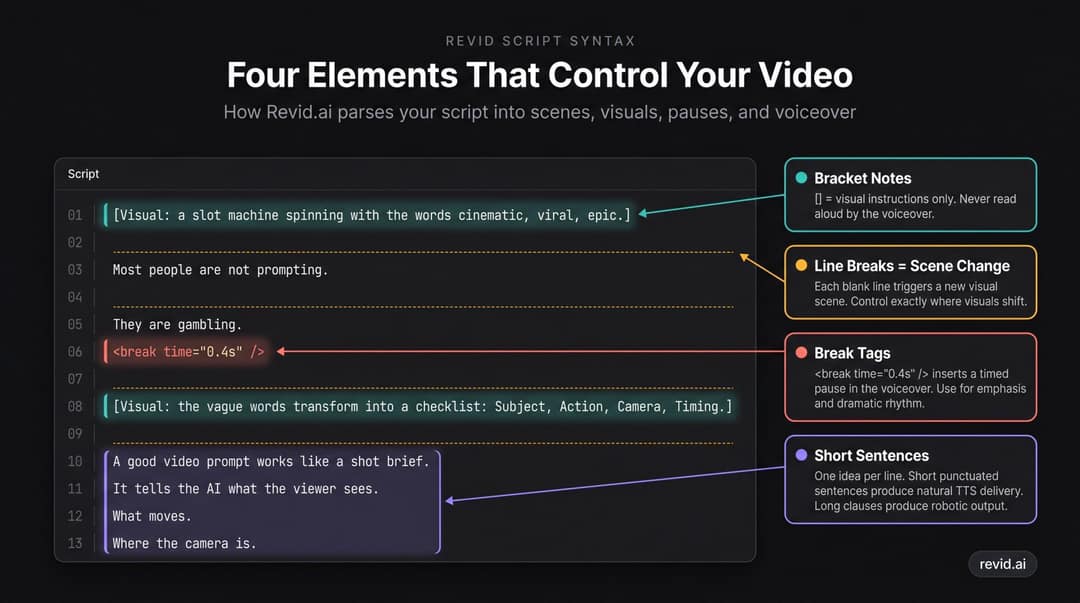
Blank lines are scene changes. Each new paragraph starts a new visual scene, so you decide where the visuals shift.
This is the first spoken sentence.

This is the second sentence. The visual just changed.

And now the third scene appears here.Bracket notes are visual instructions. Text in square brackets tells Revid what to show, and the voice-over does not read it.
[Visual: a messy editing timeline with dozens of tiny clips.]

Most people don't have a content problem.

[Visual: the messy timeline transforms into three clean steps: Script → Voice → Video.]

They have a production bottleneck.Break tags are pauses. A break tag inserts a timed pause in the voice-over so a visual can land.
Most AI video prompts fail for one reason.

<break time="0.5s" />

They describe a vibe.Short sentences make a natural voice-over. Long sentences with nested clauses sound robotic in text-to-speech; one idea per line sounds human.
Bad: Today I'm going to explain how AI video prompting works and why most people are doing it wrong because they keep writing vague prompts and expecting the model to understand what they mean.

Good:
Most AI video prompts fail for one reason.

They describe a vibe.

But video needs motion.Leave room for the visuals to carry part of the story. In the same TikTok study, videos with under 40 characters of speech had a 123K median and 20.2% passed 1 million views, against 68K and 11.9% for videos with speech throughout. For the words themselves, see how to get an AI to write a script that doesn't sound like AI.
A complete Revid script
[Opening visual: a slot machine spinning with the words "cinematic," "viral," and "epic."]
On-screen caption: "This is why your AI videos look random."

Most people are not prompting.

They are gambling.

<break time="0.4s" />

[Visual: the slot machine stops on three vague words: cool, epic, cinematic.]

A vague prompt gives the AI too many choices.

[Visual: the vague words transform into a clean checklist: Subject, Action, Camera, Timing.]

A good video prompt works like a shot brief.

It tells the AI what the viewer sees.

What moves.

Where the camera is.

[Visual: split screen. Left: "Make a viral productivity video." Right: "Close-up of a phone lighting up with five notifications while the camera slowly pushes in."]

This prompt is a wish.

This prompt is a scene.

[Ending visual: a vertical video draft appears with captions, voiceover, and a publish button.]

Stop describing the vibe.

Start directing the shot.Make it in Revid
- Open Prompt to Video and set the format (vertical, square or horizontal) and length in the settings, not the script.
- Paste the script with its bracket notes and break tags, then pick a voice.
- Generate the draft and judge the hook first: does the first frame stop the scroll?
- Replace weak scenes in the timeline editor, switching the model for a scene if it misfires.
- Export in 720p, 1080p or 4K and publish or schedule directly to TikTok, Instagram or YouTube.
Prompt to try
Create a 40-second faceless educational short for people who stay up scrolling. Open on a phone screen at 1:47 AM with the top caption "Your brain is not lazy. It is sleep-deprived.", then show the phone dimming, an animated brain icon labeled memory, mood and focus, and a hand missing an alarm clock twice. Dark bedroom lighting with blue phone glow, quick close-up cuts, calm voiceover, and end on "Save this before tonight."
AI video prompt examples: before and after
Faceless educational short
Weak:
Make a video about why sleep is important.Strong:
Create a 9:16 faceless educational short for people who stay up scrolling.

Opening frame: a phone screen at 1:47 AM, thumb hovering over another short video.
Top caption: "Your brain is not lazy. It is sleep-deprived."

Scene 1: close-up of the phone screen dimming as the room becomes quiet.
Scene 2: simple animated brain icon with three labels: memory, mood, focus.
Scene 3: alarm clock rings, but the person's hand misses it twice.

Camera: close-ups and quick cuts, no faces visible.
Style: clean, modern, slightly dramatic, dark bedroom lighting with blue phone glow.
Audio: soft ticking clock, low ambient music, calm voiceover.
CTA: "Save this before tonight."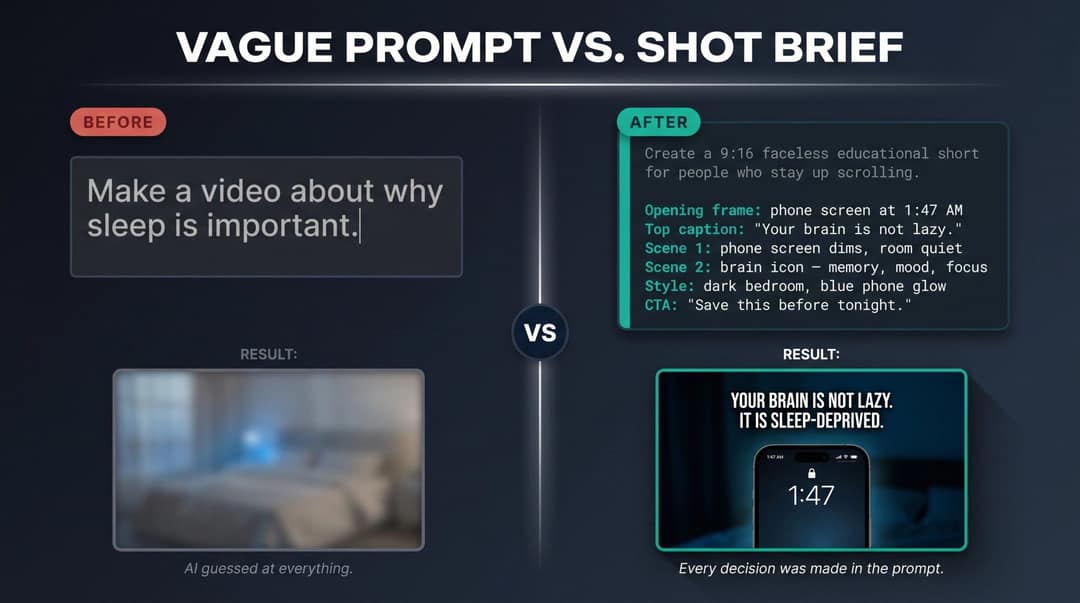
It works because it defines the audience, hook, scenes, style, audio and CTA. The weak prompt left all of them to chance.
UGC-style ad
Weak:
Create a UGC ad for skincare.Strong:
Create a 9:16 UGC-style skincare ad.

Subject: a woman in her late 20s standing in a bright bathroom, holding a small unbranded serum bottle.
Opening line: "I almost returned this because I thought it was doing nothing."
Action: she applies one drop to the back of her hand, then points to a simple on-screen checklist: texture, hydration, glow.
Camera: handheld front-facing phone camera, slight natural movement, medium close-up.
Lighting: soft bathroom daylight, realistic skin texture, no heavy beauty filter.
Style: authentic creator review, not overly polished.
Audio: natural room tone, conversational voice, light upbeat background music.
Constraints: no medical claims, no exaggerated before-and-after transformation.It uses UGC conventions (handheld phone camera, natural light, conversational tone) and keeps out the claims that get ads rejected.
SaaS product demo
Weak:
Make a video showing my app saves time.Strong:
Create a 9:16 SaaS product demo video for busy social media managers.

Opening frame: a calendar packed with content deadlines.
Caption: "One post should not become five hours of editing."

Action: the calendar zooms into one task labeled "Turn blog post into video." The screen transitions to a clean app interface where the user pastes a blog link, clicks "Generate," and three vertical video drafts appear.

Camera: screen-recording style with smooth zooms, cursor highlights and quick cuts.
Style: clean startup demo, white background, blue accent color, crisp UI.
Audio: subtle tech beat, soft click sounds, confident voiceover.
Constraint: keep UI text large and readable on mobile, captions under six words per step.
Ending CTA: "Create your first draft in minutes."Tribute video
Tribute videos fail when the prompt asks for emotion in abstract words. "Make it heartfelt" gets generic slow-motion filler. Name the relationship, the occasion, the real photos and clips, the order of memories, and what the narration should avoid.
Weak:
Make an emotional tribute video for my dad.Strong:
Create a 9:16 tribute video using family photos and short phone clips.

Occasion: memorial tribute for a father.
Tone: warm, respectful, reflective rather than dramatic.
Source material: childhood photos, backyard barbecue clips, one graduation photo, one video of him laughing at the dinner table.

Opening frame: candid close-up photo of him smiling, with no text for the first second.
Opening line: "He never tried to be the loudest person in the room. He was the one who made the room feel safe."

Sequence:
1. Early family photos with gentle slow zooms.
2. Everyday moments: grilling, fixing something in the garage, laughing with family.
3. Milestone photo: graduation hug.
4. Closing clip: family gathered around the table, ending on his smile.

Text overlays: short and sparse, only dates or memory labels such as "Summer at the lake" and "Always showed up."
Narration: calm, plainspoken, first-person family voice. No exaggerated praise or poetic cliches.
Music: soft piano or acoustic guitar, low in the mix, no dramatic swell.
Constraints: simple dissolves, no lens flares, glitch effects or sentimental stock footage.Adapt the same brief to other occasions:
- Memorial for a grandparent: focus on hands serving food, the family table, garden photos; one family member narrating gently; no angel imagery or sparkling overlays.
- Retirement: early-career photo through to the send-off; a proud, lightly celebratory voice focused on daily presence; no confetti transitions or long title cards.
- Milestone birthday: childhood photos to present-day clips with children and grandchildren; conversational narration with specific memories; relaxed pacing.
Keep one emotional through-line instead of a whole life in one crowded minute. SHNO's short-form content statistics collects data on why short edits hold attention.
AI video prompt templates
Universal template
Create a [duration] [aspect ratio] video for [platform].

Goal: help [audience] understand/want/do [specific outcome].

Opening frame: [describe the first visual in detail].
On-screen text: "[hook caption]"

Main action: [subject] [specific physical action] in [setting].
[Secondary movement or environmental detail.]

Camera: [shot type], [one camera movement], [framing], [focus].
Look: [lighting], [color palette], [one style], [mood].
Audio: [voiceover / dialogue / music / SFX / ambient sound].
Editing: [pacing, cuts, captions, transitions, ending CTA].
Constraints: [what must stay fixed, written positively].Revid faceless script template
[Opening visual: a strong first frame that makes the viewer stop scrolling.]
On-screen caption: "[hook]"

[Visual: scene 1.]
First spoken sentence.

<break time="0.4s" />

[Visual: scene 2.]
Second spoken sentence.

[Visual: scene 3.]
Third spoken sentence with a concrete example.

[Visual: final payoff or CTA.]
Final spoken sentence.Hook template
Create a 9:16 short-form video.

Target viewer: [specific audience].
First frame: [unexpected visual].
First caption: "[pattern interrupt]"
First spoken line: "[strong claim or observation]"

Beat 1: [problem visual].
Beat 2: [simple explanation].
Beat 3: [example].
Beat 4: [payoff].
CTA: [save / comment / follow / try].Sample first lines that follow the statement-first pattern:
- "You're not bad at editing. Your prompt is bad."
- "This is why your AI videos look random."
- "Stop asking AI for a video. Brief it like a director."
Music video template
Create a vertical music video visual.

Song mood: [emotional tone].
Tempo: [slow / mid-tempo / fast].
Scene: [visual world].
Motion: [movement that matches the rhythm].
Beat sync: [what changes on downbeats or the chorus].
Camera: [one movement].
Color palette: [three to five colors].
Style: [cinematic / surreal / anime / abstract / performance].
Constraint: no lip-sync unless specified.Why doesn't my AI video do what I wrote in the prompt?
Usually one of five reasons:
- You described a look, not an action. The model renders a pretty frame and invents the motion.
- One clip holds several scenes. The model compresses or skips the ones it can't fit.
- Format instructions sit in the prose. They compete with the tool's settings and with your scene description.
- Styles or camera moves contradict each other. The model averages them into something you didn't ask for.
- The prompt relies on "no" phrases. Naming the thing you don't want can bring it into the shot.
What should you do when an AI video text prompt fails to produce a usable shot?
Diagnose the symptom, then change one thing.
| Problem | Likely cause | Fix |
|---|---|---|
| Looks good but doesn't match the idea | Prompt described style, not action | Add a specific subject, action, setting and camera |
| Character changes halfway | No reference or consistency rule | Use a reference image and state what must not change |
| Output feels random | Too many scenes in one prompt | Split into one scene per generation |
| Camera movement is strange | Conflicting camera instructions | Keep one camera move |
| Frame is visually busy | Too many subjects or objects | One main subject, one main action |
| Text is unreadable | Too many words, poor placement | Fewer words, centered placement |
| Dialogue or lip-sync fails | Lines too long or speakers unclear | One short line per character, label speakers |
| Motion is weak | Prompt only described appearance | Add physical verbs and environmental movement |
| Negative prompt made it worse | Model handled negatives poorly | Rephrase positively: "empty street", not "no people" |
| Credits burn without improvement | Too many changes at once | Change one variable per generation |
OpenAI's guidance recommends exactly this: change one thing at a time and strip back camera, action or background detail when the model misfires. A four-step iteration looks like this:
- Simplest version: "A close-up of a phone on a messy desk. Notifications stack rapidly while the camera slowly pushes in. Dark room, blue phone glow, realistic style."
- Fix only the action: five notifications appear one after another and the phone vibrates slightly with each.
- Fix only the hook: add the top caption "Your attention is being auctioned."
- Fix only the edit: make it a 9:16 opening shot, sync each notification with a soft ping, keep the center clear for captions.
The final prompt:
A 9:16 TikTok opening shot. Close-up of a phone on a messy desk. Five notifications appear one after another, each synced with a soft ping. The phone vibrates with each. Top caption: "Your attention is being auctioned." Camera slowly pushes in. Dark room, blue phone glow. Keep the center clear for captions.If the shot still fails after a clean iteration, the text is no longer the bottleneck. Change the input instead: add a reference image, try another model for that scene, or split the action into two clips.
Prompting vs directing: which skill matters more for AI video generation?
Directing matters more. Prompting is the translation layer: knowing that models want verbs, one camera move and positive constraints, which you can learn from this page. Directing is deciding what deserves to be on screen: the first frame, the single action, the reason someone keeps watching. A perfectly formatted prompt for a dull idea gets you a well-rendered dull video.
A description says: "I want something cinematic and viral about productivity." A direction says: "Close-up of a phone on a messy desk. Five notifications appear in rapid succession, each with a soft ping. Camera slowly pushes in." The first asks the AI to make every decision. The second makes them and asks the AI to execute.
Directing also needs evidence, and a blank prompt carries none about what performs in your niche. That is the problem Revid is built around. Its library holds about 2.77 million short-form videos with public engagement data, and you can remix a proven viral format into an original video with the same hook style and pacing. A free deep analysis (up to 60 a day) explains why a video worked: the hook, the timed structure and the scroll-stopping moment. When Revid writes a script from a prompt in automations and several tools, it first pulls transcripts of related TikToks with more than 10,000 likes as references for style and story.
The stakes keep rising because everyone now has the same models. Wyzowl's 2026 survey found 63% of video marketers have used AI video tools, up from 51% a year earlier (sourced in our short-form video statistics), and Kapwing's 2026 video marketing statistics track the same shift. For another take on description vs direction, Prompt Builder's AI video prompt guide is a useful companion read.
How long should an AI video prompt be?
Long enough to remove ambiguity, short enough to keep one job. Adobe's Firefly guidance makes the same point: longer prompts don't automatically produce better results, and vivid, concrete language is more predictable than poetic wording.
| Content type | Prompt length |
|---|---|
| Simple motion clip | 1 to 3 sentences |
| Short-form social scene | 5 to 10 lines |
| Full Revid script | 100 to 250 words |
| Multi-scene video | Separate scene blocks |
| Complex branded ad | Prompt + references + an editor pass |
If the prompt keeps growing because it describes several videos at once, split it.
Do you need to disclose AI-generated video?
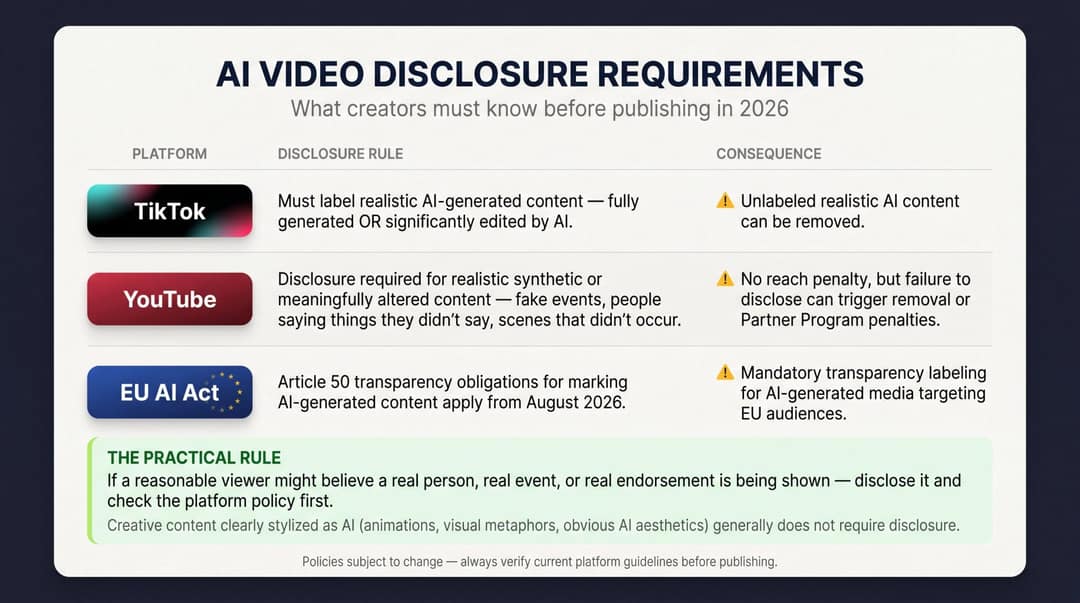
Yes, when it is realistic. TikTok's rules on AI-generated content require creators to label AI-generated content that contains realistic images, audio or video, and TikTok may label uploads automatically when they carry C2PA Content Credentials. TikTok says turning on the label does not affect distribution for videos that follow its Community Guidelines.
YouTube's disclosure policy for altered or synthetic content requires disclosure, through the "AI use" setting in YouTube Studio, when realistic content makes a real person appear to say or do something or shows a realistic scene that didn't happen. Disclosure alone does not limit reach or monetization. Since May 2026, YouTube also labels undisclosed videos with significant photorealistic AI automatically, shows that label as an overlay on Shorts, and makes it permanent for content made with Veo.
In the EU, the AI Act's transparency rules, which require deepfakes to be clearly labelled, came into effect in August 2026; the European Commission's code of practice on AI-generated content explains how marking should work.
The practical rule: if a reasonable viewer could believe a real person, event or endorsement is shown when it isn't, disclose it. A stylized explainer or an obvious visual metaphor is a different case, but check each platform's current rules before you publish.
FAQ
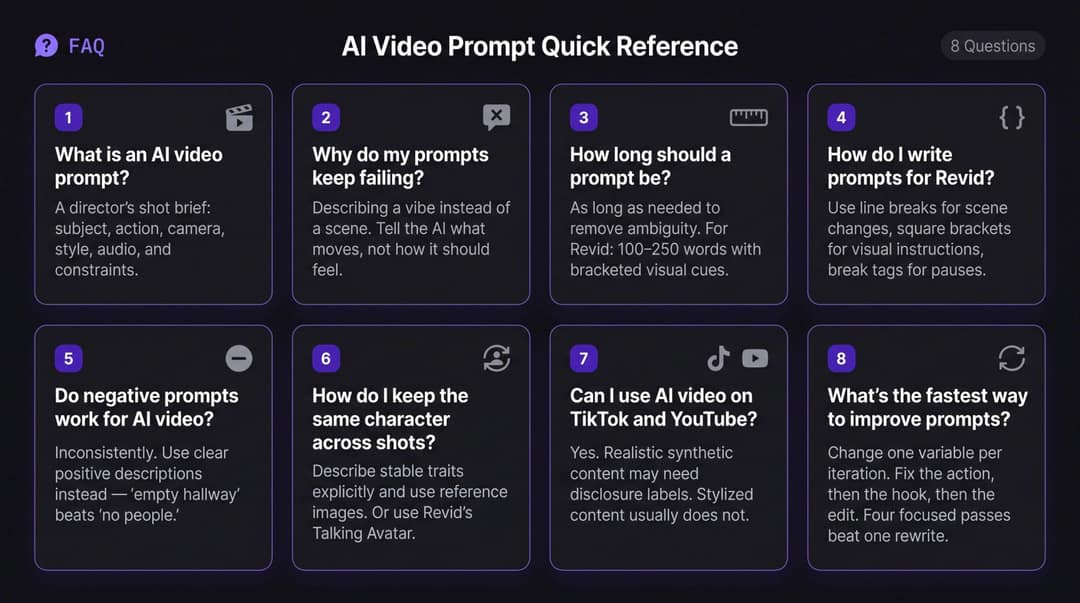
Do the same prompts work in Veo, Seedance and Kling?
The shot brief structure works in all of them, but each model responds differently to wording, especially on camera perspective and text in frame. Test one scene on two models before committing; in Revid you can choose the model per scene under one subscription.
Is Sora 2 still available for AI video generation?
No. OpenAI discontinued the Sora app on April 26, 2026 and removed Sora 2 and its Videos API on September 24, 2026. Its prompting guide is still a good reference for how to brief any video model.
Why does my character change between clips?
Because each generation starts fresh. Use the same reference image for every shot, repeat the fixed details in each prompt ("same red jacket, same short dark hair"), and keep the same model for every scene with that character.
Can ChatGPT write AI video prompts for me?
Yes, as a first draft. Give it the platform, the audience, the first frame and the single action, and ask for the 10-part brief; it formats well but cannot decide what your viewer cares about, so those decisions stay yours.