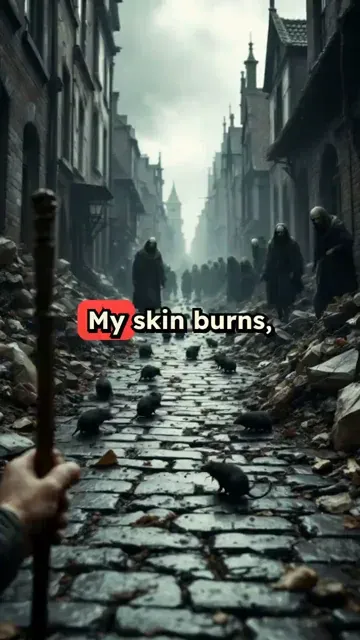
POV, get me in the most unfortable place and time that ever happened, something like the great plague, some wars, make me feel the pain, all short should be first-person
[Target Duration: 30 seconds]
Visual FormatAI Video
Visual StyleDefault
FINAL VIDEO
Create Viral POV Videos in 3 Simple Steps
1 Enter Your POV Concept
Start by typing your POV video idea or scenario into the prompt field. Be specific about the perspective, setting, and action you want to portray. The more detailed your description, the better the AI can visualize your concept.
2 Customize Your Settings
Select your preferred video style, aspect ratio, and duration. Choose from various POV perspectives and visual effects to match your creative vision. You can also add custom audio or select from our royalty-free music library to enhance the mood of your POV video.
3 Generate and Share
Click 'Generate Video' and watch as our AI transforms your concept into an engaging POV video in minutes. Once complete, you can edit further if needed, then download your video in high quality or share it directly to TikTok, Instagram, or YouTube with one click.
01
What Makes POV Videos One of the Fastest-Growing Formats on TikTok
First-person perspective content places viewers inside the scene rather than as outside observers, which creates a stronger emotional response and longer watch time. POV videos on TikTok and Reels consistently generate higher engagement rates than standard third-person storytelling because they trigger the same neural response as direct experience. The format works for fiction, roleplay, fantasy, adventure scenarios, and even professional situations like job interviews or first days at work. It is one of the most versatile viral formats available.
02
Generate a First-Person Video from Any Scenario or Prompt
Describe any situation in plain text and Revid's AI builds a fully produced POV video with matched visuals, sound effects, and voiceover narration framed from the first-person perspective. The tool applies specific rules that keep every scene grounded in the POV format including action descriptions, surrounding details, and character interactions. You can choose from anime, fantasy, cinematic, and alternative visual styles to match the mood of your scenario. Each generation produces a vertical 9:16 video sized for TikTok and Shorts.
03
POV Content That Builds Audience Habits Across Platforms
Creators who post POV video series build highly loyal audiences because the format encourages return viewing. Each installment puts the viewer back in the same immersive world, creating anticipation between posts. This makes POV content exceptionally good for growing a following on TikTok, Instagram Reels, and YouTube Shorts. The AI movie maker is worth exploring for longer cinematic storytelling that builds on the same first-person narrative energy with a more cinematic output format.
Target Audience
Who is this tool for?
TikTok fiction creators
Build immersive first-person stories one episode at a time, using AI to generate consistent visual worlds that keep followers coming back for the next installment.
Roleplay and fantasy creators
Generate POV fantasy adventures, magical worlds, and character-driven scenarios without any animation or design skills, posting consistently to grow a niche audience.
Marketing and brand storytellers
Create POV product experience videos that put the viewer in the shoes of a satisfied customer, making the case for a purchase through immersive storytelling.
Short-form video experimenters
Test new POV concepts quickly without investing hours in production. Generate multiple variations from the same prompt and post the version that resonates most.
Comparison
Why Choose Revid for POV Video Creation?
Producing a convincing first-person video normally requires filming, acting, or complex post-production to simulate the POV perspective. Revid generates it entirely from a text description.
Input
Revid POV Video GeneratorText prompt describing the scene and perspective
Manual POV Video ProductionRequires filming from a first-person camera angle or complex editing
Visual style
Revid POV Video GeneratorChoose from anime, fantasy, cinematic, and alternative visual presets
Manual POV Video ProductionVisual style is limited to what you can film or animate manually
Sound design
Revid POV Video GeneratorAI-generated sound effects matched to each scene automatically
Manual POV Video ProductionSource, edit, and sync foley sounds separately
Production time
Revid POV Video GeneratorFull POV video ready in minutes
Manual POV Video ProductionFilming, editing, and effects work takes hours per video
Series consistency
Revid POV Video GeneratorGenerate consistent visual worlds across multiple prompts
Manual POV Video ProductionMaintaining visual consistency across episodes requires significant effort
Platform output
Revid POV Video Generator9:16 vertical video formatted for TikTok and Shorts
Manual POV Video ProductionRequires manual formatting and export for each platform
Feature / Benefit
Revid POV Video Generator
Manual POV Video Production
Input
Text prompt describing the scene and perspective
Requires filming from a first-person camera angle or complex editing
Visual style
Choose from anime, fantasy, cinematic, and alternative visual presets
Visual style is limited to what you can film or animate manually
Sound design
AI-generated sound effects matched to each scene automatically
Source, edit, and sync foley sounds separately
Production time
Full POV video ready in minutes
Filming, editing, and effects work takes hours per video
Series consistency
Generate consistent visual worlds across multiple prompts
Maintaining visual consistency across episodes requires significant effort
Platform output
9:16 vertical video formatted for TikTok and Shorts
Requires manual formatting and export for each platform
More Tools
Explore Similar Video Creation AI Video Tools
Discover more ways to create engaging videos with our AI-powered tools
FAQs
Frequently Asked Questions
What exactly is a POV video?
POV (Point of View) videos are created from the first-person perspective, making viewers feel like they're experiencing the action directly through the eyes of the character. This immersive format has become incredibly popular on platforms like TikTok and Instagram, where creators use POV scenarios to tell stories, create relatable content, or transport viewers into different situations. Our POV Video Generator helps you create these engaging first-person videos without needing expensive equipment or technical expertise.
How does the POV Video Generator work?
Our POV Video Generator uses advanced AI to transform your written concept into a realistic first-person video. Simply describe the scenario you want to create, and our technology generates a video that captures that exact point of view. The AI handles everything from camera movement and perspective to visual effects that enhance the first-person experience. It's like having a professional videographer and editor who specializes in POV content at your fingertips.
What types of POV videos can I create with this tool?
The possibilities are virtually endless! You can create POV videos for storytelling, day-in-the-life scenarios, tutorials from a first-person perspective, immersive travel experiences, gaming-style POVs, romantic scenarios, workplace situations, fantasy settings, and much more. Whether you want to create content that's funny, emotional, educational, or purely entertaining, our POV Video Generator can bring your vision to life from the perfect first-person perspective.
Do I need any video editing skills to use this tool?
Not at all! That's the beauty of our POV Video Generator. You don't need any technical skills, expensive equipment, or editing experience. The AI handles all the complex work of creating a realistic first-person perspective video based on your written description. Of course, if you want to add your personal touch, our intuitive editor allows you to make adjustments after generation, but it's completely optional and designed to be user-friendly even for beginners.
How can POV videos help grow my social media presence?
POV videos are among the most engaging and shareable content formats on social media today. They create an immediate emotional connection with viewers by putting them directly into the scenario. This immersive quality typically results in higher engagement rates, longer watch times, and more shares compared to traditional video formats. Many creators have gone viral and gained thousands of followers with a single well-executed POV video. Our generator helps you tap into this powerful format consistently and with professional quality.
What's the ideal length for a POV video?
For maximum engagement on platforms like TikTok and Instagram Reels, we recommend keeping your POV videos between 15-60 seconds. This length is perfect for capturing attention without losing viewer interest. For YouTube Shorts, you can extend to up to 60 seconds. If you're creating content for regular YouTube or your website, longer POV videos of 1-3 minutes can work well. Our tool allows you to customize the duration based on your target platform and content needs.
Can I add text overlays or captions to my POV videos?
Absolutely! Text is often crucial for POV videos to set the scenario or add context. Our generator allows you to add text overlays during the creation process, and you can further customize them in the editor after generation. You can choose different text styles, positions, and animations to match your creative vision. We also offer automatic captions to make your content more accessible and to capture viewers who watch without sound.
What aspect ratios are available for POV videos?
We offer three main aspect ratios to suit different platforms: 9:16 vertical (perfect for TikTok, Instagram Reels, and Snapchat), 16:9 horizontal (ideal for YouTube and traditional video platforms), and 1:1 square (great for Instagram feed posts and some Facebook content). Choosing the right aspect ratio is important for maximizing your video's impact on your target platform, and our tool makes it easy to select the perfect format for your needs.
How realistic do the AI-generated POV videos look?
Our AI technology creates remarkably realistic POV videos that effectively simulate the first-person experience. While the quality depends somewhat on the complexity of your scenario, most users are impressed by how authentic and immersive the results feel. The AI is particularly good at creating natural camera movements, perspective shifts, and environmental interactions that make viewers feel like they're truly seeing through someone else's eyes. We're constantly improving our algorithms to make the experience even more realistic.
Can I use my own audio or music with the POV videos?
Yes! You have several audio options for your POV videos. You can upload your own audio file, record a voiceover directly in the tool, choose from our extensive library of royalty-free music and sound effects, or even use popular trending sounds (just make sure you have the rights to use them). Audio plays a crucial role in creating the mood and context for POV videos, so we give you complete flexibility to choose the perfect soundtrack for your creation.
How many credits does it cost to create a POV video?
Creating a standard POV video costs 2 credits. For more complex scenarios or longer videos, additional credits may be required. The exact credit cost will be displayed before you generate your video, so there are no surprises. We offer various subscription plans with different monthly credit allocations to suit creators of all levels, from occasional users to professional content creators who need to produce POV videos regularly.
Can I edit my POV video after it's been generated?
Absolutely! While our AI creates impressive POV videos based on your description, we understand you might want to add your personal touch. After generation, you can access our built-in editor to trim sections, add text overlays, adjust colors, incorporate additional visual effects, change the music, and more. The editor is designed to be intuitive even for beginners, giving you the perfect balance of AI assistance and creative control.
RevidAI's Viral Search and Channel Watcher surface the formats, creators, and trends getting attention right now, then help you turn them into ideas of your own.
Discover winning video formats in your niche
Follow creators and channels that matter
Start with proven ideas instead of guessing
2
Turn An Idea Into A Story.
Found something worth making? Revid AI writes the script, suggests the structure, and turns links, prompts, or topics into complete video concepts.
Start with a prompt, topic, or URL
Generate scripts inspired by proven patterns
Build stories designed to keep people watching
3
Generate The Finished Video.
Script, voiceover, visuals, subtitles, and editing all come together in one workflow. No stitching together five different tools.
Turn text into complete, multi-minute videos
Generate everything in one place
Refine the result in the editor
4
Publish Everywhere.
Share your videos to TikTok, YouTube, Instagram, and wherever your audience is.