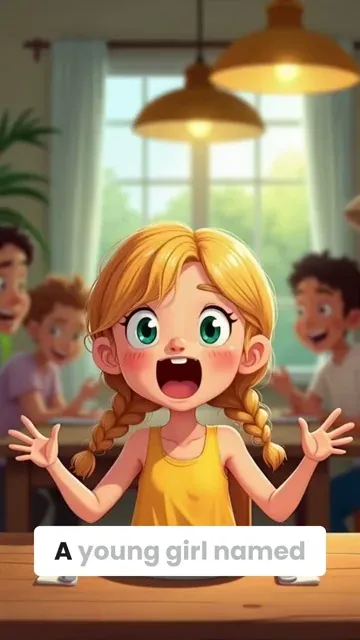
A young girl named Lily sat at her family table, excitedly telling her family about her summer in the Netherlands. “It was like stepping into a painting!” she exclaimed, her eyes wide. She described the bright tulip fields stretching across the land in colors of red, yellow, and pink, and the tall windmills that turned gently in the breeze.
Her favorite part, though, was biking along the canals in Amsterdam. “It was like every street had its own little river running beside it,” she said, laughing at the memory of trying to steer her bike. She also loved the cheese markets, the friendly people, and the magical lights reflecting off the water at night. “It was the best trip ever,” she said
Visual FormatAI Video
Visual StyleFlat Animation
FINAL VIDEO
Create AI-Animated Videos from Text in 3 Simple Steps
1 Enter Your Script
Start by typing or pasting your script into the text box. Use [brackets] to guide the AI on specific animation scenes you want to create. Our AI will analyze your text and prepare to bring it to life through animation.
2 Choose Animation Style
Select your preferred animation style from our diverse collection. Pick voice options - either AI-generated or upload your own recording. Add background music to enhance the mood of your animated video.
3 Generate and Customize
Click 'Generate' and watch as our AI transforms your text into a fluid animated video. Once complete, use our editor to fine-tune timing, adjust animations, or modify any elements to perfect your creation.
01
Text to Animated Video AI, Free and Ready in Minutes
Revid's text to animated video AI takes any written prompt, script, or idea and transforms it into a fully animated video with matching visuals, voiceover, and captions in minutes. Type what you want to see, choose an animation style, and the AI handles character movement, scene transitions, and timing automatically. No animation software, no frame-by-frame editing, no technical background required. Try it free with no sign up and generate your first animated video before you finish your coffee.
02
AI Animation Generator from Text, Built for Every Style
Whether you want fluid 2D animation, cinematic anime sequences, motion graphics, or stylized stop-motion aesthetics, Revid's AI animation generator from text supports a broad range of visual styles that go far beyond generic clip art. Describe your scene in plain language, specify the mood and visual treatment you want, and the AI generates animation that matches your creative vision with a level of consistency and quality that most free tools cannot touch. It works for any genre, any topic, and any platform you are creating for.
03
Free AI Animation Video Generator from Text Prompt
Revid's free AI animation video generator from text prompt gives independent creators, students, and small businesses access to professional animated video production without a budget or a team. Enter your prompt, select your animation style and voiceover, and the AI produces a complete animated video ready to download and share. The free tier covers the full generation pipeline so you can evaluate output quality before committing, making it the most risk-free way to test AI animation for your specific content needs.
04
Script to Animation Video, From Written Content to Finished Film
Revid goes further than most AI animation tools by supporting full script input rather than just short prompts. Paste your complete script, and the AI breaks it into scenes, assigns appropriate animation to each section, and produces a cohesive animated video that follows your narrative from start to finish. It is the most practical solution available for educators building course content, marketers producing explainer videos, and creators developing serialized animated short-form content at scale.
More Tools
Explore Similar Video Creation AI Video Tools
Discover more ways to create engaging videos with our AI-powered tools
FAQs
Frequently Asked Questions
What is the AI Animation Video Generator?
Our AI Animation Video Generator is a cutting-edge tool that transforms text into engaging animated videos automatically. No animation skills required - simply input your script, and our AI creates fluid, professional animations complete with voice-over and music. It's perfect for creating explainer videos, social media content, educational materials, and more.
How does the AI create animations from text?
Our advanced AI analyzes your script to understand context and meaning, then generates appropriate animated scenes that match your content. It uses deep learning algorithms to create fluid motions and transitions, ensuring your message is conveyed through visually appealing animations. You can guide the AI by using [brackets] to specify particular animation scenes.
What types of animations can I create?
The possibilities are endless! Create explainer videos, product demonstrations, educational content, social media posts, or business presentations. Our AI can generate various animation styles, from simple 2D animations to more complex motion graphics. Each style is designed to engage viewers and effectively communicate your message.
Do I need any animation experience to use this tool?
Not at all! Our AI Animation Video Generator is designed for everyone, regardless of technical expertise. The intuitive interface and AI-powered automation handle all the complex animation work. You focus on your message, and we'll handle bringing it to life through animation.
How long can my animated videos be?
While there's no strict limit, we recommend keeping videos between 30 seconds to 3 minutes for optimal engagement. Longer videos will require more credits. The AI processes your script and automatically determines the appropriate pacing and timing for your animations.
Can I customize the animations after they're generated?
Absolutely! Once your video is generated, use our built-in editor to adjust timing, modify animations, add text overlays, or make other refinements. While the AI creates a great foundation, you have full control to perfect your animated video according to your vision.
What voice options are available for my animated videos?
You have multiple options: choose from our library of AI voices, upload your own voice recording, or record directly in the tool. Our AI voices come in various languages and accents, ensuring your animated video sounds natural and professional.
How much does it cost to create animated videos?
Creating an animated video costs credits, with the exact amount depending on video length and features used. Each video starts at 1 credit, with additional credits needed for longer scripts or premium features. Check our pricing page for current plans and credit allocations.
Can I use the animated videos for commercial purposes?
Yes! All animated videos created with our tool can be used for commercial purposes, including marketing, advertising, and business presentations. You retain full rights to your created content, making it perfect for professional and business use.
How fast does the AI generate animated videos?
Most animated videos are generated within 2-5 minutes, depending on length and complexity. Our powerful AI works quickly to transform your text into fluid animations while maintaining high quality. You'll receive an email notification as soon as your video is ready.
RevidAI's Viral Search and Channel Watcher surface the formats, creators, and trends getting attention right now, then help you turn them into ideas of your own.
Discover winning video formats in your niche
Follow creators and channels that matter
Start with proven ideas instead of guessing
2
Turn An Idea Into A Story.
Found something worth making? Revid AI writes the script, suggests the structure, and turns links, prompts, or topics into complete video concepts.
Start with a prompt, topic, or URL
Generate scripts inspired by proven patterns
Build stories designed to keep people watching
3
Generate The Finished Video.
Script, voiceover, visuals, subtitles, and editing all come together in one workflow. No stitching together five different tools.
Turn text into complete, multi-minute videos
Generate everything in one place
Refine the result in the editor
4
Publish Everywhere.
Share your videos to TikTok, YouTube, Instagram, and wherever your audience is.